Try before you buy!
Snippety has officially switched to a freemium model. Download the app for free on #macOS and #iOS, and choose the plan that fits you best.
Later this year, we also plan to distribute the macOS app outside of the App Store.
All licenses purchased in the App Store will automatically work with the standalone version as well.
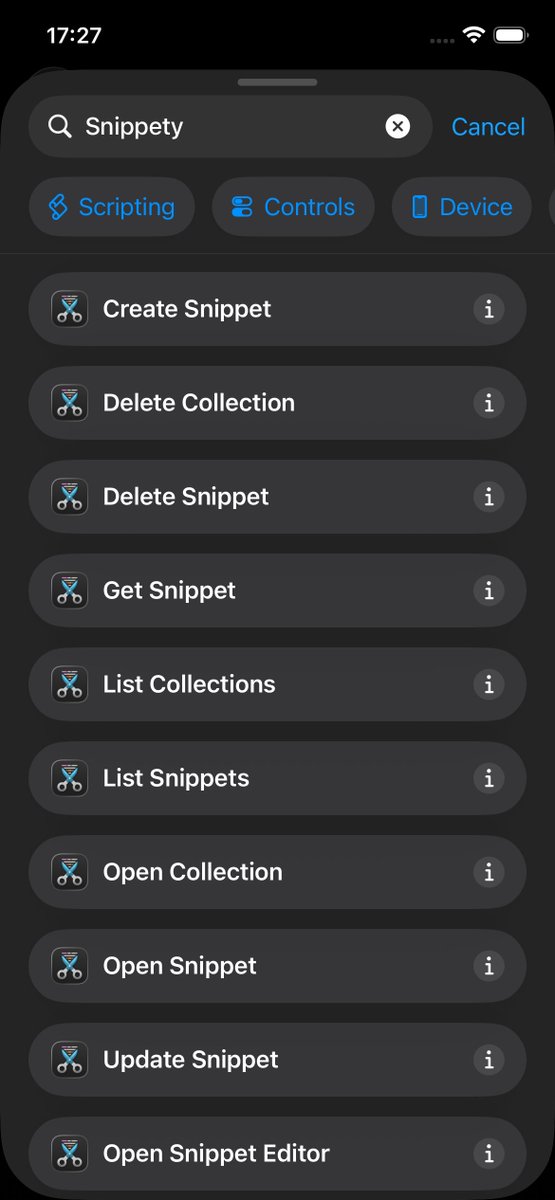
We're introducing Apple #Shortcuts support! 🚀
Now you can build custom automations on #iOS and #macOS.
Check out the new actions in the Shortcuts app and let us know what you think! 🤩
I'm not sure exactly how Apple handles refunds or if there are any specific rules. I think it might also depend on your region.
If you have any feedback about the app, feel free to let me know: [email protected]
This app is largely driven by user feedback, so I'm always happy to improve it.
The new iOS version is out!
🌄 Added support for clipboard images when using HTML format.
🤓 Added a keyboard option to disable Snippet Expander suggestions.
⌨️ Added a keyboard option to auto-switch back to typing mode when using Snippet Expander.
👉 The keyboard now returns to its initial state after snippet expansion.
🤖 Fixed the AI Assistant's "Selection" placeholder mode.
Exciting news 🤩 The latest #iOS update brings new #productivity improvements to Snippety Keyboard!
You can now expand snippets automatically by typing keywords 🔥 Just switch to the new Snippet Expander mode.
Happy New Year 🎊
The latest iPhone and iPad app update brings many quality-of-life improvements! 🤩
This time you get redesigned toolbars to quickly access all essential actions, a handy search bar to help you find snippet formats and collections more quickly, and new formatting controls for smoother editing.
Plus, there's a new button right above the keyboard to quickly insert placeholders without leaving the editor 🔥
Full release notes:
🔗 https://t.co/FkjUO0tkbT
#ios #ipados #productivity #business #apple #swiftlang #iOS26 #snippety
Snippety is now ready for #iOS26 and #macOS Tahoe!
Enjoy the refreshed app icon and new liquid glass controls!
Make sure to update both apps!
#productivity#business#apple
@daviddixon I'll update it with the next release, until then you can just use the custom integration:
https://t.co/I2saadNQ2a
URL:
https://t.co/PJYzB9LemC
Headers:
Authorization: Bearer $KEY
Model:
gpt-5
Please remember to change the snippet & editor models above the configuration.
🔃 Here you can see the conversion between RTF and HTML formats.
👉 Don’t forget to check the full release notes - this update also includes many other important changes: https://t.co/H3myhOYBse
🎊 New Version Released!
🔥 You can now use HTML to create advanced snippets for apps that support formatted text.
🤩 On top of that, you get HTML preview and automatic conversion between RTF and HTML.
🔗 Full release notes: https://t.co/iXkPDOS71J
#productivity#business #macos #apple