Locked iPhone on a stand becomes your Mac's best camera.
1. Place it landscape, rear facing you
2. Pick it in Zoom's camera list
3. Try Center Stage in Control Center
Using this setup yet? - Appit Studio
#ContinuityCamera#MacTips#Zoom
The apps that matter live in your Dock - yet you still open them manually every time.
DockFlow auto-launches them for you.
Set it once. Appit Studio handles the rest.
#DockFlow#macOS#DockCustomization
How full is your Mac's storage right now?
1. System Settings - General - Storage
2. Click the i, delete big files
3. Finder Settings - auto-empty Trash at 30 days
Appit Studio builds tools for this kind of Mac clutter.
#MacStorage#macOS
ExtraDock 5.2.5 and 4.4.13 are out.
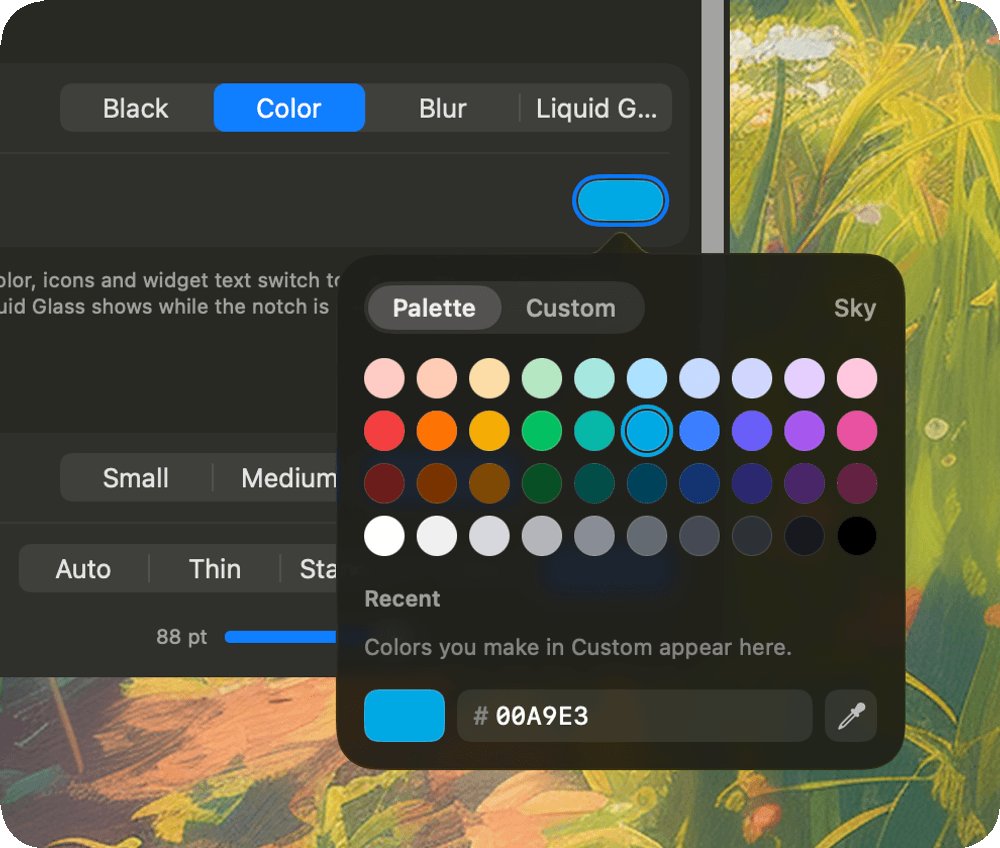
A new color picker for every color setting, notch dock backgrounds including Liquid Glass, and docks you can hide from screen sharing and recordings.
https://t.co/ka5iKoigHs
Two settings worth changing on any Mac:
1. Lock Screen - require password immediately
2. Appearance - pick your Liquid Glass level
Takes a minute. Try one today with Appit Studio.
#macOS#MacSettings#MacTips
ExtraBar 1.7.6 is out.
Search your Mac from the Launcher with quick answers like sums and unit conversions, add apps to your bar with ⌘K, and pick colors with a brand-new color picker.
https://t.co/q1lxTKeYUO
Sending a file to your iPhone shouldn't need a cable or an email to yourself.
1. Right-click the file - Share - AirDrop
2. Or press Shift-Command-R in Finder and drag it onto a device
Try it today - Appit Studio
#AirDrop#macOS#MacTips
DockFlow 1.94 is out.
Ask your AI to build App Folders, quit folder-only apps when you switch presets, and color Custom Spacers your way.
https://t.co/U9L7XNrFku