#FeatureFriday | Dealing with large reports, and looking for a faster way to sync? Choose between 3 photo sizes in the settings of your ArchiSnapper iOS app. The lower the size, the faster the sync. Happy ArchiSnapping!
P.S. Soon available for the Android app as well.
Most construction professionals don’t even get 20% of the value a phone or tablet can potentially offer them. Are you in the same boat? Read our 11 hands-on tips in this article 👉 https://t.co/vIvfZTLz7P ... and turn the tide 😉
#iphone#ipad#construction
Tired of scrolling through your smartphone or tablet camera roll to sort out which photo belongs to which project? You can now add photos on a project level, for later use by you or your colleagues, in your online account. Yay! 🙌 #FeatureFriday
Tired of scrolling through your smartphone or tablet camera roll to sort out which photo belongs to which project? You can now add photos on a project level, for later use by you or your colleagues, in your online account. Yay! 🙌 #FeatureFriday
Proud to announce that the #redesigned ArchiSnapper 5 app is available in the app store, and play store! 🎉
This summer, we worked hard on this new slick, and #userfriendly design, for an even smoother on-site reporting experience.🙌
#architecture#Construction
Set a default name for your PDF reports including variables like site name, date, report number, company name, and more. Your partners will be thankful for this clear and structured way of working. #FeatureFriday#teamwork#structure#communication
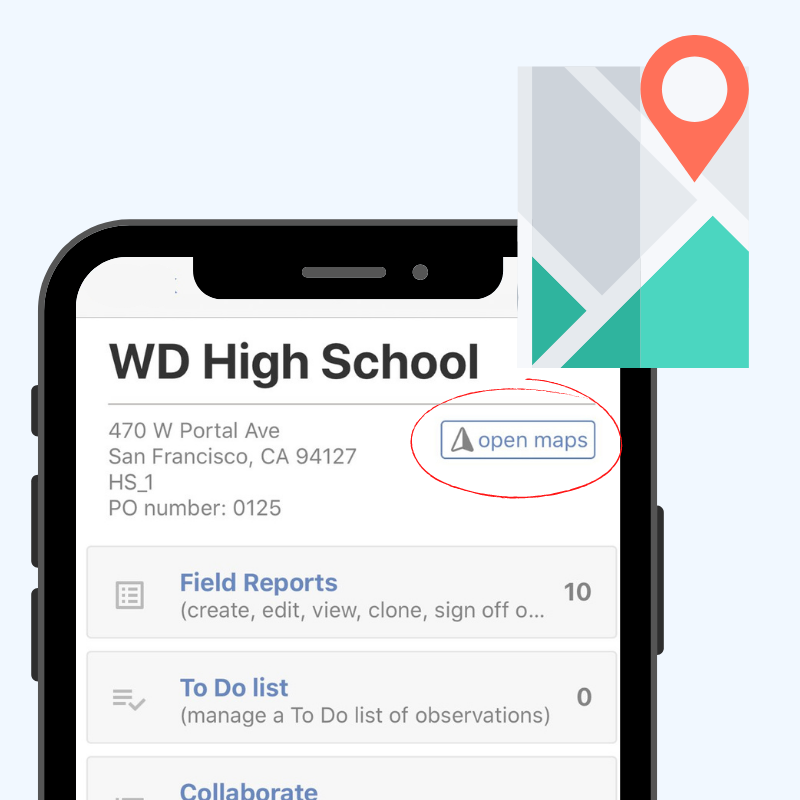
Stop searching for the address of your next site visit. Simply open up your ArchiSnapper app, click the "open maps" button, and start navigating. Drive safe! #FeatureFriday#architect#Construction#Productivity
Need to request a lot of documents?
Use your ArchiSnapper account to request, review, and store your documents directly in your online account. Lay back while the documents fly-in 💆
#architect#Construction#Productivity
#architects looking for a new laptop or mobile workstation - this guide is for you. Discover which specs are the most important when choosing your next #1 productivity tool. Happy reading!
https://t.co/qZPvuBVsBa
#FeatureFriday | Some observations need special attention. 🧐Tag them with custom labels. Choose the name and color. Make the observations stand out in your report, and use them as filters for further follow-up. "Tag" a colleague who could use this! 😉
Looking for a way to plan your site visits as efficient as possible? Or maybe you're dreaming of an overview map with your many projects pinned on it? 📍 Simply activate this setting on a project level, and click on the map. Yes, it's really that easy. 🤩 #FeatureFriday
Did you already add a profile picture 🙋♂ to your ArchiSnapper account? You'll only need one blink of an eye to see who added what to the conversation while collaborating. Teamwork makes the dream work!🎵😎 #FeatureFriday
Are your field reports so long that contractors get painful fingers from scrolling through them? Enlighten them with a 📨 Filtered Report, only including their assigned items. They get a personal overview, your remarks will be read. Everyone happy 🙌 #FeatureFriday
Tablets are becoming a must-have when in the field. We selected the 🏆 Best tablets for Architects and Contractors based on 9 selection criteria specifically for AEC professionals. Who won? @SamsungMobile or @Apple? Happy discovering! 👇
https://t.co/oUgGYzVwYk