The first frame is a nearly empty sheet titled Seaside Train Station. I am not quoting the full tab title because it uses a dash in the official UI. The formula bar later shows live spreadsheet formulas while the station, the cyclist scene, and the autumn leaves are painted in. Audio on the file is music only; there is no voiceover.
I have not opened this sheet or rerun the generation. Hydrogen availability in Antigravity is the paid-plan rollout described in the @antigravity post, not a claim that every Google Sheets user can trigger this from the menu.
Google used Gemini 4 Hydrogen to paint a moving landscape inside a spreadsheet, not to fill in a budget.
In the official @Google clip, Hydrogen, running in Antigravity, writes the code that paints and animates thousands of cells. The sheet starts almost blank, then fills in a seaside train station, a hill road with a cyclist and drifting clouds, and a frame of autumn leaves. Google says those cells recalculate frame by frame. The clip ends on a Gemini 4 Hydrogen card.
This is an official demo of Hydrogen doing the coding in Antigravity, not a new built-in Sheets animation mode for every account. I have not rerun it. The @antigravity post says Hydrogen in Antigravity is rolling out to paid Pro, Ultra, and enterprise customers.
(Video via @Google)
The clip opens on a single Doorstep Parcels card, then splits into a 100-photo grid: Gemini Decision on the left, Gemini 3.5 Flash-Lite on the right. When Decision finishes, the banner reads "Decision finished 3.8x faster (4.5s vs 17.3s)" and the left grid shows 100/100 in 4.5s.
A later card, #007 at 762 Willow Way, shows the checklist with confidence bars, including damaged vs intact, claim review, porch cover, and an overall delivery-quality score. The card footer says "All 16 QA checks."
The official blog also describes calibrated confidence scores on each answer so a workflow can route ambiguous cases. I have not run the API or the demo app. Docs: https://t.co/frBmXWvGGN
Gemini Decision 1 does not write you an answer token by token. In Google's official Doorstep Parcels demo, the on-screen comparison finishes 100 delivery photos in 4.5 seconds, 3.8x faster than Gemini 3.5 Flash-Lite on the same pass (4.5s vs 17.3s).
The official @Google thread says each photo gets 16 questions at once: yes/no, multiple-choice, and ratings, including whether the box is damaged, whether it sits under a porch, delivery quality, and whether to send the case to claim review. I have not rerun this test.
Google prices the Decisions API at $0.10 per 1 million input tokens, with no output-token charge, and cites 150 to 250 milliseconds end-to-end. It lives in Google AI Studio and the Gemini API. The official blog says one request can carry up to 1,000 questions across text, images, audio, video, and PDFs, with a 256K-token input.
(Video via @Google)
@heyshrutimishra The 76 vs 37 on 235 real bugs is the part I'd want to reproduce — especially whether the app copy includes the same third-party deps, or it's only catching first-party failures. Fake users are easy; crashing services with messy data is the useful half.
@DanKornas The part I'd actually use is the VPS backend so the group keeps running after I close the laptop. The risk is agents handing work off with stale notes if memory is per-agent and they don't share a task log. Do the delegates see the original goal, or only the last handoff message?
@RoundtableSpace A no-code intro with exercises and a certificate is fine for orientation, but people usually drop off once the math shows up. I'd want at least one messy, real dataset in the exercises, not only a clean teaching set, or the cert still won't help debug a broken training run.
@RoundtableSpace The scary part isn't the joke edit, it's that three AI systems all traced back to one tweet and still stated it as fact. An AI-written Community Note is a poor backstop if it misses the retraction an hour later. That's why I click through sources before I trust an Overview.
@RoundtableSpace 16B at 4–5 tok/s on 1GB of RAM is a paging trick, not a small-model miracle. I'd want the quality drop versus the same 16B fully resident — if answers get worse once it reads layers from storage, the TV-box demo is more novelty than a daily driver.
@ArtificialAnlys The useful number is the 76% on CWE-Bench, not the overall #3. 43% fewer output tokens than DeepSeek Flash is why it sits on the cost curve. I'd still want to see whether that 76% holds when the vulnerability is in a dependency, not only in the repo the agent was given.
@Exori_AI That's the test I'd run too. If the second prompt rebuilds the whole scene, lighting and camera on the shots you didn't mention will drift. I'd change only the first shot and compare frame hashes on shot 3 — have you seen whether it edits in place or starts over?
Auto zooms and a Mac plus iPhone in the same Blender scene, from 1 Opus 5.5 prompt. @rileybrown says his new Blender video-editing workflow finished this 37-second Glaze launch video in under 10 minutes.
The prompt was: "Create a launch video for an app just like screen studio but showing a desktop app and iOS app"
I watched the 37-second clip. It's a product spot for an app called Glaze: a dark desk with a laptop and a phone, window capture, auto zooms, an export dialog (1080p, 60 fps, H.264), then the same editor on iPhone, ending on "Screen recordings in. Polished videos out."
My take: the clip already looks like a real Screen Studio-style ad. The 10-minute time is his, not a clock I ran.
Caveat: he didn't drop a tutorial or a project file, so this is a result, not a recipe I can copy yet.
(Video via @rileybrown)
@Exori_AI Agreed — a teardown hook is useless on SIGKILL or OOM. A run-id plus expiry sweeper is the right backup, but it has to sweep the whole billing project, not just VMs by name, or leftover disks still linger. Does it also catch GPUs that were allocated but never booted?
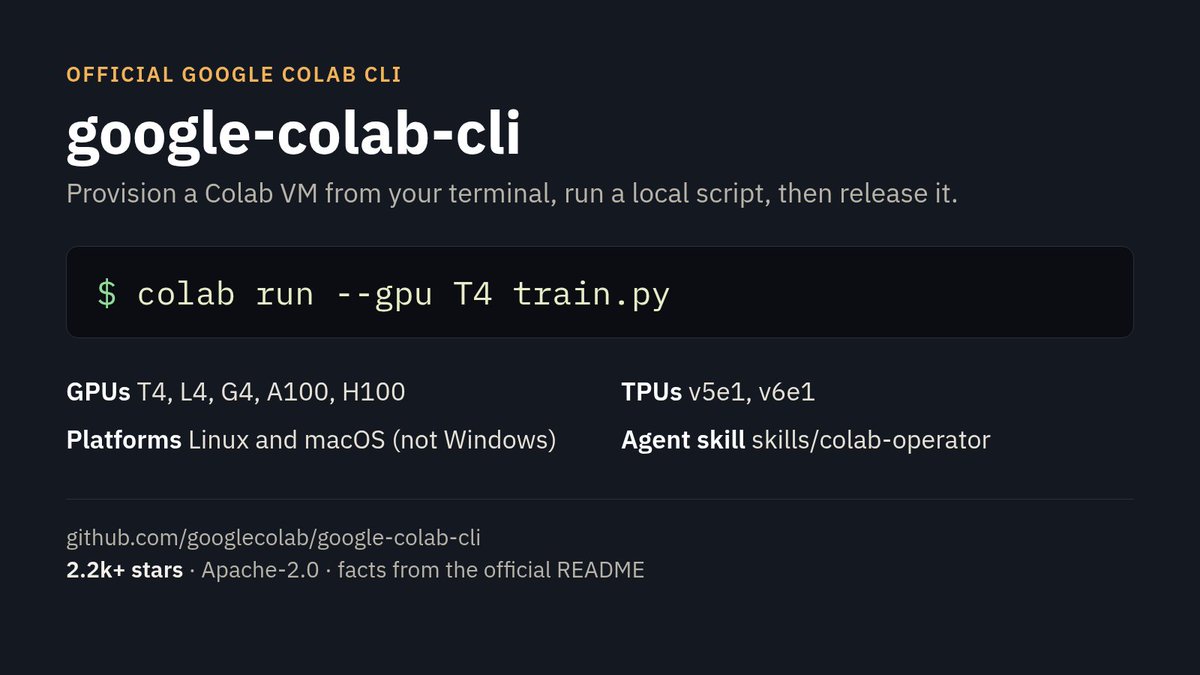
From your own terminal, an official Google CLI can provision a Colab GPU, run a local script, pull the output back, and shut the VM down.
That's google-colab-cli from the googlecolab org on GitHub: 2.2k+ stars, Apache-2.0. The README lists T4, L4, G4, A100, and H100 GPUs, plus TPU v5e1 and v6e1. 1-shot path:
colab run --gpu T4 https://t.co/TylZ0c7PUi
The repo also ships a skills/colab-operator skill, so a coding agent can drive those same commands. Linux and macOS only. Windows is out for now.
My take: this is the missing piece if you already work in a local agent and only need a GPU for 1 job. It's not a replacement for a machine you own.
Caveats: I haven't run it. The official skill says accelerator access is tier-gated, and most accounts may only get CPU. A live session can use quota, so stop VMs you no longer need.
https://t.co/Ro2fyjeoDs
(Card made from the official README)
@RoundtableSpace The headline is 145B, but only about 10B are active and it peaks at 29GB — that's the real constraint. A 90.4 GPQA from their own tests is close to Opus 4.6 on paper; I'd want to see whether the 256K context plus code still holds on a 32GB box, or if it starts swapping.
@DanKornas Budgeted context layers are the right idea — dumping a whole repo is how I blow a window. The part I'd test first is incremental indexing after I edit a couple dozen files: does retrieval stay current, or do I keep getting stale chunks until a full rebuild?
@RoundtableSpace The $54 price gap is less interesting than the 9-hour battery and the face blur before Gemini sees anyone. I'd still want to know whether 'Hey Gemini' keeps working if the phone dies, or if the glasses are just a thin client. Does the translation run on-device?
@testingcatalog The useful test for me isn't whether the Dot icon shows up in the EU — it's whether EU Dots get the same local-computer connections the earlier rollout already has, or a trimmed set. I don't have it yet either; has anyone in the EU actually pointed a Dot at a local machine?
The clip starts on Gemini 4 Carbon Medium. The cursor then opens the model menu and selects Orchestrator. The in-product blurb reads: "Carbon that may offload routine steps to Hydrogen. Same Carbon-level quality, fewer tokens used." After that, it types a signup-form task about email and username validation, then adds tests.
Google's Orchestrator post says this is rolling out to Ultra subscribers, and cites near-Carbon task success on Terminal-Bench 4.0, with 24% less quota and 19% faster completion on average. The Antigravity blog repeats those figures but labels the bench as Terminal-Bench 4.1, and also lists Orchestrator (Argon) for paid Pro plans. Hydrogen itself in Antigravity is listed for paid Pro and Ultra.
On the unpaid Gemini app tier, Google says Hydrogen is reached through automatic model routing when it is the right model for the prompt, not a full manual toggle. Search is described as rolling out for all users.
I have not tried Hydrogen or Orchestrator myself yet.
Gemini 4 Hydrogen is the fast everyday and agent-execution model in the Gemini 4 family, not a new flagship in place of Carbon.
In Google's Antigravity clip, Carbon can set the plan and Hydrogen runs the edits. Google's post says that Carbon-plus-Hydrogen path is rolling out to Ultra subscribers.
Google launched it today. The official blog prices it flat across a 1M context window at $1.50 per million input tokens and $7.50 per million output tokens, with four thinking levels: low, medium, high (the default), and xhigh. It is rolling out in Search, Google AI Studio, the Gemini API, and Gemini for business. In the Gemini app, unpaid users reach it through automatic model routing when it is the right model for the prompt, not a full manual toggle.
The official blog says that at the default high setting, Hydrogen scores 51 on the Artificial Analysis Intelligence Index, against 50 for Argon, and 54 at xhigh. Against Gemini 3.8 Flash, it also cites tasks finishing 2.5 times faster and Terminal-Bench 4.1 at 57%, up from 18.2%. I have not rerun these benches.
(Video via @Google)
@RoundtableSpace The stack is familiar; the usual break is consistency across days, not the first render. I'd pin a character sheet and a voice sample and fail the job if WhisperX and the new clip disagree on timing. Have you run this for more than one day without the captions slipping?
@heyshrutimishra Showing the cost before it generates is the part I'd actually use. The hard part is still redraws: if I change one shot, do the other clips keep the same face and lighting, or does the whole sequence drift? Have you tried a three-shot sequence and a redraw on only the middle one?