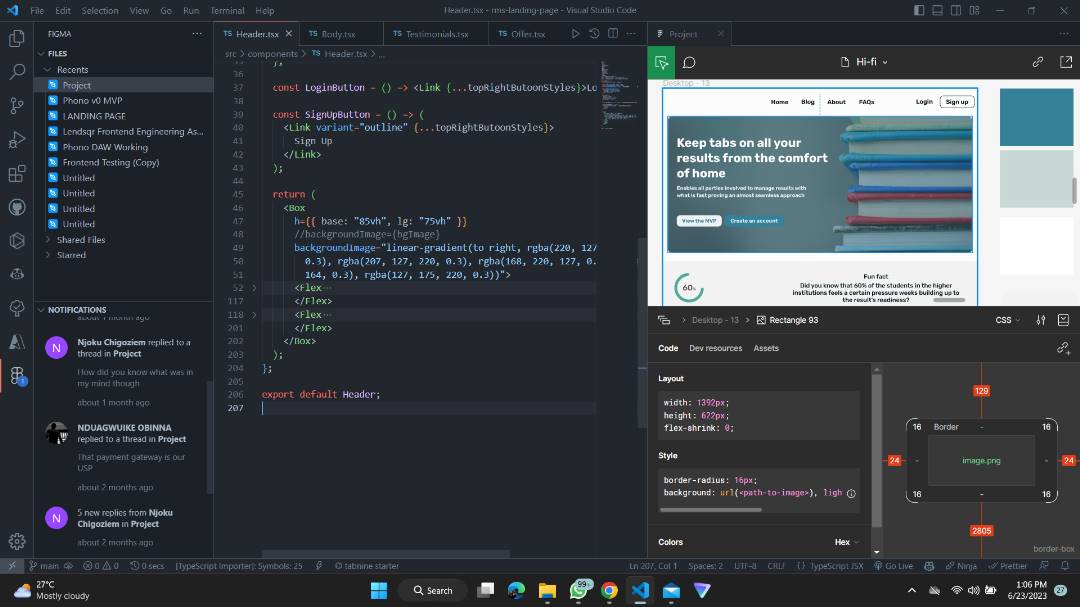
The news is out… we just launched Dev Mode at #config23, a new space in @figma built specially for developers to help them translate designs to code!
Building a great developer tool is hard enough, but building a great developer tool within a design tool is even harder 🧵
@prolax@figma@prolax appreciate the feedback! We do snapshot a version when a frame was marked ready for dev, and while the frame isn't locked (designers can make changes), you are able to jump back to exactly the version when marked ready for dev in the new focus view. Does this help?
A momumental set of launches today from @figma at #Config2024!
We're continuing to expand our product suite to help you go from idea to final product, with a new slides tool, built-in UI Kits, a responsive prototype viewer, and many improvements to Dev Mode. And of course, AI!
There’s no way you caught everything. Here’s what we launched at #Config2024
→ UI3, a redesigned Figma
→ Figma AI (Make Design, Make Prototype, Visual Search, Replace Content, Rename Layers)
→ Figma Slides
→ Dev Mode updates (Ready for Dev View, Focus View, More Statuses)
→ Code Connect is out of beta (!!)
→ Auto Layout improvements
→ Responsive Prototyping Viewer
→ FigJam Pages
https://t.co/dZDYbq9xJP
Seeing how @figma Dev Mode and Variables play together gives me so much joy! It’s like seeing your kids getting along (or even better… becoming friends that bring out the best in each other). Today, we’re sharing some ways that you can amplify your design system within Dev Mode.
We also recognize that code doesn’t always map to designs perfectly. We’ve added features that keep these in sync, with code syntax for variables to align naming conventions, and API support for token syncing. Read how the @figma team manages this: https://t.co/l0YJ6ndhmz
If this doesn't get Design Systems teams in the holiday spirit, I don't know what will. Congrats to the team (@pwnies, @shanawho and so many more) on an incredible launch!
You can now use variables in more places in Figma! I put variables in effects and strokes to make you all a lil holiday card that has the perfect day-to-night look ✨
You can see the file in the Figma Community here: https://t.co/Lzd7EGBmcJ
@makermattevans@joeyabanks@figma@makermattevans totally hear you on the miss for line-height and stroke values! We've already pushed out a fix for some of these missing properties so you should be seeing them soon!
Keep the feedback coming :)
Dang! @figma 's new variables and advanced prototyping are so freaking awesome 🎉! Look what I can make with only 1 frame, 2 components. Goodbye noodles! My next wish is animation responses to when changing variables 🙏
Missing Config this year, but damn excited to see the announcements and the next steps toward the Great Merging of design + dev.
Congrats to the @figma team!
None of this would be possible without the incredibly talented, humble, passionate Developer Tools team. There are too many people to name individually, but I haven’t met people more passionate about improving the lives of developers than these folks!
The news is out… we just launched Dev Mode at #config23, a new space in @figma built specially for developers to help them translate designs to code!
Building a great developer tool is hard enough, but building a great developer tool within a design tool is even harder 🧵
And now that we’ve launched… we’re still learning! If you want to give Dev Mode a try, check out this playground file. Ask me anything about Dev Mode in the comments! We’ll be iterating based on all of your feedback. https://t.co/DjIkGvZBrM