BREAKING: SpaceXAI has released another major new update for Grok Build (v1.0.22)
This update is focused on smoother workflows, better safety and improved reliability. It adds stronger desktop and MCP integration, clearer file-edit previews, a redesigned dashboard and better subagent support. It also fixes problems with sessions, skills, authentication and background commands while making sessions faster to open and resume.
Features
Built-in agent tools now take precedence over user MCP servers when tool names collide.
Desktop app tools are now available through a dedicated first-party MCP server.
Remote control pickers can now group servers by device using announced device identity.
edit_file diffs now show real file line numbers instead of starting at line 1.
Permission prompts for file edits now auto-expand the diff row so you can see the change before approving.
Sending a message to a finished subagent now continues that same subagent instead of failing.
Background subagent completion messages now show the actual output instead of just a pointer to run the tool.
Dashboard now shows a unified header with a location picker and an actions row for creating agents or resuming previous sessions.
New grok-workspaced daemon mode lets a long-lived process expose folders to the Computer Hub, separate from the Desktop-supervised sidecar.
Bug Fixes
MCP connectors now correctly show when they need re-authentication, even if no tools are listed.
Extensions modal shortcuts now work when the tab bar is focused, and invalid actions on headers show helpful messages.
The Send now button and shortcuts now work correctly when an automatic background turn is running.
Resumed sessions now show the exact text you typed for mid-turn follow-ups instead of the wrapped system message.
The /skills command now updates the model with newly installed skills, even when written from another NFS client.
Auto mode no longer instantly runs destructive git checkout -- commands; they now go through the model for safety.
Fixed a crash that could occur when restoring pasted content after certain skill injections or rewinds.
Subagents and workflows now respect the same bash timeout and auto-background settings configured for the parent session.
Fixed model backend selection so an explicit chat_completions setting in config.toml is no longer overwritten by same-slug siblings.
Slash command advertisements no longer spam repeatedly when your current directory is your home folder.
Foreground shell commands no longer produce spurious background-task reminders or incorrect kill results.
Queued follow-up buttons now appear in the order [Send now][edit][Cancel].
/compact instructions in the pager are now passed to the compaction backend. Bare /compact is unchanged.
/goal, and resume after pressing Esc, now correctly starts the goal planner instead of failing with “Planning failed.”
run_terminal_cmd now correctly tells the model that foreground commands are backgrounded after approximately 15 seconds instead of the 120-second timeout value.
Skill announcements no longer repeat the same list of available skills multiple times in a session.
Monitor events in multi-session processes now correctly wake idle sessions instead of being buffered until the next prompt.
Performance
Opening or resuming sessions no longer pauses the interface while reading MCP configuration files.
Download Grok Build: https://t.co/cB9Y5CyF8v
Update to the latest Alpha release: grok update --alpha
Update to the latest Stable release: grok update
Try the new Voice connector in Grok. Generate voice memos, turn daily events into a personalized podcast, or create automations for a daily brief.
Now available for everyone on iOS, Android, and Web - no setting required.
🚨 NEW GROK BUILD UPDATE 🚨
SpaceXAI is pushing new Grok Build updates almost daily.
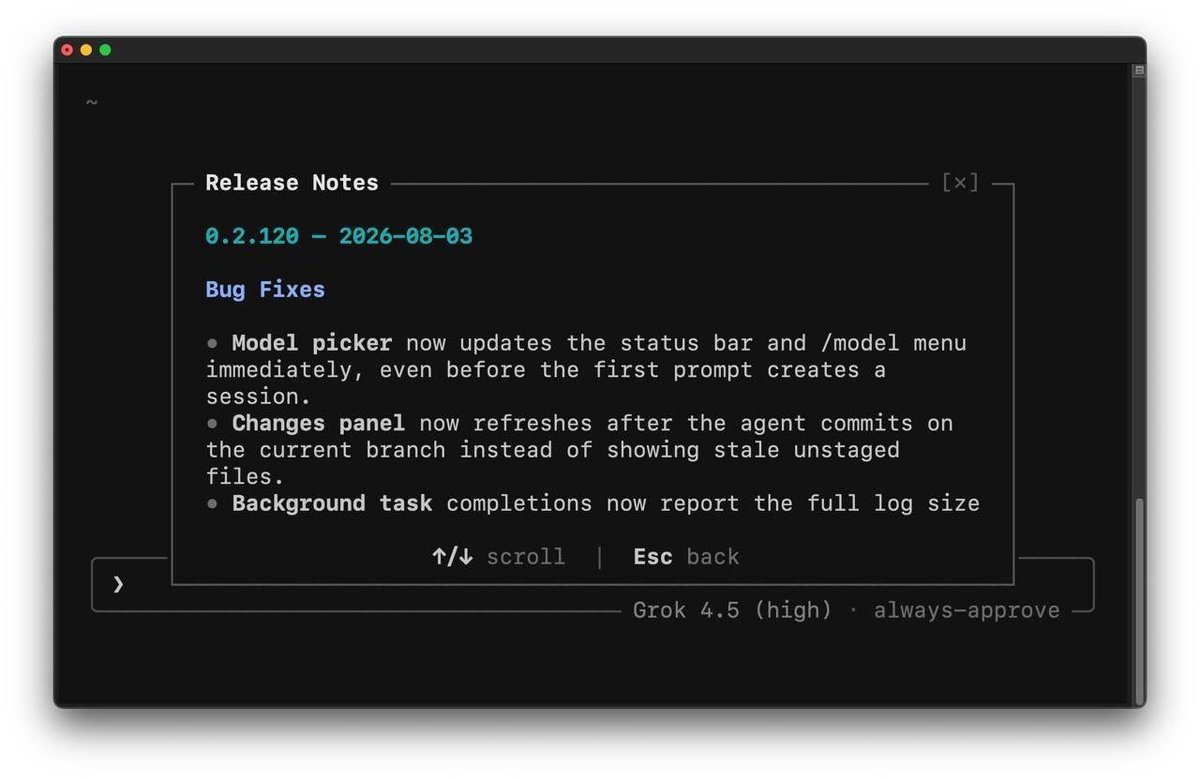
Grok Build v0.2.120 is now live.
Bug Fixes:
• Model picker now updates the status bar and /model menu immediately, even before the first prompt creates a session.
• Changes panel now refreshes after the agent commits on the current branch instead of showing stale unstaged files.
• Background task completions now report the full log size and read hint even when only a short prefix was captured.
• GitHub export on old hibernated sessions now shows a clear message to start a new chat instead of a generic error.
To download Grok Build Visit: https://t.co/O78rf2Dpaz
To update to Alpha Version use command: grok update --alpha
To update to Stable Version use command: grok update
Streamline Your YouTube Production with Advanced AI Tools
Generate tailored video scripts, optimized metadata, and content ideas in seconds.
https://t.co/xPR4eTMLLm
Web Development — Platform
Introducing SiteForge: Our Custom Platform for Service Business Websites
Read more: Blog - Awake Away TEK https://t.co/XpACZJ5Gy7
Grok Build CLI just got an update with v0.2.116! 🚀
Changelog v0.2.116
Features:
• Headless streaming output now includes tool calls, results, and usage when using `--output-format streaming-json`.
• New `/undo` slash command restores files and chat to an earlier turn, same as `/rewind`.
• Slash commands are now correctly hidden or refused in minimal or fullscreen mode based on their declared support.
Bug Fixes:
• Fixed repeated forced re-logins after laptop sleep or network hiccups during token refresh.
• Suppressed spurious history load warnings on draft conversations that have no server history yet.
• Settings enum pickers now keep the selected radio button on the current value until you press Enter.
• Deep-linked settings such as `/privacy` now close the settings modal on Esc or Enter instead of returning to the list.
Starting today, you can create ten videos *at no cost* in Gemini until 11:59pm PT on August 4th, 2026.
Just select "Create video" in the tools menu to create, edit, and remix videos to bring your ideas to life.
Share how you’re using Gemini Omni in the replies 👇
Streamline Your YouTube Production with Advanced AI Tools
Generate tailored video scripts, optimized metadata, and content ideas in seconds.
https://t.co/xPR4eTMLLm
Grok Build CLI just got an update with v0.2.111! 🚀
Changelog v0.2.111
Features:
• Users can now disable image generation and video generation tools (and their slash commands) via config.toml or environment variables.
• `/session-info` now displays whether the session uses OAuth or an API key and where to manage the account.
• You can now run `grok doctor fix` commands directly from inside the TUI instead of only from the CLI.
Performance:
• Voice dictation on macOS now uses less memory by running capture in a temporary helper process.
Bug Fixes:
• `!cmd` commands now allow up to one hour before timing out.
• npm package now installs the native binary under `$GROK_HOME/bin` (honoring the same override as the Rust CLI).
• Startup warnings now point to `/doctor` for details and fixes.
• Dashboard hover and clicks no longer miss the gaps between items in wide mode.
• Shift/Alt+Enter now inserts a newline while editing a queued prompt.
• Queued prompt edits under combine mode no longer lose changes due to premature hold release.
• Forking a session that used compaction no longer causes later rewinds to fail with missing checkpoint errors.
• When a permission prompt appears while viewing scrollback, focus now correctly moves to the prompt so you can answer.
• Pressing Esc once now cancels the current agent turn (except in fullscreen vim scrollback mode).
• Grok now automatically stops a turn that keeps repeating the exact same tool call many times in a row.
• Configs using either spelling of the workspace teleport disable flag now load and save correctly.
• Background subagent completion messages no longer leak into unrelated sessions when multiple sessions are active.
• When the auto-permission classifier times out or fails, Grok now shows a normal permission prompt instead of silently denying.
• Managed MCP tools no longer time out prematurely on slow operations like Notion updates.
Awake Away TEK Streamline Your YouTube Production with Advanced AI Tools
Generate tailored video scripts, optimized metadata, and content ideas in seconds.
Designed to fit your unique channel voice. https://t.co/xPR4eTMLLm