The code node summarizes them in a table format, which is posted to the Slack team as the daily task report for that day. In parallel, the Excel file node converts the same data to a spreadsheet, and Gmail sends it to the manager.
Built another n8n workflow!
This workflow has two function :it sends an email notification to the manager and a Slack notification to the team. It is triggered every evening at 10pm. The Google Sheets node retrieves the records from the sheet.
Another day, another workflow! 🚀😂
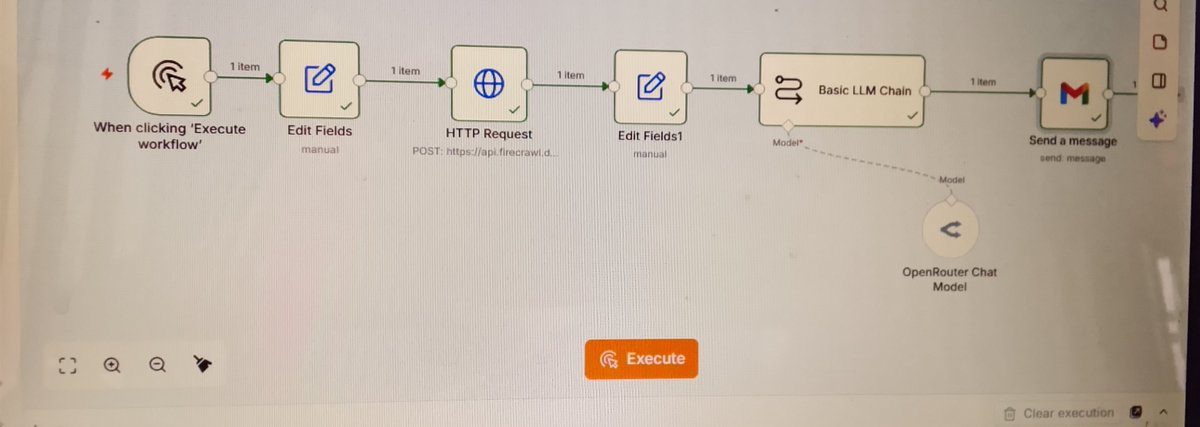
This time, I built a web scraping workflow using n8n.
But what is web scraping? It's the process of automatically extracting information from websites instead of collecting it manually.
Here's how my workflow works:
@HimStae56734 Hi, thank you for your feedback! I've been looking into other options because the scraped data isn't providing all the information I need. I appreciate your suggestion!
- Jotform: To receive form submissions.
- Airtable: To store the submitted information for future reference.
- Telegram: To notify the team when a submission comes in.
- Gmail: To send a confirmation email to the customer.
Have you ever gotten so good at using a node that you think you definitely can't make a mistake with it again?
Well, that was me yesterday!
I was working with the Telegram node in n8n. I had already created my bot, gotten my Bot Token and User ID, and connected everything to
Imagine all that stress over something so simple!
But that's the beautiful thing about learning automation. Sometimes, you think the problem is complicated, only to discover that you've overlooked one tiny detail.
For this workflow, I built an automation that uses:
to my workflow. But guess what? It kept giving me an error message! 😭
After trying to figure out what was wrong, I decided to leave it and go out to do something else. When I returned, I discovered the problem: I hadn't started my Telegram bot! 😂
- Manual Trigger: Starts the workflow.
- Edit Fields: Specifies the website URL.
- HTTP Request: Retrieves the website's response.
- Edit Fields: Organizes the retrieved data.
- AI: Processes and interprets the information.
- Gmail: Sends the result to my inbox.
feeling when you see something and have to look again to be sure it's actually you? That was exactly how I felt!
From position 88 to position 3. Omo, I wasn't expecting this at all! 😂😭
I'm still shocked, but I'm also incredibly happy and grateful.
Then today, someone mentioned that she wanted to connect with the people in the top 10 positions.
I decided to check the leadership board.
GUESS WHAT I SAW?! 😭❤️
I AM THE THIRD-BEST GRADUATING STUDENT IN DATA ANALYSIS!
At first, I was shocked. You know that
you can take something you have already built, improve it, and use it to solve a different problem.
I am still learning, experimenting, and discovering new ways to use automation to solve business problems.
It is me again! ❤️
Three days ago, I decided to rebuild a workflow I had created before, but this time, I wanted to approach the problem differently.
Here is what I built with n8n! 🚀
My first workflow calculated how much a business made throughout an entire period.
My goal was to make it easier for the business owner to see how much was generated each day without manually calculating the figures.
One thing I am learning as I explore AI automation is that you don't always have to build something entirely new. Sometimes,
💻 Uses JavaScript to calculate the daily revenue and generate insights from the sales records.
📧 Automatically sends an email report to the shop owner through Gmail.
The dataset contains historical sales records covering September 1 to October 11.