Compact mode is rolling out now to give you some screen space back! 🗜️
After updating to v1.93, head to brave://settings/appearance and enable "Use compact mode" to try it out.
On #TheBraveTechnologist podcast, tech & free speech lawyer @prestonjbyrne explains how most companies comply with foreign censorship demands they have no legal obligation to follow
Listen to this full episode, hosted by @LukeMulks, here: https://t.co/dK9ae1tqac
Compact mode is rolling out now to give you some screen space back! 🗜️
After updating to v1.93, head to brave://settings/appearance and enable "Use compact mode" to try it out.
Hi, please manually update the filter list to make sure you have the latest changes we pushed earlier today:
Desktop: Go to Settings > Shields > Content filtering and click the “Update lists” button
iOS: Go to Settings > Shields & Privacy > Content Filtering and click the “Update Lists” button
Android: Go to Settings > Brave Shields & privacy > Content filtering and click the “UPDATE” button
After that, reload your YT tabs and see if the issue is fixed. Clearing cache may also help if not. If you're still having issues, let me know!
Hi, please manually update the filter list to make sure you have the latest changes we pushed earlier today:
Desktop: Go to Settings > Shields > Content filtering and click the “Update lists” button
iOS: Go to Settings > Shields & Privacy > Content Filtering and click the “Update Lists” button
Android: Go to Settings > Brave Shields & privacy > Content filtering and click the “UPDATE” button
After that, reload your YT tabs and see if the issue is fixed. Clearing cache may also help if not. If you're still having issues, let me know!
Reminder: If you don't like YouTube Shorts, watch YT in Brave where you can block them.
Mobile:
1. Go to Settings > Media
2. Enable “Block YouTube Shorts”
Desktop:
1. Go to Settings > Shields > Content Filtering
2. Enable the "YouTube Anti-Shorts" content filter.
YouTube Shorts should’ve been a separate app
it’s so annoying and on iPhone I can’t even do anything about it
like I search for something and 90% of the results are just Shorts
I’m trying to find actual videos, not do endless doomscrolling
The @brave Rewards Card waitlist is now open. 💳
Introduced in BAT Roadmap 4.0, the upcoming card will allow users to earn $BAT rewards on everyday spending.
@rahulawasthi314 Settings search is actually part of the latest Android release (v1.93). We started the phased rollout of that update this morning but it may take a few days to get the update on your end. Exact speed of the rollout depends on whether any issues crop up.
Want Brave to automatically clear your local browsing history on a schedule?
Head to Settings → Privacy and Security → "Local history retention" and use the drop-down to choose how often your history gets wiped.
(Or choose "Forever" to keep it.)
@cobazia7 This is a desktop feature that was included with yesterday's update (v1.93).
With iOS, you can clear browsing data manually by going to Settings -> Brave Shields & Privacy and scrolling down to "Clear Private Data."
That's not the only way to clear your history.
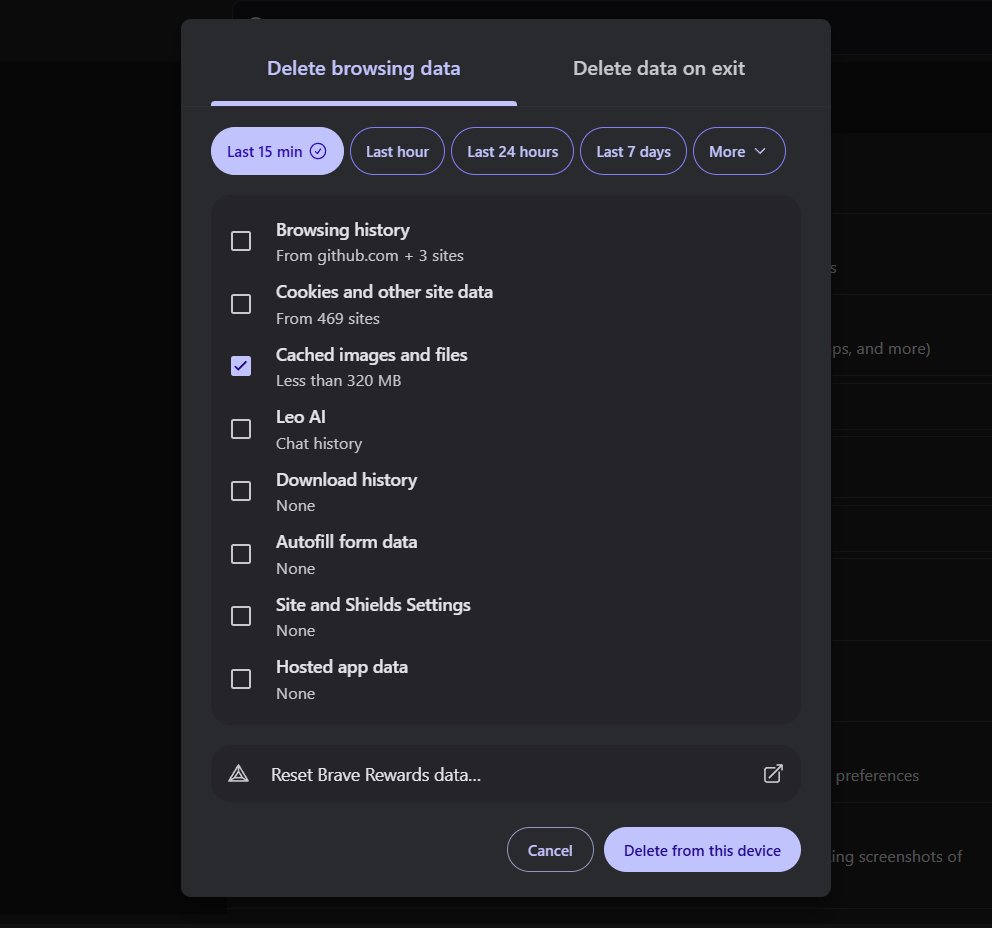
As usual, you can go to Settings → Privacy and Security → "Delete browsing data" to clear everything instantly. You can also set it to wipe automatically every time you close the browser.
@4O4Gaming You should be able to avoid that pop-up by going to Settings -> New Tab Page and setting "Opening Screen" to either "Last open tab" or "New tab."
@VerseNilVis If you wanted to hide horizontal tabs and the address bar, toggling fullscreen mode (F11 or ⌘ + Ctrl + F) would accomplish that. Or are you picturing something different?
Two big Leo changes just landed in v1.93 for desktop!
First: Leo can now organize your tabs for you! 🧹
You can ask Leo to:
↳ Rearrange tabs
↳ Move tabs to different windows
↳ Create and manage tab groups
↳ Close tabs
Open a chat with Leo now to give it a shot!