Today, we're kicking off the Summer Special
A promotion for Backyard Cloud that runs all of August.
🔥 Unlimited Messages on the Free Plan!
We're offering UNLIMITED messages for Fimbulvetr 10.7B, our most popular Cloud model, to everyone.
🤝 Referral Program - Give 50% off, Get 50% off
If you love using Backyard AI, please help spread the word among your friends/online communities!
More details: https://t.co/sYCoDCMiU6
This is Backyard AI
Immersive Text Adventures with AI Characters
- Runs on your Desktop using your GPU or on the web with our private Cloud service
- No filters or censorship
- Text & Audio based chats
- Thousands of Characters available
A quick demo 📺
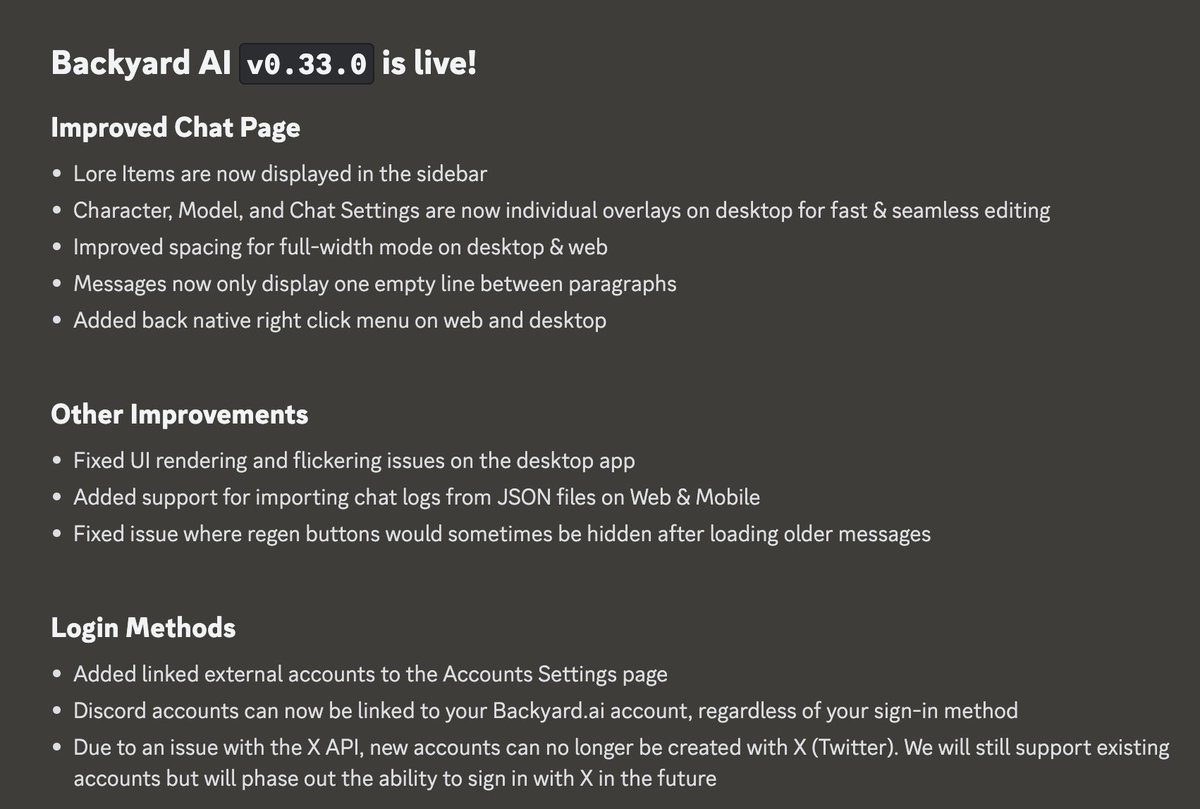
Backyard AI version 0.19.0 is live!
💡 After updating, you will need to open the "Backyard AI" app from your Applications Folder (Mac) or Desktop Folder (Windows).
Note to the Community
Just a reminder that while the brand is changing, our goals for the product remain the same.
We are focused on providing the same private, accessible, and unfiltered experience across our offerings. This type of transition isn't easy, and the dev team is working very hard.
We ask that you keep an open mind and hope you'll continue spreading the word to help build this community. We appreciate you all 🫡
Other changes in v0.18.16:
Improved "Experimental" backend on Desktop
- To use the new Experimental backend, go to the Advanced settings page
- Better GPU detection (note: models may be slow on first load, but subsequent loads will be fast)
- Fixed Llama 3 response quality issues related to the tokenizer
- Increased token rate by 5-10% on Apple metal and CUDA
- Fixed tokenizer issues affecting Command-R, Qwen2, DBRX, and other base model architectures
- Added flash attention optimization (does not apply to Vulkan)
- Fixed gibberish responses when using Vulkan GPU acceleration
Bug fixes & improvements
- Fixed issue preventing chat deletion in the header dropdown
- Improved Llama 3 prompt template formatting
- Removed hardcoded separator message between example dialogue and chat history
We're excited to announce that Faraday.dev will be rebranding to Backyard AI
Why Backyard AI?
Backyard AI gives a sense of familiarity, privacy, and ownership. This aligns perfectly with what we’re building: a product that puts you in control by leveraging your computer's local resources (running AI "in your own backyard"). Overall, it's a unique and memorable name perfectly aligned with our vision.
Why the change?
tl;dr - we’ve received consistent feedback that (1) Faraday.dev sounds like a developer tool, and (2) many people were getting our name confused with other companies. With our community growing quickly, we figured there's no better time to make the change!
🚀 On Monday, May 20th, we will transition all products and services to Backyard.ai
- Our domain, icons/logos, and socials will be moved to the new brand. Faraday.dev will automatically redirect, so don't worry about old links.
Things may look a bit different, but the core experience will remain exactly the same across all of our services.
We know this is a big change, and we're super excited to continue shipping improvements as Backyard AI. 🫡
Version 0.18.11 is live! 🚀
This release includes a ton of bug fixes, including:
- Removed word limit on User Persona templates
- Removed “initializing model” loading message on the chat page
- Fixed Character settings updates while Tethering
- Fixed chat log imports from external apps (Ooba, CAI tools)
- Fixed character imports from Faraday PNGs
- Fixed character settings page reverting input fields after refocusing the window
- Fixed issue pulling in image updates from Hub Characters
- Added ability to sort by recently updated characters on Hub
We also made some updates to the Experimental backend:
- Fixed low-quality outputs when using Llama 3 GGUFs (all Llama 3 models will need to be re-downloaded from the Model Manager)
- Added support for base model architectures, including Phi, SEA-LION, Command-R, and more
🫡