Swift: Avoiding Memory Leaks by Examples
Memory leaks are dangerous in your app because they will affect your app’s performance and might lead to crashes when the app runs out of memory. Let's see how to avoid them in this thread.
🧵 ⬇️ (1/7)
Swift Concurrency Tips: TaskGroup
Sometimes, we need to make a bunch of similar network requests in parallel. Swift Concurrency has an app for that: set up Task Groups allow us to wait for any number of functions, provided they return the same type.
Get into the details of tasks my blog: https://t.co/TavplWgtKS
If your app doesn't support App Intents yet, now is the time to reconsider. Integrating with the OS is something Apple has been pushing for a while and I reckon that it's going to be even more important when Siri gets a new brain
I'm Boris and I created Claude Code. I wanted to quickly share a few tips for using Claude Code, sourced directly from the Claude Code team. The way the team uses Claude is different than how I use it. Remember: there is no one right way to use Claude Code -- everyones' setup is different. You should experiment to see what works for you!
High Performance SwiftData: Moving off the main thread
The main culprit for our SwiftData UI hang is an unsuspecting macro that lives on our main collection view. When the view appears, this query fetches the card data from SwiftData. It’s cached on the synthesised _cardEntities property.
That’s one of my big bugbears with SwiftData, frankly. It is designed by default to live on the main thread and be accessed via a @Query macros.
But we can move this whole SwiftData database out of SwiftUI and off the main thread. We can start by using my generic SwiftDatabase to set up a database that stores our card entities. Now, we can just move all my cards into the view model instead of relying on the main-thread-locked @Query macro. Then And I can my view to display these.
This tiny shift away from the SwiftUI-embedded macro into a view model gives us the ability to load everything off the main thread, and even parallelise if we want to.
The time profile shows how much cleaner this small change makes our app. It still has its problems, including several hangs and CPU spikes, but our app is at least, almost, functional.
Clearly, however, there is a long way to go to optimise our memory usage.
Master SwiftData and iOS with my weekly blog: https://t.co/5XrYBsTLjA
I'm working on a SwiftUI Best Practices Skill and would love to improve it using your AGENTS md guidance on SwiftUI.
If you've got best practices to share, DMs are open.
It will be open-sourced when it's solid enough. Let me do the hard work for you! 🙌
I love working on app performance.
It just sounds cool. Performance. Performance.
While the bozos on feature teams are busy building stuff that actually brings in paying customers, platform engineers can feel smugly superior, typing away from our windowless basements, reducing launch time by 0.01 seconds. For everyone!
Unfortunately, if you don’t have a full-time platform team, “performance work” is generally treated the same as “tech debt tickets”.
Despite what app release notes will have you believe, no one’s going to give us time to work on performance optimisations, because a lot of the time it’s invisible. Everyone agrees that high performance is desirable, but it’s virtually impossible to quantify the impact of marginal improvements.
So how does this ever get done? And how do we stay on top of it?
There is a way. And if you can master the technique, it’s also a pretty good way to get promoted.
Be the dev that keeps a close eye on the Xcode Organizer.
Read “Xcode Organizer: your performance cheat sheet” here 🚀 https://t.co/KovJhoEzwQ
A reminder from Atomic Habits:
New goals don't deliver new results. New lifestyles do. And a lifestyle is a process, not an outcome. For this reason, all of your energy should go into building better habits, not chasing better results.
No posts today because it’s Christmas.
Just kidding 🧑🎄 LeetCode Grind: Insert Interval
This one sort of felt easy and then it wasn't. I kind of know what I have to do, but it's difficult to get the code to move in the right direction. I'm not ashamed to say I looked at the answers. Well, I'm a bit ashamed, but not very.
Okay, so basically there are three cases:
1. It doesn't touch the interval beginning. So you can just append it.
2. It doesn't touch the interval after the end. So you can just append all of the ones at the back.
3. Something in the middle and you have to merge them in some way.
To merge them, you basically iterate through until you can set the minimum and the maximum of the interval. So you're still iterating through, but you're simply using min and max to update the item as you go.
Man, mediums are painful. So I looked at the answers, came back to it, I got very close but I still didn't quite get it even though I pretty much implemented the exact frickin’ thing that I saw in the solution. These are really painful because I'm literally looking at the solution and I don't know what I did differently.
Asking ChatGPT to explain this is deeply frustrating because it will give you six trillion words and it will not explain what went wrong. It was a one-character difference. Man, I feel terrible now.
If you enjoyed this post, join my newsletter at https://t.co/uvp6t9OtSg for more in-depth iOS content to help you maximise your salary.
There is a global function in Swift that, when you fully understand it, will teach you everything you need to know about Swift internals.
You’ll never guess what it is, because I guarantee you’ve used it less than 3 times in the real world, if you’ve even heard of it.
isKnownUniquelyReferenced().
If you know, you know: this function powers the copy-on-write optimisation (a.k.a. CoW, a.k.a.k.a. 🐮).
It pretty much only ever comes up if a) you’re a library author, or b) you’re interviewing someone and want to rate their power level when it comes to Swift internals*
*I never let interviews get to this point, because I burn 45 minutes responding to their first question about weak references.
I wanted to understand how this function worked, and little did I know that it would take me on an odyssey through every single layer and sublayer of the Swift source code.
Seriously. Every layer. Through the standard library, the compiler, and the Swift runtime.
Our journey begins right here 🐮 https://t.co/Rdl5Tomn5F
The @Observable macro in SwiftUI is powerful, but only when used correctly. @nilcoalescing explains the pitfalls and their solutions.
Curated in this week's #swiftleeweekly https://t.co/mBHYY4foh1
Swift Performance Optimisation with AsyncStream and CADisplayLink
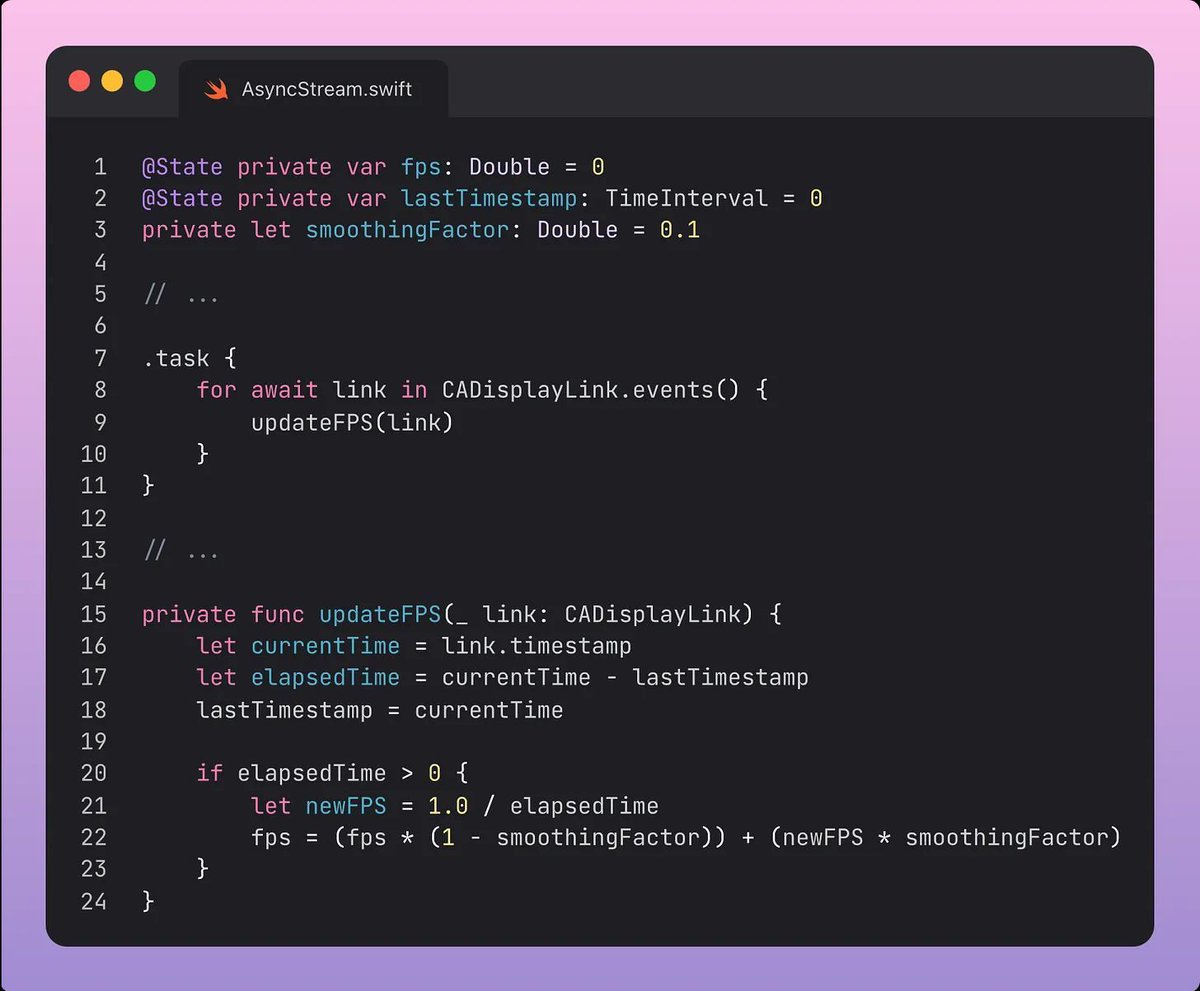
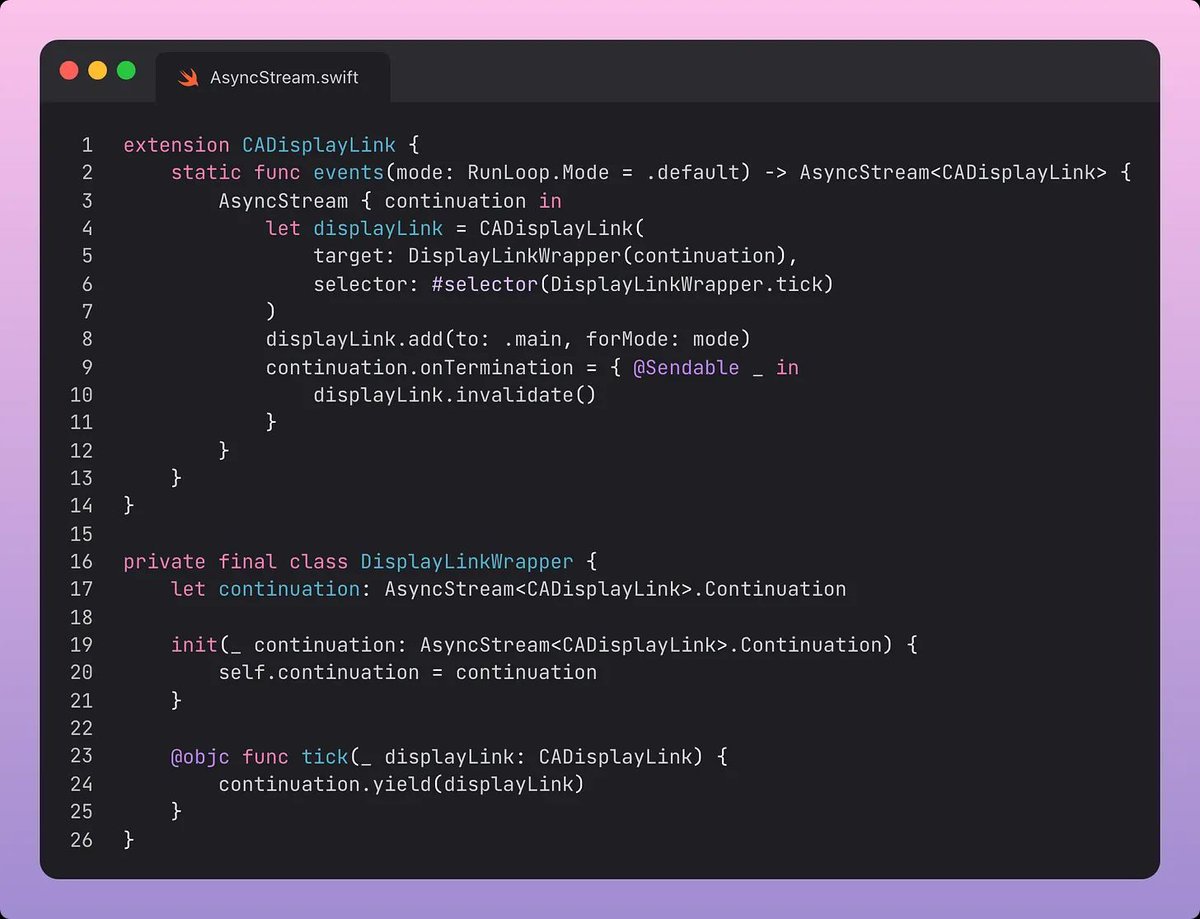
CADisplayLink is a built-in timer that allows your app to synchronise rendering with the refresh rate of the display. It fires an Objective-C selector function whenever a new frame is rendered. This makes it perfect for measuring frames per second.
We can use an AsyncStream to pass the display link for each frame tick to track our rendering performance. The for-await-in loop returns events from a CADisplayLink stream, then calculates the frames per locally in our view.
Here, we use onTermination to clean up the CADisplayLink when the AsyncStream’s task is cancelled. This means that if the SwiftUI view task running the for-await-in loop is cancelled, for instance when the view is removed, then the link is cleaned up.
If you liked this, join my blog for free! https://t.co/5XrYBsTLjA
The best approach IMO.
You get the best of both worlds, shared business logic while still maintaining native components and performance on each platform.
Bro you can do KMP, do all the business in Kotlin, have native Compose on Android and native SwiftUI on iOS and it's great. UI literally cost $0 to build those days.
I don't see the point of Flutter those days.