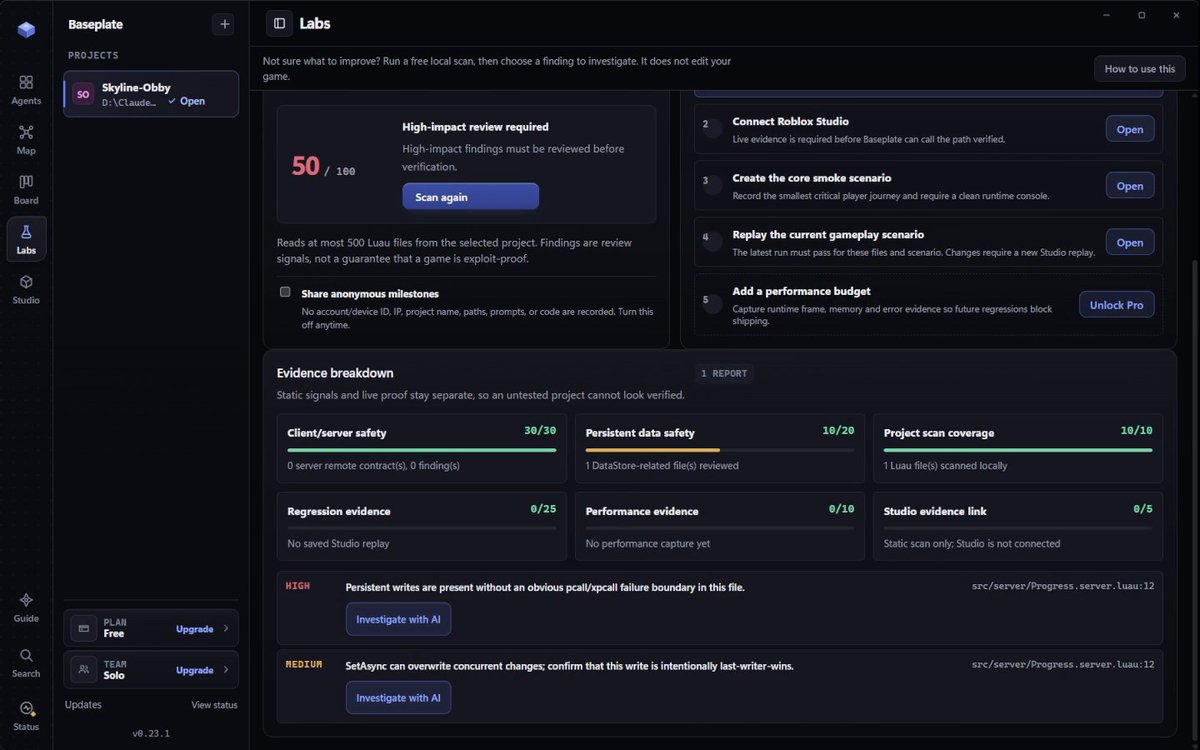
Desktop workspace for Roblox + your own Claude Code, Codex or Cursor Agent CLI. Free local scans. Review changes, then test them in Studio. Start here ↓
Baseplate is a desktop workspace for Roblox + your own Claude Code, Codex or Cursor Agent CLI.
Free: one agent + local project scans.
Pro: up to 5 agents + release reviews, $4.99/month.
Your AI plan is separate.
Actual 0.23.1 scan ↓
https://t.co/aAUJ1DFrvy
@lvlforge The 99 oil at jar 2 is a good catch. With a full lantern at 4 oil/sec, 5–40 oil means 15–23.75 lit seconds since the last refill. I’d log which brazier refilled it and sample just before the jar. I build Baseplate. Want to try that one check with your Codex setup?
@WasimShips For the Roblox part, try replaying one purchase: same request ID twice → one charge and one item. We made a free Luau lab for this: https://t.co/RIaxHKMmVh
In-memory examples; the real game still needs a Studio test.
Got a Roblox bug you can reproduce twice?
If you already use Claude Code, Codex or Cursor Agent, send the action, what should happen and what actually happens. We’ll start with free written help for one Studio test on your project.
https://t.co/gAs95tnk2u
@AtanasTankov For a new weapon, I’d equip it, respawn, and check the loadout against your intended rules. Want to try that once in Baseplate Free on a test copy? Tell me what should happen after respawn and I’ll write the steps for your Claude Code setup.
@Spidermanzdev I haven’t played it yet; that was a test idea from your plate/bonus description. Try A leaving mid-plate, B finishing, then A rejoining; check door state + both balances. How do you rerun the 30-stage checks after Claude changes shared checkpoint/save code?
@Matiosh_ Você usa o Claude Code com arquivos locais ou direto pelo MCP do Studio? Estou construindo o Baseplate para juntar esse fluxo. Queria entender onde ainda dá trabalho: levar as mudanças ao Studio, testar ou organizar vários chats?
@trq212 Building Baseplate around Roblox + coding CLIs. The handoff I want: changed file → exact player action to replay → what passed or remains untested. Then the developer can carry on in Studio and check the same behavior themselves. That last step matters.
@0xKense1 Glad it helps. We put the repeated-purchase case in a tiny Luau lab: same request ID twice, one charge/grant; insufficient funds leaves the balance unchanged. You can adapt the assertions for your QA steps: https://t.co/05GUICg9Tb
A 20-coin Roblox sword just made the buyer richer.
In our Luau test, start with 50 coins and send a price of -1.
Client sets price → 51 coins + sword.
Server sets price → 30 coins + sword.
Compare both handlers in the free scanner:
https://t.co/bTBunSCpTE
Give Roblox Assistant a test it can fail:
A opens a private menu. B keeps moving.
Watch both clients, swap roles, then rerun the same steps after the change.
Copy the one-time prompt or add it as a Studio skill:
https://t.co/PyzwquKfd7
pcall caught the error. Our fixture still authorized a save.
Ask your AI to test: failed read, missing key, existing profile.
In-memory example, not a live-game test.
Free MIT lab: https://t.co/RIaxHKMmVh
#RobloxDev#Luau
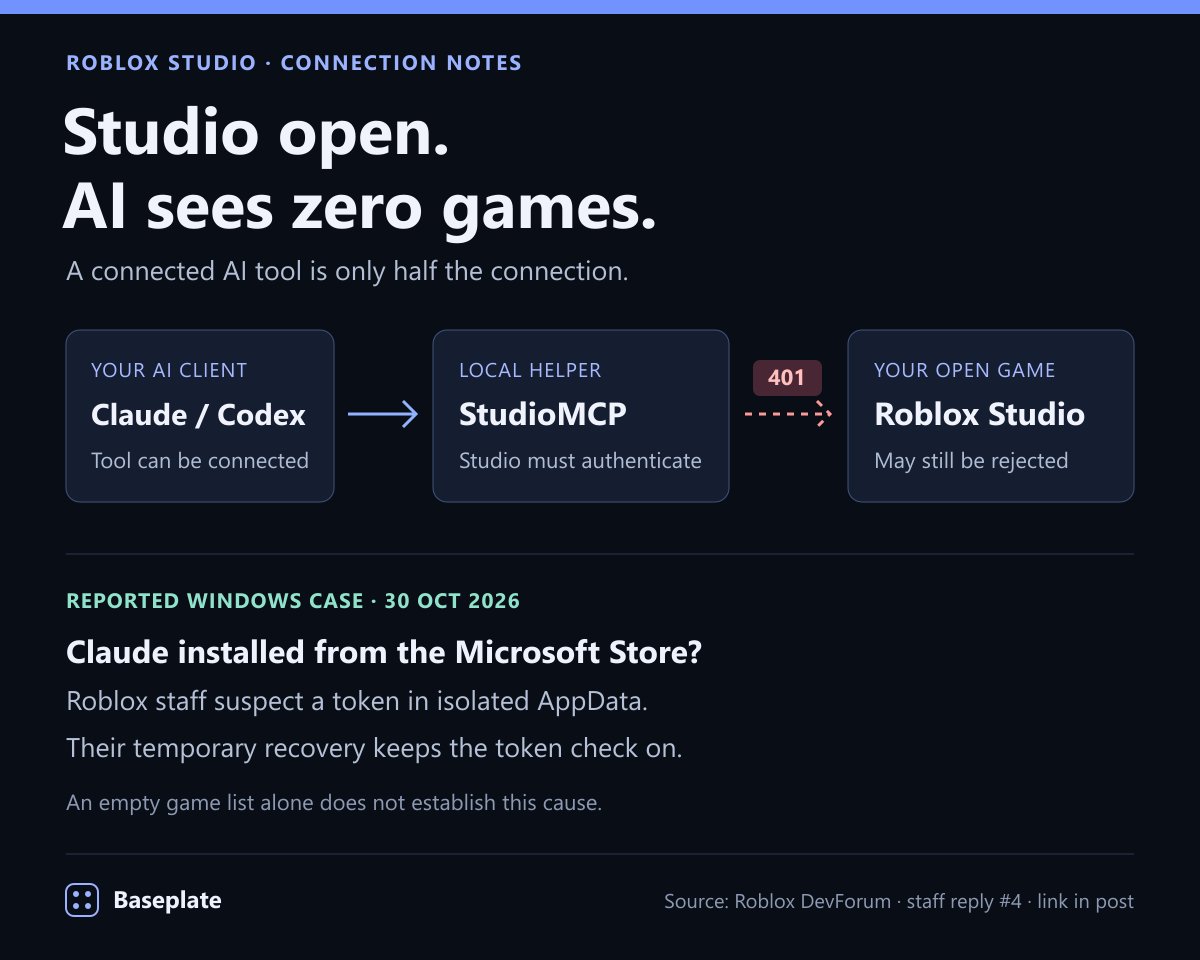
Studio open, but Claude/Codex sees zero games?
If the log also shows 401, Roblox staff suspect a Windows token-location issue. Their temporary workaround keeps authentication on. An empty list alone isn't a diagnosis.
Staff reply: https://t.co/080oCiF51B
@TeaPlyz I'd start with one pet's base mesh and materials, then change ears, face and colors for variants. Are PixelPet's pets blocky or rounded low-poly? Share one style reference and I'll help turn it into a short Blender plan you can repeat. Free, no Baseplate purchase needed.
@Argento3D One day-two test for the Sell button: sell once, then sell again without collecting anything. The second click shouldn't pay again for the same items. I build Baseplate; happy to help turn one mechanic from this Codex build into a repeatable Studio test. No purchase needed.
@ZoeyZeeZ@er_pdpe@SheepeyDarkness The Studio side is built in: Assistant → … → Manage MCP Servers → enable Studio as MCP server → Quick connect. Choose your installed client, restart it, then ask it to list the open places. Current Roblox steps: https://t.co/h7HGAa0Hhy