Most sysadmins expose SSH on every server they manage and spend their time hardening each one individually.
There is a better architecture. One hardened entry point. Everything else is invisible from the internet.
In Chapter 34 of our SSH course, you will learn how bastion hosts work, how to configure ProxyJump for transparent multi-hop connections, and how to build a secure single-entry-point infrastructure where SCP, rsync, and port forwarding all work through the bastion automatically.
Read it here → https://t.co/38Wvg6G1cM
Follow @tecmint for new #SSH chapters every week.
Quick Linux Tip #11
Need to find exactly when you ran a command without scrolling endlessly through shell history?
First, enable timestamps:
$ export HISTTIMEFORMAT="%F %T "
Then search your history:
$ history | grep ssh
This lets you quickly find commands and see the exact date and time they were executed.
For even faster searching, press Ctrl+R and start typing. Bash will search your history interactively as you type.
Once you know these shortcuts, you'll never spam the up arrow again.
Follow @tecmint for more #Linux tips
Quick Linux Tip #12
Ever wondered which files were changed on your system recently?
Here’s a simple way to check it in Linux:
find /etc -type f -mtime -30
This shows all files inside /etc that were modified in the last 30 days.
So instead of opening files one by one, Linux quickly shows you what changed.
The -type f part means it will only show files (not folders), and -mtime -30 means “modified less than 30 days ago”.
Follow @tecmint for more #Linux tips
Two backend engineers solved the same problem.
Design A 👇
SELECT *
FROM users
WHERE email = ?
Design B 👇
SELECT *
FROM users
WHERE LOWER(email) = LOWER(?)
Which query would you ship to production?
@Its_Nova1012 A.
WHERE email = ?
uses the index efficiently.
WHERE LOWER(email) = LOWER(?)
can bypass the index and trigger a table scan.
Rule: Don’t apply functions to indexed columns unless you have a functional index.
@JumiaKenya
Is it possible to change the pickup station for a particular order.
I mistakenly picked a station too far from where i should have
I was not expecting my order to be delivered to a station of close proximity
if not, just cancel it
347193517
@JumiaKenya order #385279978 is not the same as order #331347287
I am not happy about order #331347287 on the general quality of the item,
I would wish to return it, kindly share the procedure
Day 6 of MongoDB
Indexing and Performance
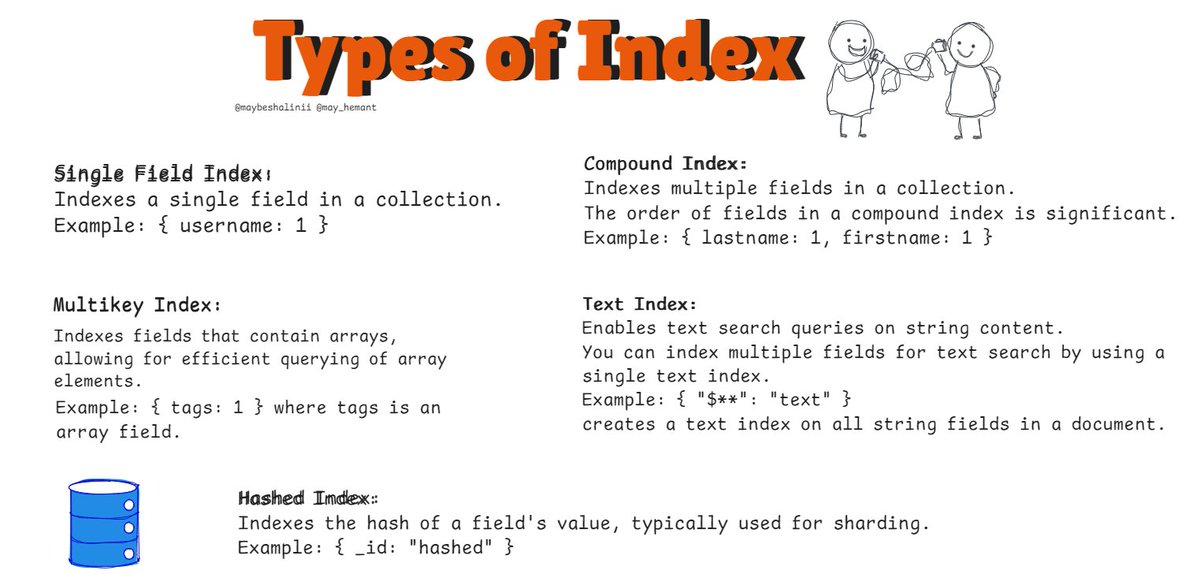
Indexes are crucial for optimizing query performance in MongoDB. They help speed up the retrieval of documents by reducing the amount of data MongoDB needs to scan to fulfill a query. Today, we'll dive into the basics of indexing, different types of indexes, and strategies for optimizing query performance.
Indexing Basics
What is an Index?
An index in MongoDB is a data structure that improves the speed of data retrieval operations on a collection. Think of an index as a table of contents in a book—it allows MongoDB to quickly locate the required data without scanning the entire collection.
How Indexes Work:
- When you query a collection, MongoDB uses an index to locate the documents that match the query criteria.
- Without an index, MongoDB must perform a collection scan, meaning it reads every document in the collection to find the matching documents.
creating an index:
db.users.createIndex({ username: 1 });
This creates an ascending index on the `username` field in the `users` collection. The `1` specifies ascending order, while `-1` would specify descending order.
Day 2 of SQL
- Components of SQL
- Retrieving specific columns with SELECT
- Using aliases for column names
Components of SQL:
- Data Definition Language (DDL):
Used for defining and modifying the structure of the database schema.
Includes commands like CREATE, ALTER, DROP, TRUNCATE.
- Data Manipulation Language (DML):
Used for manipulating data within the database.
Includes commands like SELECT, INSERT, UPDATE, DELETE.
- Data Control Language (DCL):
Used for controlling access to data within the database.
Includes commands like GRANT and REVOKE.
- Transaction Control Language (TCL):
Used for managing transactions within the database.
Includes commands like COMMIT, ROLLBACK, SAVEPOINT.
- Data Query Language (DQL):
Primarily used for querying data from the database.
Includes commands like SELECT.