nobody asked, but klo ada yg lg ngejar IELTS i'd recommend youtube ielts advantage
https://t.co/8GrTlcnZhy
3 tahun lalu pernah ielts, ga gtu ngikutin struktur penulisan.
i wish i had watched his yt a lot sooner 🫤
pic credits : ieltsdvantage
Most Excel files become harder to use every month.
More sheets.
More formulas.
More confusion.
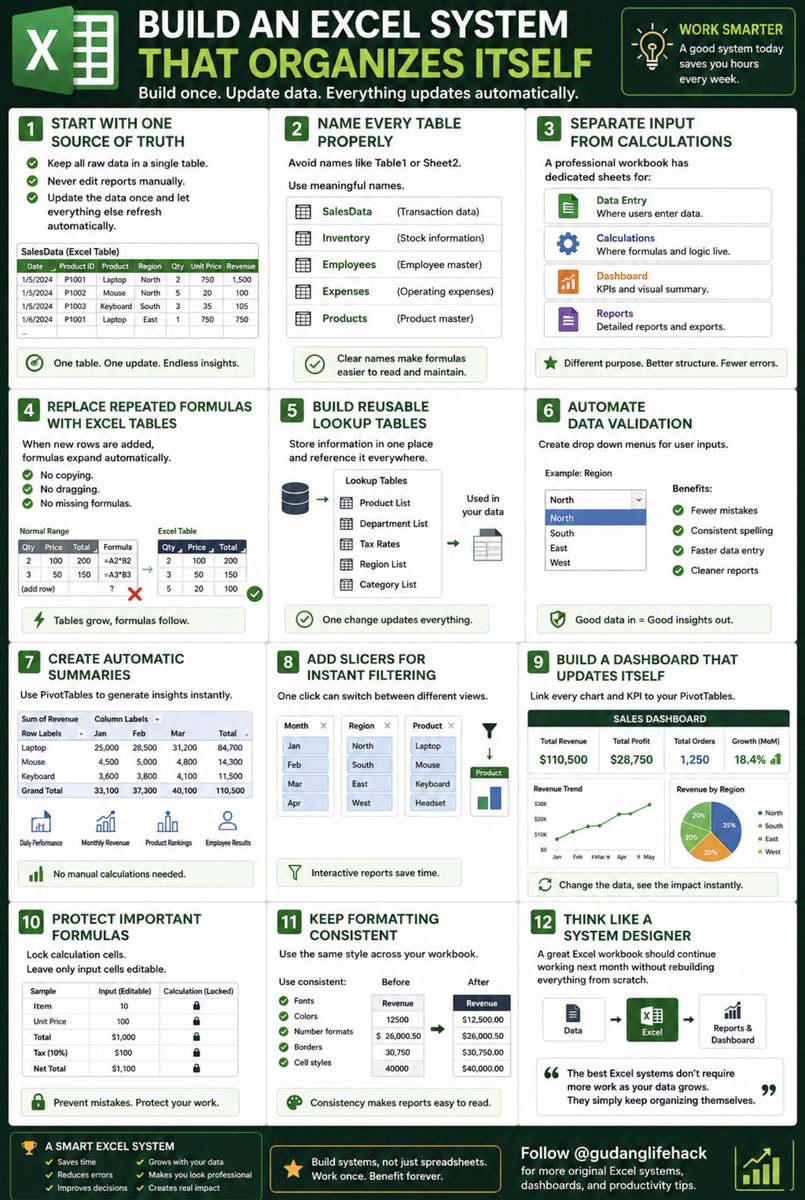
Instead of managing the chaos, build an Excel system that organizes itself.
Here’s how. 🧵👇
Start with one source of truth.
Keep all raw data in a single table.
Never edit reports manually.
Update the data once and let everything else refresh automatically.
Name every table properly.
Avoid names like Table1 or Sheet2.
Use meaningful names such as:
• SalesData
• Inventory
• Employees
• Expenses
Clear names make formulas easier to read.
Separate input from calculations.
A professional workbook has dedicated sheets for:
📄 Data Entry
⚙ Calculations
📊 Dashboard
📑 Reports
Never mix all of them together.
Replace repeated formulas with Excel Tables.
When new rows are added, formulas expand automatically.
No copying.
No dragging.
No missing formulas.
Build reusable lookup tables.
Store information like:
• Product IDs
• Departments
• Tax rates
• Regions
• Categories
Reference these tables instead of typing values repeatedly.
Automate data validation.
Create drop down menus for user inputs.
Benefits:
✔ Fewer mistakes
✔ Consistent spelling
✔ Faster data entry
Create automatic summaries.
Use PivotTables to generate:
• Daily performance
• Monthly revenue
• Product rankings
• Employee results
No manual calculations required.
Add slicers for instant filtering.
One click can switch between:
📅 Months
🌍 Regions
👤 Employees
📦 Products
Interactive reports save time.
Build a dashboard that updates itself.
Link every chart and KPI to your PivotTables.
When the data changes, the dashboard changes too.
Protect important formulas.
Lock calculation cells.
Leave only input cells editable.
This prevents accidental errors.
Keep formatting consistent.
Use the same:
• Fonts
• Colors
• Number formats
• Borders
Professional workbooks are easy to read.
Think like a system designer.
A great Excel workbook should continue working next month without rebuilding everything from scratch.
The best Excel systems don’t require more work as your data grows.
They simply keep organizing themselves.
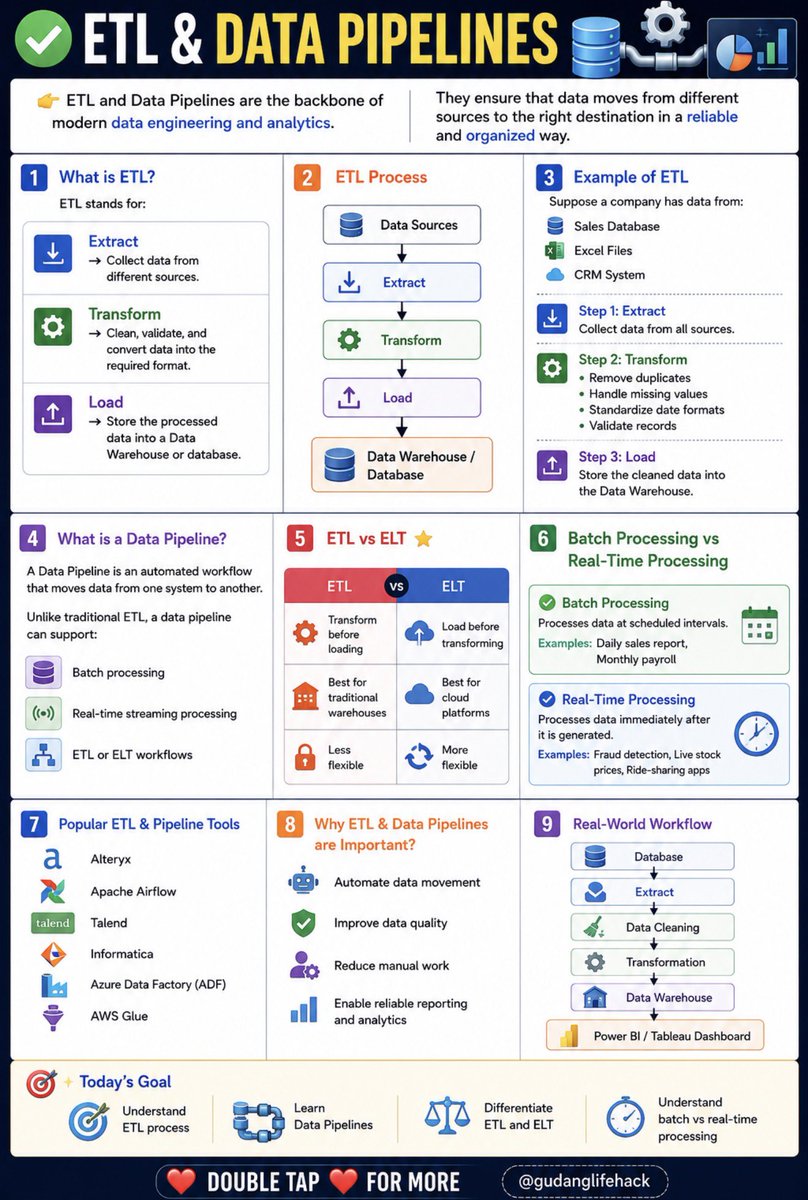
✅ ETL & Data Pipelines 🔄📊
👉 ETL and Data Pipelines are the backbone of modern data engineering and analytics.
They ensure that data moves from different sources to the right destination in a reliable and organized way.
🔹 1. What is ETL?
ETL stands for:
*Extract* → Collect data from different sources.
*Transform* → Clean, validate, and convert data into the required format.
*Load* → Store the processed data into a Data Warehouse or database.
🔥 2. ETL Process
Data Sources
↓
Extract
↓
Transform
↓
Load
↓
Data Warehouse / Database
🔹 3. Example of ETL
Suppose a company has data from:
✔ Sales Database
✔ Excel Files
✔ CRM System
Step 1: Extract
Collect data from all sources.
Step 2: Transform
Remove duplicates
Handle missing values
Standardize date formats
Validate records
Step 3: Load
Store the cleaned data into the Data Warehouse.
🔹 4. What is a Data Pipeline?
A Data Pipeline is an automated workflow that moves data from one system to another.
Unlike traditional ETL, a data pipeline can support:
Batch processing
Real-time streaming processing
ETL or ELT workflows
🔥 5. ETL vs ELT ⭐
ETL vs ELT
Transform before loading vs Load before transforming
Best for traditional warehouses vs Best for cloud platforms
Less flexible vs More flexible
🔹 6. Batch Processing vs Real-Time Processing
✅ Batch Processing
Processes data at scheduled intervals.
Examples: Daily sales report, Monthly payroll
✅ Real-Time Processing
Processes data immediately after it is generated.
Examples: Fraud detection, Live stock prices, Ride-sharing apps
🔹 7. Popular ETL & Pipeline Tools
✔ Alteryx
✔ Apache Airflow
✔ Talend
✔ Informatica
✔ Azure Data Factory ADF
✔ AWS Glue
🔹 8. Why ETL & Data Pipelines are Important?
✔ Automate data movement
✔ Improve data quality
✔ Reduce manual work
✔ Enable reliable reporting and analytics
🔹 9. Real-World Workflow
Database
↓
Extract
↓
Data Cleaning
↓
Transformation
↓
Data Warehouse
↓
Power BI / Tableau Dashboard
🎯 Today's Goal
✔ Understand ETL process
✔ Learn Data Pipelines
✔ Differentiate ETL and ELT
✔ Understand batch vs real-time processing
👉 Double Tap ❤️ For More
(Save this is important.)
Nadie te enseña esto en clase.
50 expresiones en inglés que los nativos usan a diario y que marcan la diferencia entre sonar fluido… o sonar a libro de texto
Most Schools Are Responding to AI Over-Reliance Exactly Wrong!
I advocate for AI in classrooms, loudly. That's why the over-reliance research worries me, and why I think the standard response makes the problem worse.
Zhai, Wibowo, and Li (2024) ran a systematic review in Smart Learning Environments on what heavy reliance on AI dialogue systems does to student cognition.
The damage they document lands on decision-making, critical thinking, and analytical reasoning. The mechanism is trust. Students accept AI output without questioning it because they can't gauge how far to trust the machine, so they trust all of it.
Now watch what schools do with this. They tighten restrictions, run detectors, rewrite integrity policies. Every one of those moves polices the product a student hands in. None of them touch what the paper is actually about: whether the student thought at all on the way there.
That's the misfire I want educators to see. A cheating frame asks "did you write this yourself?" A cognitive frame asks "did you think while you made this?" We keep answering the first question.
Schools never taught students to doubt AI. We told them not to use it, which leaves a student no framework for using it and doubting it at once. Over-reliance is the predictable result of handing people a confident machine and skipping the part where they learn to question it.
Zhai and colleagues line up with Gerlich on cognitive offloading and Fan on metacognitive laziness. Three teams point at one signal. The thinking you outsource is the thinking you stop building.
So design the doubt back in. Make students argue with the output, find where it's wrong, defend a claim the AI never handed them. That's the work.
Many PhD students treat the literature review as a summary of papers.
It’s not.
A strong literature review helps you:
• Understand the field
• Identify research gaps
• Compare theories and methods
• Evaluate existing evidence
• Position your own contribution
The goal isn't to show how much you've read.
The goal is to show why your research needs to exist.
#PhD #LiteratureReview #AcademicTwitter #ResearchTips
Excel’s data cleaning tools have come a long way.
What once required multiple formulas and manual work can now be automated with features like Flash Fill, Power Query, and dynamic array functions. The result is faster workflows, cleaner datasets, and more reliable analysis.
The better your data, the better your decisions. And in Excel, clean data is often the difference between confusion and clarity.
(Save this thank me later).
aku bikin kelas speaking yg biayanya 6K PER PERTEMUAN (90 mnt), ada yang mau daftar gaaa?!?! 🤓☝️
materinya macem2, ada artikel, expressions, listening, dlll pokoknya variatif dan relevan~
komen duluuu nanti aku kasih link pendaftarannya yah!