OpenClaw just got a major upgrade.
Persistent memory changes how agents operate across sessions. No more losing context after restarts.
This is the kind of capability the OpenClaw ecosystem has been missing.
Memory Skill for OpenClaw with 26k+ users in 1 week🚀
OpenClaw's memory system is broken by default.
It requires curating massive MEMORY.md files or relying on duplicate-heavy generation. Hours are wasted tuning, and massive amounts of tokens are burned.
It's time to stop. So we built the memory skill to solve that prob
Here is our superpower ⚔️
🎯 Top #1 market accuracy (92.19%) after 8+ months of intense architecture iteration
🧠 The ultimate solution to keep the timeline, facts, and meaning perfectly in place
☁️ Local & Cloud + Version control
⚡ Super easy setup
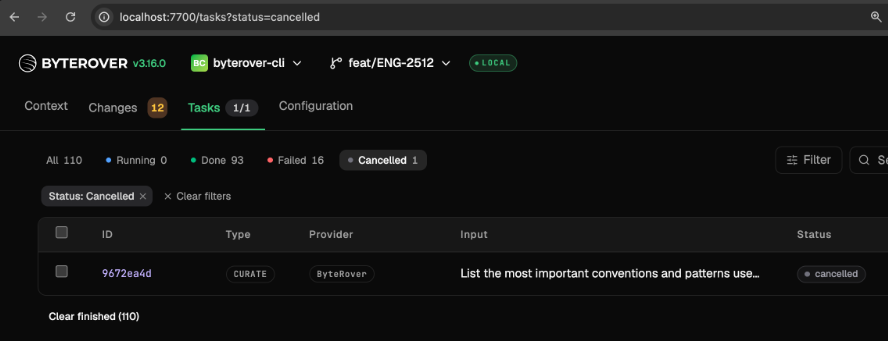
You can now cancel any running ByteRover task with 1 click:
- When you or an agent might create a query or curate with the wrong content.
- When local LLM models process tasks slowly, get stuck, or are pending for too long. It allows you to precisely cancel the task you want to cancel without restarting the daemon or losing other tasks.
We added a setting that lets you turn off ByteRover's automatic update check.
Once it is off, ByteRover stays on the exact version you have installed until you choose to upgrade yourself. When you have a brv version that works for your project, you can keep it that way.
You can change the setting from the CLI, the TUI, or the Local Web UI 👇
HTML vs Markdown for agent memory: Which is cheaper?
Before we ran the benchmark, we expected HTML to cost more because it carries images and charts.
Surprisingly it was 42% cheaper. Also 5.9% more accurate and 39% faster
The test was conducted across 271 sessions, 603 questions on LoCoMo
Check how we tested ↓
When your AI agents read from a shared memory, one wrong fact updated by your teammate can make them read as truth
To help your team prevent that and manage memory like git, we just shipped:
- Branches and Pull Requests so you can review suggested changes before they’re updated in the team's shared memory
- Conflict Intelligence (Upcoming) to catch when two PRs contradict each other
Turn on the sound for clear explanation
ClaudeCode now gives you the sources for every answer:
→ Every memory retrieved comes with a relevance score and date
So you know your agents actually pulled the project rules, past bug fixes, and team decisions they're claiming to remember.
→ Open-source, local, and free
Cloud option lets you share context across projects, people, and agents, with permission controls.
OpenClaude now remembers across sessions, projects, and teams with ByteRover.
The same memory layer that powers Codex, Claude Code, and Hermes now plugs into OpenClaude.
Your context across 22+ agents is connected in one place.
Your shared memory across Claude Code, OpenClaw, and Hermes is invisible. Now it's a webpage.
The Local Web UI for ByteRover (OSS memory system): Manage your team's context across every entry and every project, in one place.
→ trace decisions back to where they were made
→ recall how a teammate solved the same problem last month
→ see context ranked by relevance, automatically
If you're a product builder deciding what to ship next, your day is probably filled with:
- market research across X, Reddit, HN, etc
- going through notes that scattered everywhere: Obsidian, GBrain, wikis, team docs, support tickets, sales calls.
With Hermes × ByteRover, this stack saves you hours.
ByteRover is the memory that holds every source you care about, and ranks what matters the moment you ask.
Hermes is the mind that does the research. The answer is ready before you've finished typing the question.
GPT-5.5 in Codex is built for long-session agent work.
But context still doesn't follow you across projects, agents, or teammates.
ByteRover does that + Save you tokens -> No rewriting context when you switch from Claude Code to Codex.
Now connecting Codex, Claude Code, OpenClaw, Hermes, and 22+ more agents. Your context moves with you.
→ personal context for solo work
→ team context for shared decisions and bug history
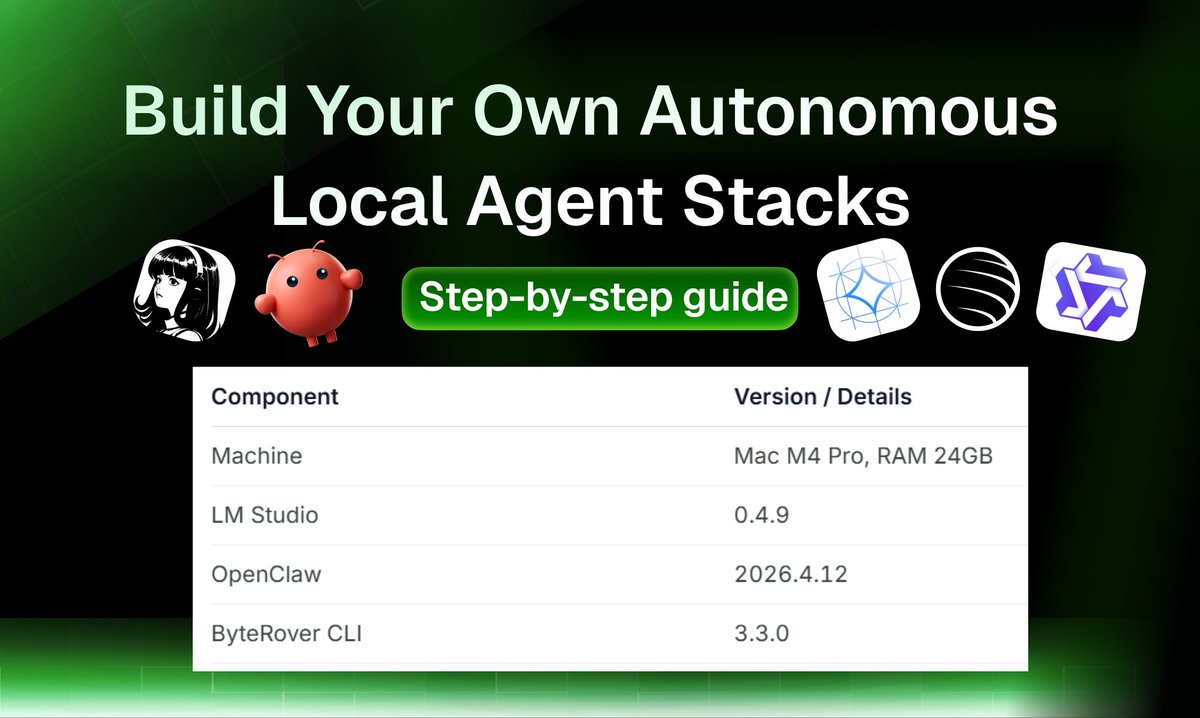
Build Your Own Autonomous Local Agent Stacks
That save 83% on token costs and give your agents 92% long-term memory retention.
This guide helps you set up a fully local and private autonomous stack. This means your data stays on your machine, your agents don't forget their tasks, and you stop paying for expensive cloud API tokens.
The Stack Components:
💪The Execution Agents: OpenClaw (2026.4.12)/ Hermes → run the actual tasks and scripts on your computer.
🧠The Brain (Local LLM): Gemma 4, https://t.co/cSsh2XhKph’s GLM-5.1, and Qwen 3.5 → able to handle complex tasks like coding, media generation, or researching
🤖The Memory Engine: ByteRover (3.3.0) → filesystem memory that connects natively with your tools and keeps context organized
Hardware Requirements
- For this experimental setup, we run on Mac M4 Pro, RAM 24GB (ByteRover and autonomous agents can run on a Apple RAM 24GB machine)
- For production usage we recommend at least an Apple M4 with RAM 48GB.
Step 1: Downloads the local LLM models
You will need two specific models to balance performance and memory efficiency:
- Gemma 4 E4B (Q4): This is for OpenClaw to handle reasoning. (Uses ~8.7 GB RAM)
- Qwen 3.5-9B (Q8): This is for ByteRover to manage your data. (Uses ~10.5 GB RAM)
On a 24 GB machine, both models fit in memory simultaneously. Gemma 4 E4B at Q4 uses ~8.7 GB and Qwen3.5-9B at Q8 uses ~10.5 GB.
Step 2: Load Both Models in LM Studio
Open LM Studio and load both models simultaneously. On a 24GB machine, these will fit together, leaving just enough room for your system to run smoothly.
Step 3: Configure Your Agent
Whether you choose OpenClaw or Hermes, the setup is the same:
- Point the agent to your local LM Studio endpoint.
- Adjust Memory: By default, OpenClaw handles 50,000 tokens. To change this, edit your openclaw.json file and run openclaw gateway restart to apply the update.
Step 4: Connect ByteRover Memory
Finally, set up the ByteRover CLI:
- Link it to the same local endpoint.
- Select the Qwen model as the primary memory handler.
The Result: You now have a persistent AI assistant that remembers your project details across different sessions. Everything stays local, with Cloud option if you ever need to collab with your teams
Detailed guide for each step 👇
ByteRover just shipped Context Management - the feature that allow you to browse, organize, and search your project's context data.
The Idea: We take Karpathy’s LLM Knowledge Base wikis (Obsidian + LLM workflow) to the next level: A product that’s free, open-sourced, production-proven and you can share with your entire team’s code, docs, and context:
- LLM automatically stores, organizes all knowledge/ context for you, recalls when you need.
It cleans, tags, summarizes, removes outdated knowledge and keeps your whole team’s knowledge base tidy without any manual work.
- You can easily view & manage your whole team’s context. Raw context → organized, beautiful, filterable, searchable, and versioned.
- Your project context will become a smart, queryable that grows smarter every time you use it.
This new feature Context Management allows you to easily view your context It introduces two visual modes: Tree View and Grid View along with a powerful full-text search with filtering capabilities.