3x CCIE (R&S, Wireless, Security). Went from running networks to leading the people who do. Still learning daily. Dad of two, gravel rider, always mid-book.
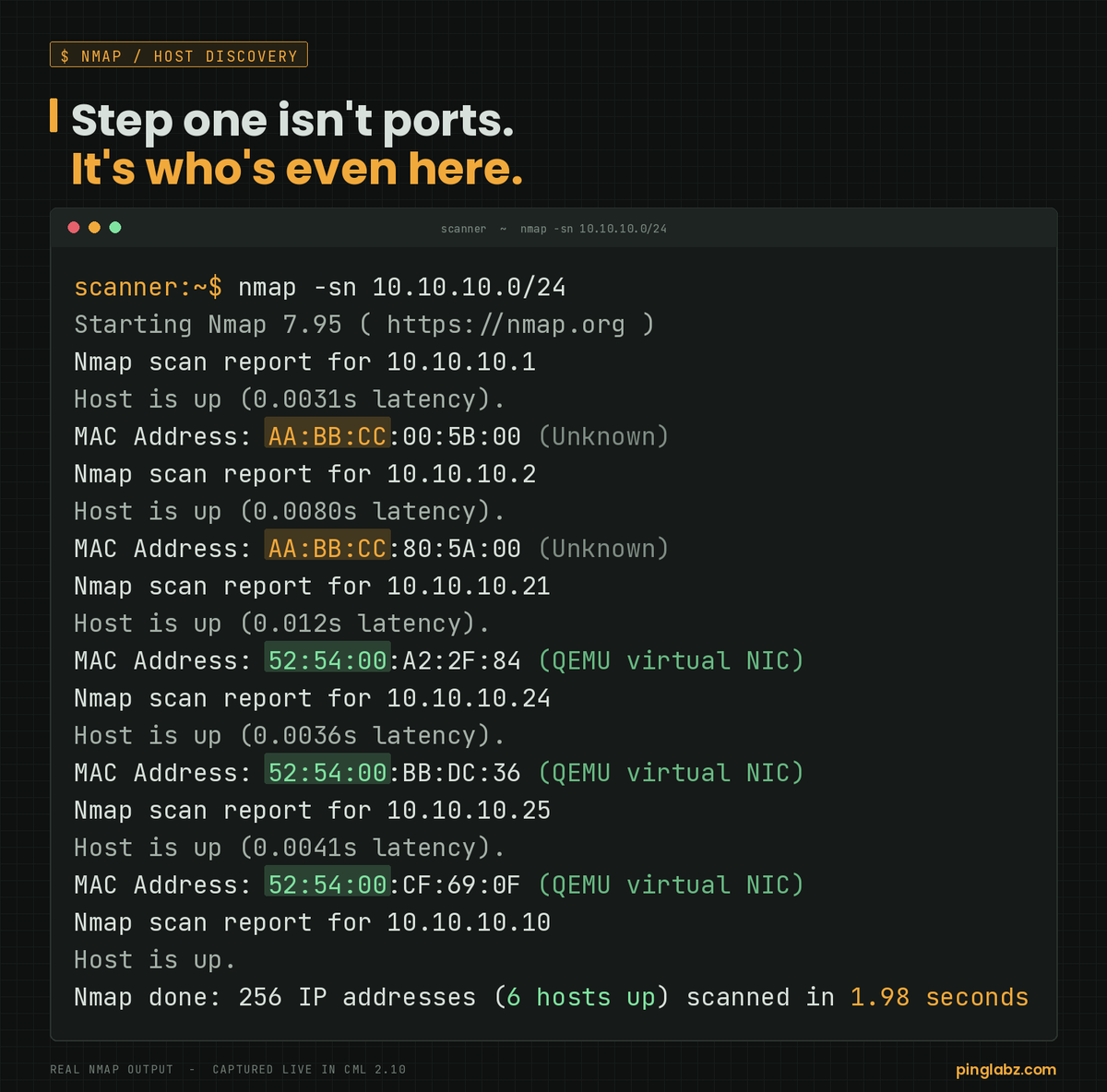
Step one of a scan isn't ports. It's "who's even here."
nmap -sn 10.10.10.0/24
On a local subnet that's an ARP sweep, no TCP at all. 6 live hosts in under 2 seconds.
And the MAC OUI already gives them away: AA:BB:CC is Cisco gear, 52:54:00 is a Linux VM. You're profiling the network before you touch a single port.
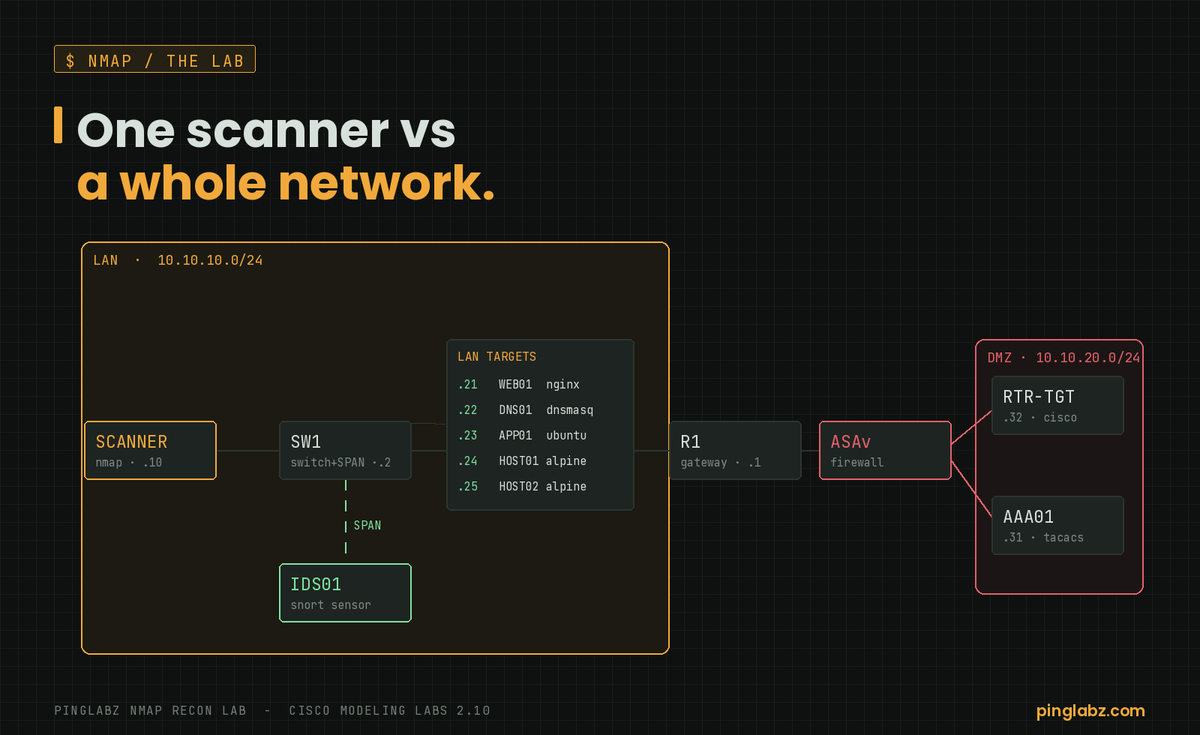
I built an attacker-vs-network lab in Cisco Modeling Labs to learn nmap the right way.
A scanner. A server farm. Real Cisco routers and a switch. An ASA firewall with a DMZ behind it. 13 nodes.
Over this series I scan all of it and post every result. Real output from real gear, nothing faked.
Here's the topology.
B, 62. think of /26 as a street with 64 houses on it. two of them aren't livable, one's the street sign (network address) and one's the mailbox everyone shares (broadcast). so 64 minus 2 leaves 62 you can actually put a device on. the .130 is just telling you which street, doesn't change the house count
@CyberRacheal B, ipsec. network layer is the giveaway. ssh and s/mime both encrypt but they sit up at the application layer, and pop3 is just pulling mail down. ipsec is the one operating on the packet itself
@BowTiedCyber B. ssh. https would encrypt a session too but the cli requirement rules it out, that's a web protocol. telnet and tftp are both cleartext so they're gone
@TutaPrivacy good list. the one people miss is a layer down. you can run all of this and still leak every site you visit in plaintext dns to your isp. encrypted dns or doh is the unglamorous piece that makes the rest of it actually hold
@dkare1009 nice diagram. worth naming what the nat table is actually showing here, three hosts sharing one public ip and staying separate by port. that's PAT, or nat overload on cisco gear. it's why a whole house runs off a single isp address
@Computerlearn_ clean breakdown. drop a third-party sfp in a cisco switch though and it'll reject it until you allow unsupported transceivers. fits fine, switch just won't light it
@ip_cisco@AnjeloAnzo solid sheet. the one thing i'd tell anyone labbing port-security: add switchport port-security mac-address sticky or it learns nothing persistent, and know your violation mode. shutdown err-disables the port and people panic thinking they broke it
"Networking is dying, it's all cloud now."
Cool. Who do you think builds the VPC peering, the transit gateways, and the BGP between your DC and three cloud regions?
The network didn't die. It moved and got harder.
Two commands that explain 90% of "the trunk isn't passing VLANs":
show interfaces trunk
Check "Vlans allowed and active" + "in spanning tree forwarding." A VLAN allowed on the trunk but pruned or STP-blocked won't pass traffic, and this output tells you which.
Prompt-to-config is coming and honestly it's fine.
The skill that just went UP in value: reading a config you didn't write and spotting what's about to break.
AI writes. You verify. The verifier is the one who gets paid, because they're the one who understands what the words actually do.
GRE vs IPsec, and why you usually want both:
GRE: tunnels anything (multicast, routing protocols), zero encryption.
IPsec: encrypts, but won't carry multicast/routing on its own.
So the classic combo is GRE-over-IPsec: GRE carries OSPF/EIGRP, IPsec wraps it in crypto. Two tools, one secure tunnel.
"Default gateway" demystified:
It's the address your device sends a packet to when the destination ISN'T on its own network.
Same subnet? Talk directly. Different subnet? "I don't know the way, gateway, you handle it." The router then figures out the next hop.
No gateway = you can talk to your neighbors and no one else.