Calling all productivity pros! 🤯
Unleash your inner organization guru with @rileybrown_ai's clever trick. 💡And to make it even sweeter, we're giving away a 50% off coupon "HAPPYHOLIDAYS" for 3 months! 🤫
Grab this deal before it vanishes on Dec31st! ✨ #OpenAI + #CakeAI = 🚀
Create a "GPT" Chatbot right now on playground.
I converted a lecture series into a chatbot in about 5 minutes.
You can take any large body of knowledge, and make it into something you can interact with in meaningful ways.
Steps are as follows:
Identify the large body of information: Choose a series of lectures on YouTube or anywhere else that you want to turn into a chatbot.
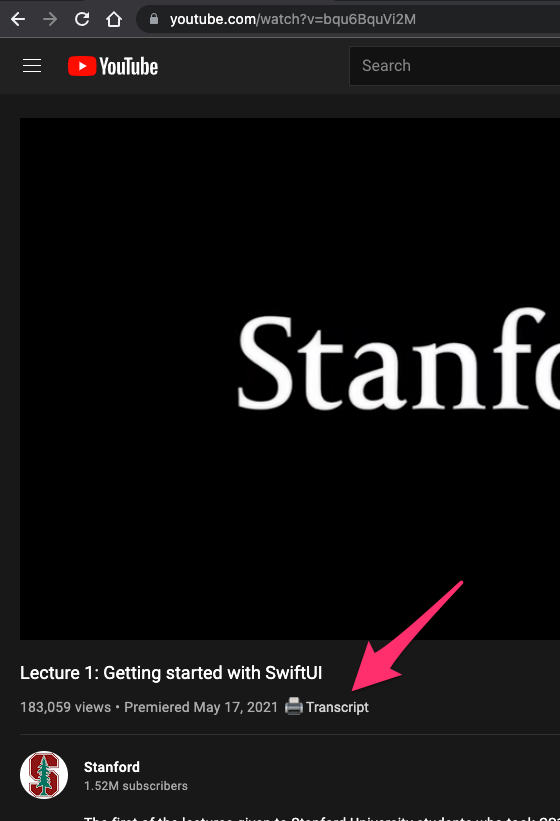
Transcribe the Lectures: Use a transcription tool, such as the 'get YouTube transcript by cake AI' Chrome extension, to obtain the transcripts of the lectures.
Download Transcripts: Click on the transcript button provided by the extension to download the transcripts for each lecture.
Compile Transcripts: Gather the first 20 transcripts, as the current upload limit is set to 20 files.
Upload to Playground: Go to the Assistance tab in the Playground feature and upload the 20 transcripts.
Create Instructions for the Chatbot: Ask the GPT-4 model to write instructions for the chatbot that will be based on the content from the 50 lectures.
Input Instructions into Playground: Enter the generated instructions into the instructions tab in Playground to guide the chatbot's responses.
Interact with the Chatbot: Ask the chatbot questions related to the lectures and refine the instructions as needed to improve the chatbot's performance.
Test and Improve: Test the chatbot by asking various questions related to the lectures and assess its retrieval accuracy. Adjust the instructions accordingly for better performance.
@pcskeptik Hey Patrick! You can use it for 1 transcript a day for free. It shouldn't ask you for subscription then. If you want to use it more than that, you will need to subscribe. It's very cheap compared to anything else out there. Give it a try!
Thanks to Google Registry for the https://t.co/igHoNyhQPm domain. We are live there now and will be bringing more and more automation tools for you in coming weeks! #Automation#googleregistrypartner
@nathanielomoore Hi there! Were you able to get subscribed properly? If it didn't work, could you try reinstalling the extension and recheck?
Thank you!
@its_roggy Hi there! Just to provide an update. We released the latest extension version today which includes the ability to download subtitles in SRT files. Let us know how it works for you.
Update from here and check the settings page to configure SRT downloads. https://t.co/MAfgoI0aLC
@its_roggy Hi there! Thank you for the suggestion. SRT will be a good addition to the current capability. We are working on it right now. Expect to hear from us within the next few weeks.
Thank you for using our extension. Let us know if there are more things we can improve on.
In the celebration of reaching over 1000+ users on our Get YouTube Transcript Extension, we have added the support for subtitles downloads (SRT files) from the videos as well.
Download the extension here: https://t.co/MAfgoI0aLC
@molivaolave Hey Marcelo, thanks for the feedback! We are working towards the ability to add real-time transcript and lyrics detection. We are hoping to launch it in the coming months. Stay tuned!
@Purcell3_a Hey Angela! Sorry about the issues and delay in reaching out. Could you give it a try again? If it doesn't work, please DM the youtube video URL to us so that we can investigate.
Also, thank you for your donation, they are always appreciated!
@lamallettebiz Hi there! You should see the transcript button right under the video name. If you do not see this for a specific video, please let us know via a DM.
A sample screenshot with the transcript button.