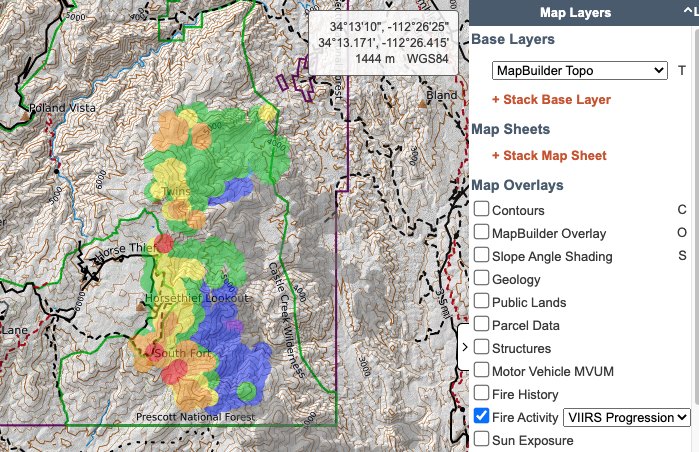
With so many people accessing fire layers and because we are starting to see CalTopo maps in lots of fire briefings and news, we wrote a new training page explaining how all these layers work and what you can, and can't, learn from them.
Check it out at: https://t.co/uj2Bzwyk1T
@jdenoy with a new update to the app we have removed that feature. You can update your device settings to keep the screen from timing out/auto locking.
@satrntgr Is this for track recording? You can instruct them to fill in their call sign when they start recording the track, or have them change their name in their account (web only, not mobile app).
@satrntgr you can find the section in the user guide on importing here: https://t.co/3zCmtPnH4p. Please email us at [email protected] for more information.
@freemalefactor You have to allow third party cookies for the site. We've tried to fix it, but the problem isn't on our end. Email us if you need more info!
Today's 8/3/22 Morning #McKinneyFire and #YetiComplex virtual tour situation and analysis includes:
How to read a wildfire operations map.
Firing tactics.
Incident Command concepts.
Web resources for wildfire intelligence.
https://t.co/QZad0fv94k
@the_real_crusak just checked and it is working as expected. If it is not working for you, please email us with details about the issue you are experiencing at [email protected] and we'd be happy to assist you.
@ai6yrham For ground-searching this presents a lot of challenges. Recommend developing grids/assignments based on contours, navigability, and more. Otherwise makes ground nav difficult and req more phone battery. See https://t.co/rET0WtZOdk for details.
@NoJoeSchmoUKnow@CampVogel As far as what the fire data on it means, we have an extensive write up at https://t.co/uj2Bzwyk1T. Individuals can make their own maps, with relevant data to them, and share it, as @CampVogel has done here.
@ultralightjerk we do have plans to make improvements to snap to in the future although we won't be able to revisit it anytime soon. In the meantime, you can try zooming in and panning the map to reduce the loading/processing time as you draw or measure a line.
@satrntgr we don't have an icon glossary in the user guide or outside the program at this time. It sounds like you are already aware but if you hover over the icon in the app, the name of the icon will appear
@bccarlso currently there is not a way to link to a particular route or map object. If you want to highlight a specific object on a map, you could set other folders to not be visible on page load, effectively hiding the objects in those folders