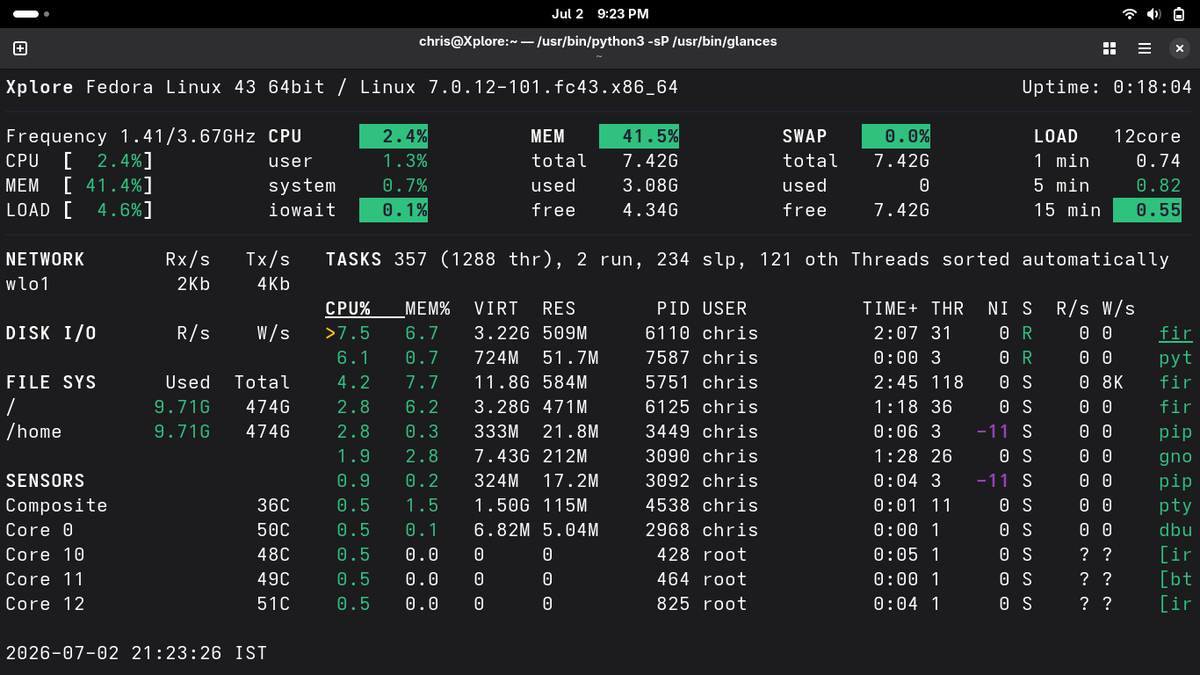
🚨 Most Linux admins still use 5 commands to check server health.
I use 1.
Run: glances
One terminal.
Real-time visibility.
✅ CPU
✅ RAM
✅ Disk I/O
✅ Network
✅ Filesystem
✅ Processes
✅ Load Average
When production goes down, every second matters.
Stop switching between:
top • free • df -h • iostat • vmstat
Use glances instead.
💡 Pro tip: Press f to filter processes instantly.
Follow for Linux tricks they don't teach in certifications. 🐧
#Linux #DevOps #SRE #SysAdmin #Cloud
I wish someone had shown me these Linux terminal shortcuts earlier.
They save a surprising amount of time.
• Ctrl + A → Jump to the beginning of the command.
• Ctrl + E → Jump to the end of the command.
• Ctrl + U → Delete everything before the cursor.
• Ctrl + K → Delete everything after the cursor.
• Ctrl + W → Delete the previous word.
• Ctrl + R → Search your command history.
• Ctrl + L → Clear the terminal.
• Ctrl + C → Stop the current command.
• Ctrl + D → Exit the terminal session.
• Tab → Auto-complete commands, files, and directories.
You don't need to memorize them all today.
Start using just 2–3 of these, and within a week they'll become muscle memory.
What's your favorite terminal shortcut that most people don't know? 👇
#Linux #LinuxTips #Bash #Terminal #DevOps #SRE #SysAdmin #OpenSource #ChrisXplore
👀 Still using top?
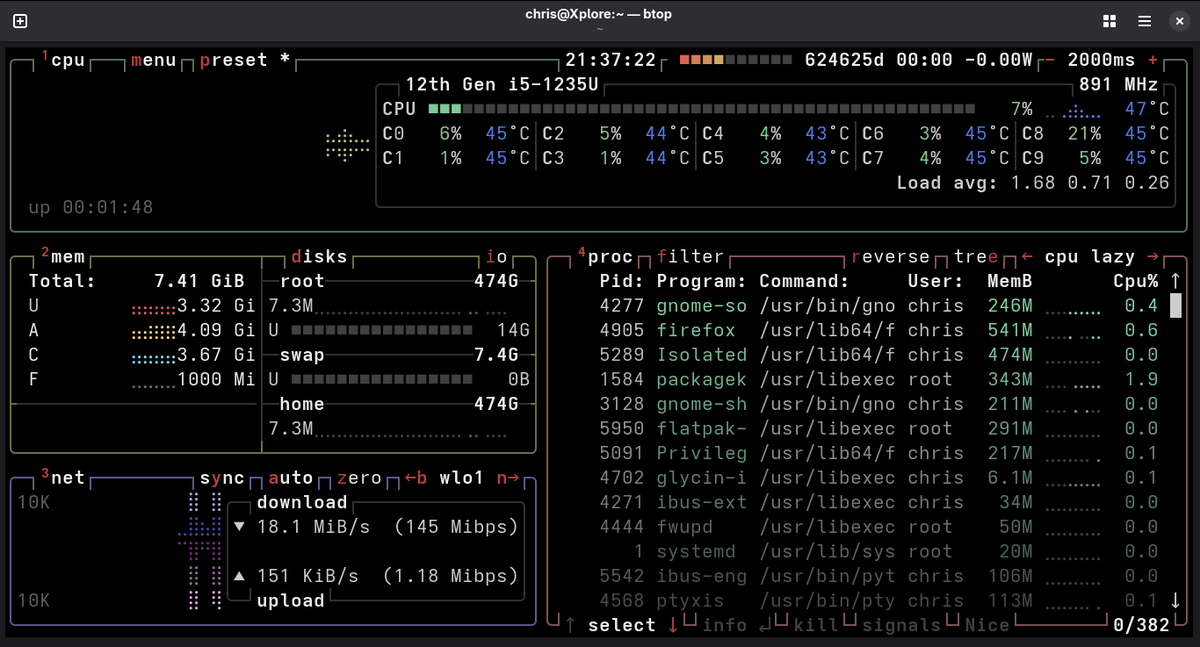
Meet btop — the Linux system monitor that makes terminal monitoring actually enjoyable.
⚡ Why developers and sysadmins love it:
• 📊 Beautiful real-time CPU, RAM, Disk & Network graphs
• 🔥 Live process viewer with sorting & filtering
• 🎯 Mouse support inside the terminal
• ⌨️ Easy keyboard shortcuts
• 🚀 Fast, lightweight, and highly responsive
• 🎨 Clean UI with multiple themes
Install it:
# Ubuntu/Debian
sudo apt install btop
# RHEL/Fedora
sudo dnf install btop
# Arch Linux
sudo pacman -S btop
One command:
btop
After trying btop, it's hard to go back to top.
🐧 What's your favorite terminal tool that more people should know about?
#Linux #LinuxTips #DevOps #SysAdmin #Terminal #OpenSource #Cloud #Programming #100DaysOfLinux #ChrisXplore
🚀 One of my favorite Linux time-saving tricks:
Let's say you accidentally run:
useradd x
❌ Result:
useradd: Permission denied
(or "must be run as root")
Instead of retyping the entire command with sudo:
sudo useradd x
Just run:
sudo !!
✅ !! expands to your previous command, so it becomes:
sudo useradd john
💡 This works for almost any command you forgot to run with sudo.
Small trick.
Big productivity boost.
Follow for more Linux, Shell, and Open Source tips. 🐧⚡
#Linux #LinuxTips #Bash #SysAdmin #DevOps #OpenSource #Terminal #Cloud #100DaysOfLinux #ChrisXplore
🚀 One of my favorite Linux time-saving tricks:
Let's say you accidentally run:
useradd x
❌ Result:
useradd: Permission denied
(or "must be run as root")
Instead of retyping the entire command with sudo:
sudo useradd x
Just run:
sudo !!
✅ !! expands to your previous command, so it becomes:
sudo useradd john
💡 This works for almost any command you forgot to run with sudo.
Small trick.
Big productivity boost.
Follow for more Linux, Shell, and Open Source tips. 🐧⚡
#Linux #LinuxTips #Bash #SysAdmin #DevOps #OpenSource #Terminal #Cloud #100DaysOfLinux #ChrisXplore
🚨 One filesystem feature has saved me from rebuilding servers.
When using LVM:
✅ ext4 → Extend and shrink.
✅ XFS → Extend only. Shrinking isn't supported.
That one difference matters.
Over-allocated a logical volume?
With ext4, you can reclaim the space.
With XFS, you're usually planning a migration instead.
In production, mistakes happen.
Choose a filesystem based not just on today's requirements, but on tomorrow's recovery options.
Which do you deploy more: ext4 or XFS?
Follow me for knowledge that goes beyond certifications and into real production.
Meet,
Greg Kroah-Hartman
• Linux Kernel Maintainer
• Maintainer of the Stable Linux Kernel
• Open Source Contributor
• Core Linux Developer
• Long-time Linux Foundation Fellow
• USB Subsystem Maintainer
• Driver Model Maintainer
• Kernel Security Advocate
• Code Review Expert
• Mentor to Open Source Developers
• Champion of Software Quality
• Maintains Long-Term Support (LTS) Kernels
• Collaborates with Developers Worldwide
• Strong Advocate for Community-Driven Development
• Helping Keep Linux Reliable for Millions
A reminder that consistent contributions can shape the technology the world depends on. 🚀
#Linux #OpenSource #Kernel #LinuxKernel
Think Linux in the Cloud = Think Enterprise Linux.
The majority of production cloud workloads don't run on flashy desktop distros.
They run on battle-tested enterprise distributions like:
🔴 RHEL (Red Hat Enterprise Linux)
🟢 openSUSE / SUSE Linux Enterprise
Why?
✅ Stability
✅ Security
✅ Long-term support
✅ Enterprise-grade reliability
✅ Vendor certifications
If you're aiming for a career in Cloud, DevOps, SRE, or Platform Engineering...
👉 Learn Linux.
👉 Master RHEL.
👉 Get comfortable with the SUSE ecosystem.
Linux isn't just an operating system.
It's the backbone of the cloud. 🚀
#Linux #CloudComputing #RHEL #SUSE #OpenSUSE #DevOps #SRE #PlatformEngineering #CloudEngineer