𝗧𝗿𝗮𝗱𝗶𝘁𝗶𝗼𝗻𝗮𝗹 𝗖𝗼𝗱𝗲 𝗥𝗲𝘃𝗶𝗲𝘄 𝘃𝘀 𝗔𝗴𝗲𝗻𝘁𝗶𝗰 𝗖𝗼𝗱𝗲 𝗥𝗲𝘃𝗶𝗲𝘄.
As coding agents generate more code, the bottleneck is shifting from writing it to reviewing it.
In a 𝘁𝗿𝗮𝗱𝗶𝘁𝗶𝗼𝗻𝗮𝗹 𝘄𝗼𝗿𝗸𝗳𝗹𝗼𝘄, a developer writes code, opens a PR, automated checks run, and a human reviews the changes. Feedback goes back to the developer until the PR is ready to merge.
𝗔𝗴𝗲𝗻𝘁𝗶𝗰 𝗰𝗼𝗱𝗲 𝗿𝗲𝘃𝗶𝗲𝘄 moves that loop earlier and makes more of it autonomous.
A coding agent generates a change → a separate review agent inspects it → findings feed back into another revision → the change is reviewed again.
That can start before a PR is even opened, then continue through CI and the PR workflow.
But reviewing each change is only part of the problem.
As change volume grows, 𝘁𝗲𝗮𝗺𝘀 𝗮𝗹𝘀𝗼 𝗻𝗲𝗲𝗱 𝘁𝗼 𝗱𝗲𝗰𝗶𝗱𝗲 what deserves attention, understand what actually changed, and manage the risk of what ships.
That's the broader idea behind 𝗮𝗴𝗲𝗻𝘁𝗶𝗰 𝗰𝗵𝗮𝗻𝗴𝗲 𝗺𝗮𝗻𝗮𝗴𝗲𝗺𝗲𝗻𝘁.
CodeRabbit extends beyond AI code review with 𝗧𝗿𝗶𝗮𝗴𝗲 to prioritize changes, 𝗖𝗵𝗮𝗻𝗴𝗲 𝗦𝘁𝗮𝗰𝗸 to explain complex changes, and 𝗦𝗲𝗰𝘂𝗿𝗶𝘁𝘆 to find and verify risks across the codebase.
The real shift is from reviewing code line by line to reviewing change as a system.
𝗦𝘁𝗮𝗿𝘁 𝗮 𝗳𝗿𝗲𝗲 𝟭𝟰-𝗱𝗮𝘆 𝘁𝗿𝗶𝗮𝗹, 𝗻𝗼 𝗰𝗿𝗲𝗱𝗶𝘁 𝗰𝗮𝗿𝗱, 𝟮-𝗰𝗹𝗶𝗰𝗸 𝘀𝗲𝘁𝘂𝗽 → https://t.co/4iyuDMh6at
What else would you add?
——
♻️ Repost to help others learn AI.
🙏 Thanks to @coderabbitai for sponsoring this post.
➕ Follow me ( Nikki Siapno ) to improve at AI and system design.
𝗟𝗼𝗴𝘀 𝘃𝘀 𝗠𝗲𝘁𝗿𝗶𝗰𝘀 𝘃𝘀 𝗧𝗿𝗮𝗰𝗲𝘀.
Logs, metrics, and traces can all point to the same problem, but they show you that problem from completely different perspectives.
𝗟𝗼𝗴𝘀 = “𝗪𝗵𝗮𝘁 𝗵𝗮𝗽𝗽𝗲𝗻𝗲𝗱?”
When something happens inside an application, logs capture a timestamped record of the event, from errors and warnings to requests and state changes. That detailed context helps you understand exactly what happened at a particular point in time.
𝗠𝗲𝘁𝗿𝗶𝗰𝘀 = “𝗛𝗼𝘄 𝗶𝘀 𝘁𝗵𝗲 𝘀𝘆𝘀𝘁𝗲𝗺 𝗯𝗲𝗵𝗮𝘃𝗶𝗻𝗴?”
Rather than recording individual events, metrics turn system behavior into numerical measurements over time, such as request rate, error rate, latency, CPU usage, and memory consumption. This makes patterns, trends, and abnormal behavior much easier to spot.
𝗧𝗿𝗮𝗰𝗲𝘀 = “𝗪𝗵𝗮𝘁 𝗽𝗮𝘁𝗵 𝗱𝗶𝗱 𝘁𝗵𝗲 𝗿𝗲𝗾𝘂𝗲𝘀𝘁 𝘁𝗮𝗸𝗲?”
Across a distributed system, a single operation can pass through many services. Traces connect spans from each step into an end-to-end journey, showing where time was spent, which services were involved, and where errors or latency appeared.
But during an incident, seeing the signals is only part of the problem.
The hard part is connecting them with deploys, commits, dependencies, and past incidents 𝘁𝗼 𝗳𝗶𝗴𝘂𝗿𝗲 𝗼𝘂𝘁 𝘄𝗵𝗮𝘁 𝗮𝗰𝘁𝘂𝗮𝗹𝗹𝘆 𝗯𝗿𝗼𝗸𝗲 𝗮𝗻𝗱 𝘄𝗵𝘆.
That’s where agentic root cause analysis can help. Investigations by @incident_io starts working the moment an incident is declared, reasoning across that context to build a hypothesis backed by evidence and identify where to look next.
𝗜𝗻𝘀𝘁𝗲𝗮𝗱 𝗼𝗳 𝘀𝘁𝗮𝗿𝘁𝗶𝗻𝗴 𝗳𝗿𝗼𝗺 𝘀𝗰𝗿𝗮𝘁𝗰𝗵 and digging for answers, 𝘆𝗼𝘂 𝗮𝗿𝗿𝗶𝘃𝗲 𝘄𝗶𝘁𝗵 𝗮 𝘄𝗼𝗿𝗸𝗶𝗻𝗴 𝘁𝗵𝗲𝗼𝗿𝘆.
Check it out → https://t.co/45CkvWsPva
What else would you add?
——
♻️ Repost to help others learn and grow.
🙏 Thanks to incident .io for sponsoring this post.
➕ Follow me ( Nikki Siapno ) to improve at AI and system design.
𝗣𝗼𝘀𝘁𝗴𝗿𝗲𝘀 𝘃𝘀 𝗠𝗼𝗻𝗴𝗼𝗗𝗕 𝘃𝘀 𝗖𝗮𝘀𝘀𝗮𝗻𝗱𝗿𝗮.
Choosing the right database isn’t about the tool. It’s ultimately about the workload.
AWS Next Gen Stats is a great real-world example.
As Next Gen Stats evolved, it ended up using all three for different workloads. MongoDB for flexible data models and derived stats, Cassandra for predictable query latency at scale, and Postgres for analytics.
This is polyglot persistence; using different databases for different workloads instead of asking one system to do everything.
On Friday, I was in Melbourne for the NFL International Games with AWS to get a firsthand look at the engineering behind Next Gen Stats.
Next Gen Stats turns player and ball tracking data from every play into real-time statistics and insights. Behind that are some fascinating real-time data and machine learning problems.
But AWS’s database design is just one part of the architecture. Over the next three weeks, I’ll be sharing a full system design case study and video breaking down how the system works.
Learn more here → https://t.co/iXhGANzSDw
What else would you add?
——
♻️ Repost to help others learn databases.
🙏 Thanks to @awscloud for partnering with us to unpack the engineering behind Next Gen Stats, and for sponsoring this post.
➕ Follow me ( Nikki Siapno ) to improve at AI and system design.
How OAuth 2.0 works
(clearly explained in under 2 mins):
OAuth can be thought of as a digital handshake between the app, service, and user, with everyone agreeing on what is shared.
It's an authorization framework that enables applications to access a user’s data on another service (like Facebook or GitHub) 𝘄𝗶𝘁𝗵𝗼𝘂𝘁 𝘀𝗵𝗮𝗿𝗶𝗻𝗴 𝘁𝗵𝗲 𝘂𝘀𝗲𝗿’𝘀 𝗽𝗮𝘀𝘀𝘄𝗼𝗿𝗱.
How it works:
𝗧𝗵𝗲 𝗽𝗿𝗼𝗰𝗲𝘀𝘀 𝗴𝗲𝗻𝗲𝗿𝗮𝗹𝗹𝘆 𝗳𝗼𝗹𝗹𝗼𝘄𝘀 𝟲 𝘀𝘁𝗲𝗽𝘀 𝘄𝗶𝘁𝗵 𝟰 𝗰𝗼𝗺𝗽𝗼𝗻𝗲𝗻𝘁𝘀 𝘁𝘆𝗽𝗶𝗰𝗮𝗹𝗹𝘆 𝗶𝗻𝘃𝗼𝗹𝘃𝗲𝗱:
• Client (app wanting access)
• Resource owner (user)
• Authorization server
• Resource server
𝗧𝗼 𝘂𝗻𝗱𝗲𝗿𝘀𝘁𝗮𝗻𝗱 𝘁𝗵𝗲 𝗽𝗿𝗼𝗰𝗲𝘀𝘀, 𝗹𝗲𝘁’𝘀 𝘁𝗮𝗸𝗲 𝗮 𝗹𝗼𝗼𝗸 𝗮𝘁 𝗵𝗼𝘄 𝗮 𝗴𝗮𝗺𝗲 𝘄𝗼𝘂𝗹𝗱 𝗰𝗼𝗻𝗻𝗲𝗰𝘁 𝘁𝗼 𝗮 𝗽𝗹𝗮𝘆𝗲𝗿’𝘀 𝗙𝗮𝗰𝗲𝗯𝗼𝗼𝗸 𝗮𝗰𝗰𝗼𝘂𝗻𝘁.
𝟭) 𝗥𝗲𝗾𝘂𝗲𝘀𝘁 𝗮𝗰𝗰𝗲𝘀𝘀
Within the game (client), the player (user) clicks on a “connect with Facebook” button to link their profile and find friends.
𝟮) 𝗥𝗲𝗱𝗶𝗿𝗲𝗰𝘁 𝘁𝗼 𝘀𝗲𝗿𝘃𝗶𝗰𝗲
The game redirects the player to Facebook’s (service’s) login page.
𝟯) 𝗣𝗲𝗿𝗺𝗶𝘀𝘀𝗶𝗼𝗻 𝗿𝗲𝗾𝘂𝗲𝘀𝘁
After logging in, the data that the game is requesting access to will be shown to the player which they can either allow or deny.
𝟰) 𝗔𝘂𝘁𝗵𝗼𝗿𝗶𝘇𝗮𝘁𝗶𝗼𝗻 𝗰𝗼𝗱𝗲
If the player gives their approval, Facebook redirects the player back to the game with an authorization code (from authorization server). The code is a temporary credential that proves the player’s consent.
𝟱) 𝗘𝘅𝗰𝗵𝗮𝗻𝗴𝗲 𝗰𝗼𝗱𝗲 𝗳𝗼𝗿 𝘁𝗼𝗸𝗲𝗻
The game now sends the authorization code along with its own identification to Facebook’s server in the background. Facebook identifies the authorization code and the game’s identity and returns an access token.
𝟲) 𝗨𝘀𝗲 𝘁𝗵𝗲 𝘁𝗼𝗸𝗲𝗻
The game can now use the access token to request the agreed-upon data from Facebook (from the resource server), like the player's friends list.
In this process, the player’s Facebook credentials were never shared, but the game was able to access the agreed-upon player data from Facebook. This is what OAuth 2.0 facilitates; allowing third-party applications to access data from services in a secure manner without sharing credentials.
What else would you add?
♻️ Repost to help others learn system design.
➕ Follow me ( Nikki Siapno ) + turn on notifications.
How RAG actually works
(clearly explained in under 2 mins):
RAG (Retrieval-Augmented Generation) is a system that retrieves relevant data and feeds it into an LLM before generating a response.
It lets models answer questions using external knowledge, not just what they were trained on.
If you’re building with these patterns, here's a great guide on scaling multi-agent RAG systems: https://t.co/HcR012BLn4
Here’s a simple mental model to understand it:
𝟭) 𝗗𝗮𝘁𝗮 𝗶𝘀 𝗶𝗻𝗴𝗲𝘀𝘁𝗲𝗱
↳ Documents (PDFs, docs, APIs) are collected and split into chunks
↳ Each chunk is cleaned and formatted ready for embedding
𝟮) 𝗘𝗺𝗯𝗲𝗱𝗱𝗶𝗻𝗴𝘀 𝗮𝗿𝗲 𝗰𝗿𝗲𝗮𝘁𝗲𝗱
↳ Each chunk is converted into a vector representation
↳ Similar meaning → closer vectors
𝟯) 𝗗𝗮𝘁𝗮 𝗶𝘀 𝘀𝘁𝗼𝗿𝗲𝗱
↳ Vectors are stored in a vector database
↳ Enables fast similarity search across large datasets
𝟰) 𝗥𝗲𝗹𝗲𝘃𝗮𝗻𝘁 𝗰𝗼𝗻𝘁𝗲𝘅𝘁 𝗶𝘀 𝗿𝗲𝘁𝗿𝗶𝗲𝘃𝗲𝗱
↳ The user's query is converted into an embedding (vector representation)
↳ The system compares it against stored vectors and retrieves the most relevant chunks
𝟱) 𝗧𝗵𝗲 𝗟𝗟𝗠 𝗴𝗲𝗻𝗲𝗿𝗮𝘁𝗲𝘀 𝘁𝗵𝗲 𝗮𝗻𝘀𝘄𝗲𝗿
↳ The query + retrieved context are combined into a prompt
↳ The model generates a grounded response
That's the foundation of RAG. There are several types of RAG, each designed for different use cases and levels of complexity.
If you’re curious what this actually looks like in practice (beyond diagrams), this repo is a great place to start: https://t.co/mZBm95CPtY
It has:
↳ E2E implementations of RAG, AI applications, agents, and systems
↳ Resources covering AI agent architecture, reasoning strategies, and memory systems.
↳ Hands-on workshops and guided learning
Start it to keep it bookmarked. This repo will keep growing, and you'll want it on hand as you build.
What else would you add?
——
♻️ Repost to help others learn AI engineering.
🙏 Thanks to @Oracle for sponsoring this post.
➕ Follow me ( Nikki Siapno ) to improve at AI engineering.
30 resources to learn system design:
1. JWT: https://t.co/Kuv7DAj6B9
2. gRPC: https://t.co/QwgTXr1N9z
3. Microservices: https://t.co/1CpY04nNxb
4. ACID vs BASE: https://t.co/a7nOyylUxk
5. Rate limiting: https://t.co/wr0UAh4sJm
6. Event-driven architecture: https://t.co/QNUuf1JOy7
PS - if you want a structured path, get our FREE 142-page System Design Handbook when you join our free weekly newsletter → https://t.co/LybPLdor9s
7. System design quality attributes: https://t.co/v9WJoUPevt
8. Idempotency: https://t.co/2sItwlz1oe
9. Network protocols: https://t.co/tx7MlZQIwE
10. Observability: https://t.co/VjfECfyB9d
11. Change Data Capture (CDC): https://t.co/tgwwoTitCA
12. CI/CD pipelines: https://t.co/SM2YvhioIX
13. Database types: https://t.co/T0tUF1xYPI
14. CAP theorem: https://t.co/ONwpduTOD1
15. Health checks vs heartbeats: https://t.co/r5SalP6CCh
16. API gateway vs load balancer vs reverse proxy: https://t.co/Tg3EhT60tU
17. HTTPS: https://t.co/wc3CQOsmPS
18. Load balancing algorithms: https://t.co/VCLCKOZzni
19. Database caching: https://t.co/23QdZATj2o
21. API protocols: https://t.co/2CEu4Wnhsv
21. CDN: https://t.co/MbaSzBnZPQ
22. Database types: https://t.co/T0tUF1xYPI
23. Message Queues: https://t.co/7Tz5sevNA8
24. Password storage & hashing: https://t.co/RMZpv3ACRz
25. Service Discovery: https://t.co/rcKkXkWWcX
26. Pub/Sub: https://t.co/HF0Zr5R4SK
27. Connection pooling: https://t.co/39SsEo4kk3
28. Forward proxy vs reverse proxy: https://t.co/0P6NM8kh8u
29. Consistent hashing: https://t.co/8d8o74EsaS
30. SQL vs NoSQL:https://t.co/oDTRpsnQUn
What else should be on the list?
What concepts would you like me to cover?
——
👋 PS: Get our FREE 142-page System Design Handbook when you join our free weekly newsletter.
Join 31,000+ engineers → https://t.co/F7xn98xjNK
——
♻️ Repost to help others learn system design.
➕ Follow me ( Nikki Siapno ) to become good at system design.
AI Feature vs AI-Native Platform: they're NOT the same.
If you’re unclear, read this:
Old model: AI informs you. Work happens outside the product.
New model: AI works with you inside the platform.
Here's a simple breakdown (save this):
𝗖𝗵𝗮𝘁𝗯𝗼𝘁 𝗹𝗮𝘆𝗲𝗿 (𝗼𝗹𝗱 𝗳𝗲𝗮𝘁𝘂𝗿𝗲 𝗺𝗼𝗱𝗲𝗹)
↳ AI gives suggestions
↳ You interpret them
↳ You execute everything manually
↳ The software 𝗶𝗻𝗳𝗼𝗿𝗺𝘀 you. You do the work.
𝗘𝘅𝗲𝗰𝘂𝘁𝗶𝗼𝗻 𝗹𝗮𝘆𝗲𝗿 (𝗔𝗜-𝗻𝗮𝘁𝗶𝘃𝗲 𝗽𝗹𝗮𝘁𝗳𝗼𝗿𝗺)
↳ You describe the outcome
↳ The platform turns intent → actions
↳ It pulls context from your data + history
↳ It runs analysis, drafts changes, queues tasks
↳ You review, refine, approve
↳ The software 𝘄𝗼𝗿𝗸𝘀 𝘄𝗶𝘁𝗵 𝘆𝗼𝘂
Take @Shopify Sidekick for example:
It’s not just a chatbot sitting on top of Shopify.
It’s embedded directly into the product layer.
Meaning it can take action inside Shopify itself, using your store’s context, permissions, and history, rather than generating suggestions you have to implement yourself.
𝗦𝗼 𝘄𝗵𝗮𝘁 𝘀𝗲𝗽𝗮𝗿𝗮𝘁𝗲𝘀 𝗮 𝗿𝗲𝗮𝗹 𝗽𝗹𝗮𝘁𝗳𝗼𝗿𝗺 𝘀𝗵𝗶𝗳𝘁 𝗳𝗿𝗼𝗺 𝗮 𝗳𝗲𝗮𝘁𝘂𝗿𝗲 𝗰𝗵𝗲𝗰𝗸𝗹𝗶𝘀𝘁?
Not “who has AI.”
But who can do these 4 things reliably:
1. Context → deep understanding of your business + current state
2. Trust → scoped permissions, previews, audit logs, rollback
3. Execution → multi-step tasks inside the real workflow (no context switching)
4. Memory → learns from outcomes, not just prompts
For example Sidekick can:
↳ Complete multi-step tasks like updating product collections, adjusting discounts, or configuring settings, without pulling you into separate dashboards.
↳ Turn plain English into a working custom app, generating the underlying code so merchants can build tools without coding.
↳ Generate analytics reports from natural-language questions, pulling directly from Shopify Analytics.
↳ Proactively surface weekly opportunities based on store performance, not just react when asked.
↳ Edit product images directly in the Shopify app; removing backgrounds, adjusting visuals, and publishing changes in place.
That’s not AI as an add-on.
That’s AI as an execution layer.
We’re moving toward 𝗱𝗲𝗰𝗶𝘀𝗶𝗼𝗻 𝗢𝗦 𝗽𝗹𝗮𝘁𝗳𝗼𝗿𝗺𝘀:
Intent → plan → action → feedback → memory (with guardrails).
If you’re building software, the question isn’t “Where do we add AI?”
It’s: What should this product safely do on the user’s behalf?
What else would you add?
→ https://t.co/V8PhF6U3wu
--
📌 Save for later.
♻️ Repost to help other engineers learn and grow.
🙏 Thanks to Shopify for sponsoring this post.
➕ Follow Nikki Siapno + turn on notifications.
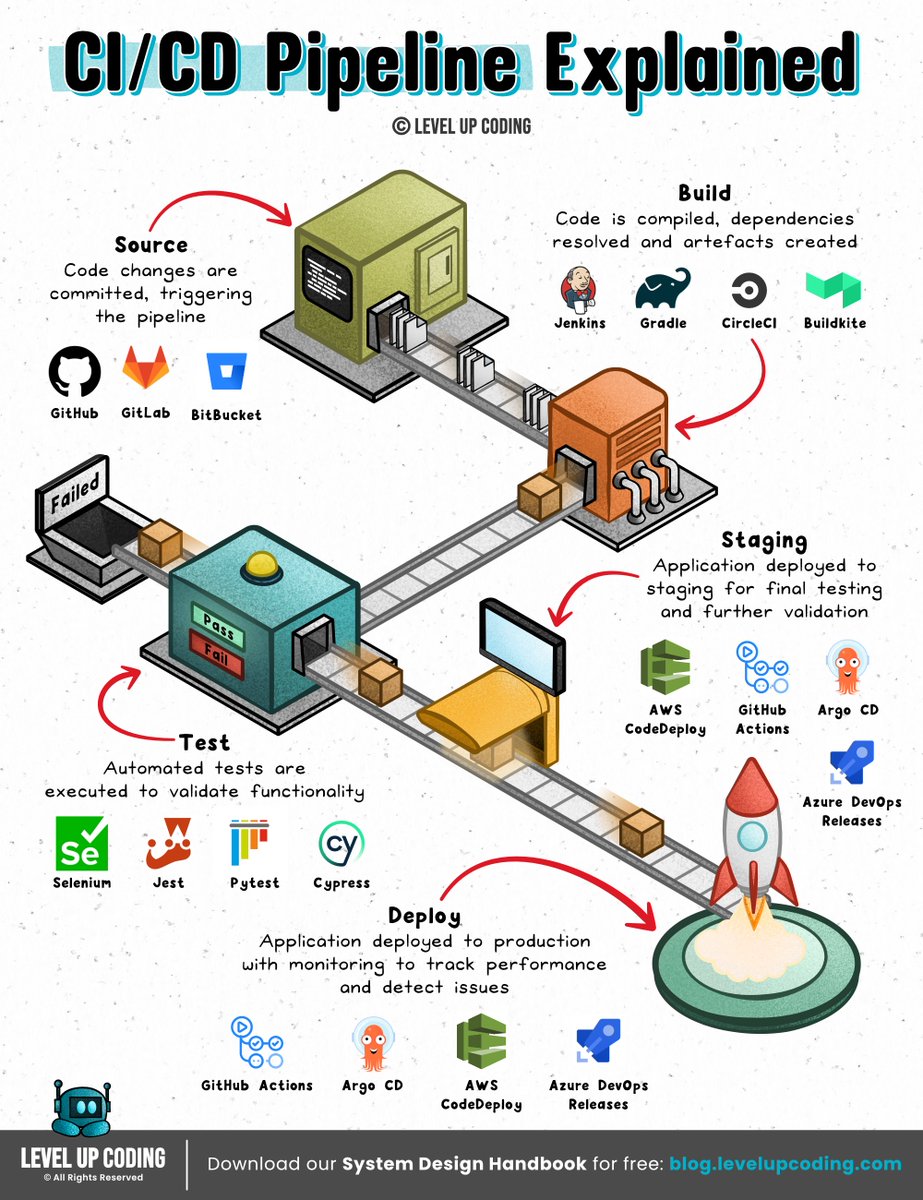
How CI/CD pipelines work
(explained in 2 mins or less):
A CI/CD pipeline is an automated workflow that facilitates continuous integration (CI) and continuous delivery or deployment (CD) by managing code building, testing, and release processes.
It integrates the various stages of the software development lifecycle (SDLC) into a seamless, repeatable process.
These stages include source code management, automated testing, artifact creation, and deployment orchestration.
Continuous ‘delivery’ and ‘deployment’ are sometimes used synonymously.
But there is a clear and important distinction between the two.
Delivery is about ensuring the software can be released at any time.
It requires manual intervention to deploy to production.
Deployment, on the other hand, does the release through automated workflows.
Learn more here: https://t.co/pPPVI1DEfC
What else would you add?
--
👋 PS: Get our System Design Handbook FREE when you join our newsletter. Join 30,001+ engineers: https://t.co/8uVCeyVa1w
--
📌 Save for later.
♻️ Repost to help other engineers learn CI/CD.
➕ Follow Nikki Siapno + turn on notifications.
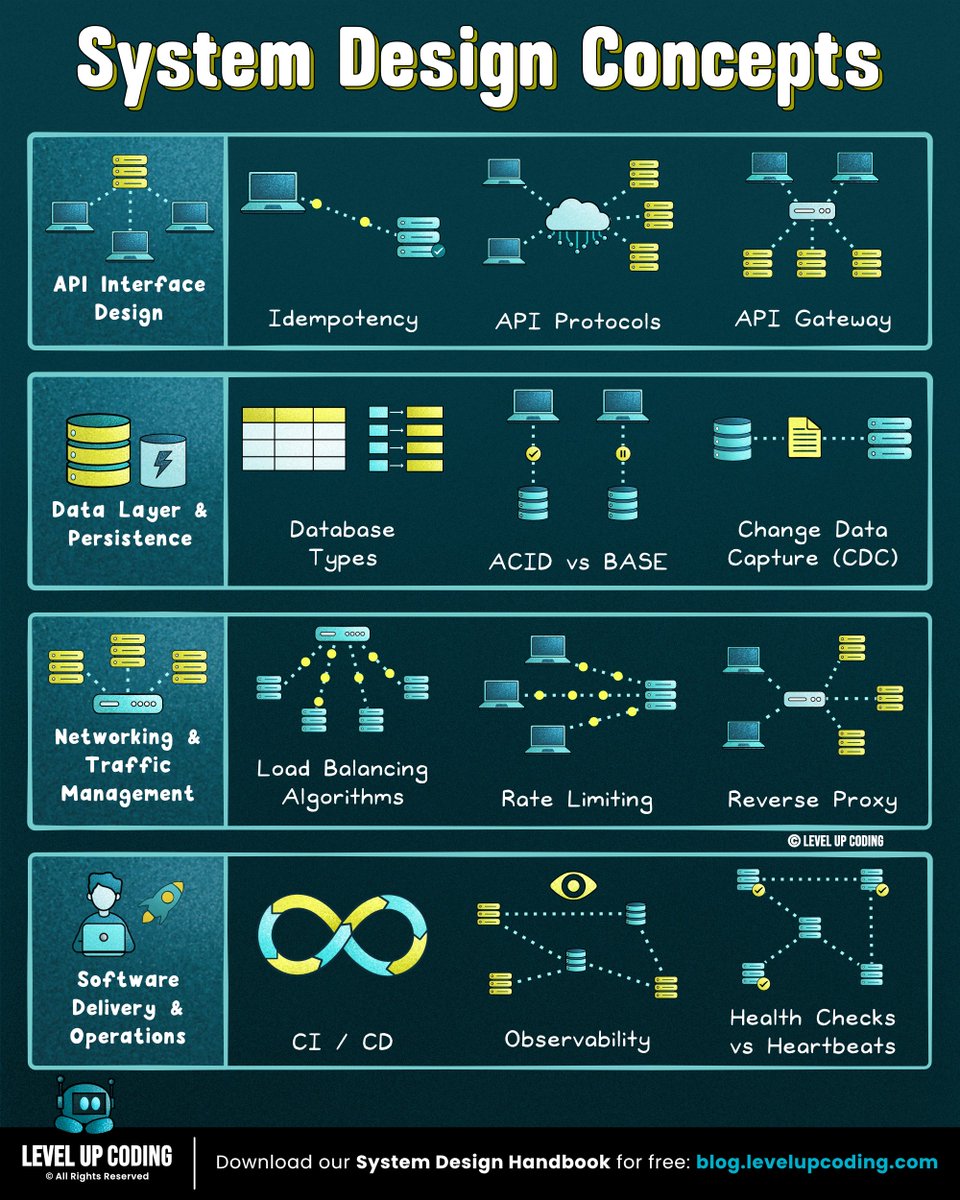
If you're serious about starting with system design, learn these 19 concepts (save this now):
1 System Design Concepts
↳ https://t.co/Jqfyh7YfZn
2 How to Crack the System Design Interview
↳ https://t.co/kVEggLp9C2
3 Computer Science Stack Simply Explained
↳ https://t.co/qfZnlyCSN5
4 High Availability - A Deep Dive
↳ https://t.co/ccG16ukgej
5 Modular Monolith Architecture
↳ https://t.co/VVV6v3KGHJ
6 How RPC Works
↳ https://t.co/yeIgcmAxQx
7 How JWT Works
↳ https://t.co/SZXXrlBsWH
8 How Does HTTPS Work
↳ https://t.co/r5rUtVpw0O
9 How Bloom Filters Work
↳ https://t.co/ntZXq7LxVn
10 How Consistent Hashing Works
↳ https://t.co/7d6EipPcKF
11 How Service Discovery Works
↳ https://t.co/BcL3tgxx1u
12 API Versioning - A Deep Dive
↳ https://t.co/OHAtKSUgVN
13 Deployment Patterns
↳ https://t.co/YC7sphP77c
14 How Idempotent API Works
↳ https://t.co/afe7ACuSYE
15 Saga Design Pattern
↳ https://t.co/2CffTodOHL
16 How Databases Keep Passwords Securely
↳ https://t.co/KSfIhpAT2j
17 How DNS Works
↳ https://t.co/H7hcZnws8N
18 How Websockets Work
↳ https://t.co/JfT6mj4mrv
19 Distributed Systems 101
↳ https://t.co/yi0K5K5RIE
(What else should make this list?)
——
👋 PS - Want my System Design Playbook for FREE?
Click the link below to join my newsletter right now:
→ https://t.co/ByOFTtOihX
(200K+ software engineers have already signed up.)
———
💾 Save this for later & RT to help other software engineers ace system design.
👤 Follow @systemdesingone + turn on notifications.
12 System design concepts engineers should know:
1. Load balancing algorithms explained
↳ https://t.co/VCLCKOZzni
2. gRPC clearly explained
↳ https://t.co/QwgTXr1N9z
3. How HTTPS actually works
↳ https://t.co/wc3CQOsmPS
4. Database caching strategies
↳ https://t.co/23QdZATj2o
5. System design quality attributes
↳ https://t.co/v9WJoUPevt
6. Health checks vs heartbeats
↳ https://t.co/r5SalP6CCh
7. CI/CD pipelines
↳ https://t.co/SM2YvhioIX
8. API gateway vs load balancer vs reverse proxy
↳ https://t.co/Tg3EhT60tU
9. Microservices clearly explained
↳ https://t.co/1CpY04nNxb
10. How JWT works
↳ https://t.co/Kuv7DAj6B9
11. Idempotency in API design
↳ https://t.co/2sItwlz1oe
12. API protocols made simple
↳ https://t.co/2CEu4Wnhsv
What else should make the list?
What concepts would you like me to cover?
👋 PS: Get our System Design Handbook FREE when you join our newsletter. Join 30,001+ engineers: https://t.co/8uVCeyVa1w
--
📌 Save for later.
♻️ Repost to help other engineers learn system design.
➕ Follow Nikki Siapno + turn on notifications.
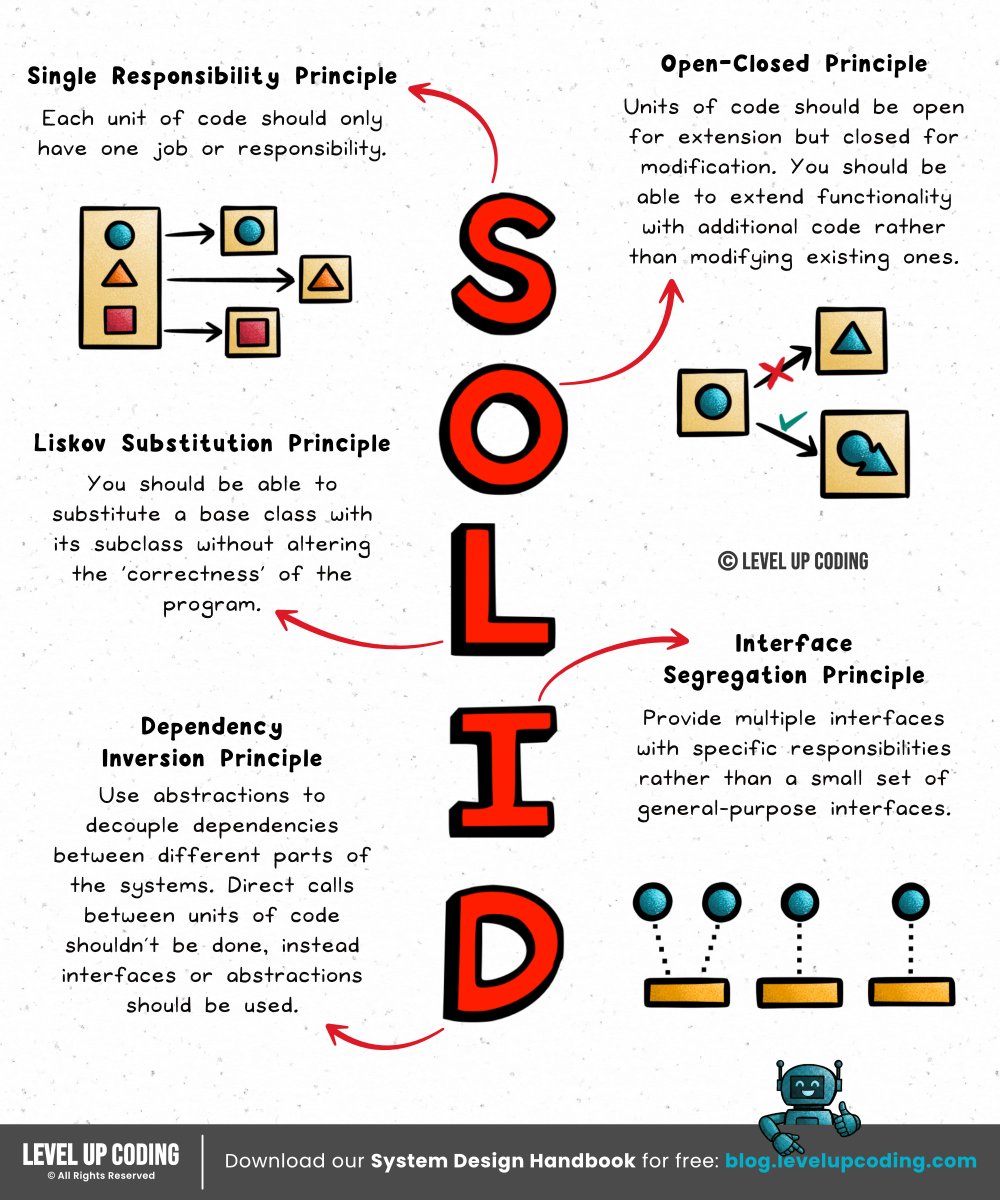
Things every developer should know: SOLID principles.
SOLID is about designing for change. Separating responsibilities and managing dependencies so your codebase doesn’t become brittle over time.
𝗦 - Single Responsibility Principle
𝗢 - Open/Closed Principle
𝗟 - Liskov Substitution Principle
𝗜 - Interface Segregation Principle
𝗗 - Dependency Inversion Principle
Let’s break down each principle ↓
𝟭. 𝗦𝗶𝗻𝗴𝗹𝗲 𝗥𝗲𝘀𝗽𝗼𝗻𝘀𝗶𝗯𝗶𝗹𝗶𝘁𝘆 𝗣𝗿𝗶𝗻𝗰𝗶𝗽𝗹𝗲 (𝗦𝗥𝗣)
Each unit of code should only have one job or responsibility. A unit can be a class, module, function, or component. This keeps code modular and removes the risk of tight coupling.
𝟮. 𝗢𝗽𝗲𝗻-𝗖𝗹𝗼𝘀𝗲𝗱 𝗣𝗿𝗶𝗻𝗰𝗶𝗽𝗹𝗲 (𝗢𝗖𝗣)
Units of code should be open for extension but closed for modification. You should be able to extend functionality with additional code rather than modifying existing ones. This principle can be applied to component-based systems such as a React frontend.
𝟯. 𝗟𝗶𝘀𝗸𝗼𝘃 𝗦𝘂𝗯𝘀𝘁𝗶𝘁𝘂𝘁𝗶𝗼𝗻 𝗣𝗿𝗶𝗻𝗰𝗶𝗽𝗹𝗲 (𝗟𝗦𝗣)
You should be able to substitute objects of a base class with objects of its subclass without altering the ‘correctness’ of the program.
An example of this is with a Bird base class. You might assume that it should have a ‘fly’ method. But what about the birds that can’t fly? Like a Penguin. In this example, having a ‘fly’ method in the Bird class would violate LSP.
𝟰. 𝗜𝗻𝘁𝗲𝗿𝗳𝗮𝗰𝗲 𝗦𝗲𝗴𝗿𝗲𝗴𝗮𝘁𝗶𝗼𝗻 𝗣𝗿𝗶𝗻𝗰𝗶𝗽𝗹𝗲 (𝗜𝗦𝗣)
Provide multiple interfaces with specific responsibilities rather than a small set of general-purpose interfaces. Clients shouldn’t need to know about the methods & properties that don't relate to their use case.
Complexity ↓
Code flexibility ↑
𝟱. 𝗗𝗲𝗽𝗲𝗻𝗱𝗲𝗻𝗰𝘆 𝗜𝗻𝘃𝗲𝗿𝘀𝗶𝗼𝗻 𝗣𝗿𝗶𝗻𝗰𝗶𝗽𝗹𝗲 (𝗗𝗜𝗣)
High-level modules shouldn’t depend on low-level modules. Both should depend on abstractions. Abstractions shouldn’t depend on details. Details should depend on abstractions.
Across these principles, you’ll often see the same pattern emerge: composition over inheritance.
What else would you add?
--
👋 PS: Get our System Design Handbook FREE when you join our newsletter. Join 30,001+ engineers: https://t.co/8uVCeyVa1w
--
📌 Save for later.
♻️ Repost to help others learn and grow.
➕ Follow Nikki Siapno + turn on notifications.
Kafka is often described as a message queue.
It’s not...
Kafka is a distributed commit log that lets you replay, scale, and process data streams in parallel.
That difference matters.
Here’s the mental model:
↳ Producers write events to a 𝘁𝗼𝗽𝗶𝗰
↳ Topics are split into 𝗽𝗮𝗿𝘁𝗶𝘁𝗶𝗼𝗻𝘀
↳ 𝗕𝗿𝗼𝗸𝗲𝗿𝘀 replicate partitions for durability
↳ 𝗖𝗼𝗻𝘀𝘂𝗺𝗲𝗿𝘀 read at their own pace using 𝗼𝗳𝗳𝘀𝗲𝘁𝘀
The key idea:
Kafka doesn’t just move messages, it 𝗽𝗲𝗿𝘀𝗶𝘀𝘁𝘀 𝗼𝗿𝗱𝗲𝗿𝗲𝗱 𝗲𝘃𝗲𝗻𝘁 𝘀𝘁𝗿𝗲𝗮𝗺𝘀.
That’s why it works for:
→ Event-driven systems
→ Real-time analytics
→ Log aggregation
→ Data lake ingestion
Here’s a simple decision rule:
If you need:
• Replayable history
• Horizontal scalability
• Parallel consumption
• Durable event storage
➟ Kafka fits.
If you just need:
• Simple async jobs
• Low operational overhead
• Basic task queues
➟ It’s probably overkill.
Kafka is powerful.
But it earns its complexity.
What else would you add?
--
Thanks to Sonar for keeping our content free.
They’re bringing 𝘄𝗲𝗹𝗹-𝗸𝗻𝗼𝘄𝗻 𝗲𝗻𝗴𝗶𝗻𝗲𝗲𝗿𝗶𝗻𝗴 𝗹𝗲𝗮𝗱𝗲𝗿𝘀 together to discuss building better software in the AI era.
𝗜𝗳 𝘆𝗼𝘂 𝘄𝗮𝗻𝘁 𝘁𝗼 𝘀𝘁𝗮𝘆 𝘀𝗵𝗮𝗿𝗽 in the current landscape, 𝘄𝗮𝘁𝗰𝗵 the 𝘃𝗶𝗿𝘁𝘂𝗮𝗹 event here (𝗳𝗼𝗿 𝗳𝗿𝗲𝗲): https://t.co/L3D4BEIqLd
--
📌 Save for later.
♻️ Repost to help others learn Kafka.
➕ Follow Nikki Siapno + turn on notifications.
If you want to become good at system design,
learn these 12 concepts:
1. Load balancing algorithms explained
↳ https://t.co/VCLCKOZzni
2. gRPC clearly explained
↳ https://t.co/QwgTXr1N9z
3. How HTTPS actually works
↳ ↳ https://t.co/wc3CQOsmPS
4. Database caching strategies
↳ https://t.co/23QdZATj2o
5. System design quality attributes
↳ https://t.co/v9WJoUPevt
6. Health checks vs heartbeats
↳ https://t.co/r5SalP6CCh
7. CI/CD pipelines
↳ https://t.co/SM2YvhioIX
8. API gateway vs load balancer vs reverse proxy
↳ https://t.co/Tg3EhT60tU
9. Microservices clearly explained
↳ https://t.co/1CpY04nNxb
10. How JWT works
↳ https://t.co/Kuv7DAj6B9
11. Idempotency in API design
↳ https://t.co/2sItwlz1oe
12. API protocols made simple
↳ https://t.co/2CEu4Wnhsv
👋 PS: Get our System Design Handbook FREE when you join our newsletter. Join 28,501+ engineers: https://t.co/1YxuvrLqeh
--
🔖 Save for later.
♻️ Repost to help other engineers learn and grow.
➕ Follow Nikki Siapno + turn on notifications.