Web Search Agents by Nimble is launching today on Product Hunt.
Worth checking out if you spend a lot of time researching online.
Support here: https://t.co/ioElTbx6gQ
#ProductHunt#AI#WebResearch#AITools#SaaS
I have spent way too much time doing web research.
Open 10 tabs.
Check a few sources.
Copy the useful information.
Cross-check it.
Then realize you need to do the same thing again tomorrow.
That is what caught my attention about Web Search Agents by Nimble.
What I like most is that the agent gets better with experience.
If it found a good way to solve something before, it can remember that and use it again.
It feels less like asking AI a question and more like having someone handle the research for you.
𝗥𝘂𝗻𝗻𝗶𝗻𝗴 𝗮 𝘀𝗲𝗿𝗶𝗼𝘂𝘀 𝗯𝘂𝘀𝗶𝗻𝗲𝘀𝘀?
Then you need better systems.
And AI agents are making those systems more powerful than ever.
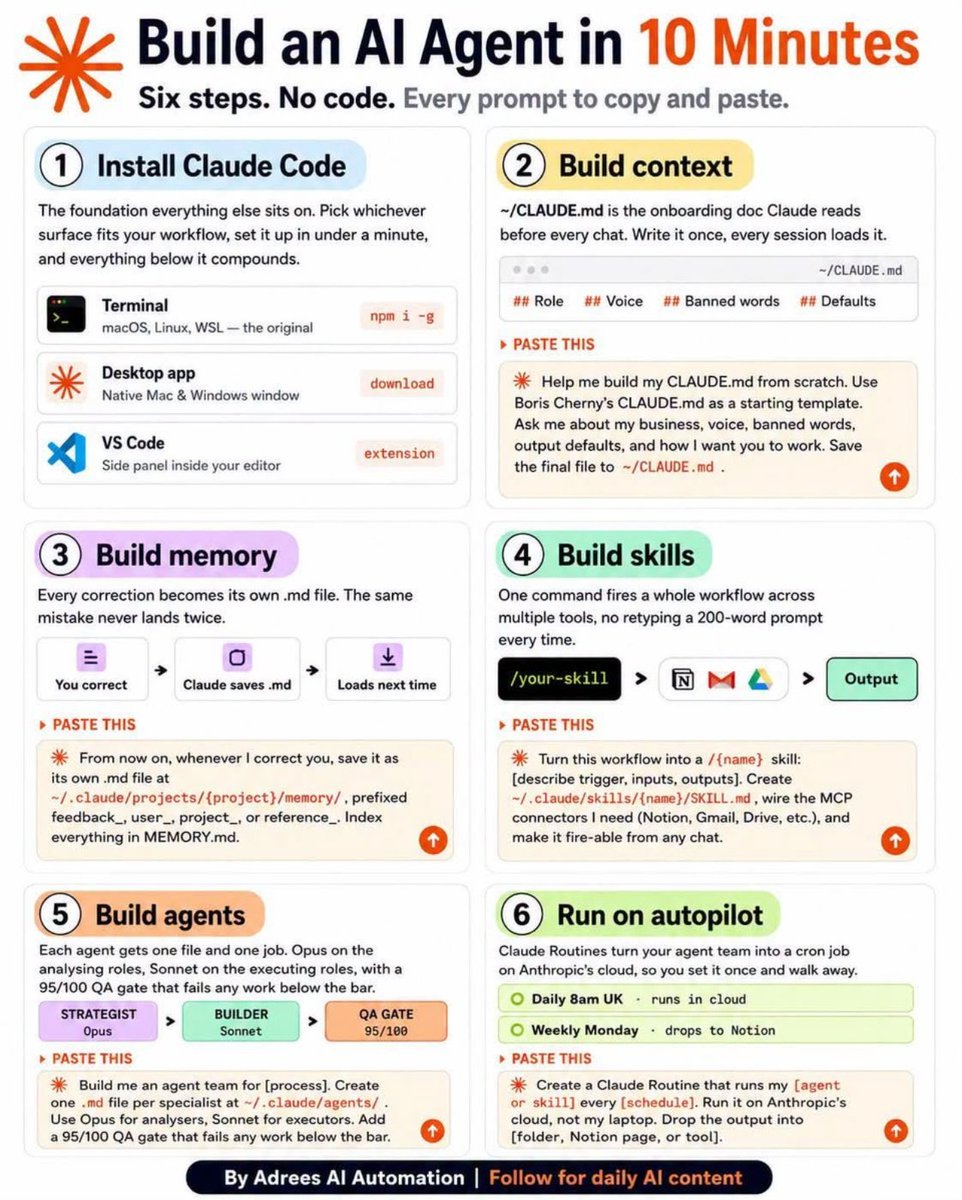
Think of an AI agent as a 𝗱𝗶𝗴𝗶𝘁𝗮𝗹 𝘁𝗲𝗮𝗺 𝗺𝗲𝗺𝗯𝗲𝗿 that can follow instructions, use tools, remember context, and complete a specific workflow without you having to micromanage every step.
If I were building one as a solopreneur, I’d start like this:
𝗦𝘁𝗲𝗽 𝟭: 𝗣𝗶𝗰𝗸 𝗢𝗡𝗘 𝗿𝗲𝗽𝗲𝘁𝗶𝘁𝗶𝘃𝗲 𝘁𝗮𝘀𝗸
Don’t try to automate your entire business.
Start with something you do every week:
→ Content research
→ Lead qualification
→ Customer follow-ups
→ Weekly reports
→ Competitor research
→ Data analysis
𝗦𝘁𝗲𝗽 𝟮: 𝗚𝗶𝘃𝗲 𝘁𝗵𝗲 𝗮𝗴𝗲𝗻𝘁 𝗼𝗻𝗲 𝗰𝗹𝗲𝗮𝗿 𝗷𝗼𝗯
Tell it exactly what it owns.
Bad:
“Help me with marketing.”
Better:
“Every Monday, analyse my content performance and recommend the next 3 pieces of content I should create.”
Specific tasks produce better results.
𝗦𝘁𝗲𝗽 𝟯: 𝗚𝗶𝘃𝗲 𝗶𝘁 𝘆𝗼𝘂𝗿 𝗰𝗼𝗻𝘁𝗲𝘅𝘁
Your business.
Your audience.
Your offer.
Your brand voice.
Your previous work.
Your processes.
AI without context gives generic answers.
𝗖𝗼𝗻𝘁𝗲𝘅�� 𝘁𝘂𝗿𝗻𝘀 𝗶𝘁 𝗶𝗻𝘁𝗼 𝘀𝗼𝗺𝗲𝘁𝗵𝗶𝗻𝗴 𝘂𝘀𝗲𝗳𝘂𝗹.
𝗦𝘁𝗲𝗽 𝟰: 𝗖𝗼𝗻𝗻𝗲𝗰𝘁 𝘁𝗵𝗲 𝘁𝗼𝗼𝗹𝘀 𝗶𝘁 𝗻𝗲𝗲𝗱𝘀
Google Drive.
Notion.
Email.
CRM.
Spreadsheets.
APIs.
The more relevant business data your agent can access, the more useful its work becomes.
𝗦𝘁𝗲𝗽 𝟱: 𝗚𝗶𝘃𝗲 𝗶𝘁 𝗿𝘂𝗹𝗲𝘀
Define:
→ What it can do
→ What it cannot do
→ When it should ask for your approval
→ What requires human judgment
This is where an AI experiment starts becoming an actual business workflow.
𝗦𝘁𝗲𝗽 𝟲: 𝗔𝗱𝗱 𝗺𝗲𝗺𝗼𝗿𝘆 𝘄𝗵𝗲𝗿𝗲 𝗻𝗲𝗰𝗲𝘀𝘀𝗮𝗿𝘆
If the agent needs to remember clients, conversations, preferences, decisions, or historical data, build that into the system.
Otherwise, you’ll keep explaining the same things over and over.
𝗦𝘁𝗲𝗽 𝟳: 𝗕𝗿𝗲𝗮𝗸 𝗯𝗶𝗴𝗴𝗲𝗿 𝘄𝗼𝗿𝗸𝗳𝗹𝗼𝘄𝘀 𝗶𝗻𝘁𝗼 𝘀𝗺𝗮𝗹𝗹𝗲𝗿 𝗷𝗼𝗯𝘀
One agent researches.
Another analyses.
Another reviews.
You make the final decision.
You don’t need one giant AI agent trying to run your entire business.
𝗦𝘁𝗲𝗽 𝟴: 𝗗𝗲𝘀𝗶𝗴𝗻 𝘁𝗵𝗲 𝗼𝘂𝘁𝗽𝘂𝘁 𝗮𝗿𝗼𝘂𝗻𝗱 𝘁𝗵𝗲 𝗻𝗲𝘅𝘁 𝗮𝗰𝘁𝗶𝗼𝗻
Don’t ask for a 2,000-word explanation when what you actually need is:
𝗦𝗵𝗼𝘄 𝗺𝗲 𝘁𝗵𝗲 𝟯 𝗮𝗰𝘁𝗶𝗼𝗻𝘀 𝗜 𝘀𝗵𝗼𝘂𝗹𝗱 𝘁𝗮𝗸𝗲 𝘁𝗼𝗱𝗮𝘆.
The best output isn’t the longest one.
It’s the one you can immediately act on.
𝗦𝘁𝗲𝗽 𝟵: 𝗣𝘂𝘁 𝗮𝗻 𝗶𝗻𝘁𝗲𝗿𝗳𝗮𝗰𝗲 𝗮𝗿𝗼𝘂𝗻𝗱 𝗶𝘁
A simple form, dashboard, or chat interface can turn an internal AI workflow into something you actually use every day.
𝗦𝘁𝗲𝗽 𝟭𝟬: 𝗧𝗲𝘀𝘁 𝗯𝗲𝗳𝗼𝗿𝗲 𝘆𝗼𝘂 𝘁𝗿𝘂𝘀𝘁 𝗶𝘁
Run it.
Find where it fails.
Improve the instructions.
Add checks.
Repeat.
Because an AI agent that works once is interesting.
𝗔𝗻 𝗔𝗜 𝗮𝗴𝗲𝗻𝘁 𝘁𝗵𝗮𝘁 𝘄𝗼𝗿𝗸𝘀 𝗿𝗲𝗹𝗶𝗮𝗯𝗹𝘆 𝗲𝘃𝗲𝗿𝘆 𝘄𝗲𝗲𝗸 𝗶𝘀 𝘃𝗮𝗹𝘂𝗮𝗯𝗹𝗲.
And this is the part solopreneurs should really pay attention to:
You don’t need to replace yourself with AI.
𝗬𝗼𝘂 𝗻����𝗲𝗱 𝘁𝗼 𝗿𝗲𝗺𝗼𝘃𝗲 𝘁𝗵𝗲 𝘄𝗼𝗿𝗸 𝘁𝗵𝗮𝘁 𝘀𝗵𝗼𝘂𝗹𝗱𝗻’𝘁 𝗿𝗲𝗾𝘂𝗶𝗿𝗲 𝘆𝗼𝘂.
Your time should go toward:
→ Customers
→ Sales
→ Strategy
→ Relationships
→ Decisions
→ Creating something new
Let systems handle the repeatable work.
That’s the real opportunity with AI agents.
Not 𝗱𝗼𝗶𝗻𝗴 𝗲𝘃𝗲𝗿𝘆𝘁𝗵𝗶𝗻𝗴 𝘄����𝘁𝗵 𝗔𝗜.
But building a business where 𝗬𝗢𝗨 𝗱𝗼𝗻’𝘁 𝗵𝗮𝘃𝗲 𝘁𝗼 𝗺𝗮𝗻𝘂𝗮𝗹𝗹𝘆 𝗱𝗼 𝗲𝘃𝗲𝗿𝘆𝘁𝗵𝗶𝗻𝗴.
Save this framework.
Then look at your business and ask yourself:
𝗪𝗵𝗮𝘁 𝗮𝗺 𝗜 𝗱𝗼𝗶𝗻𝗴 𝗲𝘃𝗲𝗿𝘆 𝘄𝗲𝗲𝗸 𝘁𝗵𝗮𝘁 𝗮 𝘄𝗲𝗹𝗹-𝗱𝗲𝘀𝗶𝗴𝗻𝗲𝗱 𝗔𝗜 𝗮𝗴𝗲𝗻𝘁 𝗰𝗼𝘂𝗹𝗱 𝗵𝗮𝗻𝗱𝗹𝗲?
Start there.
❤️ Like
🔁 Retweet
🔖 Bookmark
Follow @sonalshukla3377 for more such posts
If AI is becoming part of your daily workflow, keeping those conversations organized is going to matter more and more.
AI Toolbox 3.0 is live on Product Hunt.
Worth checking out if you’re tired of losing your best AI conversations.
https://t.co/ILizuCuSZ6
I lost a really useful ChatGPT conversation once.
I knew I had written the prompt.
I knew the answer was good.
But finding that chat again?
Impossible.
If you use AI every day, you probably know the feeling.
With one Chrome extension, you can:
→ Search across ChatGPT, Claude, Gemini & Grok
→ Organize chats into folders
→ Save and reuse prompts
→ Export conversations
→ Track your context window