Welcome to my coding journey! I share SwiftUI programming tips to help others learn and grow. Explore tutorials, code snippets, and more on my blog and Patreon.
Are you using TabView as root navigation component in your app? Then you need only 2 lines of code to adopt it to iPhone Duo folded and unfolded states. #swiftui
https://t.co/fXzgsuxqzP
@geekdegafas las apps lista/detalle se adaptan bastante rápido, el problema está con la api minimo 27.1 para ir adaptando la UX/UI iphone Duo de cada pantalla de la app, además suma que si se quiere dar soporte a versiones inferiores, es lioso.
@geekdegafas Un pequeño apunte, los desarrolladores no hemos recibido el SDK hasta que anunciarón el iphone Duo, sin posibilidad de adquirir fisicamente un dispositivo, no todas las apps funcionan en el simulador (está limitado en algunos aspectos) a parte IOS 27.1 minimo
@jcfmunoz Pues eso, sí que le veo sentido, no lo que estuviera solo para 27.1, era raro ir con xcode 27.2 y no tener iphoneDuo ni soporte de sus apis, unificaron en la 27.2 beta 3, lo de separar el simulador, supongo les es más fácil tenerlo así.
@twannl Suggestion:
RocketSim = basic screen recording
Additional application = advanced screen recording features, creation of graphic assets for App Store uploads, production of promotional videos, etc.
Spent way too much time perfecting this adaptive concept layout (saw in timeline x)! 😅
Building a dynamic MasonryVStack in #SwiftUI with adaptive columns, custom GeometryProxy layout metrics, and smooth responsive states.
#iosdev#UXUI#Buildinpublic
Small detail I've been polishing in Habiter: when you open the app, your past days fill in one by one, in Grid, Calendar and Week view.
Took a few rounds to make it feel calm, not flashy.
#buildinpublic#SwiftUI
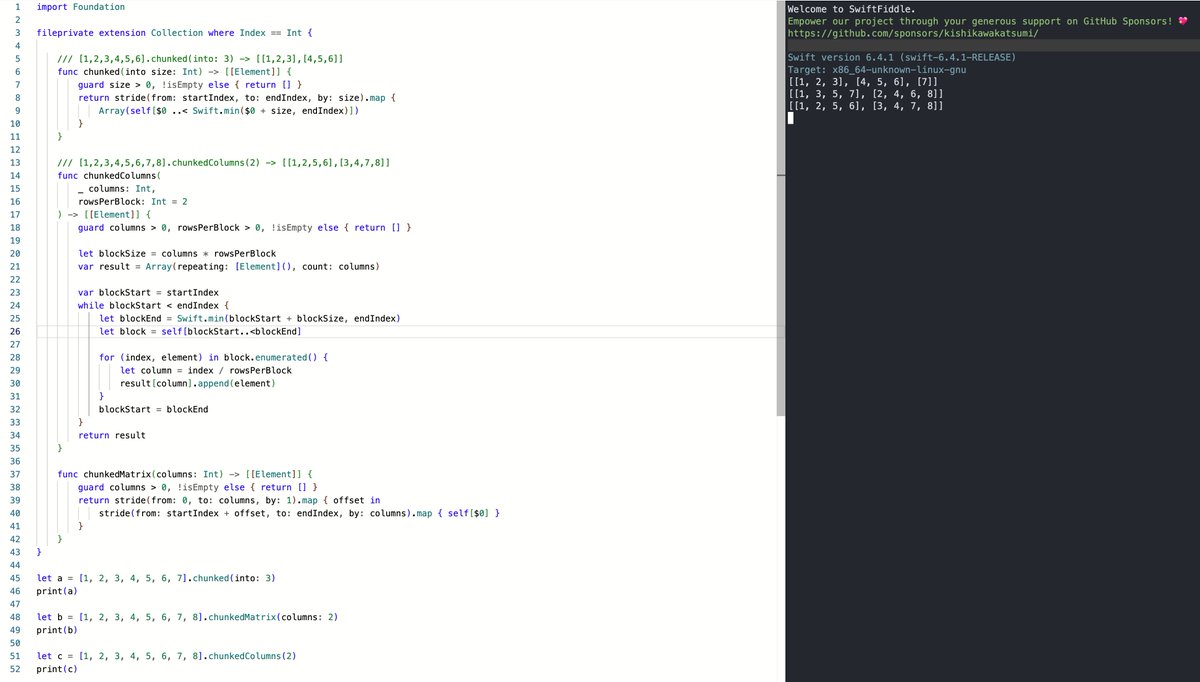
Need to chunk flat collections into columns or matrices for custom grid layouts (especially for dual-screen devices like iPhone Duo)?
#Swift#SwiftUI#iOSDev#iphoneDuo