Born in this beautiful country, a resident who thanks the UAE, my school where all my childhood memories were, the baqala I used to get kinder chocolates at, Koukh al Shay where I used to meet my friends, the apartments that have a million memories in them & my first Job. I don’t know anywhere else more than I know the streets of Sharjah, Dubai, Abu Dhabi, Ras Al Khaimah, Ajman, Fujairah & Umm al Quwain, I moved to Canada for studies and yet all I could think about was coming back home, ahh the feeling of the sun shining, the food from a million cultures, the families everywhere ❤️🇦🇪
O UAE thank you for all the memories, the blessings that came from you, thank you for treating me like your own, thank you to the leaders who made our life easier, God bless the UAE!
- A letter from all the residents born in this beautiful country ❤️🇦🇪
Solution 2:
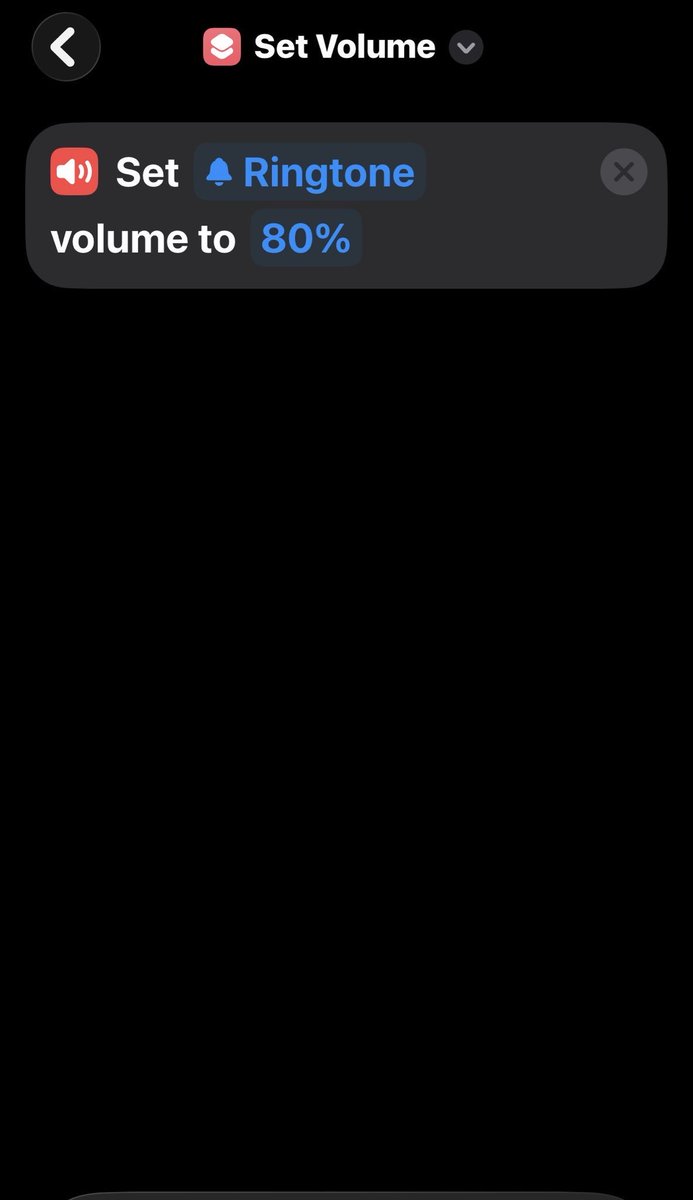
1) Create a shortcut called “set volume”, which when triggered turns ringtone or ringer volume to 100%
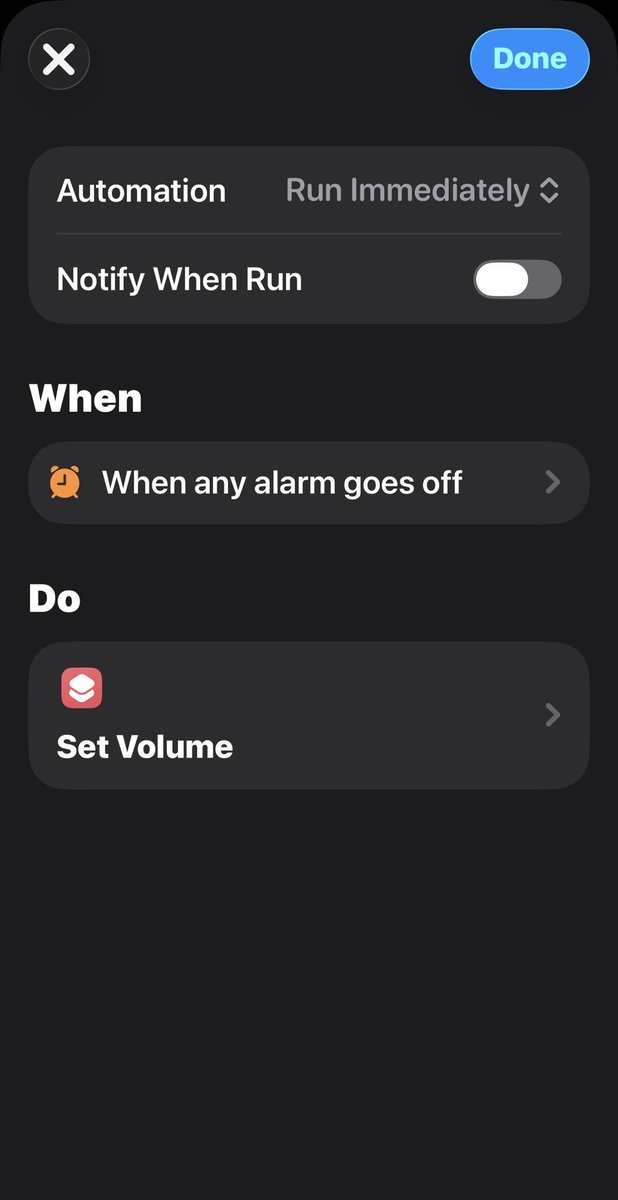
2) Create an automation which “When: alarm is on, Do: “Set volume” shortcut, “Run immediately at the top”
Cause apple doesn’t have ringer volume and media volume seperate it’s the same, so idk how it happens but when you turn the volume down it turns the ringer volume down too, I’m assuming it’s for when you have your phone not on silent it does that.
For me this forces the ringer to be at 100% volume each time an alarm rings so it works
@BrandBranFlakes@_sorrengailll@Apple Whenever it happens just check your ringer volume before touching anything, it’s most likely gonna be at 0, attention awareness was off for me and it still happens until I did this alarm short cut, you don’t gotta agree but it is what it is
@bgrimson6@_sorrengailll@Apple You don’t have to do it multiple times, it’s just a precaution, usually once every month or two you’ll see your alarm not ring so this just makes sure it rings every time
@BrandBranFlakes@_sorrengailll@Apple That’s for when you have the phone on, if it sees your face it doesn’t ring for phone calls or alarms, if you put the phone down and it doesn’t see your face it rings, that’s why it’s called attention awareness, search it up
@bgrimson6@_sorrengailll@Apple It works every time for me, the problem is doesn’t have a seperate audio panel for each app, so when you turn down the volume it can turn the ringer volume down too, that’s why this short cut makes sure your ringer volume stays at 100% as soon as an alarm is triggered
How to fix below:
1) Create a shortcut called “set volume”, which when triggered turns ringtone or ringer volume to 100%
2) Create an automation which “When: alarm is on, Do: “Set volume” shortcut, “Run immediately at the top”
I know it’s stupid and idk why it happens but here’s the fix until addresses it atleast.