`NOT IN` is shorthand for a chain of `<>` comparisons joined by `AND`.
The algorithm check's each row inside a single process. Parallel query still speeds it up, since workers check their own share of rows at the same time, but no single row's check is split across them. Give it a literal list of 9 or more constants and Postgres 15+ replaces the comparisons with a single hash table lookup per row.
With a literal list, like `status NOT IN ('cancelled', 'refunded')`, Postgres turns the list into an array and takes one of two paths. Under 9 items, it walks the array one element at a time, in the order you wrote it, and stops at the first value that matches, because one false comparison breaks the chain of `AND`. At 9 or more constants of a hashable type, the walk is replaced by a hash table that's built once per query and probed for each row.
With a subquery, like `id NOT IN (SELECT user_id FROM banned)`, Postgres runs the subquery as a SubPlan. If the subquery doesn't reference the outer query and its result fits in hash memory (`work_mem` × `hash_mem_multiplier`), it's hashed once and probed for every outer row. Otherwise the subquery is rescanned for each outer row, which is where a slow `NOT IN` comes from.
NULL: a NULL anywhere in NOT IN makes every comparison unknown, so the query returns zero rows. A NULL on the left side fails its own row the same way, unless the subquery returns no rows at all.
Postgres 19 can turn `NOT IN` into an anti-join, but only when it can prove neither side can be NULL.
A time period is really just a single value. It contains a distinct start, and a distinct end, but the period is just a single value. If you store it as two columns, consider using Postgres' date or timestamp range type. It actually helps avoid a few of the gotchas, like:
* Representing unbounded periods with NULL; the "IS NULL" is not optional
* Consistently handling whether boundary dates are inclusive or exclusive; which row owns which second
* Finding adjacent periods requires manual date comparisons, which are easy to reverse
* Finding periods that contain a date filters on two columns, which a B-tree cannot efficiently answer as one range operation
Postgres has the concept of infinity. When dealing with numbers, dates, or timestamps, it can be a clean, effective tool for schema design.
In our post on the Ambiguity of NULL in Postgres, we explained how calculations or comparisons with NULL create a contagion, which causes the result of the expression to always yield NULL. While NULL represents an unknown or missing value, infinity represents a known, unbounded value that is larger than all finite numbers or dates (and -infinity for values smaller than all others).
Postgres range types (daterange, tsrange) already handle open-ended bounds natively. But if you are using separate columns for unbounded start/end dates or values, consider using infinity instead of NULL.
The "NULL Contagion" Problem
The following is what we mean by "contagion". When using the greater than operator to compare a date with NULL, the value is NULL:
```sql
SELECT DATE '2024-06-15' > NULL AS gt_null;
-- (null)
```
Because a WHERE clause only keeps rows where the condition evaluates to TRUE, any row containing a NULL comparison gets dropped. The standard workaround is padding every query with `OR ending_date IS NULL`. If your schema uses 'infinity' to represent an open-ended date, you eliminate the need for those query workarounds.
Using Infinity in Practice
Here is a price history table that stores the open-ended row as `'infinity'::date`. The greater-than comparison returns true against it, because infinity is larger than every finite date:
```sql
CREATE TABLE prices (
product_id int NOT NULL,
price numeric(10,2) NOT NULL,
valid_from date NOT NULL,
valid_to date NOT NULL
);
INSERT INTO prices VALUES
(1, 9.99, DATE '2024-01-01', DATE '2024-04-01'),
(1, 11.99, DATE '2024-04-01', DATE '2024-07-01'),
(1, 14.99, DATE '2024-07-01', 'infinity'::date);
SELECT price FROM prices
WHERE product_id = 1
AND valid_from <= DATE '2099-12-31'
AND valid_to > DATE '2099-12-31';
-- 14.99
```
Key Behaviors to Keep in Mind
• Sorting: infinity sorts logically as greater than any finite value (and -infinity as smaller). NULL will still sort higher than infinity unless you use NULLS last.
• Indexing & Performance: Standard B-Tree indexes index 'infinity' natively. Queries filtering on ranges (e.g., valid_to > CURRENT_DATE) can utilize clean single-index scans without forcing complex OR clauses or bitmap index scans to capture NULL values.
• MIN / MAX Aggregates: max() encountering 'infinity' returns 'infinity'. min() will evaluate finite values normally unless '-infinity' is present.
• Arithmetic: Adding or subtracting days from 'infinity' still yields 'infinity'. Functions like date_trunc() preserve infinity. When using a function against infinity, ensure it behaves as expected.
• Equality & Constraints: Unlike NULL, infinity is equal to infinity ('infinity'::date = 'infinity'::date is TRUE). This allows UNIQUE constraints and indexes to evaluate open-ended rows predictably.
By setting NOT NULL, but allowing infinity on a column, you remove the headache double checking every query for a "OR ... IS NULL".
An asside about Toy Story:
While writing this, I realized "To Infinity and Beyond" was a essential to the irrational confidence of the character of Buzz Lightyear. There is no beyond infinity, but he doesn't care, he's going to pursue it anyhow.
`\gexec` is the YOLO! cousin of `\gset`. With it, you can use SQL to construct SQL, and automatically execute any query built.
Use `format()` with `%I` for identifiers (and `%L` for literals) so the generated SQL is quoted safely.
When using psql, append `\gset` to a query, and after execution, it stores each column as a psql variable. Use the variables in the same session.
The column name (or alias) becomes the variable name. Integer and boolean values are referenced with `:varname`. String values need `:'varname'` (the single quotes make them safe to interpolate into SQL literals).
Postgres 19 is reducing scope.
The most interesting is the removal of the default toast compression change to LZ4. This compression algorithm has been an optional setting available since Postgres 14. You can still use this change yourself as it would have shipped in Postgres 19.
It was a default setting change if LZ4 was available. It could appear mostly ceremonial, as it's been available so long.
When time became the constraint, and the focus looked toward the necessary. With a need to cut the optional changes, a compression change was truly optional. Changing a default setting seems simple on the surface, but in a project as massive as Postgres, even minor default shifts require documentation updates, build-matrix verifications, and testing cycles. All of these would have required time away from the necessary value of the release.
The rigor they have used to make this decision is impressive. We have even more admiration for the core team after the scope reduction. The pressure to ship. The announcements. The anticipation. When it came down to it, they managed to focus just on Postgres and just on quality and let the external factors fall away.
In an age of ship-ship-ship and AI rush, the human rigor of the Postgres core team is admirable.
https://t.co/lCt4ExrVcK
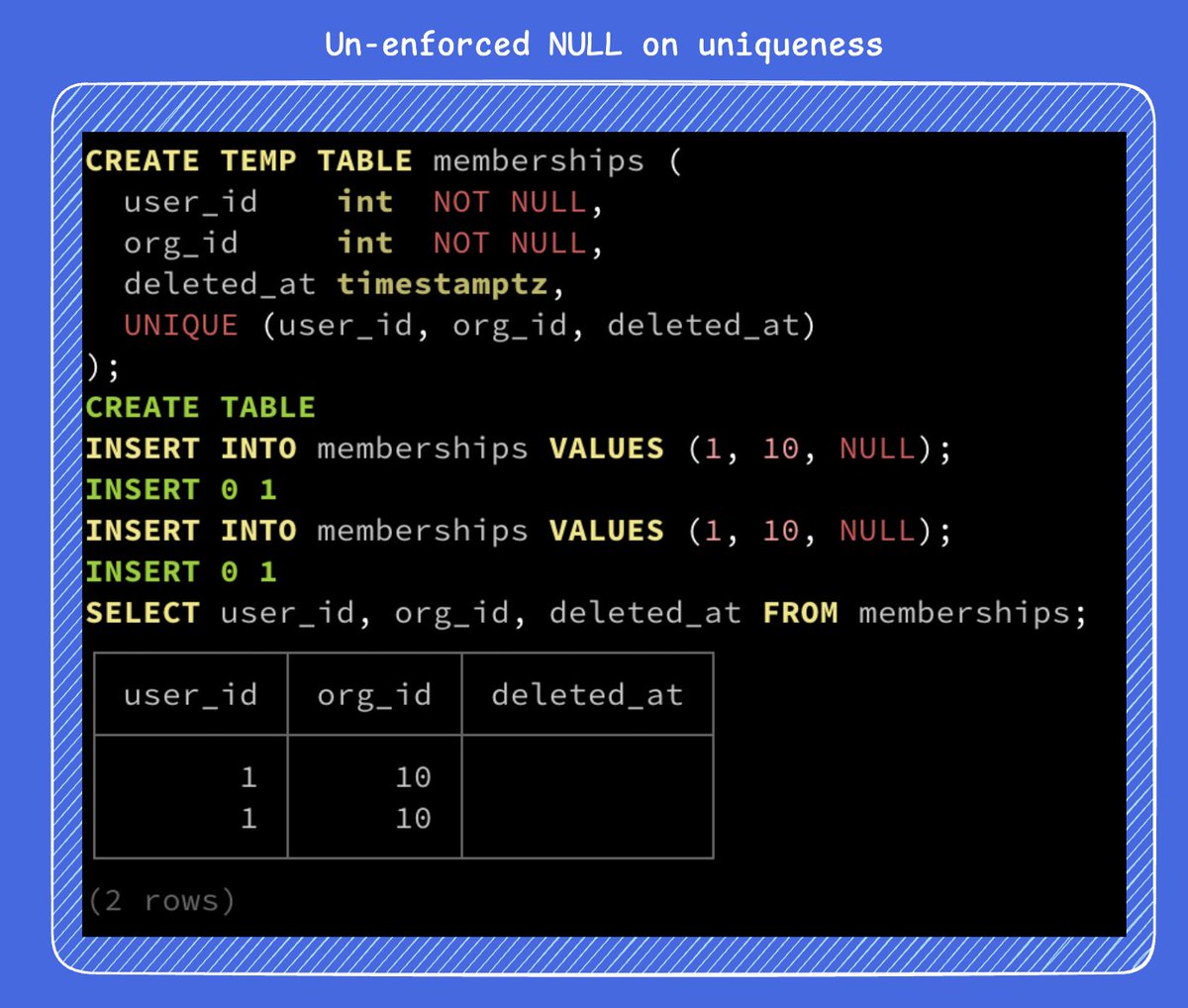
Uniqueness is checked with `=`, and `NULL = NULL` is not true. By default, a NULL value is not a unique value. Postgres can't prove the equality of NULL values, so it keeps both. An easy to demonstrate failure scenario is with composite key:
```sql
-- UNIQUE (user_id, org_id, deleted_at)
INSERT INTO memberships VALUES (1, 10, NULL);
INSERT INTO memberships VALUES (1, 10, NULL); -- both rows land
```
With this, you get two live memberships for the same user because the constraint never fires.
NULLS NOT DISTINCT
Since Postgres 15, unique constraints and indexes can treat NULLs as equal:
```sql
UNIQUE NULLS NOT DISTINCT (user_id, org_id, deleted_at)
```
The second insert fails. This also rejects two rows that share the same deleted_at value, not just two live rows.
Partial unique index
Use a partial unique index to only enforce the unique index on the live rows:
```sql
CREATE UNIQUE INDEX ON memberships (user_id, org_id)
WHERE deleted_at IS NULL;
```
`now()` is not now, it's more of a was.
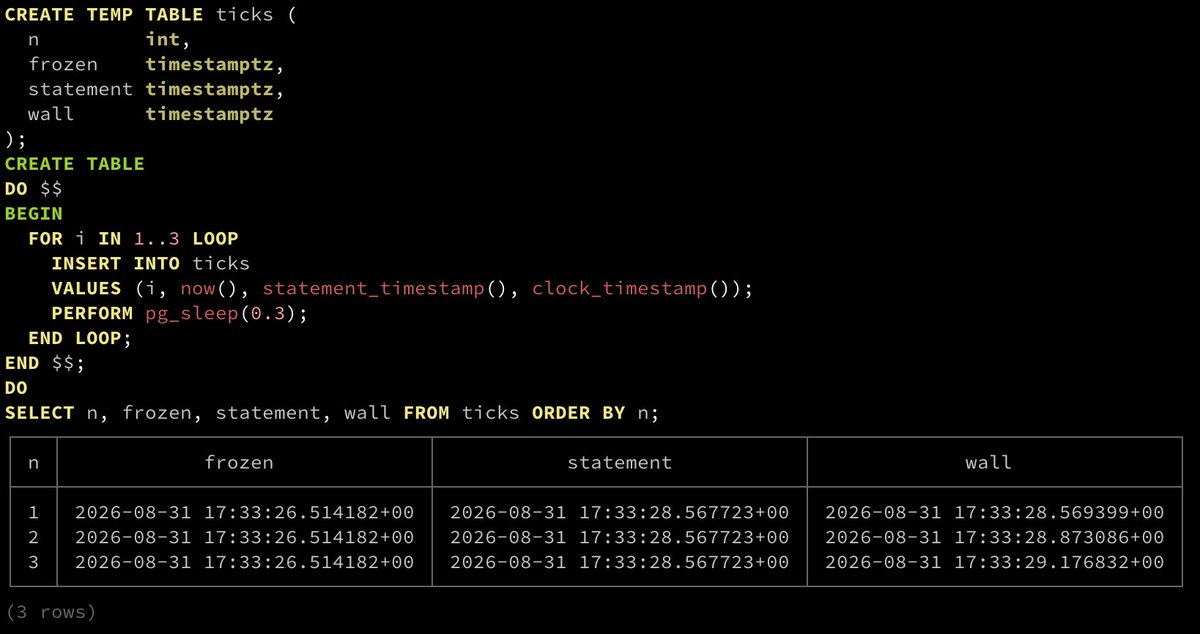
`now()` is actually the start of the current transaction. The wall clock continues to move. Every later `now()`, `CURRENT_TIMESTAMP`, `CURRENT_TIME`, and `CURRENT_DATE` in a transaction still returns same time. Postgres calls this a transaction-frozen timestamp.
A 10,000-row `INSERT` with `created_at DEFAULT now()` gets one timestamp, not 10,000 slightly different ones.
Three clocks
• `now()` is a Postgres tradition (among other databases) and is not a SQL-standard. The SQL standard is `CURRENT_TIMESTAMP`. (Additionally, Postgres has the `transaction_timestamp()`method is is the same as `now()`, but with a name that admits what it is.)
• `statement_timestamp()` moves once per statement, which is useful inside a long transaction when you want per-command times without going all the way to the wall.
• `clock_timestamp()` is the only `timestamptz` that changes during a single statement
CASE/WHEN is the SQL equivalent of an if/else expression. It evaluates conditions top to bottom and returns the value of the first matching branch. The result is a value. Being SQL, it can go anywhere a value can go: SELECT, WHERE, ORDER BY, GROUP BY, inside aggregate functions.
Below is a valid SQL statement, although there are performance ramifications for such choices.
It's common for application developers to be quick to write an application-level audit log, and check the box that logging is complete. But that's just application-level logging.
What happens if someone logs into the database and modifies a value there?
Your app never saw it. The middleware never saw it. That is the gap pgAudit is for. It logs inside Postgres, through the normal server log, for every session (not just the app commands as the application-level audit log is doing).
If you are in a regulated environment or one that has compliance requirements, you will have your own requirements for pgAudit.
However, if you aren't using pgAudit today, do the following as a minimum:
Database changes and ROLE changes
```sql
ALTER SYSTEM SET pgaudit.log = 'ddl, role';
```
• DDL is schema change (CREATE/ALTER/DROP on tables, indexes, and views).
• ROLE is privilege admin (GRANT/REVOKE, CREATE/ALTER/DROP ROLE).
Together they answer: who changed the shape of the database, and who got access?
Log changes to high-value columns
For the table values that change application behavior significantly (like `users.role`, external_id to payment systems, user credentials, or MFA flags), use what is called "object logging".
For instance, do you have a `users.role` column that if set to a value (like "superuser"), it would grant privileges to all accounts? Absolutely log changes to that column.
Object logging is controlled by granting the relevant privileges to the role named in pgaudit.role:
```sql
CREATE ROLE auditor NOLOGIN;
ALTER SYSTEM SET pgaudit.role = 'auditor';
GRANT UPDATE (role) ON users TO auditor;
-- UPDATE users SET role = 'admin' WHERE id = 1; -- logged
-- UPDATE users SET email = '[email protected]' WHERE id = 1; -- silent
```
With object logging, a statement is logged when it touches the granted column, whether it came from the app or from an interactive session.
Changes to make pgaudit more useful
• Enable pgaudit.log_parameter so bind parameters (`$1`) are logged (Side note: this is off by default because Postgres doesn't want to expose private data in logs by default. Look over the data that gets logged if enabled, and ensure you aren't pushing sensitive data to logs)
• Enable pgaudit.log_rows to show the count of rows affected in the logs, which means zero-row updates are visible.
• Put user and time in log_line_prefix (`%m %u %d [%p]`). pgAudit does not add those fields itself.
If you are under specific regulations (SOC 2, PCI-DSS, HIPAA, GDPR, etc.), you will almost certainly need to go beyond this minimum and document retention, integrity controls, and review procedures. But for anyone who currently has only application-level audit logs, turning on ddl, role plus targeted object logging is a high-value, low-effort improvement.
We've updated our Postgres Playground tutorials (learn while using an in-browser Postgres), and it inspired our latest blog post.
A few weeks ago, we set about updating all of the content for the Postgres Playground tutorials. It was a larger change than we initially thought because we launched Postgres Playground with Postgres 14.
This got us thinking: "What else have we written that has changed since we wrote it?" We have blog posts that were posted when Postgres 10 was just released, so this idea also turned such a big ask we had to break it into chunks.
For this post, we limited it to the "load, storage, indexes, and partitioning" content: https://t.co/mly4ldAUYb
If you have anyone interested in the basics of Postgres, point them at the tutorials in the Postgres Playground: https://t.co/UhpJRYKAAp
Exporting a CSV from Postgres? You've probably heard use \copy instead of COPY because it saves locally.
But, the \copy command in psql is just a psuedo-command for COPY TO STDOUT.
`COPY ... TO '/path/on/server'` writes a file on the database host, as the Postgres user (the server's machine, not on your local machine)
`\copy` (in psql) just runs `COPY TO STDOUT` and saves the stream to a path on your local machine.
`COPY TO STDOUT` is not psql-only. It is a protocol feature. It's ordinary SQL. The server switches into copy-out and streams bytes. Any client that implements the protocol can consume it: libpq (`PQgetCopyData`), JDBC (`CopyManager.copyOut`), psycopg (`cursor.copy`), and pgx all support it.
Key options:
`FORMAT csv`
Commas, quoting, and escapes that spreadsheet tools expect.
`HEADER true`
Writes column names as the first line.
Column list
`\copy orders (sku, price) TO ...` exports only those columns, in that order. Wrap a `SELECT` when you need filters, joins, or expressions.
`NULL`
In CSV mode, nulls are an unquoted empty string by default. Empty strings are written as `""`. Match the same `NULL '…'` string on import if you override it.
`FORCE_QUOTE`
Force quotes on non-null values. Handy when a consumer is picky about fields that look like numbers or leading zeros.
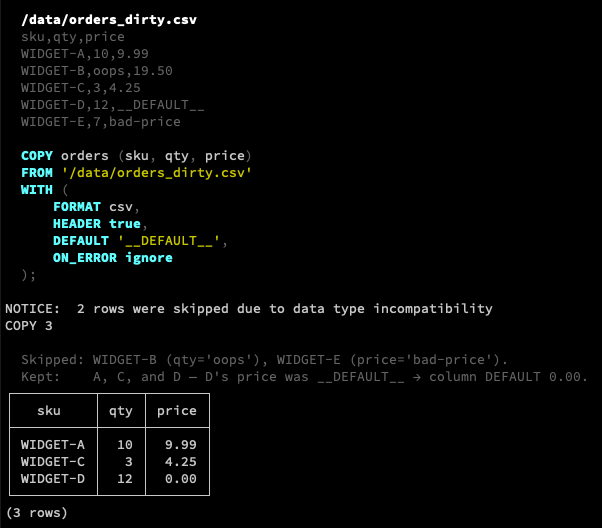
Importing a CSV into Postgres? Use `COPY` (or `\copy`). It’s fast because it streams in a single bulk command with minimal protocol chatter, a single parse & plan, direct tuple conversion, and no per-row statement overhead.
Common behaviors and options to know:
`FORMAT csv`
Activates standard CSV parsing (commas, quoted fields, escaped quotes).
Target column list
CSV column order rarely matches the table. Always list your target columns in the order they appear in the file. Postgres maps by position, not by CSV header name.
`HEADER` / `HEADER n`
Skips header rows. Plain `HEADER` skips the first line. Postgres 19 is exptected to accept an integer (`HEADER 2`, etc.) to skip multiple preamble lines.
`DEFAULT 'string'`
Maps a sentinel string in your CSV (e.g. `'__DEFAULT__'`) to the column’s default expression.
Unlisted columns
Table columns omitted from the target column list automatically receive their `DEFAULT` (or `NULL`).
Extra CSV columns
Postgres errors if the CSV contains more fields than the columns you listed. Trim the file or load into a wider staging table first.
Null values
In `csv` format the default `NULL` representation is an unquoted empty string (override with `NULL 'string'`).
Error handling (`ON_ERROR` and `REJECT_LIMIT`)
`COPY` historically aborted on the first conversion error. Newer versions add:
• `ON_ERROR ignore` (17) — discards malformed rows and reports the skipped count
• `REJECT_LIMIT n` (18) — maximum bad rows allowed under `ON_ERROR ignore` before aborting
• `ON_ERROR set_null` (19) — replaces the invalid field with NULL instead of dropping the whole row
Mid-summer database housekeeping! So, how about the queries themselves?
pg_stat_statements tracks query shape, call counts, and timing across the whole database. It is the shortest path from "the database feels slow" to "these five statements burn most of the time."
Enabled pg_stat_statement
If you are running Crunchy Bridge, it is available by default (skip to the "CREATE EXTENSION" command below)! If you are self-hosting, a modification is required to `postgresql.conf` and a restart is required:
```
shared_preload_libraries = ''pg_stat_statements, ...''
pg_stat_statements.track = top
```
You can set it to "top" or "all". "all" includes functions and procedures. "top" is the default, and tracks only statements run by clients.
To enable on a database, and run:
```sql
CREATE EXTENSION IF NOT EXISTS pg_stat_statements;
```
Finding expensive queries
Total time is usually the right mid-summer review because a medium query called millions of times often hurts more than a rare slow one:
```sql
SELECT
round(total_exec_time::numeric, 1) AS total_ms,
calls,
round(mean_exec_time::numeric, 2) AS mean_ms,
rows,
query
FROM pg_stat_statements
ORDER BY total_exec_time DESC
LIMIT 20;
```
Also glance at mean time and at rows returned, because the sequential scans show up here as high `total_exec_time` plus large `rows` for what should be a point lookup.
What the columns mean
• calls : the number of times the query has run since the last reset
• total_exec_time / mean_exec_time : cumulative and average execution time in milliseoncds
• rows : total rows retrieved or affected.
• query : the query, but normalized with `$1` placeholders
Stats accumulate until you reset them:
```sql
SELECT pg_stat_statements_reset();
```
Do know that a reset wipes history. For housekeeping, either reset at the start of a known busy window, or compare against a previous snapshot you saved.
What to do with your find
1. Run explain with the queries using real parameters: `pg_stat_statements` shows the shape, not the plan.
2. Look for missing indexes, bad `work_mem` spills, or chatty app patterns (N+1) behind high `calls`.
3. After a deploy or index change, reset, let traffic run, and re-check whether total time improved.
Had another few large TB migrations into Crunchy Bridge recently.
It was just over 5 years ago we were doing one of our largest early migrations of over 20 TB into @crunchydata.
I used to say I'd never get comfortable with migrating a production database, there is always some risk. Yet, we've done it so much over the recent years that it's really a non-event for us.
And migrated from literally everywhere, from RDS, Aurora, Azure, Heroku, self-managed on prem even.
It's really great to sit back and watch the team day after day deliver an amazing experience so people can forget about their database and get back to building.






![crunchydata's tweet photo. It's common for application developers to be quick to write an application-level audit log, and check the box that logging is complete. But that's just application-level logging.
What happens if someone logs into the database and modifies a value there?
Your app never saw it. The middleware never saw it. That is the gap pgAudit is for. It logs inside Postgres, through the normal server log, for every session (not just the app commands as the application-level audit log is doing).
If you are in a regulated environment or one that has compliance requirements, you will have your own requirements for pgAudit.
However, if you aren't using pgAudit today, do the following as a minimum:
Database changes and ROLE changes
```sql
ALTER SYSTEM SET pgaudit.log = 'ddl, role';
```
• DDL is schema change (CREATE/ALTER/DROP on tables, indexes, and views).
• ROLE is privilege admin (GRANT/REVOKE, CREATE/ALTER/DROP ROLE).
Together they answer: who changed the shape of the database, and who got access?
Log changes to high-value columns
For the table values that change application behavior significantly (like `users.role`, external_id to payment systems, user credentials, or MFA flags), use what is called "object logging".
For instance, do you have a `users.role` column that if set to a value (like "superuser"), it would grant privileges to all accounts? Absolutely log changes to that column.
Object logging is controlled by granting the relevant privileges to the role named in pgaudit.role:
```sql
CREATE ROLE auditor NOLOGIN;
ALTER SYSTEM SET pgaudit.role = 'auditor';
GRANT UPDATE (role) ON users TO auditor;
-- UPDATE users SET role = 'admin' WHERE id = 1; -- logged
-- UPDATE users SET email = 'x@y.com' WHERE id = 1; -- silent
```
With object logging, a statement is logged when it touches the granted column, whether it came from the app or from an interactive session.
Changes to make pgaudit more useful
• Enable pgaudit.log_parameter so bind parameters (`$1`) are logged (Side note: this is off by default because Postgres doesn't want to expose private data in logs by default. Look over the data that gets logged if enabled, and ensure you aren't pushing sensitive data to logs)
• Enable pgaudit.log_rows to show the count of rows affected in the logs, which means zero-row updates are visible.
• Put user and time in log_line_prefix (`%m %u %d [%p]`). pgAudit does not add those fields itself.
If you are under specific regulations (SOC 2, PCI-DSS, HIPAA, GDPR, etc.), you will almost certainly need to go beyond this minimum and document retention, integrity controls, and review procedures. But for anyone who currently has only application-level audit logs, turning on ddl, role plus targeted object logging is a high-value, low-effort improvement.](https://pbs.twimg.com/media/HQkrN7TWEAEUF06.jpg)