A Deep Dive into Mobile Forensics
I recently completed a full mobile forensic analysis on an iPhone 13 Pro and it was a powerful reminder of how much a device actually remembers.
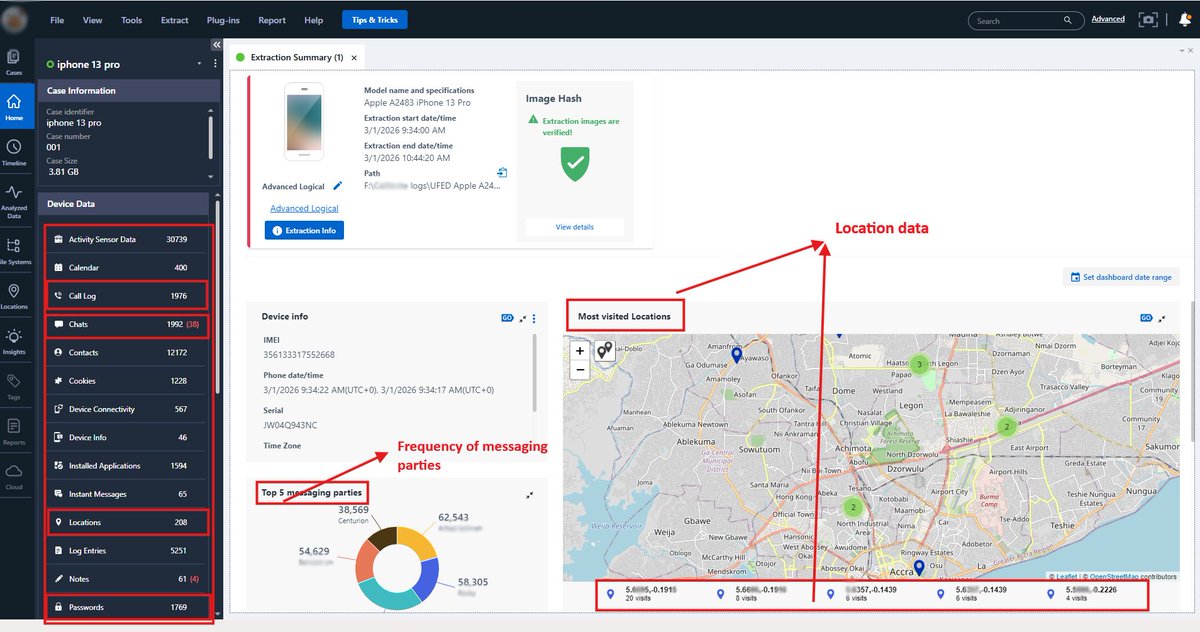
This was an advanced logical extraction with verified image integrity. Even without diving into content, the metadata alone told a story.
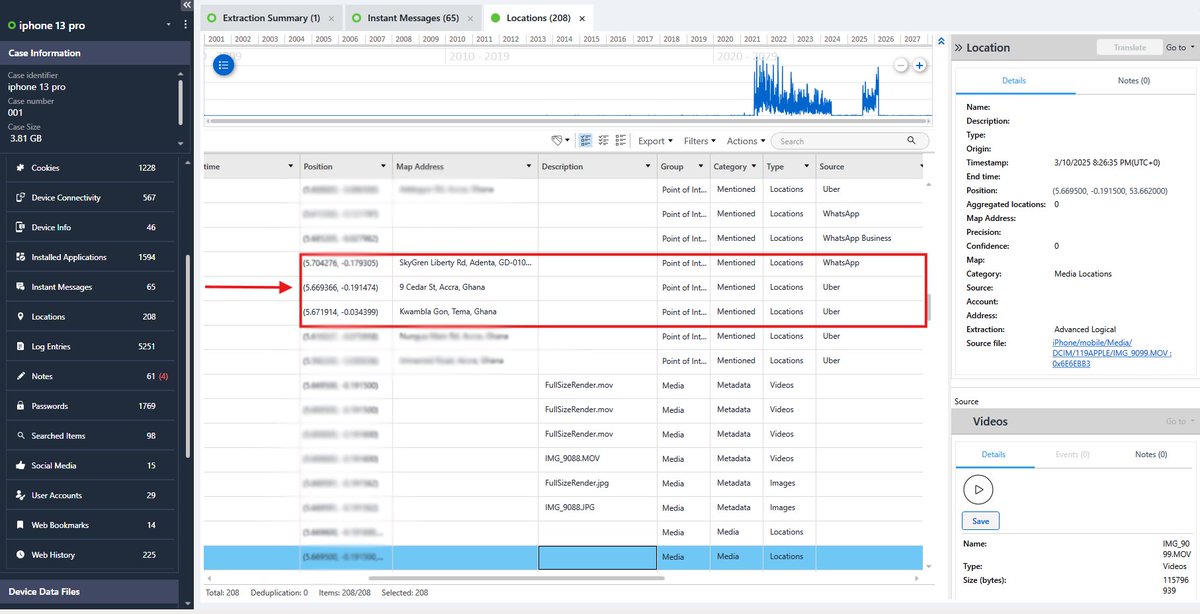
From location artifacts, I reconstructed where the device had been, the routes it traveled and the exact timestamps tied to those movements. But more importantly, I could see how those locations were generated.
Some coordinates were tied to ride activity such as uber and bolt. Others came from navigation searches. Some were linked to shared live locations inside messaging apps.
Each source leaves a different footprint. A searched address tells a different story than an active trip. A shared live location suggests intentional disclosure. The coordinates are only part of it, the behavior behind them is the real evidence.
The “most visited locations” view made patterns obvious. Certain coordinates appeared repeatedly, building a clear picture of routine and frequency over time.
On the communication side, interaction volume alone highlighted the primary contacts. Without even reading conversations, it was immediately clear who the highest frequency messaging relationships were. Volume builds pattern. Pattern builds context.
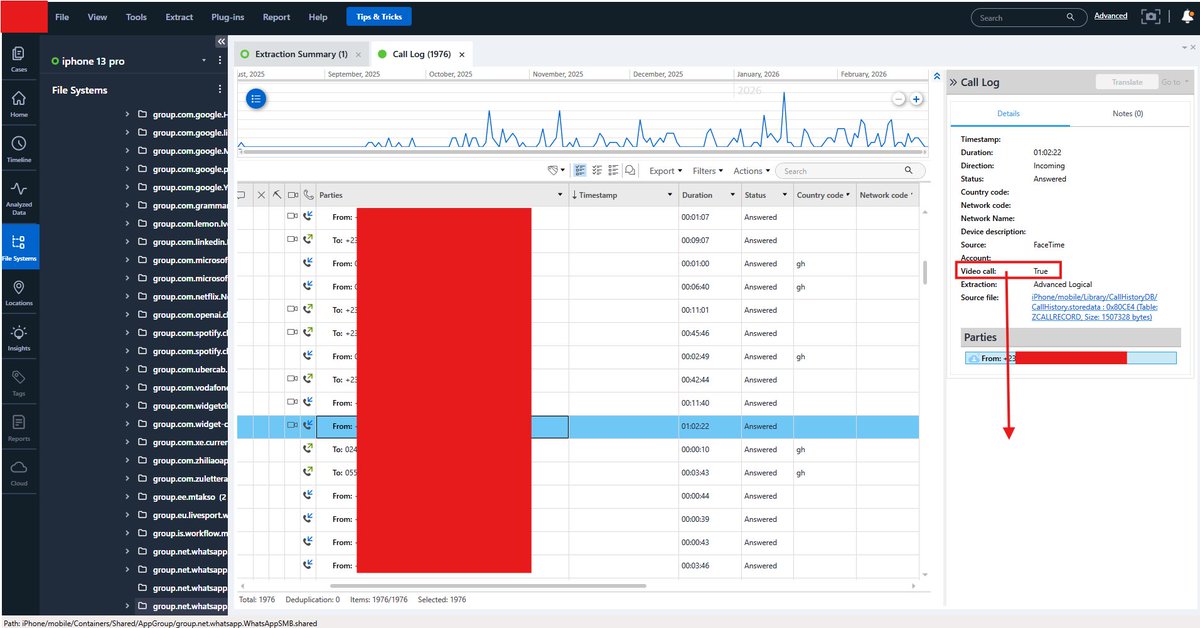
Call analysis went just as deep. Even when call entries were deleted, I could still determine whether interactions were audio or video, which platform they occurred on, how long they lasted, and whether they were answered, missed or rejected. Deleting a visible log doesn’t erase the underlying artifacts.
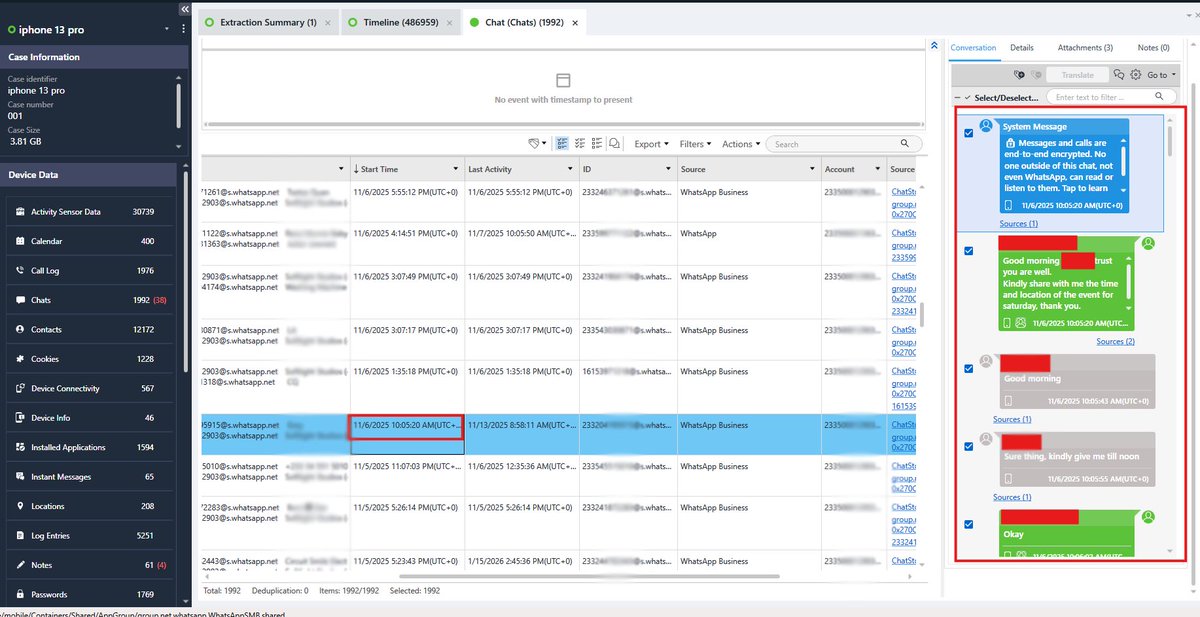
I was also able to recover delivered media, expired content, deleted messages and metadata tying everything to specific timestamps and user actions.
Here’s what stands out. Phones don’t just store content. They store behavior.
They store routine. They store intent.
Files can be deleted. Logs can be cleared. But the artifacts remain.
#digitalforensics #DFI #mobileforensics #cybersecurity
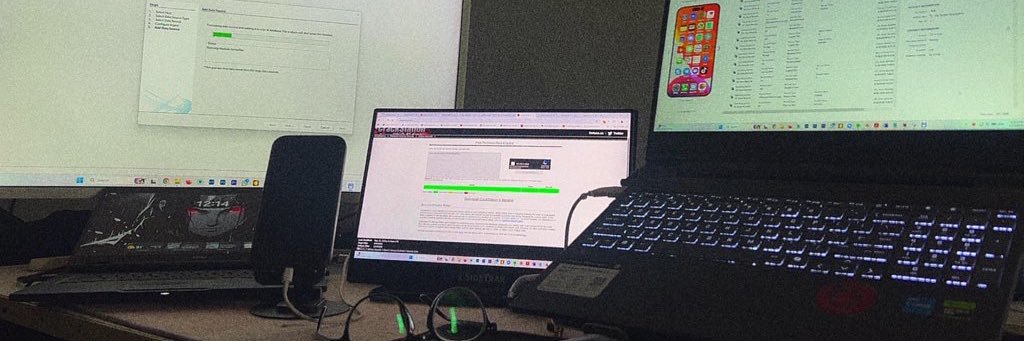
Still working on that. It’s masquerading itself in a folder that mimics 𝙋𝙧𝙤𝙜𝙧𝙖𝙢𝘿𝙖𝙩𝙖\𝙈𝙞𝙘𝙧𝙤𝙨𝙤𝙛𝙩\𝙒𝙞𝙣𝙙𝙤𝙬𝙨\𝘿𝙚𝙛𝙚𝙣𝙙𝙚𝙧 path called 𝙒𝙞𝙣𝙙𝙤𝙬𝙨𝙎𝙚𝙘𝙪𝙧𝙞𝙩𝙮 in ProgramData, which isn’t a default path.
I’ll post a full report when I’m through.
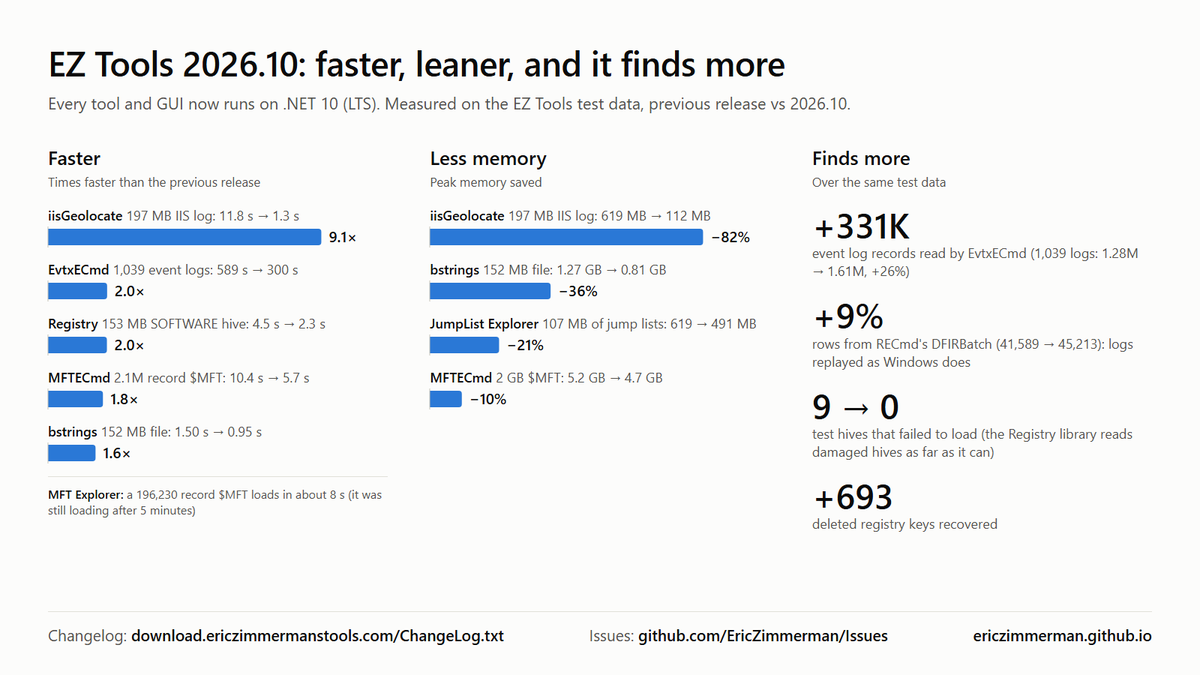
1/ EZ Tools 2026.10 is out, all on .NET 10 (LTS)
✅ More accurate: 331K more event log records, hive logs replayed as Windows does, every test hive loads
⚡ Faster: up to 9x; EvtxECmd and Registry 2x
📉 Less memory: up to 82% less
Update with Get-ZimmermanTools 🧵 #DFIR
This is why I love seeing DFIR professionals exchange ideas. The discussion around my RAM forensics post has led me to fascinating research and new avenues to explore.
This RAM forensics investigation has sparked some interesting perspectives from digital forensics and SOC professionals on Linkedin. Some opinions stand out to me currently.
1. Memory forensics is underappreciated. A RAM acquisition can provide a time-sensitive snapshot of processes, connections and other evidence that may disappear once the system's state changes.
2. Recovery after a reboot may still be possible. I agree, depending on the circumstances. However, the original discussion concerns a complete shutdown, which raises a different question.
3. Could we build tools to recover RAM data after a complete shutdown? An interesting idea, though the technical feasibility and limitations deserve serious investigation.
Memory forensics deserves far more recognition. The evidence it can preserve may be the difference between understanding what happened and losing critical context entirely.
This RAM forensics investigation has sparked some interesting perspectives from digital forensics and SOC professionals on Linkedin. Some opinions stand out to me currently.
1. Memory forensics is underappreciated. A RAM acquisition can provide a time-sensitive snapshot of processes, connections and other evidence that may disappear once the system's state changes.
2. Recovery after a reboot may still be possible. I agree, depending on the circumstances. However, the original discussion concerns a complete shutdown, which raises a different question.
3. Could we build tools to recover RAM data after a complete shutdown? An interesting idea, though the technical feasibility and limitations deserve serious investigation.
Memory forensics deserves far more recognition. The evidence it can preserve may be the difference between understanding what happened and losing critical context entirely.
I captured 32 GB of RAM from my Windows system with Belkasoft RAM Capturer. Then I ran WinHex’s File Recovery by Type on the image. The output was multiple file types, each sorted into its own folder.
The JPEG folder ran past 004000 files. Three of those faces belong to people I follow on X. @Josephnartey_@ireteeh@samgeorgegh. I have never interacted with them. WinHex also returned a search hit for X at offset 1ED6721F. A trace of the platform sat in memory next to the images.
This is the order of volatility in practice. 𝗥𝗙𝗖 𝟯𝟮𝟮𝟳 tells investigators to collect the most volatile evidence first. Memory sits above disk. RAM holds image data, file fragments, running processes and network connections.
A shutdown erases all of it. My rule on every live system, acquire memory, then image the disk, then power down. Skip step one and you cannot get it back.
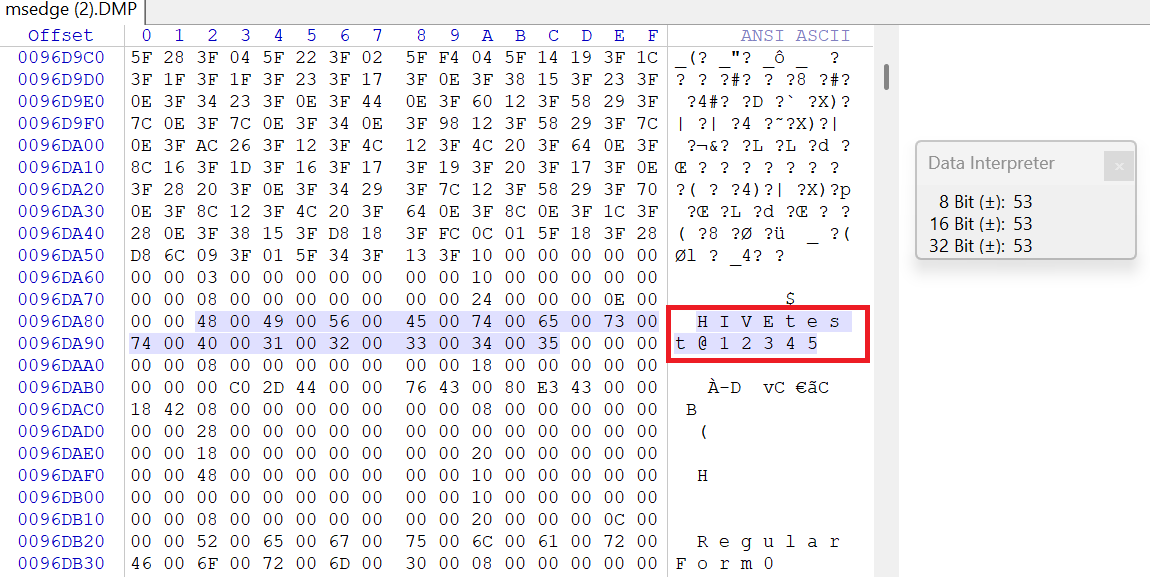
Using Windows Task Manager, I acquired the Chromium-based browser's process memory and performed hexadecimal and string analysis with WinHex, identifying credential artifacts within the captured memory space.
The experiment demonstrates how sensitive authentication data may persist in volatile memory, depending on browser memory allocation, application behavior, and acquisition timing. Memory indeed sits above disk.
Key takeaway: TLS encrypts credentials in transit, but it does not eliminate potential plaintext exposure within endpoint memory.
I captured 32 GB of RAM from my Windows system with Belkasoft RAM Capturer. Then I ran WinHex’s File Recovery by Type on the image. The output was multiple file types, each sorted into its own folder.
The JPEG folder ran past 004000 files. Three of those faces belong to people I follow on X. @Josephnartey_@ireteeh@samgeorgegh. I have never interacted with them. WinHex also returned a search hit for X at offset 1ED6721F. A trace of the platform sat in memory next to the images.
This is the order of volatility in practice. 𝗥𝗙𝗖 𝟯𝟮𝟮𝟳 tells investigators to collect the most volatile evidence first. Memory sits above disk. RAM holds image data, file fragments, running processes and network connections.
A shutdown erases all of it. My rule on every live system, acquire memory, then image the disk, then power down. Skip step one and you cannot get it back.