Every automation project starts with a tool conversation. Which platform, which integration layer, which vendor. But the projects that actually reach production and stay there started with a different conversation.
Before any tool enters the picture, three questions determine whether a process is ready to be automated at all. A process that fails any of the three needs redesign first, not a tool that compensates for the gap.
Swipe through to see how each question works and what to do when a process fails one of them.
The full framework is in our latest article: https://t.co/3VPXyvd6E8
Automation feels like magic once it is running.
What nobody sees is the work that made that possible.
Behind every pipeline that runs reliably in production, there is a phase where someone documented the actual workflow step by step using real examples.
There is an integration audit where every manual data re-entry point between systems was identified and accounted for.
There is a testing period where the automation and the manual process ran side by side on the same inputs until edge cases were resolved. And there is a deployment where success metrics were defined before launch (not after).
That process is what actually matters before any tool gets chosen, before any AI layer gets added, before a single line of code gets written.
Color contrast, HTML attributes, WCAG compliance checks. All of that is straightforward automation that runs the same way every time with zero token cost.
But evaluating whether an alt text actually describes an image well enough, or making sure dozens of writers across a large organization are following the same voice and patterns, that's where automation hits its ceiling, and AI starts earning its place.
The approach doesn't have to be one or the other. You can build the stable workflow first and add what our team calls "sparkles of AI" where judgment is actually needed.
The key is understanding how these tools process information so you're feeding them context in the way they work best with.
Our full video covers how our team layers AI and automation in enterprise pipelines.
Watch it here: https://t.co/hVdzUaz8nI
Your team knows which processes are slow, manual, and eating up capacity.
The harder question is which ones are actually ready to automate and which ones will break the moment you hand them to a tool.
Business process automation delivers when you define the process before you choose the tooling.
That means evaluating output consistency, input predictability, and failure cost before any architecture decision gets made.
We wrote about the diagnostic framework we use in enterprise engagements to filter automation candidates, the three categories that reliably return value first, and where AI earns a place in the pipeline versus where a deterministic layer handles the job better.
https://t.co/3VPXyvcyOA
The World Cup starts today. 48 teams, and every single one of them spent years figuring out who plays where before stepping onto that pitch.
Web development teams are no different.
You need someone watching the environment before issues surface, an architect who locks down the foundation before anyone else touches the codebase, a connector who keeps frontend and backend from drifting apart, an engineer who knows when to ship and when to hold, and someone the whole team orients around when priorities shift mid-project.
We mapped our team to the positions that fit them.
Swipe through and tell us in the comments which one you've played.
When a CMS evaluation kicks off, the first round of research usually surfaces comparison pages written by hosting providers and platform vendors.
The conclusions in those articles are predictable.
Our team implements WordPress, Drupal, and Contentful across different client contexts, and none of those platforms pays us more to recommend one over the others.
This piece documents what actually separates them: how the architectural choice shapes content operations and multi-channel delivery, where each editorial experience creates real friction for content teams, how all three platforms are approaching AI in 2026, and what total cost looks like after two or three years of running the platform.
If you have a CMS evaluation coming up this year, this comparison is worth reading before you start: https://t.co/5QcqKO187R
Sanity, Strapi, and Storyblok have each been in production long enough that the real differences only show up after the contracts are signed.
Every vendor comparison page leads with the dimensions where that vendor wins.
That's expected, but it doesn't help a CTO or Content Manager trying to weigh three platforms fairly before committing budget and development time to one of them.
We built with all three.
This comparison covers what the vendor pages skip: architecture trade-offs, editorial friction, AI readiness, and the organizational patterns that tend to lead to satisfaction or regret a year later.
Full breakdown here: https://t.co/pVkRIpEsWc
Every year, the HRC Foundation publishes the Corporate Equality Index, the most comprehensive benchmark for LGBTQ+ workplace inclusion in the U.S. The 2026 edition landed with a mix of progress and warning signs that every company in tech should be paying attention to.
We work in an industry that talks a lot about transparency, in code, in architecture, in how we build systems. That same principle applies to how we treat the people building those systems.
Companies that communicate their inclusion commitments see stronger retention, higher engagement, and better financial performance, but the ones that go quiet see trust erode, talent leave, and productivity decline.
At Octahedroid, we believe inclusion is part of how you build a healthy company. Pride is a good time to revisit where your organization stands and whether the people inside it actually know.
Everybody’s feeling the pressure to lead with AI on every new build. But automation can run a task faster, cheaper, and without the uncertainty of a probabilistic output, when it has a fixed correct answer, given the same input.
The problem is nobody gets credit for choosing the boring option.
Leadership wants AI in the stack because token budgets need to be spent. And teams default to the most expensive model because it's "supposed to be better."
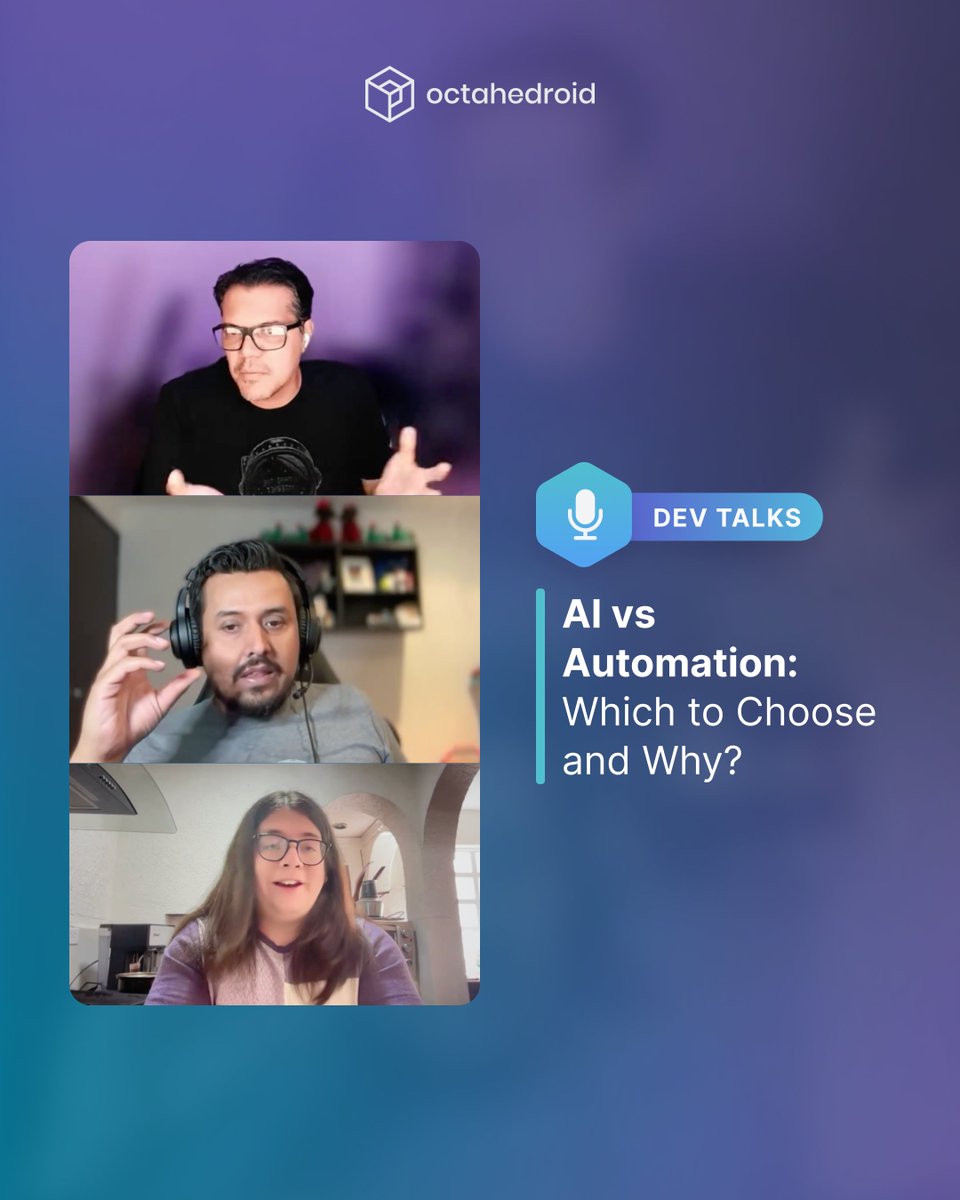
In our next Dev Talks episode, our developers share what they've learned building these pipelines at scale: where automation should lead, where AI earns its place on top, and why that decision needs to happen before the architecture gets locked in.
It drops next week! Follow us so you don't miss it.
Today is Global Accessibility Awareness Day, and for the first time in six years, the numbers are not looking good.
The latest WebAIM Million report found that accessibility errors across the top million websites increased 10.1% compared to last year, reversing what had been a slow but steady trend of improvement since 2019.
A big part of the problem is complexity.
Home pages got 22.5% more complex in just twelve months, and the report points directly to AI-assisted coding practices and the growing use of third-party frameworks as key drivers.
More code is being generated and shipped faster than ever, but the fundamentals of accessible markup are getting lost in the process.
The same six types of failures, things like low contrast text, missing alt text, and empty links, have topped the report for seven years running.
All of them are fixable, and all of them keep showing up at a massive scale because they were never prioritized in the first place.
For over 1.3 billion people worldwide living with a disability, this means the web is getting harder to use, not easier.
Most teams don't realize their CMS is slowing them down until a redesign or migration forces the conversation.
Doc. Tahedroid's Content Platform Assessment helps you get ahead of that. In about 5 minutes, you'll identify where your editorial workflows are creating friction, how your platform's technical foundation holds up, and whether you're looking at an optimization path or a migration.
You walk away with a prioritized action plan you can actually take to your next planning meeting.
Download it below!
Have you tried setting up a decoupled Drupal environment locally and found yourself stuck configuring OAuth keys, GraphQL schemas, and environment variables before writing any actual project code?
We built a workflow that handles all of that for you. One Composer template, one DDEV command, and you get a fully configured Drupal 11 backend with GraphQL Compose, Simple OAuth, authentication keys, and sample content ready to go.
The Next.js starter connects to your local instance and starts rendering content immediately.
The current stack ships with Next.js 16, Storybook 10, shadcn/ui, and Tailwind 4, all tested together.
The walkthrough covers the full process from Composer template to frontend integration, plus troubleshooting for the most common issues teams run into early.
Get the complete guide here: https://t.co/15WapRCliO
What most teams want to verify before committing to a decoupled architecture is whether content editors lose ground. Our Drupal Decoupled one-click demo on Tugboat answers that directly.
When you deploy, you get a fully connected stack: Drupal 11 with GraphQL Compose handling API delivery, Next.js on the frontend, and Storybook showing how the component library is organized. Everything wired up, nothing to configure.
The Preview Iframe module embeds the live frontend inside Drupal's editing interface, so editors stay in familiar territory while seeing exactly how content renders.
Paragraph components can be reordered and the changes appear on the frontend in real time.
Webforms submit through the GraphQL layer and land in Drupal's standard submission interface with all existing handlers intact: Mailchimp, CRM integrations, everything you already have set up on the Drupal side stays in place.
The environment runs for 15 to 20 minutes, enough to walk through the full editorial and integration workflow without touching a local setup.
Our Co-Founder and CTO, @omers, wrote a detailed breakdown of everything inside: https://t.co/FLbSPkyEdA
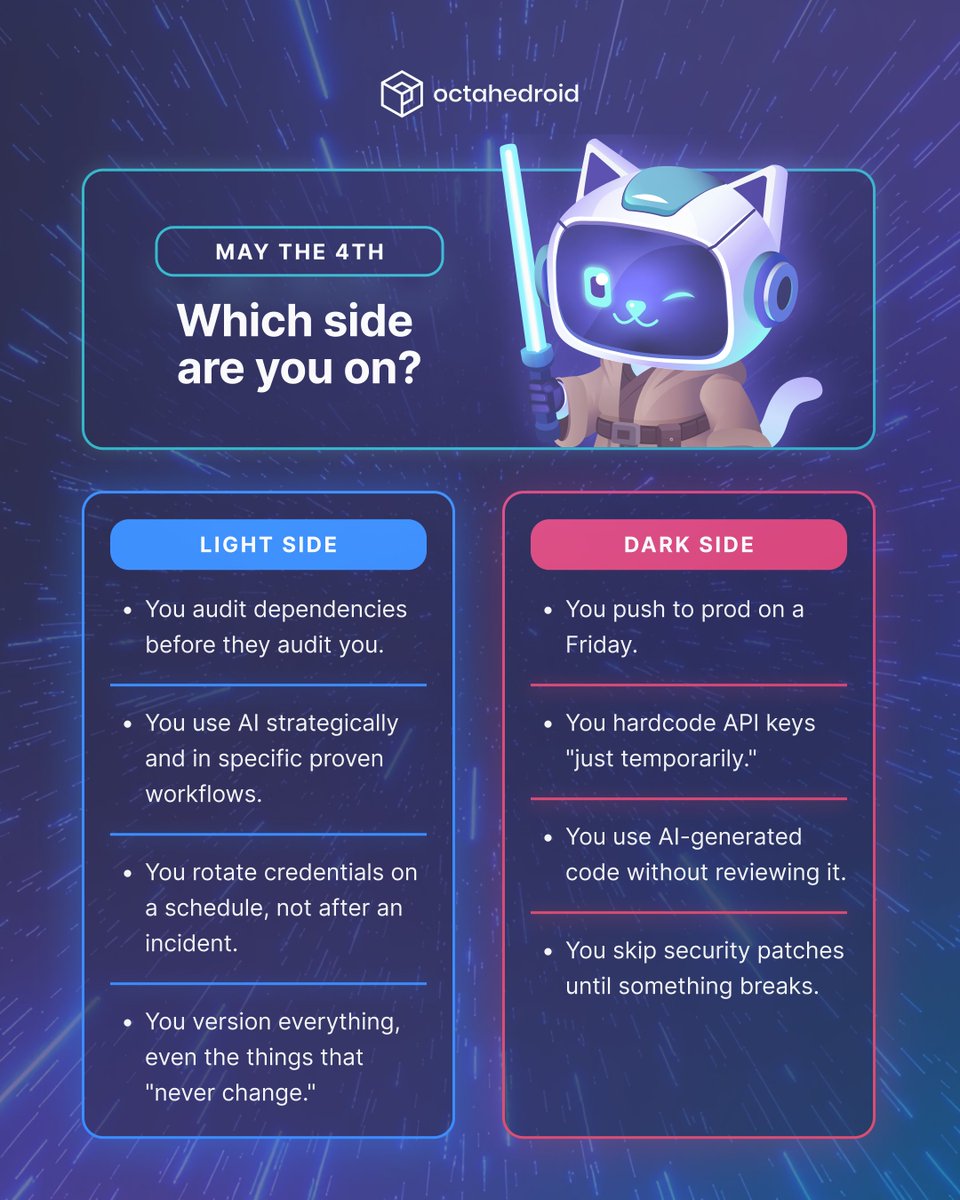
Every dev tells themselves they're on the Light Side, but the repo doesn't lie…
Between recent Next.js vulnerabilities, GitHub incidents, and supply chain attacks becoming the norm, the line between good and sloppy practices has never mattered more.
Where do you land?
Happy May the 4th from the team at Octahedroid!
Behind every project we ship, there's a group of people with very specific, very complementary skills. The kind of team where every role has a purpose, and nobody is redundant
The CMS you choose shapes how your team builds, how editors work, and how fast your users get content.
In a traditional CMS, the content, database, and front-end live inside the same system. Setup is fast, but everything is tightly coupled, and one server renders every page on every request.
A headless CMS separates content from the front-end entirely. Content lives in one place and gets delivered anywhere through an API, so developers build the front-end with whatever tools they choose and every user request triggers a live API call.
A static site generator takes a different approach: content sources, components, and data are pulled together once at deploy time, the build process outputs pre-rendered HTML files, and a CDN serves them instantly with no server involved at runtime.
Swipe through to see how the three core architectures compare, and what each one actually means for your stack and your team.
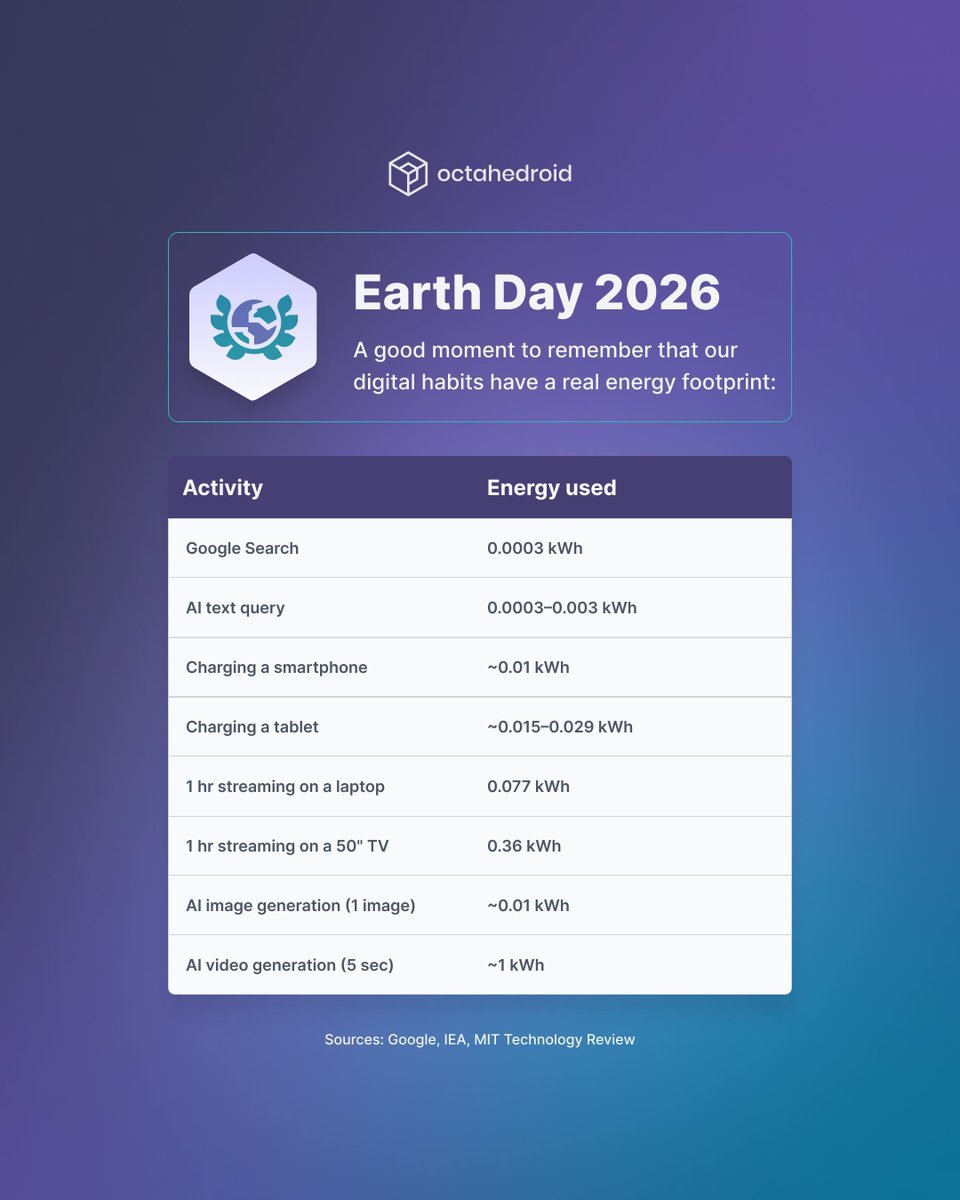
A few years ago, the conversation around digital sustainability was mostly about streaming and device usage.
Now AI is part of almost every workflow, and its energy footprint is a different order of magnitude.
Generating a 5-second AI video consumes about as much electricity as three hours of streaming on a 50-inch TV. A single AI image costs about the same energy as a full phone charge.
Earth Day is a good reminder to look at the habits we've built around technology, and how fast they're changing.
That doesn't mean avoiding the tools, but being aware of what we're actually using, and making more informed decisions about when and how we use them.
Teams evaluating decoupled Drupal often ask the same question: what happens to our forms?
In this webinar clip, Jesus Olivas shows how the Webform module works in a decoupled setup.
A form submission on the Next.js front end gets captured by Drupal's Webform, and from there, all the handlers you already use (Mailchimp, your CRM, any third-party integration) work exactly the same. No custom form logic on the front end. No rebuilding what Drupal already does well.
Watch the full demo here: https://t.co/gWVhrxuVw3
AI is making it easier for lean, technical teams to skip the CMS entirely. And as these tools get better, that option becomes viable for more people. But the answer was never about the tools.
It was always about the team.
For small, developer-heavy teams, flat files and AI agents can genuinely work.
For teams with editors, multiple publishing channels, or compliance requirements, a CMS provides structure that custom tooling takes months to rebuild.
The line between the two will keep shifting. Where your team falls today depends on who touches your content and what you need to sustain over time.
Nobody knows exactly where this line lands in two years.
What we do know is that the operational needs behind a CMS don't disappear when you remove it. They just move somewhere else.
We compared both approaches across seven capabilities. Swipe through and see where your team sits today.
Read the full article here: https://t.co/vjyFjLRiR4