Inspired by the amazing invention by @KrisGfx
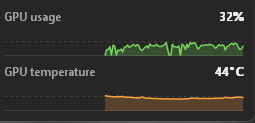
Today we launch TraySense, an open source tool to check your hardware usage and temps with as low as 1.1 MB memory usage and 0% CPU usage, no setup, just a double click.
Main features:
CPU, GPU, RAM and VRAM usage CPU, GPU and SSD temps displaying
Lives on your taskbar, works while gaming or idling
GitHub: https://t.co/yALsx6eT2U
Download: https://t.co/0TCxlsxrSu
You asked, we delivered,
TraySense v1.2 Out, featuring all of your requested changes!!
Features Change log:
- Added auto updater
- Added temps graphs
- Added two rows style for people who have tons of apps on taskbar
- Added 3 format of positioning control
Sensors/reading change log:
- Added Network Speed test
- Added disk utilization
- Added CPU power consumption
- Added GPU power consumption
- Added GPU Vram Usage
- Added GPU power consumption
- Added GPU and Vram clocks
Download link: https://t.co/F374TmZYtR
Follow to stay tuned !
Inspired by the amazing invention by @KrisGfx
Today we launch TraySense, an open source tool to check your hardware usage and temps with as low as 1.1 MB memory usage and 0% CPU usage, no setup, just a double click.
Main features:
CPU, GPU, RAM and VRAM usage CPU, GPU and SSD temps displaying
Lives on your taskbar, works while gaming or idling
GitHub: https://t.co/yALsx6eT2U
Download: https://t.co/0TCxlsxrSu
You asked, we delivered,
TraySense v1.2 Out, featuring all of your requested changes!!
Features Change log:
- Added auto updater
- Added temps graphs
- Added two rows style for people who have tons of apps on taskbar
- Added 3 format of positioning control
Sensors/reading change log:
- Added Network Speed test
- Added disk utilization
- Added CPU power consumption
- Added GPU power consumption
- Added GPU Vram Usage
- Added GPU power consumption
- Added GPU and Vram clocks
Download link: https://t.co/F374TmZYtR
Follow to stay tuned !
Inspired by the amazing invention by @KrisGfx
Today we launch TraySense, an open source tool to check your hardware usage and temps with as low as 1.1 MB memory usage and 0% CPU usage, no setup, just a double click.
Main features:
CPU, GPU, RAM and VRAM usage CPU, GPU and SSD temps displaying
Lives on your taskbar, works while gaming or idling
GitHub: https://t.co/yALsx6eT2U
Download: https://t.co/0TCxlsxrSu
@nikkkhil_io It’s actually what window report which is your true network utilisation, I see it as not as important but if you still want it I’ll add it
@nikkkhil_io I added that then removed it since it’s measuring 160 KB/s for upload on my pc which is what windows shows so I thought it was pretty uslesss
You asked, we delivered,
TraySense v1.2 Out, featuring all of your requested changes!!
Features Change log:
- Added auto updater
- Added temps graphs
- Added two rows style for people who have tons of apps on taskbar
- Added 3 format of positioning control
Sensors/reading change log:
- Added Network Speed test
- Added disk utilization
- Added CPU power consumption
- Added GPU power consumption
- Added GPU Vram Usage
- Added GPU power consumption
- Added GPU and Vram clocks
Download link: https://t.co/F374TmZYtR
Follow to stay tuned !
New Update today 👀
Featuring:
Internet speeds,
More tuning ralated to task bar positioning
Add power draws for specs
Add Storgaw consumption %
And much more…
Follow and stay around 🤝
Inspired by the amazing invention by @KrisGfx
Today we launch TraySense, an open source tool to check your hardware usage and temps with as low as 1.1 MB memory usage and 0% CPU usage, no setup, just a double click.
Main features:
CPU, GPU, RAM and VRAM usage CPU, GPU and SSD temps displaying
Lives on your taskbar, works while gaming or idling
GitHub: https://t.co/yALsx6eT2U
Download: https://t.co/0TCxlsxrSu
You asked, we delivered,
TraySense v1.2 Out, featuring all of your requested changes!!
Features Change log:
- Added auto updater
- Added temps graphs
- Added two rows style for people who have tons of apps on taskbar
- Added 3 format of positioning control
Sensors/reading change log:
- Added Network Speed test
- Added disk utilization
- Added CPU power consumption
- Added GPU power consumption
- Added GPU Vram Usage
- Added GPU power consumption
- Added GPU and Vram clocks
Download link: https://t.co/F374TmZYtR
Follow to stay tuned !
Inspired by the amazing invention by @KrisGfx
Today we launch TraySense, an open source tool to check your hardware usage and temps with as low as 1.1 MB memory usage and 0% CPU usage, no setup, just a double click.
Main features:
CPU, GPU, RAM and VRAM usage CPU, GPU and SSD temps displaying
Lives on your taskbar, works while gaming or idling
GitHub: https://t.co/yALsx6eT2U
Download: https://t.co/0TCxlsxrSu
You asked, we delivered,
TraySense v1.2 Out, featuring all of your requested changes!!
Features Change log:
- Added auto updater
- Added temps graphs
- Added two rows style for people who have tons of apps on taskbar
- Added 3 format of positioning control
Sensors/reading change log:
- Added Network Speed test
- Added disk utilization
- Added CPU power consumption
- Added GPU power consumption
- Added GPU Vram Usage
- Added GPU power consumption
- Added GPU and Vram clocks
Download link: https://t.co/F374TmZYtR
Follow to stay tuned !
TraySense v1.1 is out
You asked we deliver:
- No more overlapping tray icons or taskbar apps
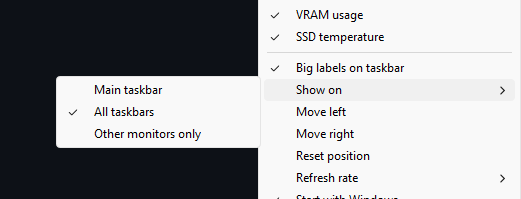
- Multi monitor support (right click > Show on)
- Fixed layout on bigger taskbars/stretch
Follow to stay tuned on next updates!
Download: https://t.co/2DpoGWcJYZ
Inspired by the amazing invention by @KrisGfx
Today we launch TraySense, an open source tool to check your hardware usage and temps with as low as 1.1 MB memory usage and 0% CPU usage, no setup, just a double click.
Main features:
CPU, GPU, RAM and VRAM usage CPU, GPU and SSD temps displaying
Lives on your taskbar, works while gaming or idling
GitHub: https://t.co/yALsx6eT2U
Download: https://t.co/0TCxlsxrSu
You asked, we delivered,
TraySense v1.2 Out, featuring all of your requested changes!!
Features Change log:
- Added auto updater
- Added temps graphs
- Added two rows style for people who have tons of apps on taskbar
- Added 3 format of positioning control
Sensors/reading change log:
- Added Network Speed test
- Added disk utilization
- Added CPU power consumption
- Added GPU power consumption
- Added GPU Vram Usage
- Added GPU power consumption
- Added GPU and Vram clocks
Download link: https://t.co/F374TmZYtR
Follow to stay tuned !
New Update today 👀
Featuring:
Internet speeds,
More tuning ralated to task bar positioning
Add power draws for specs
Add Storgaw consumption %
And much more…
Follow and stay around 🤝