I received wrong item instead of my order which is worth or 7,299 INR (new balance shoes). I raised a return request but the portal isnt reflecting it and not even one call was attempted from your side this is very disgrace and unhappy with your customer service. @amazonIN
I received wrong item instead of my order which is worth or 7,299 INR (new balance shoes). I raised a return request but the portal isnt reflecting it and not even one call was attempted from your side this is very disgrace and unhappy with your customer service. @amazonIN
Customer service assistance were so rude on this they are not even talking me properly and they saying they cant take my product as return. This is so so disdainful @amazonIN
I received wrong item instead of my order which is worth or 7,299 INR (new balance shoes). I raised a return request but the portal isnt reflecting it and not even one call was attempted from your side this is very disgrace and unhappy with your customer service. @amazonIN
#Giveaway Alert 🚨
We’re giving away the Apple iPhone 16 Pro Max 512 GB
Steps to Enter ⬇️
🔄 RETWEET
✅ FOLLOW 👉🏾 @dealztrendz
We’ll pick 🔟 random followers & each will get a Apple iPhone 16 Pro Max 512 GB 만우절
GET SET GO 만우절 #DealzTrendzGiveaway
#Interviews
Two scenario-based SQL Interview questions !
Question 1:
Scenario: You have a table called "orders" with columns "order_id", "customer_id", "order_date", and "total_amount". Write a query to find the customers who have placed an order in the last 30 days, but not in the last 14 days.
Answer:
```
SELECT customer_id
FROM orders
WHERE order_date BETWEEN DATEADD(DAY, -30, GETDATE()) AND DATEADD(DAY, -14, GETDATE())
GROUP BY customer_id
HAVING COUNT(order_id) > 0;
```
Question 2:
Scenario: You have a table called "products" with columns "product_id", "product_name", "price", and "product_category". Write a query to find the products that have a price greater than the average price of all products in their category, but less than the maximum price in their category.
Answer:
```
SELECT p1.product_id, p1.product_name, p1.price
FROM products p1
JOIN (
SELECT product_category, AVG(price) AS avg_price, MAX(price) AS max_price
FROM products
GROUP BY product_category
) p2 ON p1.product_category = p2.product_category
WHERE p1.price > p2.avg_price AND p1.price < p2.max_price;
```
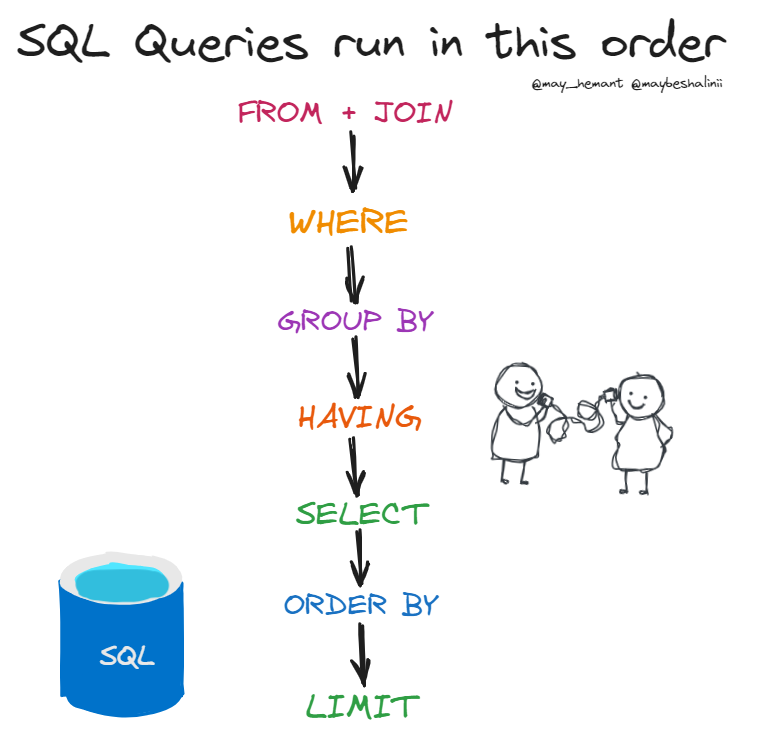
In which order SQL queries run?🔎👇
In SQL, the order in which queries are processed is typically defined by the logical query processing order. The logical query processing order is different from the order in which the SQL statements are written in the query.
Here is the general logical order in which SQL queries are processed:
1. FROM clause:
The data sources (tables, views, etc.) specified in the FROM clause are processed first.
This involves reading the data from the tables and combining data from multiple sources if there are joins.
2. WHERE clause:
The WHERE clause is applied to filter the rows based on the specified conditions.
Rows that do not meet the criteria in the WHERE clause are excluded from further processing.
3. GROUP BY clause:
If a GROUP BY clause is present, rows are then grouped based on the specified columns.
Aggregate functions (like SUM, COUNT, AVG) are then applied to each group.
4. HAVING clause:
If a HAVING clause is present, it filters groups based on aggregate conditions.
Groups that do not meet the criteria in the HAVING clause are excluded.
5. SELECT clause:
The SELECT clause is then applied to the result set.
Columns are selected, and expressions are computed.
6. ORDER BY clause:
If an ORDER BY clause is present, the result set is then sorted based on the specified columns.
7. LIMIT/OFFSET (if applicable):
If there is a LIMIT or OFFSET clause (used in some database systems), the final result set is then limited or offset accordingly.
Everyone should learn EXCEL irrespective of your profession.
It will put you ahead of the curve.
Here are 5 YouTube videos that will help you master Excel:
Power BI for Data Science Complete Study Plan
10 hours a week to dedicate to this, here's a 12-week study plan
Week 1: Introduction to Power BI
Day 1-3: Begin with the official Power BI Guided Learning resources to get familiar with the platform.
Link: https://t.co/PWVCCtUccj
Day 4-7: Watch the "Getting Started with Power BI" series
Link: https://t.co/o85dKUszN0
Week 2: Data Loading and Transformation
Day 1-4: Explore the Power Query Editor and learn how to load and transform data.
https://t.co/yFD5vVZnlb
Day 5-7: Watch the tutorial on data transformation in Power BI
https://t.co/DvWD9ETbxH
Week 3: Building Visualizations
Day 1-4: Dive into creating basic visualizations like tables, charts, and maps using the official documentation.
[https://t.co/UctxYxRXjd!)
Day 5-7: Watch tutorials on creating all the visuals
https://t.co/dpCV0Z6x7Q
Week 4: Advanced Visualizations
Day 1-4: Explore the advanced Power BI tutorials
https://t.co/IJVpGFRkgT
Day 5-7: Watch tutorials on including custom visuals and slicers.
Customer Visuals: https://t.co/2sJreyuIFX
Slicers: https://t.co/pODYgrAhNh
Week 5: Data Modeling and DAX
Day 1-4: Learn about data modeling and the DAX language
Dax: https://t.co/1OHrfIKZmY
Data Modelling: https://t.co/vTp9wthJrz
Day 5-7: Watch DAX tutorials on Power BI's YouTube channel.
https://t.co/zfH6OyTmGr
Week 6: Dashboard Design, Publishing And Project
Explore dashboard creation, Design, and publishing options in Power BI.
Design: https://t.co/RDkRpiqPIs
Publish: https://t.co/L3rfqjx7Qe
Project: https://t.co/8NG4Fn9WKp
Throughout your study plan, remember to practice what you learn by working on personal projects or datasets related to your data science field.
- - -
That’s all for now!
- Smash the LIKE button and REPOST
- BOOKMARK because you’ll definitely want to revisit this again
- Follow me for more posts like this