NO TIENE NINGÚN SENTIDO. ES LA SALVACIÓN MÁS LOCA DE LA HISTORIA 🔥
@casademontBZ se salva cuando perdía de 5 puntos a falta 6 segundos 🤯
#LigaEndesaxDAZN 🏀
NO TIENE NINGÚN SENTIDO. ES LA SALVACIÓN MÁS LOCA DE LA HISTORIA 🔥
@casademontBZ se salva cuando perdía de 5 puntos a falta 6 segundos 🤯
#LigaEndesaxDAZN 🏀
🎉 Ha llegado el día. Lanzo Versátil. 🎉
Y lo hago con un regalo al final del tweet.
Durante meses he estado construyendo el espacio que me habría gustado tener cuando empecé.
Un lugar donde analizar estrategias, entender en profundidad cómo se construyen marcas y conectar aprendizajes que realmente ayuden a los creadores a hacer cosas grandes.
A esto accedes con tu membresía en Versátil:
✅ Análisis en profundidad, en formato VÍDEO y en TEXTO, de campañas y estrategias de las mejores marcas digitales.
✅ Un buscador de marcas para encontrar inspiración.
✅ De cada marca, tendrás disponible el enlace a su web, su instagram, y su biblioteca de Meta Ads.
✅ Acceso a todas las herramientas y plantillas disponibles.
✅ Acceso a formación, con lecciones en las que aplicamos lo que aprendemos del análisis de marcas.
💡 Para todos, GRATIS, La Versátil. Todos los domingos a las 9:00 recibirás una newsletter que concibo como espacio para pensar, aprender y conectar ideas.
Si te interesa el marketing desde la estrategia, la creatividad y la diferenciación, esto es para ti.
Regalo, para los más rápidos.
Con el código TWITTER, tendrás tu suscripción al 50% de por vida, elijas mensual, o anual. Ese precio, con ese descuento, para siempre.
🔗 Te dejo el enlace en el siguiente tweet
Es mi proyecto más importante del año, y estoy deseando ver qué construimos juntos. Agradecido, por adelantado, a todos los que habéis ayudado a lanzar esto con vuestra visión, y por compartir esto con vuestro entorno.
Voy con todo.
🎙️ @RaulJardiel define a @PQuiilez para @sportaragon_com.
🏃 Quilez es una de las novedades más interesantes en el cuerpo técnico del @RealZaragoza:
🗣️ “Pablo Quilez es una persona tremendamente capaz, un gran profesional. Moderno, versátil y con una mentalidad abierta”
🔜🔜
📺💥 El VAR convierte LaLiga EASports en una broma de cámara oculta.
👉🏻 Dobvyk se encuentra por delante del último defensor de forma clara.
❌ ES FUERA DE JUEGO.
▪️ La infracción es apreciable tirando únicamente la línea del defensor.
Nos volveremos a ver.
Ilusionados y los once de siempre.
Una gira reencuentro que arranca en el Wizink y que continuará en 2025.
València, estaremos.
Serán noches distintas.
♥️
#LookerStudio Chrome extension
The new version of LS Companion is available
You want to show you reports without revealing confidential data? For a portfolio or a meeting ?
2 options have been added (Settings tab):
- Mix text values
- Mix numeric values
https://t.co/XuRnYulYjC
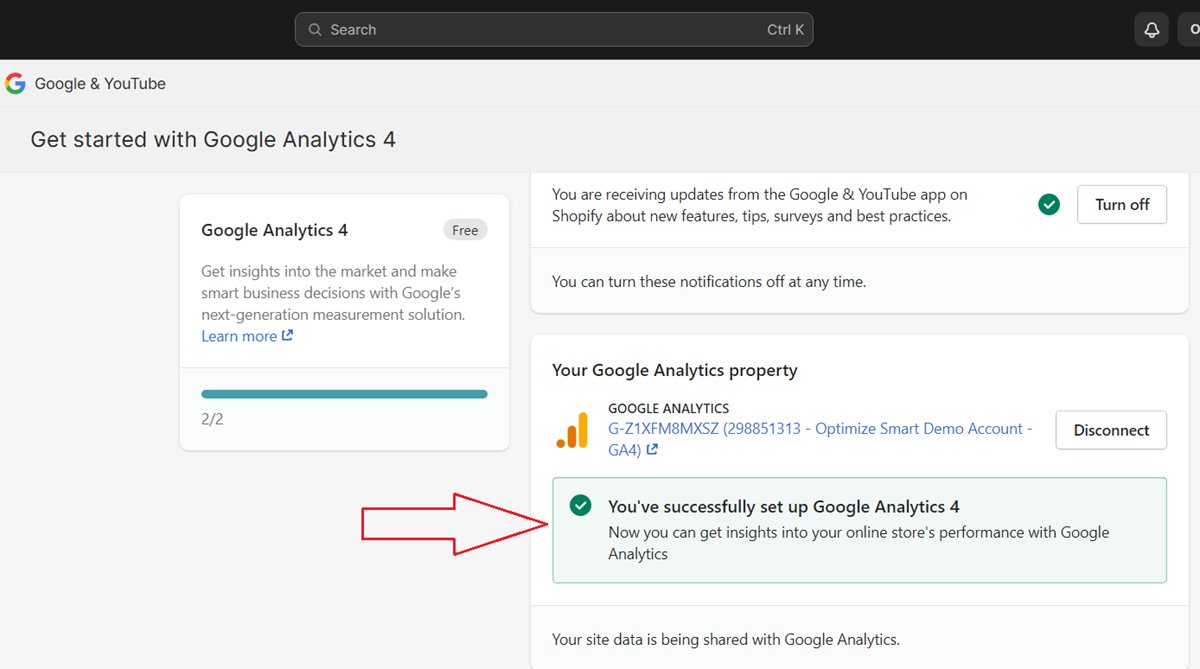
There is a lot of misinformation regarding setting up #GA4 for Shopify. Some experts suggest using the native integration; some suggest using GTM. But in reality, you need both.
The use of the Google & YouTube Channel app for installing GA4 is called the Shopify native integration.
When you connect your GA4 property to your Shopify Store via this app, the GA4 tracking is automatically installed for your store.
You also automatically start tracking ecommerce events (like 'purchase') in your GA4 property without any additional configuration.
The e-commerce data layers are automatically set up for your store.
.
.
The following ecommerce events are automatically tracked when you use the Google & YouTube Channel App for Shopify:
add_payment_info
add_to_cart
begin_checkout
purchase
view_item
It is best advised to use Shopify native Integration only for the above events and not try to implement them using Google Tag Manager, which many developers do.
Using GTM can make it very difficult to pass Products with variants and may lead to multiple products in GA4 reports with incorrect revenue numbers.
For example,
If the product name is ‘Magnet perfume’ and has various variants like ‘30 ml bottle’, ‘50 ml bottle’, and ‘100 ml bottle’., GTM could consider these three variants as different product names, and you may see incorrect reporting.
This happens because the product name in the data layer changes, which is generally used for custom event tracking from the backend of the website.
But if you use native Shopify Integration, Shopify assigns the product variant correctly, and there are no issues in the GA4 reporting.
.
.
Another reason to use native Shopify integration is that “Checkout.liquid” will be deprecated for the ‘Information’, ‘Shipping’, and ‘Payment’ pages on August 13, 2024 and for the ‘Thank you’ and ‘Order status’ pages on August 28, 2025.
If you currently use ‘checkout.liquid’, you need to upgrade to ‘Checkout Extensibility’ before the aforementioned deadlines.
.
.
The following ecommerce events are not automatically tracked when you use the ‘Google & YouTube Channel’ App for Shopify:
select_item
select_promotion
view_cart
view_item_list
view_promotion
However, these events can be tracked via GTM.
.
.
You will also need to configure GTM for the Google & YouTube channel App to avoid duplicate events.
Similarly,
You may need to configure your Shopify store for GTM + Google & Youtube Channel App tracking to remove e-commerce data layers that are not required and that may cause duplicate events.
Long story short, you will need to use both the ‘Google & YouTube Channel App and GTM for a complete GA4 Shopify tracking setup. It is not as easy tracking setup.
Hola @SEUR_responde Me gustaría localizar mi pedido desaparecido antes de que sea demasiado tarde. ¿Alguna forma de comunicarse con vosotros además de los MDs que no atendéis?
Google published a set of rules (checklist) for #GA4 UTM tracking, but most people continue to ignore this checklist and tag URLs however they please. Then, they complain about the "unassigned" traffic appearing in their reports.
.
.
Unassigned traffic in GA4 refers to the website traffic that is not attributed to any one of the following default channel groups:
Affiliates
Audio
Cross-network
Direct
Display
Email
Mobile Push Notifications
Organic Search
Organic Shopping
Organic Social
Organic Video
Paid Other
Paid Search
Paid Shopping
Paid Social
Paid Video
Referral
SMS
.
.
Google uses certain rules (called ‘channel rules‘) to group similar website traffic sources (usually that all belong to the same traffic medium).
For example,
Consider the following traffic sources:
google (as in google / organic)
yahoo (as in yahoo / organic)
bing (as in bing / organic)
aol (as in aol / organic), etc.
Since they all have the same traffic medium, ‘organic’, they will be grouped together under the channel group ‘organic search’.
Google does not have any pre-defined channel rules to group traffic sources that have either user-defined sources and mediums or are (not set).
So, what it will do is group these traffic sources under the ‘unassigned’ channel group.
.
.
Your UTM parameters should strictly follow the channel rules for manual traffic (check the screenshot below) wherever you can so that your website traffic is attributed to one of Google‘s default channel groups.
For example, consider the following URL of a Facebook ad:
https :// www. abc .com/book-maths-and-stats/?utm_source=facebook&utm_medium=fb-ad&utm_campaign=pdf-book-campaign&utm_content=ad1
Here, ‘fb-ad’ is not a system-defined traffic medium.
So Google will label all the website traffic from this URL under the ‘unassigned’ channel group.
But this is not what you want.
You want this traffic to be grouped under the ‘paidsocial‘ channel.
To do that, rewrite the UTM parameters like the one below:
https :// www .abc .com/book-maths-and-stats/?utm_source=facebook&utm_medium=paid&utm_campaign=pdf-book-campaign&utm_content=ad1
Here, paid is a system-defined traffic medium.
.
.
Use system-defined traffic sources and system-defined traffic mediums wherever possible.
A system-defined source is one that is already defined/recognized by GA4 as a traffic source.
Similarly, a system-defined medium is one that is already defined/recognized by GA4 as a traffic medium.
.
.
The more user-defined traffic sources and/or medium you will use, the higher will be the unassigned website traffic in GA4.
Memorize channel rules and definitions for accurate tagging.
It is very important to know how Google groups similar traffic sources and how it defines a particular marketing channel.
This knowledge will help you tremendously in tagging URLs that follow GA4 default channel rules.
Share this information with all those who tag URLs in your organization. Everybody needs to be on the same page.
@GuilleMellado Era la intención, hasta que la motivación se fue perdiendo y las comisiones de la plataforma cayeron. Hoy dan lo justo para mantenerlas y poder ver ejemplos reales en clases... y poco mas 😅
Here is how you can find out which products were bought together in a single transaction in #GA4 and which items to always keep in stock for cross-selling.
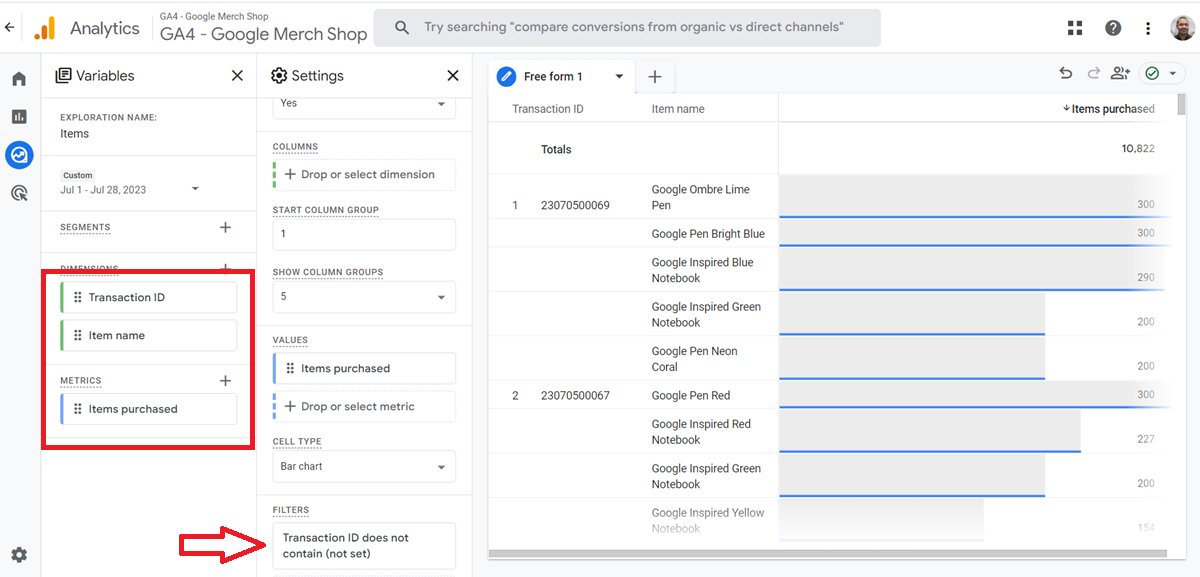
Create a new exploration report with the following dimensions and metric:
Dimensions: Transaction ID, Item name
Metrics: Items purchased
.
.
The 'Items purchased' metric tells you how many units of a single item were purchased.
For example,
Let us suppose a user purchased one quantity of the 'Stan and Friends Tee' and two quantities of the 'Google Grey Women's Tee' in a single transaction.
Now the Item quantity for 'Stan and Friends Tee' is 1
The item quantity for 'Google Grey Women's Tee' is 2
Total Quantity: 1+2 = 3
.
.
Note(1): The 'Items purchased' metric is the same as the 'Item quantity' metric.
Note(2): Is (not set) a big number in your report?
(not set) do not appear in GA4 e-commerce reports without any good reason.
There is almost always some tracking/tagging issue, which you can fix it.
Other than that, apply the following dimension filter to your report so that (not set) does not appear:
'Transaction ID' does not contain (not set).