Destiny 2 was not a failure.
Destiny is—was—by all measures, one of the most resounding successes in its field, and its end is a consequence of its management, not the game itself, nor the team and community that propped it up time and time again, or the vision that fueled it.
Destiny was a pioneer of the live-service formula. It was one of the earliest games of the 2010s to try to deliver constant goods, whether they took the form of missions, new loot rewards, or skins, to a console audience.
https://t.co/Y6jQnqIJKu
As a former Wizard101 Community Manager, I genuinely can’t believe we’re at the point where Destiny 2 is receiving its final update. Destiny has been one of the defining live-service games of the last decade—countless raids, expansions, seasons, and memories shared by millions of Guardians.
Get online June 9th for one more journey, one more adventure, one more Destiny!
See you starside, Guardians.
#WeWantDestiny3
Build your Monument of Triumph.
Play new and updated content including Pantheon, Sparrow Racing League, Distortions, and new Triumph pursuits celebrating your Guardian’s journey across Destiny 2.
New challenges, abilities, and rewards arrive for all Guardians on June 9, 2026.
⚪ https://t.co/Punb9TAsCe
While our focus for Monument of Triumph is to revitalize many core pieces of Destiny 2 with fresh experiences and rewards, we do have a few items coming to the Lawless Frontier for players who wish to hop in.
For those who love their Praxic Blade, we hope you enjoy the hunt...
Here are the full releases notes for @Tesla's new 2026 Spring Update, which just started rolling out tonight:
• New Self-Driving app: subscribe with a single tap, learn how to activate and use the feature, and view ongoing stats.
• Immersive Sound Upgrade: Premium Immersive Sound uses advanced sound extraction to place the listener in front of a detailed soundstage within an Immersive space. This enhancement works with all streaming sources.
• "Hey Grok": Launch Grok by saying "Hey Grok." You can also set location based reminders, like "remind me to pick up milk when I'm near home." Say "goodbye" to dismiss.
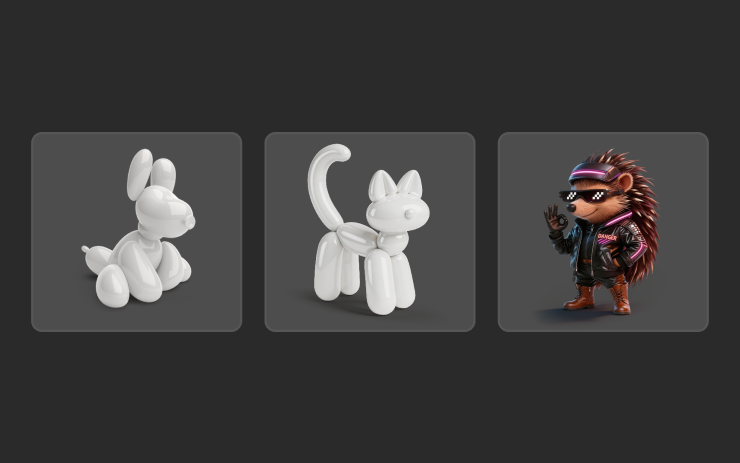
• Pet Mode: Choose and name your pet. New pet hedgehog icon.
• Visual Updates: The center display now features higher quality images of your Tesla, and an enhanced park scene environment.
• Trips: Trips are now in the Energy app, where you can create and manage multiple trips to track energy usage across different drives, routes, or conditions.
• Blind Spot Warning Accent Lights: Accent lights now turn red when an object is in your blind spot and your turn signal is engaged, or when an approaching object is detected while parked.
• Music App Queuing: Swipe right on tracks in Apple Music or Spotify to add them to the queue. In Apple Music, tap and hold on a track to add or remove from Favorites.
• Automatic Software Updates: Your Tesla can now automatically install downloaded software updates overnight. When enabled, updates will install while your Tesla is parked and not in use, ensuring you always have the latest features and improvements.
• Dashcam Viewer Updates: Recent Dashcam footage can now extend up to 24 hours, and you can save any clip for permanent storage on your Tesla or on your phone. Clips stay on the vehicle and are never shared to Tesla. Clips downloaded to your phone now include details such as speed, steering wheel angle, and Self-Driving state. Downloads require Premium Connectivity and Mobile App version 4.55.6 or later.
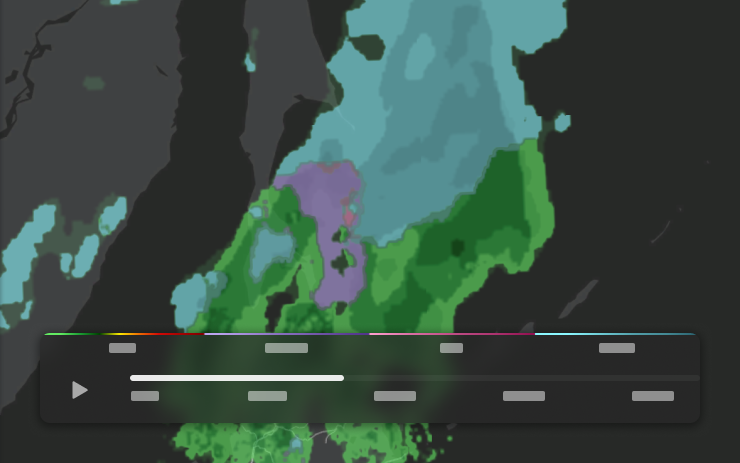
• Weather Maps Improvements: Weather maps now show snow and rain with improved colors that make it easier to distinguish between precipitation types. You can also view the past hour of weather data to see how conditions have been changing along your route. This feature requires Premium Connectivity.
• Supercharger Pricing Filter: You can now choose to route only to Superchargers with Tesla pricing. When enabled, Trip Planner will avoid locations where Tesla does not set charging prices or accept Free Supercharging credits.
• Keyboard: Your selected keyboard language will also select the language used for dictation. Tap the international keyboard button to change keyboard and dictation language, without changing voice command language. Tap the mic icon in the keyboard to dictate.
• Sketchpad: Unleash your inner artist with the enhanced Sketchpad, now supporting stickers and emojis. Save your sketches to access them in the Mobile App and share. Requires Mobile App version 4.55.6 or later.
• Security Improvements
This is update 2026.14.1