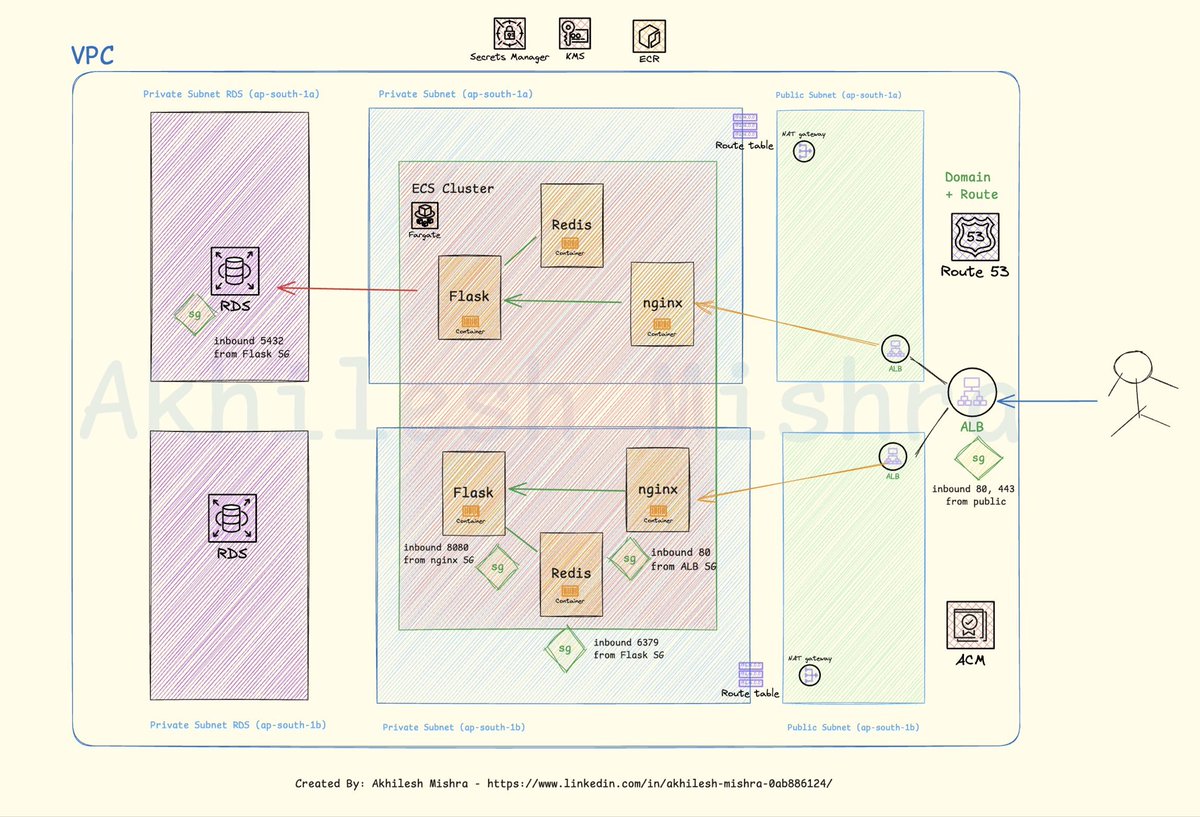
In my DevOps bootcamp last week, we built a complex project on AWS ECS. AWS + Terraform + GitHub Actions + multi-environment setup
🏗️ Architecture Overview:
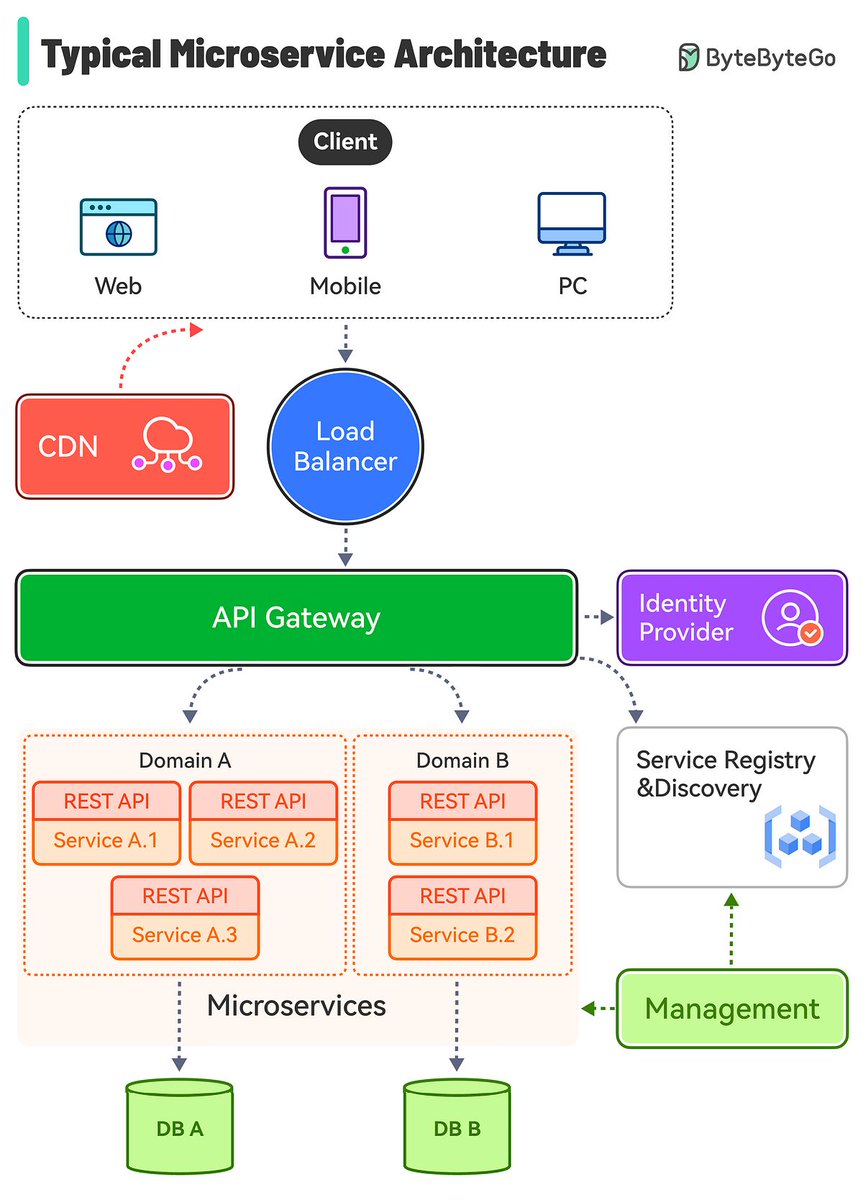
Application Stack: Flask + Nginx + Redis microservices
Container Orchestration: ECS Fargate for 3 services
Service Mesh: ECS Service Connect for inter-service communication
Load Balancing: ALB with HTTPS listener
DNS & SSL: Route53 + ACM for domain management
Database: RDS PostgreSQL in private subnets
Caching: Redis for session management & caching
🔐 Security & Best Practices:
✅ Multi-AZ deployment across 2 availability zones
✅ Private subnets for ECS tasks and RDS
✅ Security Groups with least privilege access
✅ Secrets Manager for database credentials
✅ KMS encryption for data at rest
✅ ECR for secure container image storage
✅ NAT Gateways for secure outbound internet access
🛠️ Infrastructure as Code:
Terraform modules for reusable infrastructure
Multi-environment support (dev/staging/prod)
GitHub Actions for CI/CD pipeline
Automated deployments with blue-green strategy
💡 Key Learnings:
🔹 ECS Service Connect simplifies service discovery vs traditional ALB routing
🔹 Fargate eliminates server management while maintaining performance
🔹 Multi-subnet architecture ensures high availability and fault tolerance
🔹 Proper security groups are crucial for zero-trust networking
🔹 Terraform state management becomes critical in team environments
📊 Architecture Highlights:
Scalable: Auto-scaling based on CPU/memory metrics
Resilient: Multi-AZ deployment with health checks
Secure: End-to-end encryption and network isolation
Cost-Optimized: Fargate spot instances for non-prod environments
Observable: CloudWatch logging and monitoring integrated
This project perfectly demonstrates how modern DevOps practices combine infrastructure automation, containerization, and cloud-native services to build enterprise-grade applications.
CI/CD Simplified Visual Guide 👇
𝗖𝗼𝗻𝘁𝗶𝗻𝘂𝗼𝘂𝘀 𝗜𝗻𝘁𝗲𝗴𝗿𝗮𝘁𝗶𝗼𝗻 (𝗖𝗜) is the practice of frequently merging code changes into a shared repository, automatically verifying their integrity.
𝗖𝗼𝗻𝘁𝗶𝗻𝘂𝗼𝘂𝘀 𝗗𝗲𝗽𝗹𝗼𝘆𝗺𝗲𝗻𝘁 (𝗖𝗗) automates the release and deployment of code changes into production, ensuring a streamlined and reliable process.
This visual guide will help you easily understand.
55K+ read my DevOps and Cloud newsletter: https://t.co/WBucLdwLhJ
What do we cover:
DevOps, Cloud, Kubernetes, IaC, GitOps, MLOps
🔁 Consider a Repost if this is helpful
People think building AI agents in n8n is hard.
Reality: one prompt builds an entire agent for you.
No need to learn complex workflows or spend hours on setup.
Just give ChatGPT the following prompt. It handles the entire agent creation process in minutes.
Here's exactly how to use it step by step:
[bookmark 🔖 this post for later]
The process:
1. Open ChatGPT
2. Paste in one mega prompt
3. Describe the agent’s purpose
4. GPT delivers:
↳ Workflow structure
↳ n8n nodes
↳ Trigger setup
↳ LLM integration
↳ Error handling
↳ Ready-to-use code
5. Implement the steps in n8n.
And you’re done.
Here's the mega prompt (copy it):
- - - prompt starts below this line - - -
<role>
You are an experienced automation architect with advanced knowledge of building AI-powered agents in n8n. You have deep expertise in automation flows, activation triggers, third-party APIs, GPT connections, custom JavaScript logic, and error handling.
</role>
<task>
Walk me through, step by step, how to create an AI-powered agent in n8n. The agent’s purpose is: {$AGENT_PURPOSE}
</task>
<requirements>
1. Begin by defining the agent's objectives and necessary inputs/outputs.
2. Create the overall architecture for the agent workflow.
3. Suggest the required n8n nodes to include (built-in, HTTP, function, OpenAI, etc.).
4. Explain how to configure each node and why it’s needed.
5. Provide instructions for any custom logic (JavaScript functions, expressions, etc).
6. Help me implement retry logic, error handling, and backup procedures.
7. Show how to store and access data between runs (e.g., with Memory, Databases, or Google Sheets).
8. When the agent requires external APIs or services, explain the connection and authentication process.
</requirements>
<output_style>
Be exceptionally clear and practical, as if coaching a beginner automation developer. Use visual formats if possible (e.g., structured lists, flow-style layout), and always provide ready-to-implement node configurations or code examples.
</output_style>
<expandability>
Conclude by recommending ways to increase the agent's capabilities, such as workflow chaining, webhook integration, or connections to vector databases, CRMs, or Slack.
</expandability>
- - - prompt ends above this line - - -
I used this to create:
✓ A Reddit, Claude, Telegram content curator
✓ A prospect qualifier that evaluates and directs incoming leads
✓ An automated email assistant that analyzes messages + creates replies
All driven by Claude + n8n.
- No Zapier.
- No LangChain.
- No complex frameworks.
Why this approach works:
→ GPT acts like a senior engineer, designing the agent end-to-end
→ n8n gives you complete flexibility (logic, memory, APIs, webhooks)
→ Claude or ChatGPT handles reasoning and decision-making
It’s the simplest way to launch real AI agents today.
📌 Get Advanced ChatGPT Guide (free): https://t.co/kOBWfKrBaX
👉 Follow me @AndrewBolis for more and 🔄 Repost this to help others learn AI
The Kubernetes v1.35 Production Readiness Review Freeze goes into effect October 9th: this is the first release where the PRR is being used, so if you want to opt-in for an enhancement, this is the time to open a PR https://t.co/w5LWMzMIdr
Kubernetes v1.35 Release Cycle: Enhancements Freeze deadline of 16th October is approaching. All opted-in Enhancements have to comply with the requirements, or file for an exception, to be included in the release https://t.co/r0Aqh9vcVY
How to Build n8n AI Agents in 1 Click (No Coding Required)
Step 1: Create Claude project with n8n knowledge base
Step 2: Upload custom instructions and templates
Step 3: Screenshot target workflow
Step 4: Paste image → get instant JSON
Step 5: Copy-paste into n8n → working automation ✅
This process turns hours of work into seconds 💫
Save/bookmark this video, it will revolutionize your automation workflow 🚀
Want the SOP? DM me.
Agents & MCP are great... but how can you DEPLOY an agent with MCP tools?
Here's the fastest way I've found to build and deploy with the OpenAI Agents SDK in <3 minutes.






![AndrewBolis's tweet photo. People think building AI agents in n8n is hard.
Reality: one prompt builds an entire agent for you.
No need to learn complex workflows or spend hours on setup.
Just give ChatGPT the following prompt. It handles the entire agent creation process in minutes.
Here's exactly how to use it step by step:
[bookmark 🔖 this post for later]
The process:
1. Open ChatGPT
2. Paste in one mega prompt
3. Describe the agent’s purpose
4. GPT delivers:
↳ Workflow structure
↳ n8n nodes
↳ Trigger setup
↳ LLM integration
↳ Error handling
↳ Ready-to-use code
5. Implement the steps in n8n.
And you’re done.
Here's the mega prompt (copy it):
- - - prompt starts below this line - - -
<role>
You are an experienced automation architect with advanced knowledge of building AI-powered agents in n8n. You have deep expertise in automation flows, activation triggers, third-party APIs, GPT connections, custom JavaScript logic, and error handling.
</role>
<task>
Walk me through, step by step, how to create an AI-powered agent in n8n. The agent’s purpose is: {$AGENT_PURPOSE}
</task>
<requirements>
1. Begin by defining the agent's objectives and necessary inputs/outputs.
2. Create the overall architecture for the agent workflow.
3. Suggest the required n8n nodes to include (built-in, HTTP, function, OpenAI, etc.).
4. Explain how to configure each node and why it’s needed.
5. Provide instructions for any custom logic (JavaScript functions, expressions, etc).
6. Help me implement retry logic, error handling, and backup procedures.
7. Show how to store and access data between runs (e.g., with Memory, Databases, or Google Sheets).
8. When the agent requires external APIs or services, explain the connection and authentication process.
</requirements>
<output_style>
Be exceptionally clear and practical, as if coaching a beginner automation developer. Use visual formats if possible (e.g., structured lists, flow-style layout), and always provide ready-to-implement node configurations or code examples.
</output_style>
<expandability>
Conclude by recommending ways to increase the agent's capabilities, such as workflow chaining, webhook integration, or connections to vector databases, CRMs, or Slack.
</expandability>
- - - prompt ends above this line - - -
I used this to create:
✓ A Reddit, Claude, Telegram content curator
✓ A prospect qualifier that evaluates and directs incoming leads
✓ An automated email assistant that analyzes messages + creates replies
All driven by Claude + n8n.
- No Zapier.
- No LangChain.
- No complex frameworks.
Why this approach works:
→ GPT acts like a senior engineer, designing the agent end-to-end
→ n8n gives you complete flexibility (logic, memory, APIs, webhooks)
→ Claude or ChatGPT handles reasoning and decision-making
It’s the simplest way to launch real AI agents today.
📌 Get Advanced ChatGPT Guide (free): https://t.co/kOBWfKrBaX
👉 Follow me @AndrewBolis for more and 🔄 Repost this to help others learn AI](https://pbs.twimg.com/media/G3EVNeAb0AAFQO5.png)


