@Ms_Giauque_MES There are so many new technology tools and devices emerging every day for education. As a leader, it's really important that we stay current and practice using these tools. It is also important to distinguish what tools can be resourceful for the teachers we serve.
@misswatts3rd I completely agree with you. This is why I believe that parents need trainings for classroom tools and device so that they can support their children at home.
Technology provides students tools to explore the world. Through PBL, we can engage students by allowing them to explore topics of their interest and share knowledge with their peers in creative ways. Technology allows our students to take charge of their education. #KSUITEC7410
@LindsayNeck I think this would be perfect for a STEM/STEAM bin! I would add a writing or math component to this. Students can create a graph based on the piece or write a story about how all of the pieces came together to create a picture.
I love seeing activities like these. This is a great hands-on activity that students can participate complete independently that can start a conversation about the food chain, food web, and how different creatures affect each other.
Take your classroom to a new level by using @eyejackapp. This augmented reality app will allow students to design their own projects in Science and Social Studies that will really come to life. #creativeedu
I did an activity similar to this with my students. You would be surprised how helpful this is for students with a read-aloud about stress. #creativeedu
Looking for a fun end-of-the-year activity? @BookCreatorApp allows students to create books/stories online. Imagine if your students had to write a story about this school year. Now that would be interesting. #creativeedu
Imagine giving your students traveling around the world and creating videos showing themselves traveling across the country. #Doink is a great kids-friendly greenscreen, drawing, and video editing tool. #creativeedu
#COVID19 has made it a challenge for students to stay connected. Although they are online, it is important that they can still communicate with each other and feel some form of unity. Mrs. Beachboard created "digit desks" that allow her students to connect in a creative way.
Using Google Slides, Cathleen Beachboard created a digital "desk" for each student in her virtual classroom because she "needed a place where we can all be together."
@chrisleycreator I am looking forward to creating more collaborative opportunities for my students. I know this will also be a great way for students emotionally to remain social with their friends during a time when they are not able to see people outside their households.
An essential element for Universal Design is providing clear instructions in multiple ways to cater to all students' abilities. We provide instructions through a video with captions modeling an assignment, an anchor chart, and written text. #ITEC7481#UDL
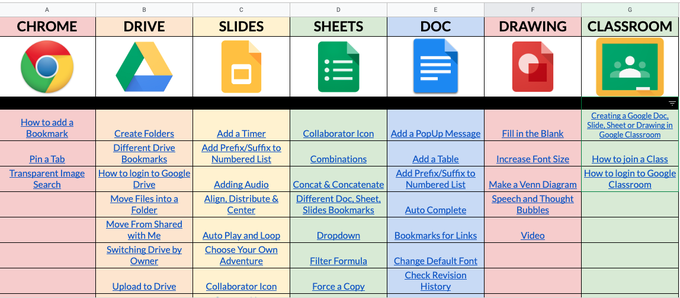
A valuable resource for educators AND families. You want to make a copy of this now💯 @GoogleForEdu Tutorials created by so many talented people! Thank you for sharing ❤️
Check it out 👇
https://t.co/RpaBFJxnt2