Kotlin now has its own public benchmark for AI coding agents. 🚀
It ranks agents on 105 engineering tasks from open-source Kotlin repositories.
Compare agents by resolution rate, token cost, and latency, and dive into the methodology.
👉 https://t.co/drh9NtVU8I
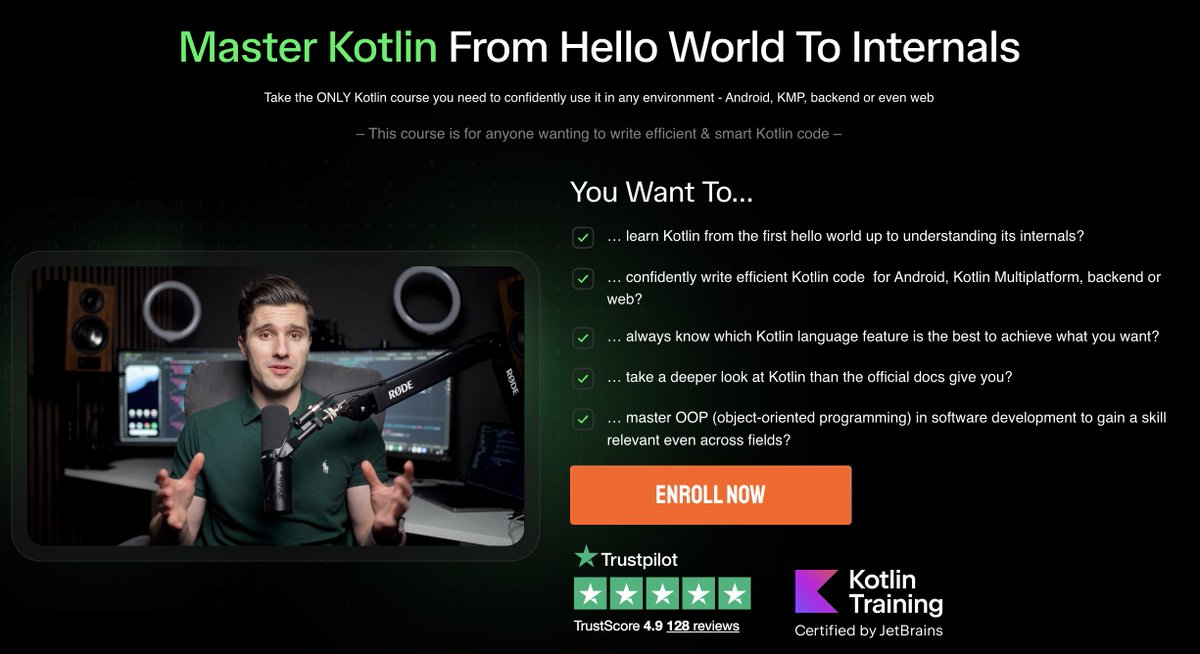
Master Kotlin from “Hello, world!” to compiler internals.
Philipp Lackner’s new course includes 200+ videos (20+ hours), covers all language features, and explores generated bytecode to build deep understanding.
Save 30% until March 2, 2026.
👉 Enroll now: https://t.co/TraE7dcQsS
Authentication in REST APIs acts as the crucial gateway, ensuring that solely authorized users or applications gain access to the API's resources.
Some popular authentication methods for REST APIs include:
1. Basic Authentication:
Involves sending a username and password with each request, but can be less secure without encryption.
When to use:
Suitable for simple applications where security and encryption aren’t the primary concern or when used over secured connections.
2. Token Authentication:
Uses generated tokens, like JSON Web Tokens (JWT), exchanged between client and server, offering enhanced security without sending login credentials with each request.
When to use:
Ideal for more secure and scalable systems, especially when avoiding sending login credentials with each request is a priority.
3. OAuth Authentication:
Enables third-party limited access to user resources without revealing credentials by issuing access tokens after user authentication.
When to use:
Ideal for scenarios requiring controlled access to user resources by third-party applications or services.
4. API Key Authentication:
Assigns unique keys to users or applications, sent in headers or parameters; while simple, it might lack the security features of token-based or OAuth methods.
When to use:
Convenient for straightforward access control in less sensitive environments or for granting access to certain functionalities without the need for user-specific permissions.
Over to you:
Which REST API authentication method do you find most effective in ensuring both security and usability for your applications?
–
Subscribe to our weekly newsletter to get a Free System Design PDF (158 pages): https://t.co/FIzCeaWsZV
URL, URI, URN: Understanding the Differences
These terms form the foundation for identifying and accessing resources on the internet. Without them, finding and sharing information online would be more difficult.
URI (Uniform Resource Identifier)
- Identifies a logical or physical resource on the web
- URL and URN are subtypes of URI
- General structure: scheme:[//authority]path[?query][#fragment]
URL (Uniform Resource Locator):
- Locates and provides access to a resource on the web
- Key concept in HTTP, also used with other protocols (e.g., FTP, JDBC)
URN (Uniform Resource Name):
- Names a resource without specifying its location or how to access it
- Typically uses the "urn" scheme
- Serves as persistent, location-independent resource identifiers
- Cannot be used to locate a resource directly. They need to be resolved through a separate resolution mechanism.
–
Subscribe to our weekly newsletter to get a Free System Design PDF (158 pages): https://t.co/kNfv0DVDdf
Keep database access fast, so you have no issues.
Here are 5 things that can help:
1- Use Indexing Wisely
Start by indexing columns frequently used in WHERE clauses, JOIN conditions, and ORDER BY statements.
Avoid adding too many indexes; it will slow down the insertion or updating of data.
2- Reduce Database Calls Per Page
If you call the Database 20 times per page view, you are screwed no matter what you do.
Cache aggressively at different levels to offload the Database and speed up data retrieval.
3- Try to make a read-only database if you can
Separate Database reads from writes. If you don't have a lot of RAM and you do reads and writes, you get paging involved, which can hang your system for seconds.
Set up a separate copy of your main Database just for reading data.
This copy handles all read requests, while the main Database focuses on updates and changes.
4 - Denormalize data
If you have to fetch stuff from 20 different tables, try making one table just used for reading.
Create a simplified table that contains the most frequently used data from multiple tables, specifically for reading.
This reduces the number of steps needed to fetch data, making the application faster. Update this table regularly to keep it accurate.
5- Build a Search index if you need to search a lot.
Use a dedicated search index like Elasticsearch, Azure Search, or a full-text search feature in your Database.
A search index is optimized for quick searches, allowing you to find data faster than regular database queries.
Keep your friends close; keep your Database closer!
⚠️ Prepare your app for edge-to-edge!
Starting in Android 15, apps targeting API35 will be edge-to-edge by default in order to give your users a more satisfying and premium experience.
Get the details about testing your app's edge-to-edge UI → https://t.co/b12E6mLncL
An Interview question every developer should know.
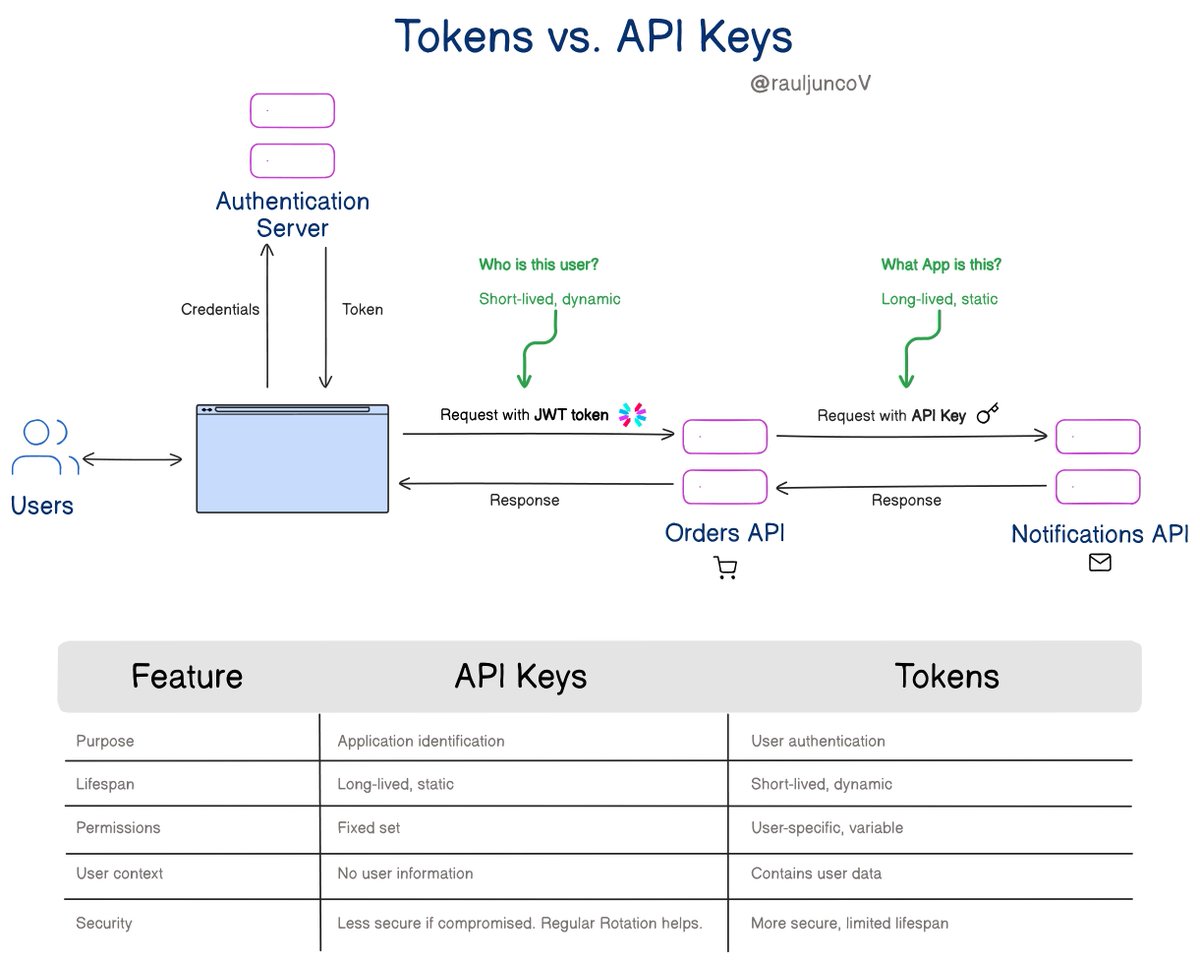
What's the difference between Tokens and API keys?
We use API keys and tokens for authentication and authorization.
But they serve different purposes and have distinct characteristics.
Tokens (like JWT - JSON Web Tokens):
Carries user context and permissions for authentication and authorization.
Encoded with a user ID, permissions, and expiration time, often in JWT format.
Critical for user-specific access, like accessing a user's profile data in an e-commerce platform.
It is issued by an authentication server after user login and contains user-specific information.
API Key:
Primarily for identifying the application or the consumer making the API call.
They are long strings we pass in the header or as a query parameter in the API request.
You use API keys when access does not involve user context. For example, accessing a public API or service-to-service communication.
They are long-lived and created through the API provider's platform or admin console.
In simple terms:
- Tokens are for managing user sessions, permissions, and context.
- API keys are for identifying applications.
Which one have you used the most?
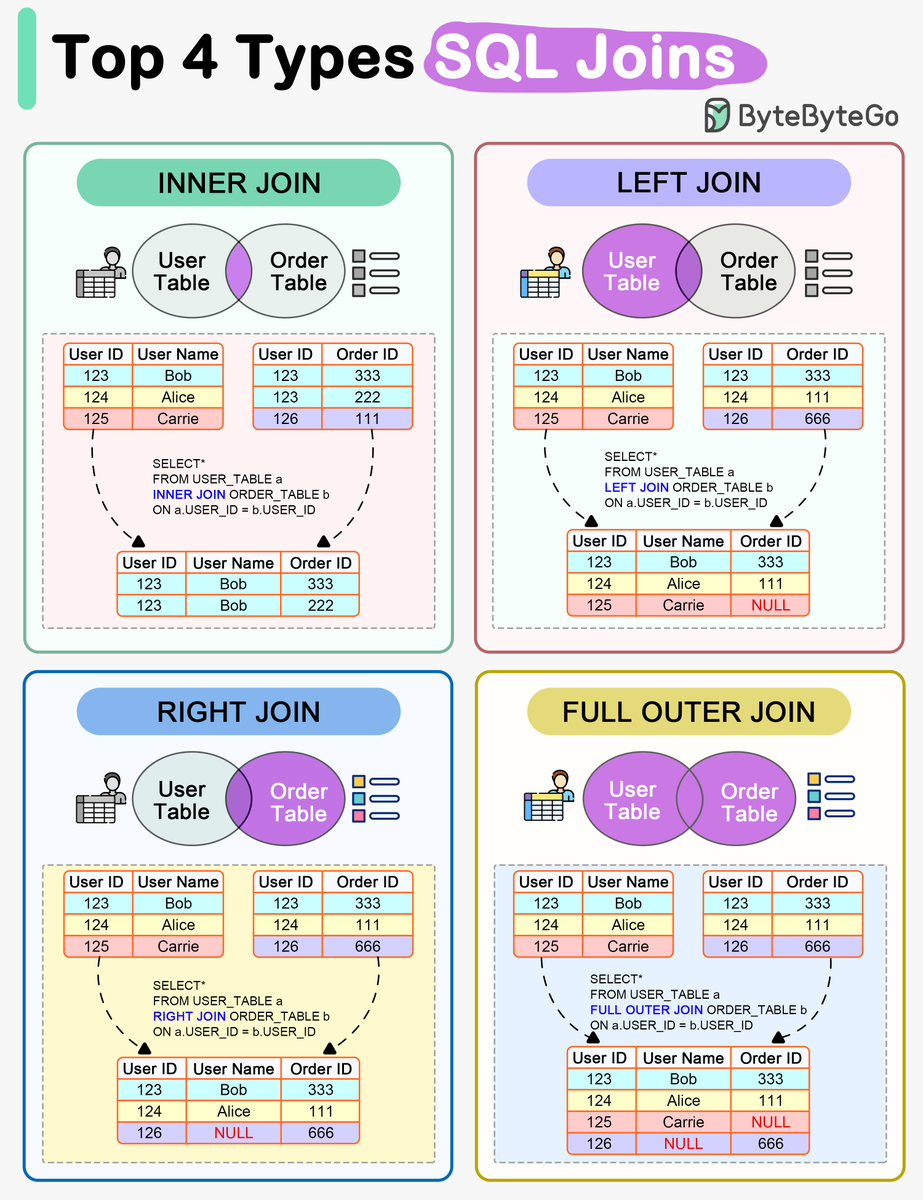
SQL Joins
The diagram below shows how 4 types of SQL joins work in detail.
🔹 INNER JOIN
Returns records that match in both the left and right tables.
🔹 LEFT JOIN
Returns all records from the left table, along with any matching records from the right table.
🔹 RIGHT JOIN
Returns all records from the right table, along with any matching records from the left table.
🔹 FULL OUTER JOIN
Returns all records from both the left and right tables, pairing records that match on the join condition. This includes records from the left table that do not have a match in the right table, and vice versa.
In practice, inner joins and left joins tend to be the most commonly used. Inner joins allow matching data between tables, while left joins ensure all records from the initial table are included.
–
Subscribe to our weekly newsletter to get a Free System Design PDF (158 pages): https://t.co/kNfv0DVDdf
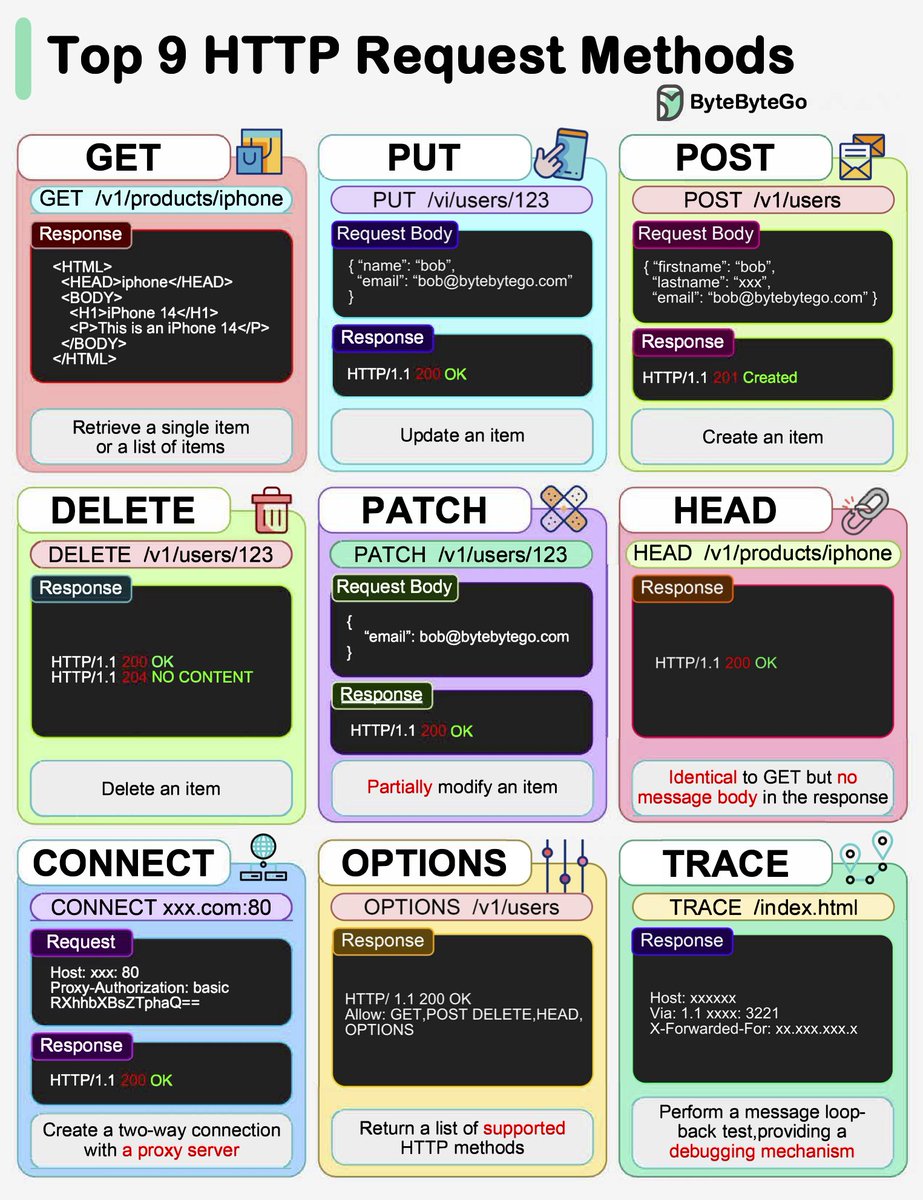
A Visual Guide to Common HTTP Verbs
🚀 HTTP GET
Retrieves a resource from the server. GET is safe and idempotent - identical requests return the same result without side effects.
📝 HTTP PUT
Updates or creates a resource. PUT is idempotent, so duplicate requests will update the same resource. Useful for complete replacements.
✉️ HTTP POST
Creates new resources. POST is not idempotent - duplicate requests will create additional resources. The workhorse for most APIs.
🗑 HTTP DELETE
Deletes a resource. Like PUT, DELETE is idempotent. Repeat as much as you want, the resource will be deleted once.
🛠 HTTP PATCH
Applies partial modifications to resources. Useful for updating parts of an object without replacing everything.
📃 HTTP HEAD
Gets just the headers for a resource, no body. Good for light existence checks before heavier GETs.
🔌 HTTP CONNECT
Establishes a tunnel to a server identified by the target resource. Enables SSL proxying and tunneling.
❓ HTTP OPTIONS
Describes communication options for the target resource. What methods are supported? What extensions?
🔁 HTTP TRACE
Performs a message loop-back test along the path to the target resource. Handy for diagnostic purposes.
What other HTTP verbs have you used?
–
Subscribe to our weekly newsletter to get a Free System Design PDF (158 pages): https://t.co/kNfv0DVDdf
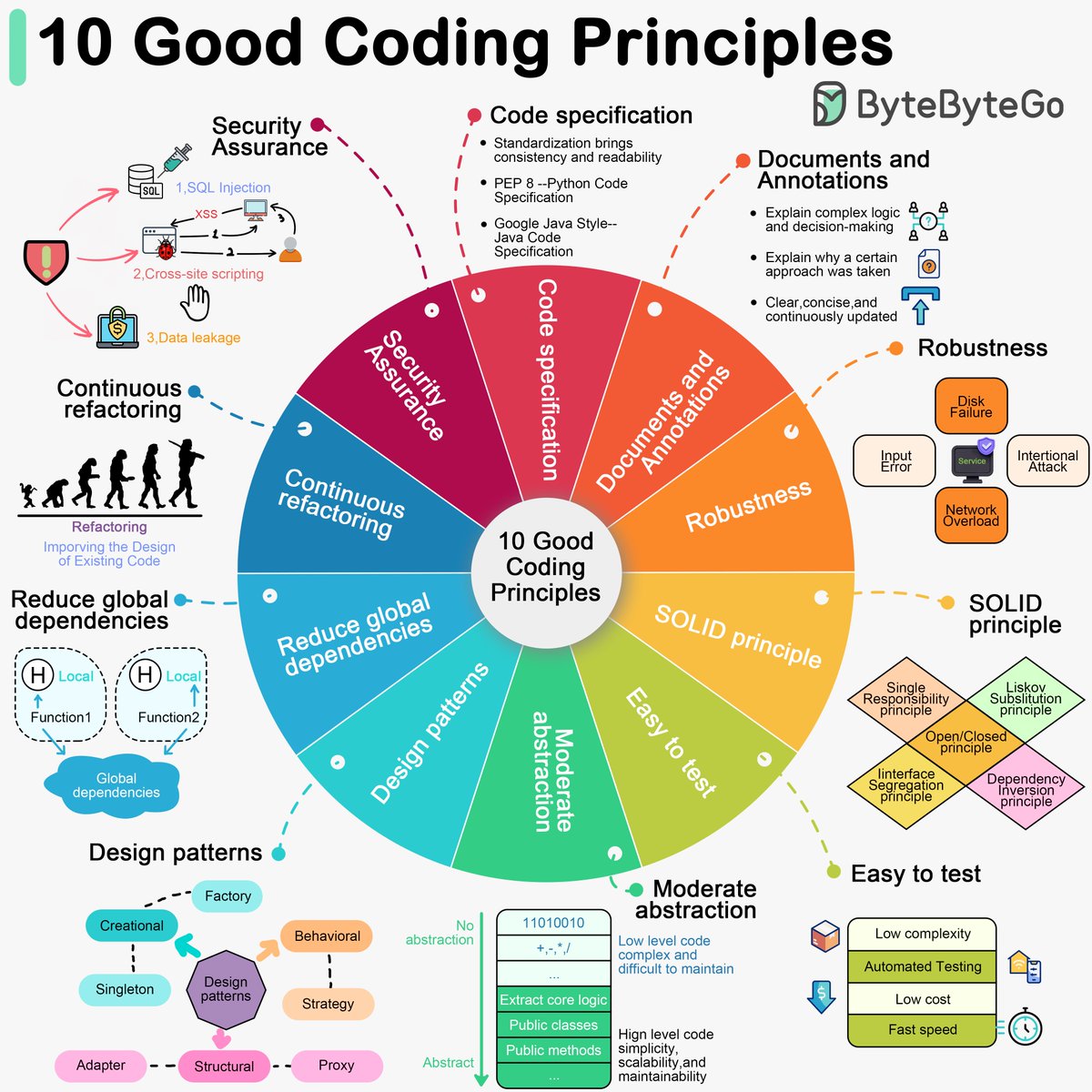
10 Good Coding Practices
1. Follow code specifications (e.g., "PEP 8", "Google Java Style") for consistent and readable code.
2. Document and comment code clearly and concisely, focusing on "Why" rather than "What".
3. Write robust code that handles unexpected situations and inputs without crashing.
4. Follow the SOLID principles for scalable and maintainable code.
5. Make testing easy by reducing complexity and supporting automated testing.
6. Use abstraction to extract core logic and hide complexity, making code flexible and generic.
7. Utilize design patterns appropriately, avoiding overuse or misuse.
8. Reduce global dependencies; rely on localized state and parameter passing.
9. Continuously refactor code to reduce technical debt and maintain extensibility.
10. Prioritize security to avoid vulnerabilities like SQL injection and XSS.
–
Subscribe to our weekly newsletter to get a Free System Design PDF (158 pages): https://t.co/kNfv0DVDdf
MVC, MVP, MVVM, MVVM-C, and VIPER
So, let's talk about these software architecture patterns. Each one offers a different approach to organize your code and keep things clean and tidy.
MVC - the OG
This classic pattern divides your app into three parts: Model (the data), View (what your users see), and Controller (the glue that connects them). It's great for simple web apps where you want clear separation between data and presentation, but be careful not to overload the Controller with too much logic.
MVP - more control for presenters
Similar to MVC, but instead of a Controller, you have a Presenter that handles the logic and state management. This makes the View more passive, just displaying what the Presenter tells it to. MVP is perfect for complex interfaces where you need more control and easier testing.
MVVM - data binding
Here, the ViewModel takes center stage. This middleman handles data manipulation and logic. It binds your View directly to your Model. This means less code and a more straightforward way to build user interfaces, especially with modern frameworks.
MVVM-C - navigation made easy
When your MVVM app starts getting tangled with navigation logic, bring in the Coordinator. This component controls how your users move around your app. This keeps the ViewModel clean and focused on data.
VIPER - extreme modularity
This pattern is about clean separation of concerns. Each component has a specific job: View (display), Presenter (presentation logic), Interactor (business logic), Entity (data models), and Router (navigation). It's for complex apps where you need strict modularity for easier testing and maintenance.
–
Subscribe to our weekly newsletter to get a Free System Design PDF (158 pages): https://t.co/kNfv0DVDdf
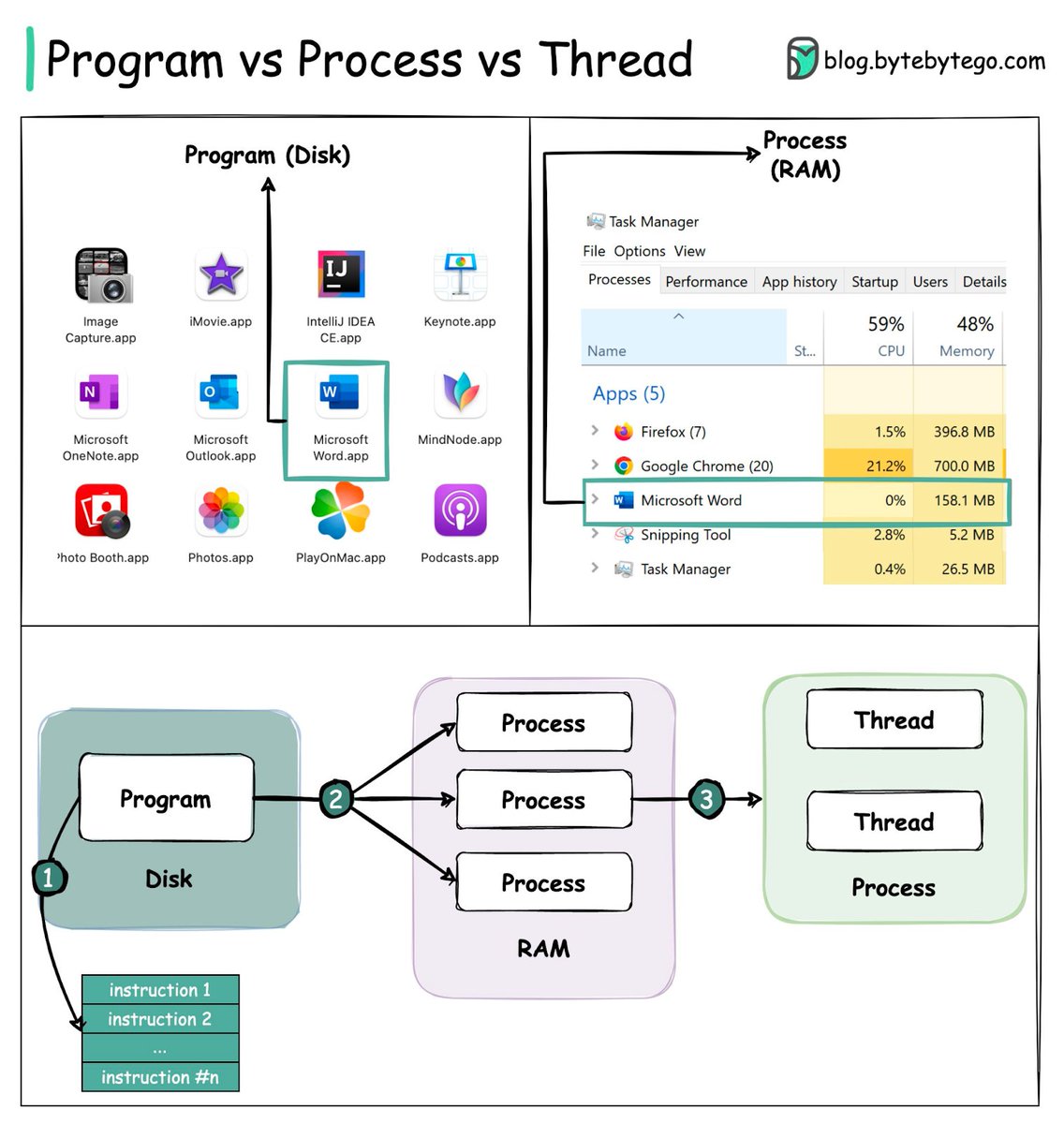
Popular interview question: What is the difference between a Process and a Thread?
To properly understand the distinction, let’s first define what a Program is.
A Program is an executable file containing a set of instructions that is stored on disk. A single program can have multiple processes associated with it. For example, Chrome creates separate processes for each open browser tab.
When a program is loaded into a computer’s memory and begin executing, it becomes a Process. The newly activated process requires access to essential resources like registers, a program counter, and a call stack to operate.
Within the context of an executing process, a Thread represents the smallest sequence of instructions that can be managed independently by the operating system scheduler.
The relationship between a program, a process, and a thread can be summarized in three steps:
1. A program starts out as a static set of instructions held in an executable file.
2. When loaded into memory, the previously inert program activates into one or more running processes.
3. After a process initializes, it acquires memory and resources from the operating system. A single process can then further subdivide itself into one or more threads if needed. For example, Microsoft Word often devotes one thread to spellchecking duties and another to inserting text into a document.
There are several key differences between processes and threads:
🔹 Processes tend to execute independently of each other, while threads exist within the context of a parent process.
🔹 Individual processes do not share the same memory space, while threads belonging to the same parent process can access shared memory.
🔹 Processes require more overhead to initialize and terminate than threads. They are heavyweight operations.
🔹 Transitioning between processes requires more expensive context switching compared to transitioning between threads.
🔹 Communication and data sharing can happen faster between threads since they inhabit the same process context.
Over to you: Some programming languages support coroutines. How do coroutines differ in behavior compared to threads?
–
Subscribe to our weekly newsletter to get a Free System Design PDF (158 pages): https://t.co/kNfv0DVDdf





![sahnlam's tweet photo. URL, URI, URN: Understanding the Differences
These terms form the foundation for identifying and accessing resources on the internet. Without them, finding and sharing information online would be more difficult.
URI (Uniform Resource Identifier)
- Identifies a logical or physical resource on the web
- URL and URN are subtypes of URI
- General structure: scheme:[//authority]path[?query][#fragment]
URL (Uniform Resource Locator):
- Locates and provides access to a resource on the web
- Key concept in HTTP, also used with other protocols (e.g., FTP, JDBC)
URN (Uniform Resource Name):
- Names a resource without specifying its location or how to access it
- Typically uses the "urn" scheme
- Serves as persistent, location-independent resource identifiers
- Cannot be used to locate a resource directly. They need to be resolved through a separate resolution mechanism.
–
Subscribe to our weekly newsletter to get a Free System Design PDF (158 pages): https://t.co/kNfv0DVDdf](https://pbs.twimg.com/media/GXK2-sHa8AAYg8c.jpg)