🚀 Come on, frens! As $BTC breaks out, #AEON is racing to 100K followers—and we’re bringing rewards!
🎉 Claim your 100K memorial #OAT—exclusive to the first 100K supporters! Holding this OAT = eligibility for upcoming AEON #Airdrop!
🤩 Mint now & secure your spot: https://t.co/QlgmuyaZxx
🪂 OFFICIAL ANNOUNCEMENT: MEGA AIRDROP CAMPAIGN – ROAD TO LISTING 🪂
To celebrate the upcoming $GARA Token listing, we’re dropping a $400,000 Airdrop.
🔹 Total Prize Pool:
1,111,111 $GARA = $400,000
(Current Price: $0.18 | Listing Price: $0.36)
🔹 Campaign Duration:
🗓 1.6.2025 – Until Listing Day
🔹 Vesting Schedule:
⏳ 20% at TGE, remaining linearly over 3 years
💥 HOW TO JOIN
🧠 Complete quests on Zealy & Discord
🎯 Earn 2,000+ total points (Zealy XP + Discord Points)
💰 The higher your points, the more $GARA you earn
⚠️ Rewards are based on leaderboard rankings
⚠️ Distribution: Within 20 days post-campaign via Polygon chain
🆙 Daily quests & XP boosts will be added — so check in regularly!
🏆 Maximize Your Earnings
It's not just about reaching 2,000 points. The more quests you complete, the more $GARA tokens you'll earn. Extra rewards will be based on your total combined XP & Points above 2,000 at the end of the campaign. More high-XP quests will be added throughout the sprint to help you participate.
👉 Join Zealy Now: https://t.co/VUAdTLh3Yk
👉 Join Discord Now: https://t.co/e8tMYSWaSh
📢 More details: https://t.co/02lWMtePKR
📌 Stay active. Earn daily. Win big.
📣 Spread the word
#Airdrop #Zealy #CryptoGiveaway
@zealy_io @Coingaragesro
In a world where WhatsApp trades your privacy for profit, Session gives it back to you. And now, it even rewards you for it. 🔐
@session_app is the messenger for people who care about privacy — no phone number, no metadata, no surveillance.
Just end-to-end encrypted chats, powered by a decentralized network of Session Nodes.
Stake $SESH to secure the network and earn rewards — already live since May. 🚀
Run a node, help deliver messages, and get rewarded for uptime, storage & reliability.
Already trusted by 1M+ users — Session proves secure, anonymous communication doesn’t need to be centralized. 🔥
Take part in Enter the depinhouse, the biggest DePIN campaign of the year:
🔹 Complete Galxe quests
🔹 $50,000+ in rewards
🔹 150+ DePIN devices to win
Join the campaign and explore how real privacy is built:
https://t.co/mCK1zZEPi1
🚨 New @Galxe Quest is LIVE! 🚨
Our Enter the depinhouse campaign just leveled up🔥
This one’s all about learning from the creators shaping the #DePIN space 🎥🧠
🎁 Complete the quest & get closer to the final prize pool — including $50,000+ in rewards & 150+ DePIN devices to win 👀
Don't miss out on this 🔗https://t.co/zVH1XE0G1Z
Come for the rewards. Stay for the community 💥
🔥 Enter the depinhouse — the biggest DePIN growth campaign of the year — kicks off TODAY
🎁 $50,000+ in rewards
🛠️ 150+ DePIN devices to win
🌍 Featuring top projects: @AnyoneFDN, @Quakecore_com, @nubilanetwork, @session_app, @watchxnetwork, @EdenWeb3_Global, @Tangem, @BeamableNetwork, @AethirEdge & more
🚀 How to win:
Head to https://t.co/hSCGSjtqNf
Complete Galxe quests & earn points
Follow us on X & Discord to be the first to get quest updates
Stack points. Climb the leaderboard. Win premium DePIN gear 🏆
✨ And on top of that:
Get direct insight into the teams building the most advanced decentralized infrastructure — and discover the real-world impact behind each project.
As part of the depinhouse community, you'll also gain access to exclusive perks along the way 👀
👉 Join our Discord Now to be the first to know when new quests go live https://t.co/BNTCScmpSq
🪂 Just claimed my $AVL Airdrop over at @avalonfinance_!
Claim up to 20% more in $AVL rewards! How? Click here to get started: https://t.co/pzsSiXyQlX
Secure your allocation and be part of the Avalon next generation phase: 👇
https://t.co/DCUUzECywp
"There's even more exciting technologies and coins out there. There's another one called Zano that allows anybody to create their own privacy tokens where nobody can see what's going on. Then there's a project called Confidential Layer ( @ConfidentialLyr ), which is creating a bridge from $BTC, $BCH, and $ETH onto Zano, and when it's on Zano, you have very, very strong privacy with that as well." ~Roger Ver
Learn more about Zano: https://t.co/Tjxh3nomkH.
Don't miss the $CLONE Airdrop!
Make sure you're ready to receive your allocation by connecting your wallet to the $CLONE Airdrop campaign website. Time is running out—there are only a few days left!
Connect your wallet now!
https://t.co/qpPiaJV62s
The Zano Ecosystem Task for the Confidential Layer airdrop just went live!🔥
Find the tasks here: https://t.co/ZgPrt6nxUc
I have prepared a step-by-step guide, including a list of Frequently Asked Questions (FAQ) to walk you through the entire process. Let's dive in!🪂
If you already have a Zano Desktop Wallet app connected with the Zano Companion browser extension and a registered Zano alias, click ''Connect Wallet'' and ''Connect X Profile'', then proceed to click on ''Claim''. That's all you'll have to do!
If you are new to the Zano Ecosystem, then follow my steps below.👇
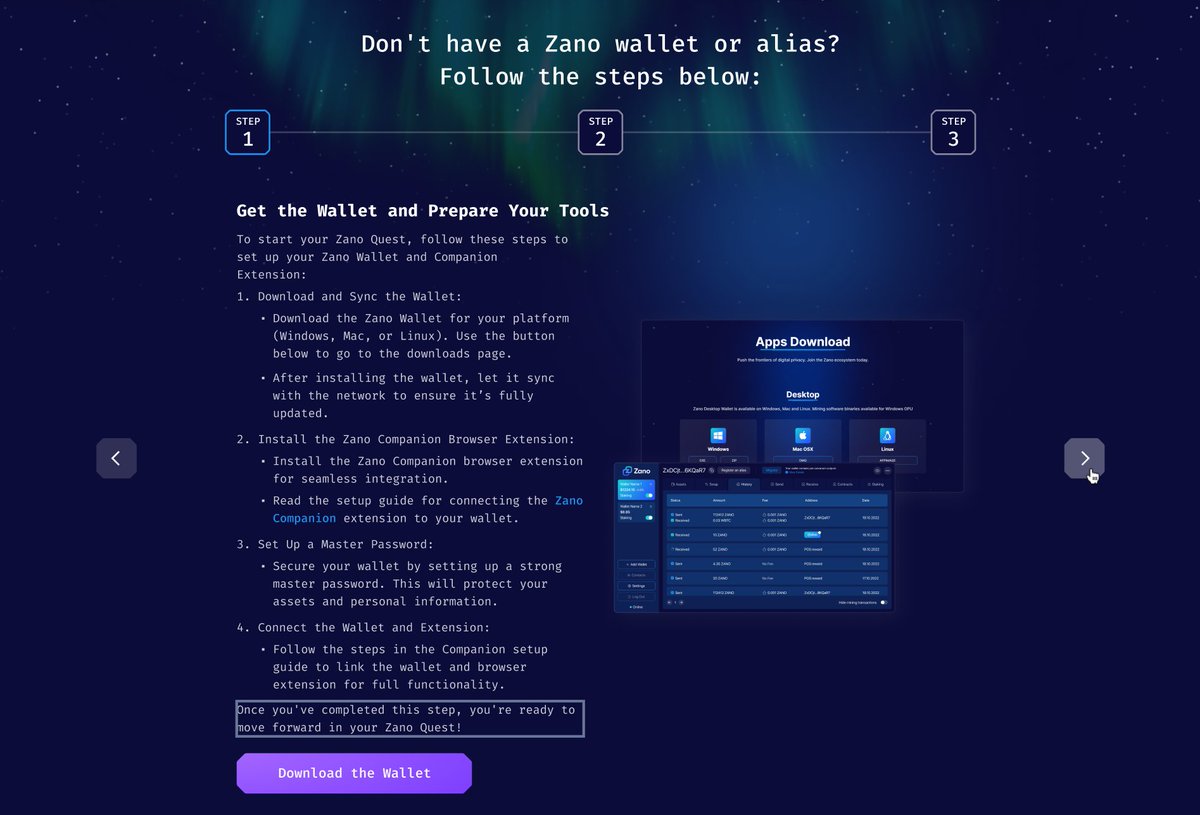
As you can see on the screenshot, the first thing you'll have to do is install the Zano Desktop Wallet via this link: https://t.co/ZwiB59qeh7.
Navigate to "Desktop" and select your computer's operating system (Windows, Mac OS, or Linux).
After installing, let the wallet sync with the blockchain. Once its synced, it'll say ''Online'' with a green dot.🟢
Why is the syncing taking so long?⌛️
The Zano desktop wallet runs on a full node that you run yourself. Therefore, you have to download the blockchain data, and while this is great for network decentralization, it can take some time. You can track the status of your synchronization at the bottom left corner of your wallet. The Zano team is working on a Lite Wallet that runs on a remote node for fast syncing so that people can choose which wallet they want to use.
While your Zano Desktop Wallet is syncing, you can proceed with downloading the Zano Companion browser extension.
You can find the browser extension here: https://t.co/oIFnu23WlH
Once installed, you can find a guide on how to connect your Zano Companion with your Zano Desktop Wallet here: https://t.co/F9UbBHXCab
If you prefer a video instead, check out this guide made by @Zanolist: https://t.co/HmQKE8glq6
Now that we've set you up with both the Zano Desktop Wallet and the Zano Companion app, we can proceed to buy some $ZANO from an exchange, which you'll need to register your Zano alias.🪪
There are a number of exchanges you can use, as shown on the ecosystem task page, with a full list available here: https://t.co/OsCHOl0Gcy
If you haven't used an exchange before, we have this step-by-step guide on how to buy $ZANO on @MEXC_Official: https://t.co/GkQDVVxC7L
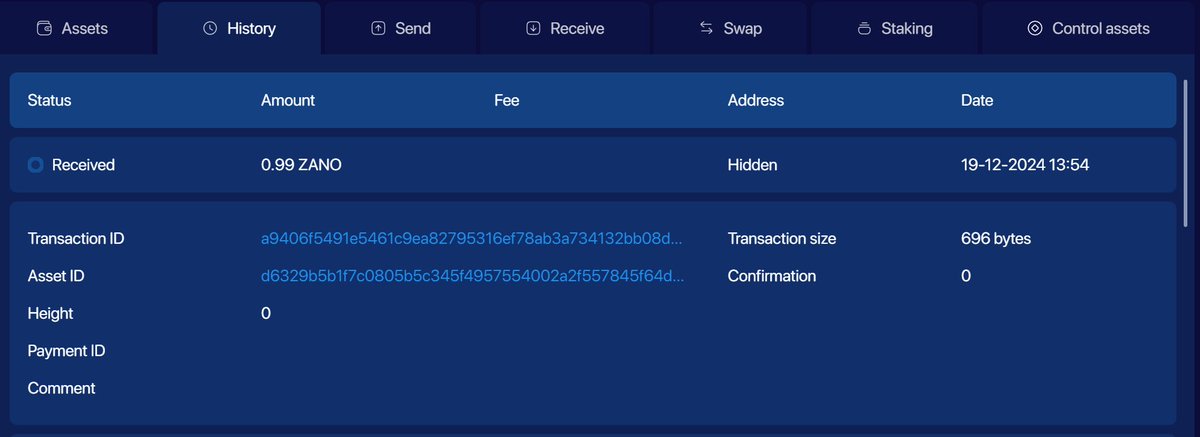
After you have received the $ZANO into your Zano Desktop Wallet, wait for ten block confirmations, approximately ~10 minutes, before you can proceed to respend your $ZANO and register the Zano alias.
Once you click on the transaction that you've just received, you can check the number of confirmations, as seen in the image below.
After waiting for the ten confirmations, you can proceed to register your Zano alias!
You can do this at the top of your Zano Desktop Wallet via the ''Register an alias'' button or directly via the Zano Ecosystem task page by following the instructions.
Congratulations! Now you're all set and can claim your 4000 Space Miles!🎉
I hope this guide was helpful to you. Make sure to retweet and help someone else. Want to further connect and engage with the Zano ecosystem and community? Check out all of our links here: https://t.co/Ucd9FsFrTs