most people set up Puppeteer, fight with proxies, and manage 3 different API keys just to scrape a webpage
with DumplingAI CLI it's 3 commands:
1. install it
2. search the catalog
3. run it
clean markdown output. no proxy config. no API key juggling.
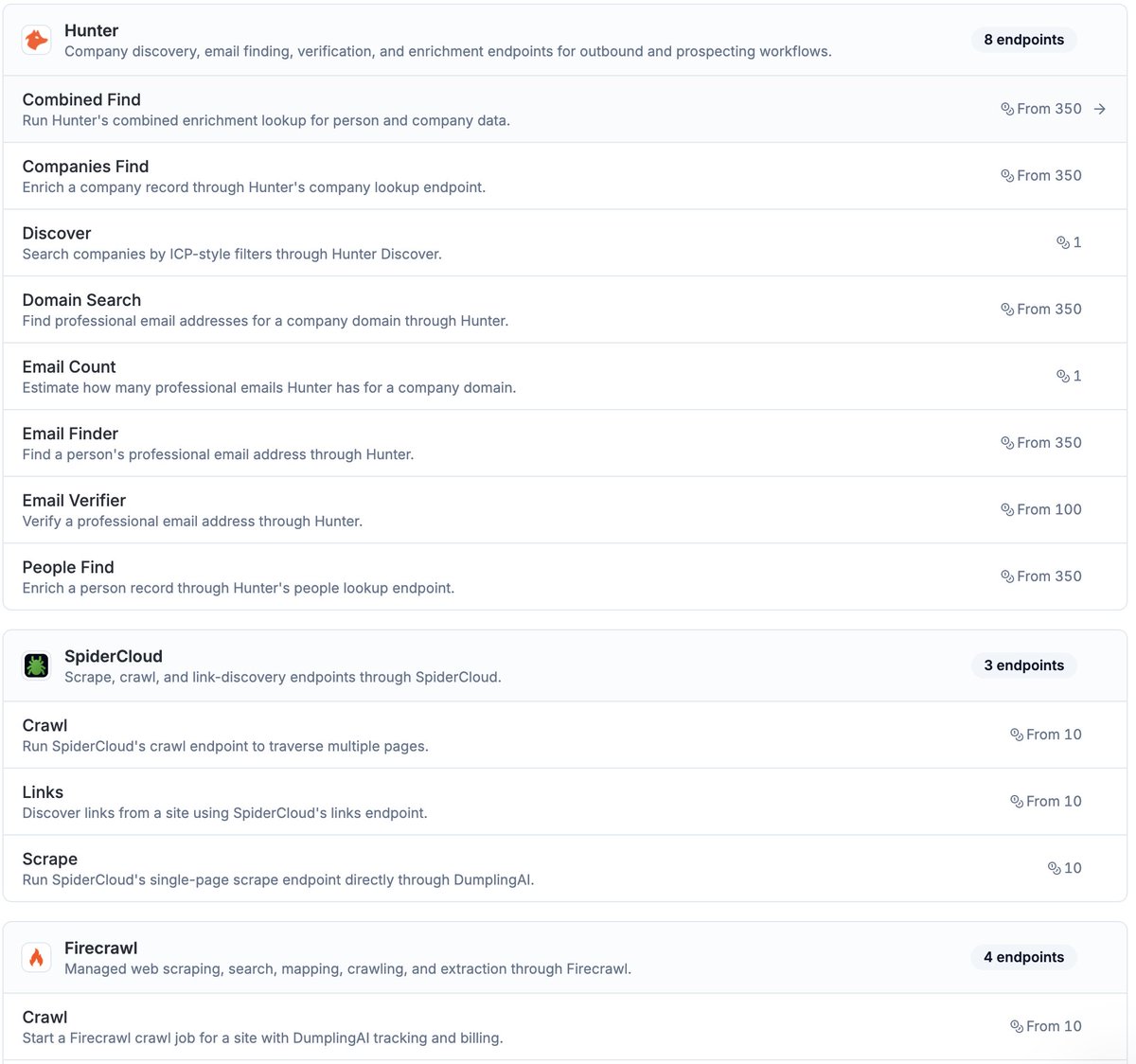
it auto-routes across 4 providers (Firecrawl, ScrapingFish, SpiderCloud, PhantomJS) — if one fails, it falls back to the next
one API key. 50+ data capabilities. pay per use.
get started → https://t.co/ghtLkhwz6p
Want an API we don't have yet? Just let us know and we will add it!
Check out the source code, open an issue, or suggest a feature in the GitHub repository.
https://t.co/dHD5DaY90w
Introducing the DumplingAI CLI
Give your AI agents access to 50+ data APIs without needing to juggle countless API keys or subscriptions
Save money, better reliability, no subscriptions
Start with:
npm install -g dumplingai-cli
sooo many ways to use a workflow like this (google maps is a treasure trove)
1) scrape the companies, find the gaps via reviews, offer service
2) use this workflow as a backend for a saas
3) start a boring business with a validated opportunity
4) start a local directory/newsletter resell the leads
don't sleep on boring local biz folks! sometimes there are golden opportunities in your backyard
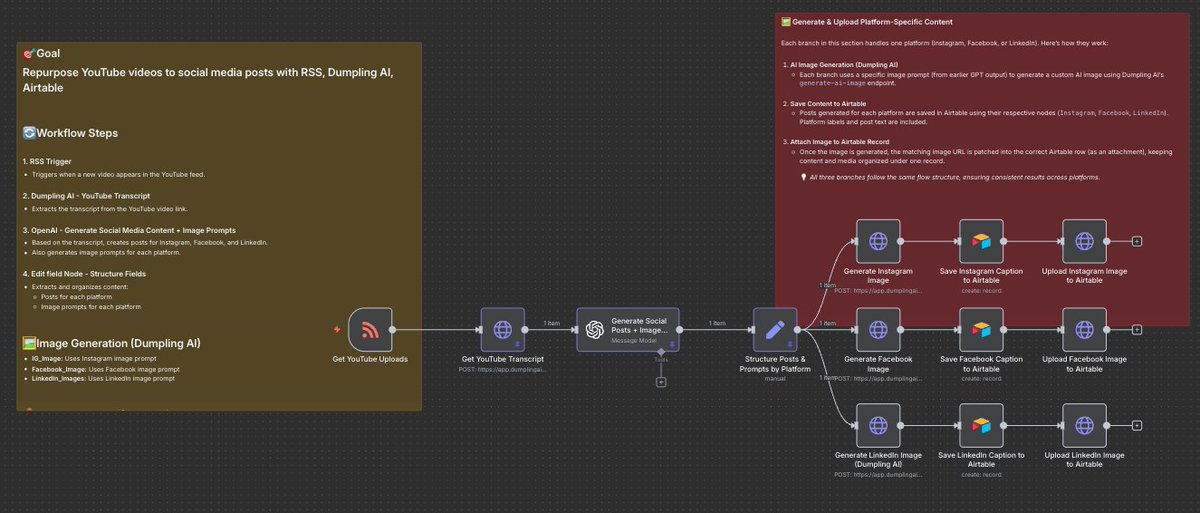
I just cracked the code on turning one YouTube video into 9 ready-to-post social media pieces... completely hands-off.
most creators spend 3+ hours manually repurposing each video into Instagram, Facebook, and LinkedIn posts...
whereas this n8n workflow does it all while you sleep:
– watches your YouTube channel for new uploads
– auto-extracts the full transcript
– generates 3 platform-specific captions using AI
– creates 3 custom images that match your content
– saves everything to Airtable, ready to schedule
one video in → 9 pieces of content out, zero manual work
this is like having a full-time content team for the cost of lunch
want the complete n8n workflow + setup guide?
comment "REPURPOSE", follow + bookmark this post and I'll send you everything (must be following so I can DM)
@EXM7777 We've talking to hundreds of automation agencies and the single thing that differentiates those that succeed is the ability to acquire clients
Building skills are important but can be learnt as you go
@I_amDamola yes! focus should be on solving the business problem and delivering value instead of building overly complex systems when it can be done simpler
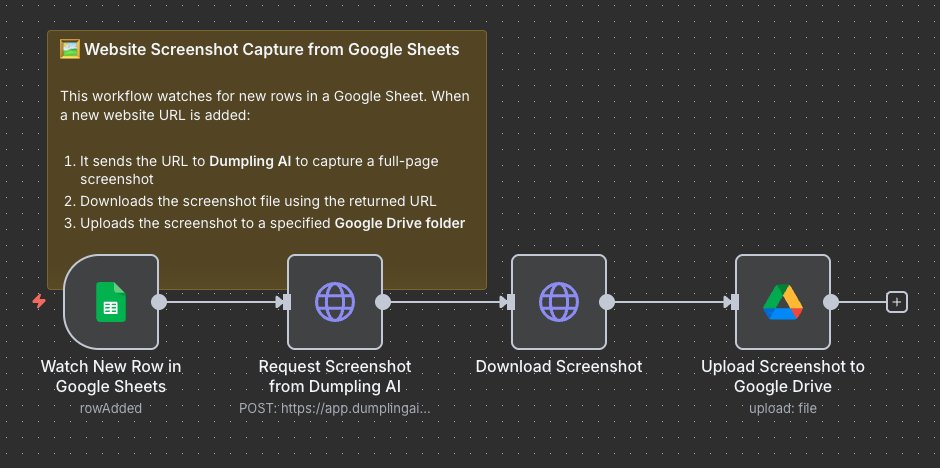
I built an n8n workflow that turns any Google Sheet into a screenshot machine.
Drop a URL → get a full-page screenshot saved to Google Drive. Automatically.
No more manual screenshots. No more "can you grab that webpage real quick?"
Just pure automation that handles:
– Lead generation visual tracking
– Client website monitoring
– Competitor research snapshots
– Landing page archives
Takes 30 seconds to capture what used to take 5 minutes of copy/paste/save.
My outreach team went from spending 2 hours a day on screenshots to literally zero.
Now they just paste URLs and the workflow does everything else.
Want the full n8n JSON + setup guide?
Comment "SCREENSHOT" + follow + bookmark this post and I'll DM you the complete workflow (must be following so I can DM)
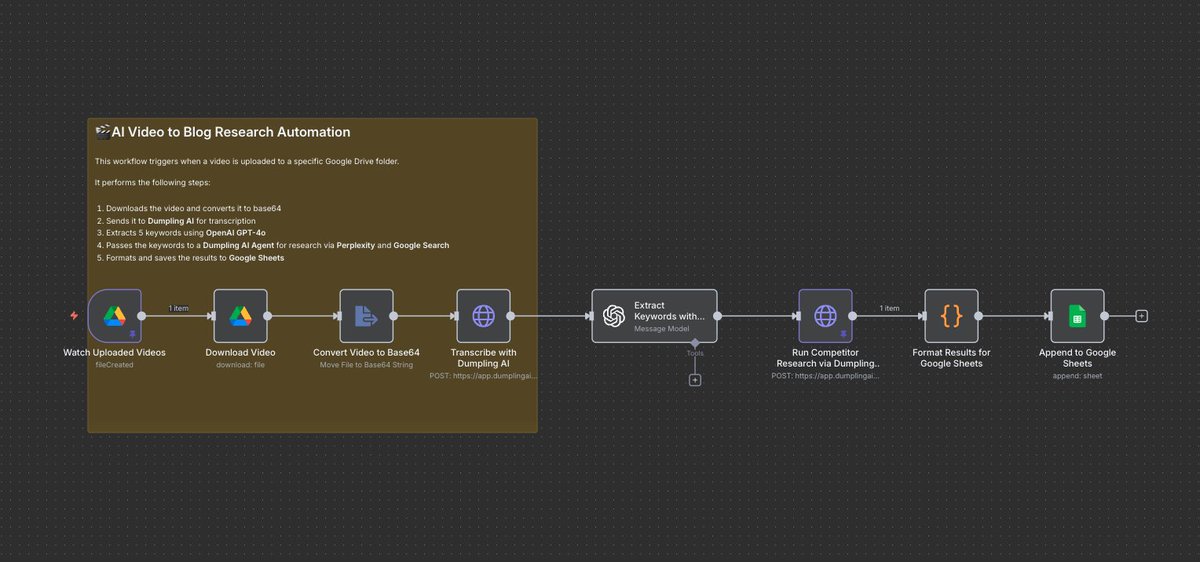
most content creators sit on goldmines of video content... but manually turning each one into blog research takes forever.
so I built an n8n workflow that does it automatically while I sleep.
just drop a video in Google Drive and it:
– transcribes the entire thing with AI
– extracts 5 SEO keywords automatically
– runs competitor research on those keywords
– pulls blog examples and topic ideas
– saves everything to a clean Google Sheet
now I turn every podcast, webinar, or video call into structured blog research in minutes instead of hours.
the workflow uses Dumpling AI + OpenAI + Google Sheets and runs completely hands-off.
want the full n8n JSON + setup guide?
comment "RESEARCH" + follow + bookmark this post and I'll send it over (must be following so I can DM)
Stop Manually Scraping Google Maps. Automate Your Local Lead Generation.
Building targeted lead lists from local business data is a powerful strategy, but spending hours searching Google Maps, then painstakingly copying and pasting names, addresses, and phone numbers into a spreadsheet is not scalable.
This is a classic data headache. We're here to solve it.
Here’s how this powerful automation works:
1. You provide a simple Google Maps search query, like "best gyms in Austin" or "plumbers in San Diego."
2. The workflow sends this query to DumplingAI, which intelligently extracts a list of relevant businesses.
3. For each business, it captures key data points: Name, Address, Website, Phone Number, Rating, Price Level, and more.
4. Each result is then neatly formatted into a new row and automatically added to your designated Google Sheet. Zero ongoing maintenance required.
Want the full workflow and guide?
Comment “N8N LEADS” + like this post and I'll DM you it for FREE!
(must be following)
staying relevant is a full-time job.
you need to monitor industry news, find unique angles, and consistently publish
this is how you automatically turn trending news topics into linkedin posts on autopilot
Here’s a breakdown of how it works:
Step 1: The Setup
The workflow kicks off automatically on a daily schedule. It pulls a list of your core content topics directly from a Google Sheet. Simple, organized, and set-and-forget.
Step 2: Real-Time Data Extraction
This is where the magic happens. For each topic, the workflow makes an API call to DumplingAI's Search News endpoint. It finds the most relevant, up-to-the-minute articles from across the web, providing the raw material for your commentary.
Step 3: Deep Content Scraping
Finding the articles isn't enough. We then use the DumplingAI Scrape endpoint to pull the full, clean content from each source. No ads, no boilerplate—just pure, LLM-ready data. This step eliminates the data headaches typically associated with web scraping.
Step 4: Data Prep & Aggregation
Before we generate anything, we aggregate the content from all sources and run it through a quick cleaning process. This removes excess formatting and links, ensuring the AI model receives pristine, high-signal information to work with.
Step 5: Intelligent Content Generation
With high-quality, contextual data in hand, we prompt GPT-4o to write a thoughtful, first-person commentary tailored for a LinkedIn audience. Because the input data is so good, the output is nuanced and sounds like a real expert—no generic AI slop.
Step 6: Closing the Loop
The final commentary is automatically appended back into your Google Sheet, right next to its original topic. The workflow then loops to the next topic on your list until the job is done.
like this post and comment “n8n” for the template
ignoring the goldmine sitting on YouTube is a rookie mistake...
that's why I built a system that scrapes them and turns them into SEO-optimized blog posts all from a single video URL
now instead of guessing what resonates, I'm creating content that speak exactly to what people care about most
want the full n8n flow?
comment “YOUTUBE”, follow + repost and I’ll send it over (must be following so I can DM)
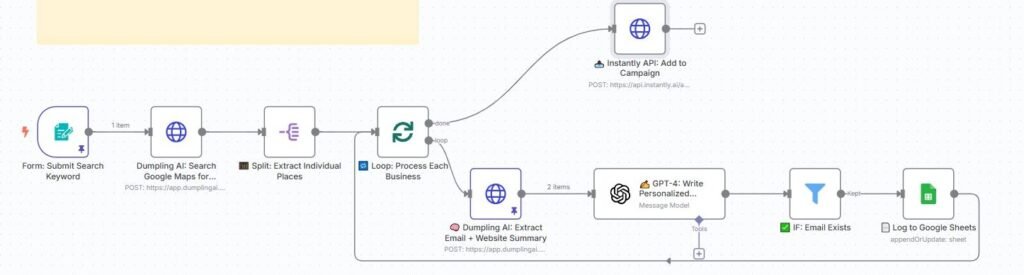
Generate Cold Email Icebreakers from Local Business Search using GPT-4 and Dumpling AI
Sending cold emails that feel personal and relevant is hard , especially when reaching out to hundreds of local businesses. Most outreach feels like spam because it’s generic, boring, and clearly automated.
This workflow solves that problem.
It helps you:
Find local businesses based on keywords like “Dentist in New York”
Pull real data from their websites (email, what they do, phone)
Use GPT-4 to write warm, human-sounding icebreaker messages
Log everything into a Google Sheet
Optionally send leads to https://t.co/XvRTyN3xUc for automated cold outreach
You end up with a spreadsheet full of high-quality leads, with personalized icebreaker emails already written — ready to send.
🧩 Tools Used
n8n: Workflow automation platform
Dumpling AI: To search for local businesses and extract contact info
OpenAI GPT-4: To write friendly, customized outreach messages
Google Sheets: To store lead and message data
https://t.co/XvRTyN3xUc (optional): To push leads into your cold email campaigns
🛠 Step-by-Step Breakdown
🔹 Step 1: Submit Search Keyword via Form
It starts with a form that takes in a simple keyword phrase like:
Dentist in New York
This allows anyone on your team to generate cold email leads just by submitting a keyword.
🔹 Step 2: Search Google Maps with Dumpling AI
The keyword is sent to Dumpling AI’s search-maps endpoint.
This instantly returns a list of matching local businesses, including:
Business name
Website URL
Phone number
Google rating
Description
🔹 Step 3: Split Results Into Individual Businesses
The returned list of places is split into single items. This lets us process each business one by one, and get clean data per row.
🔹 Step 4: Loop Through Each Business
We loop through the places in batches of two. This gives us flexibility and ensures smooth processing if you are working with many results.
🔹 Step 5: Extract Contact Info + Website Summary
For each business, we use Dumpling AI’s extract API to:
Find an email on the website
Generate a summary of what the business does
This summary is critical because it’s what GPT-4 uses to sound personalized when writing the icebreaker.
🔹 Step 6: Generate a Personalized Icebreaker Message with GPT-4
Now the fun part.
We send the following info to GPT-4 via n8n’s LangChain OpenAI node:
Business Name
Keywords from their Google Maps types
Website Summary
And we prompt GPT-4 to write a short message that:
Starts with a personalized comment about the business
Genuinely admires what they do
Gently introduces your digital marketing agency
Asks if they’d like to hear some ideas
Here’s a sample output:
Hi 209 NYC Dental,
I came across your site while exploring established dental practices in NYC and was genuinely impressed by your long-standing reputation since 1887. Offering both general and cosmetic dentistry with financing options is a great way to serve your community.
I run a digital marketing agency and I’d love to share a few ideas that could help you get even more local visibility. Would it be okay if I sent some over?
🔹 Step 7: Filter — Only Continue If Email Exists
Some businesses don’t list emails on their website. This step checks if we got an email, and only proceeds if we did.
This avoids adding incomplete leads to your outreach sheet.
🔹 Step 8: Save Everything to Google Sheets
We now push all key lead data to Google Sheets:
Business Name
Website
Email
Phone Number
Website Summary
Icebreaker Email
If the lead already exists (based on URL), the row is updated. If not, a new row is added.
🔹 Step 9 (Optional): Send to https://t.co/XvRTyN3xUc Campaign
If you’re using https://t.co/XvRTyN3xUc for outreach, this step adds the lead directly into your campaign, with the personalized message as the intro.
Campaigns run on autopilot from there.
💡 What You Can Use This For
Local lead generation (dentists, lawyers, roofers, etc.)
Agency prospecting based on niche
Cold outreach based on relevance
Lead lists for SDRs or sales teams
Instant campaign personalization at scale
🧠 Final Thoughts
This workflow combines scraping, email finding, AI writing, and CRM-ready output into one smooth, scalable pipeline.
Instead of manually googling businesses and writing emails one-by-one, you can:
Enter a keyword
Click submit
Get a spreadsheet full of warm, personalized cold email leads in minutes
You don’t just automate outreach — you make it feel human again.