shipped this product teardown of my premium hardcover!
you can flip through and read the entire book, notebook, cards, and even see cost breakdown.
https://t.co/dnXyWHbTH8
I wanted to bring back the old charm of those all-in-one radioshack electronic kits from my youth, being able to wire up circuits and lighting up LEDs, to more complex projects. Back then the manuals were pretty awful and you could get stuck quickly. Believe it or not, this was before AI or the internet.
In this modern revision, you get a manual with 24 projects, but also the ability to chat with Claude about what you're building. Claude can see your circuits and help with any questions you might have.
One of the first things you would do in these kits is wire up a resistor to an led, but that always felt so arbitrary, so here's Claude explaining to me why it picked R3 for this project.
Built with Opus 5.5 in about a day.
https://t.co/whSXOMBNhj
@bentossell@ryolu_ need the discipline to take a step back and ask the LLM to reveal under the hood / the sequence of things. need forcing function to show that you've wrestled with it
If you want to edit videos with claude code - a few tricks:
1. use opus 5.5
2. literally single prompt attempt something first, get a feel for how it works
3. then film something on your own and ask it to turn it into a nice clip or youtube video. ask it what it needs from you to do great work - inform it about hyperframes and ask about other open libraries including motion graphics
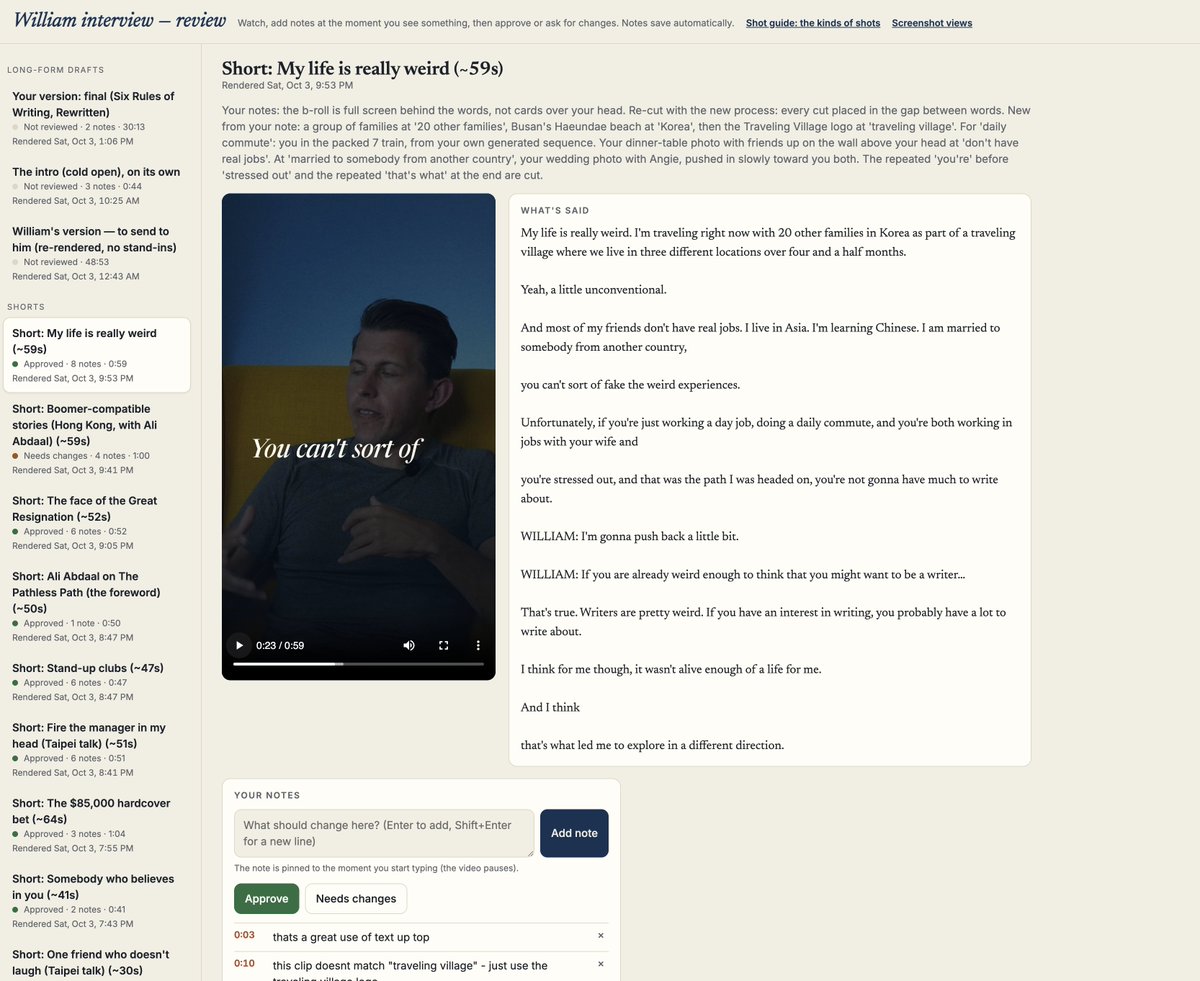
4. build your own review dash - tell it to create a dash where you can give feedback aligned with timestamps and tag stuff as need review
5. find reels or videos you link and ask it to watch and screencapture them, and start building your preferences
6. ask it to scan your local folders for b roll and have it organize and label b roll
7. ask where you can get free b roll
8. prompt away with the dash in your browser
9. tell it to auto update every time you fix something to develop a skill around your preferences
heres a preview of the dash i am using in claudes browser
This is so good.
Thousand things to say and wonder about:
- wow, that's how I write too: the overflow, the keeping of alternatives, focusing on paragraphs, ...
- there are many things in here that I don't think would've been built before AI
- it's striking how much of the "workflow" (excuse the word) is apparent in the software
- it's even more striking how you can see yourself jump in and use these features
- wondered: I bet if I send this video to Amp, let it add captions, and then have it analyze it frame by frame, it could clone the whole thing
- the ai integration is so good: I never want to see what the AI would write instead, it kinda tarnishes everything; but seeing what it would remove by dimming it is 100x better
THE VIBE MANUFACTURING PLAYBOOK
1. Measure everything. Digital calipers for small parts, a phone LiDAR app like Polycam to scan a space or an object. Bad measurements are the #1 reason first builds fail
2. Have a frontier model write the design as code. Describe the part to a model like Claude Opus 5.5 or Astra, and have it write the design in a codebased CAD tool like OpenSCAD or CadQuery. Zoo's Text to CAD does it in one step!
3. Use real CAD files. The text to 3D models on Hugging Face make shapes that look right, but factories need precise files: STEP for machined parts, DXF for lasercut metal, STL for 3D printing
4. Make sure it can be made. Ask the AI to check the design against how factories actually work: how tight metal can bend, how small a hole can be, how much wiggle room parts need etc...
5. Prototype in plastic first. A $300 to $600 home 3D printer like a Bambu Lab lets you test the fit overnight before paying for metal (really fun to play with too!)
6. Pay an engineer for 1 hour. Before your first real order, have a mechanical engineer on Upwork etc review the files. It's the cheapest insurance you'll ever buy.
7. Send it out. SendCutSend cuts and bends metal, Xometry and Protolabs handle machining and plastic, JLCPCB builds circuit boards. Instant quotes, and parts usually ship in days.
8. Add the brains. Most smart features run on a cheap wifi chip like the ESP32. Design the board in KiCad, and use ESPHome to control it straight from your phone.
9. Make one, then fix it. Your first version will be off somewhere! Order a single unit, test it, and adjust.
10. Do the math. Add up parts, finishing, assembly, packaging, and shipping. Custom products are hard to resell, so price for healthy margins.
11. Sell the design and make to order. Let customers adjust the measurements, and only manufacture after they pay. Zero warehouse, zero unsold stock.
12. Handle the boring part. If it plugs into a wall or touches kids, you'll need safety certification. It's slow and annoying, which is exactly why it's a moat.
13. Scale when it works. Once orders are steady, switch to batch runs and your cost per unit drops fast.
Vibe coding changed who can build software!
Vibe manufacturing is about to change who can build things!!
Even if you just want to make things for yourself (and not make things for others)
WELCOME TO THE VIBE MANUFACTURING ERA