@NVIDIAGFN@Warcraft I will always remember when I crossed the Dark Portal and saw the Hellfire Pennisula in Outland for the first time. I was astonished by the broken world and mobs fighting around the portal. It was so different than the zones in Azeroth. I still like to level in that zone.
@NVIDIAGeForce@Warcraft I will always remember when I crossed the Dark Portal and saw the Hellfire Pennisula in Outland for the first time. I was astonished by the broken world and mobs fighting around the portal. It was so different than the zones in Azeroth. I still like to level in that zone.
Do you want to have some fun and achieve the Glory of the Legion Hero and get the Leyfeather Hippogryph mount? Then join our community achievement runs :)
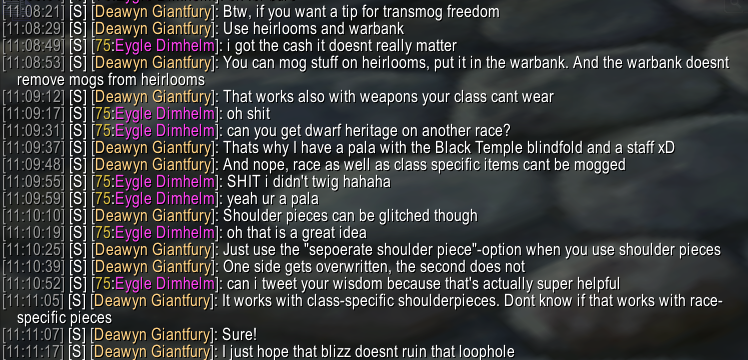
Met a kind stranger who taught me some CRAZY useful RP transmog advice.
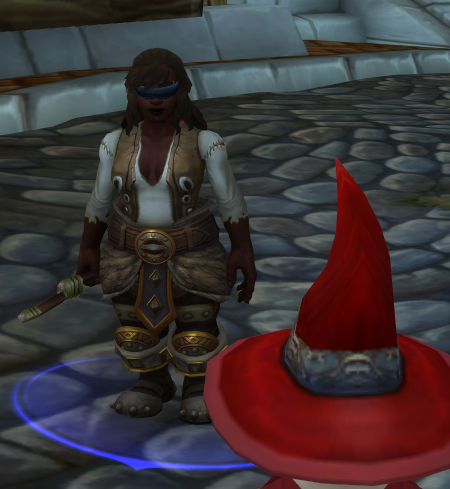
This is a Paladin, wielding a 2h staff and a leather blindfold.
Via storing transmogs on heirlooms in your warband bank, you can easily create transmogs with items you're not supposed to wear.
Today I learned if you double click a tracked recipe, a pop-up window appears. Shift clicking the icons while the AH window is open automatically fills the search bar!!! No addons needed.
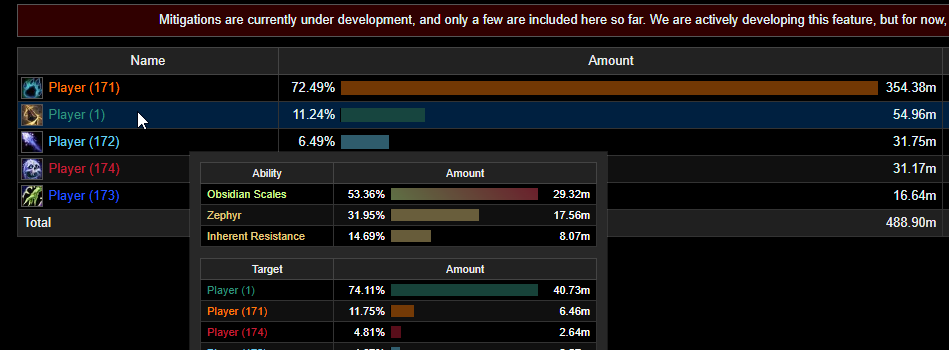
Warcraft Logs Mitigations Update!
We've finished updating Mitigations for 11.0. Not only have we updated existing abilities, but also added plenty new.
You can find Mitigations under the Healing tab - for ease of overview I suggest toggling off Healing and Absorbs.
Performance issues in raids
Since everyone and their grandfather appears to be an expert on social media when it comes to FPS and frametime issues, let's have a little realtalk, explanations and recommendations.
1.) Currently known bugs in the game
- Models and modelscenes will cause major performance drops, due to a bug in the game engine. This is mostly related to any kind of WeakAura which is using these kind of model effects (Fancy glowing power bars, animated models dancing on your screen, etc). You should go through all of your WAs, open the "Display" tab and make sure you disable or delete any active models or modelscene overlays. Without calling out names, the two most popular class WeakAura packs on Wago are known for using these models for the above mentioned effects. This is not something the AddOn devs can fix really and Blizzard has to figure it out. The issue has been investigated and confirmed on multiple Discords and was reported to Blizzard.
- Portraits on UnitFrames and NamePlates will tank your performance by a lot, for similar reasons as models. You should definitely not use them and if you really insist, swap to 2D non-animated versions instead.
- If you are interested in raw numbers, one single rendered model on your screen can be as bad a 10 FPS loss. This is not made up.
1.1.) Spammy background events
- Events are fired by the game and used by AddOns to execute certain code, for example the GROUP_ROSTER_UPDATE event is only supposed to fire whenever someone joins or leaves your party/raid, however, this event is randomly spamming the hell out of your client and forces AddOns to execute their group roster update code over and over. The bigger your raid group, the worse it becomes.
2.) Filtering for Buffs and Debuffs [short: Auras]
- Filtering your auras using allowlists/whitelists and blocklists/blacklists is pretty much the most CPU intensive task for an AddOn, sadly the majority of players is used to it and it will be really hard to convince them for an alternative solution like single indicators which are registered to the combatlog using spell IDs since it would require turning off automatic tracking of auras on frames/plates and manually adding the IDs they care about.
3.) Issues related to fonts
- After some testing and troubleshooting it has come to our attention, that large font files, for example fonts which support multiple glyphs for alphabets like Cyrillic, Chinese, Japanese and Korean, will impact your FPS by a very noticeable amount. This is something you can only partially check ingame. Confirm which font/s you are mostly using and then figure out which AddOn is providing it and open up their folder in Interface\AddOns - then navigate to the font file and check for the file size - if your font file is larger than 100kb and you are using it for a lot of things, especially cooldown text on action bars and WeakAuras, it might be one of your issues.
4.) Update rates for bars, icons and text
- Most AddOns are shipped with very fast update rates on their animations, bars, icons, text. Some of them are updating in real time. This is a major impact on performance and you should go in the options and think about how fast you really need them to update the information. There is no reason in the world where your DPS meter should update at a rate of 0.05 seconds which is 20 updates !per second! - this also goes for your NamePlates and text on other elements.
Details: /details options -> Display -> Update Interval
Plater: /plater -> Advanced -> Update Interval
ElvUI: /ec -> General -> Tag update Rate
5.) Load conditions and AddOns-per-content
- Make sure your auras and AddOns are only loaded/enabled for the content you are about to run.
- For WeakAuras you can do that on a per-aura-basis in the "Load" tab
- For AddOns I recommend something like Simple Addon Manager (SAM) where you can setup profile sets of your AddOns based on custom categories for each content (Dungeons, Raids, PvP, Open World)
- There is literally no reason to have your Dungeon AddOns and PvP AddOns or stuff like HandyNotes, TomTom and other things enabled when you are about to start your mainraid for multiple hours. 1 click on the profile into a fast reload and all the unused AddOns are disabled.
6.) Graphics profile for Raids and Battleground
- It is highly recommended to enable the "Raid Graphics Quality" checkbox in your ESC -> Options -> Graphics -> Raid and Battleground tab. This will make sure the game will load a specific set of settings whenever you enter the loading screen of a Raid or Battleground. If you need some very sane recommendations for the best possible FPS while still being able to see all important effects like void zones, other puddles and healer cooldowns like Spirit Link and Healing Rain - follow my screenshot: https://t.co/DkWAvGhRaS
- If you need more in-depth information to futher optimize graphics in general please refer to my guide over at https://t.co/sdIcIB2bRV
7.) ElvUI-specific "fixes"
- Most people complaining about bad FPS using ElvUI, are not using the AddOn defaults (for obvious reasons) and prefer personal layouts or one of their favorite streamers layout, fair enough. However - everything about to follow, is the main reason for bad FPS and is not enabled by default out of the box.
- "Debuffs" on Party, Raid1, Raid2, Raid2 should be disabled, for filtering reasons explained at the very top of this post. This will be the main issue for your unplayable FPS in 20-30man raids.
- The very performance-friendly alternative here is "RaidDebuff Indicator" and can still be configured to display debuffs which ur current spec can actively dispel.
- Portraits on Player/Target should be turned off
- Smooth bars should be turned off
- Gradient coloring (added by some plugins) should be turned off
8.) Shameless self promotion
- If you are looking for the most optimized layout for dungeons and raid performance, you should definitely check out my personal work on LuckyoneUI (a ElvUI plugin)
- Its is completely free available on CurseForge and Wago AddOns / UI Packs
- Its always up to date with the latest and greatest tweaks for performance as well as bug fixes, even early on around PTR and Betas/Alphas when AddOns are enabled.
- Trusted and confirmed by over 4500 people on the Discord server, you will find mostly if not only positive feedback from people switching to my layouts.
- https://t.co/FXaSjhaLhn
- https://t.co/5G544kGtZN
- https://t.co/aDnBHBASTO
- https://t.co/XyozcRY9LO
9.) The end
There might be typos in this post, I don't really care :)
Also if you are about to start off a random rant about someones work or any kind of AddOn I will get rid of your comments. Let's be honest, no one is interested in reading your social media hate.
I like doing Mythic+ this season. I play with guilders and members of the @dungeondojowow community. I love to teach, help, instruct. We win together. We die together. We learn. We overcome obstacles.
If you want things to change.
Be the change.
One key at a time. Together
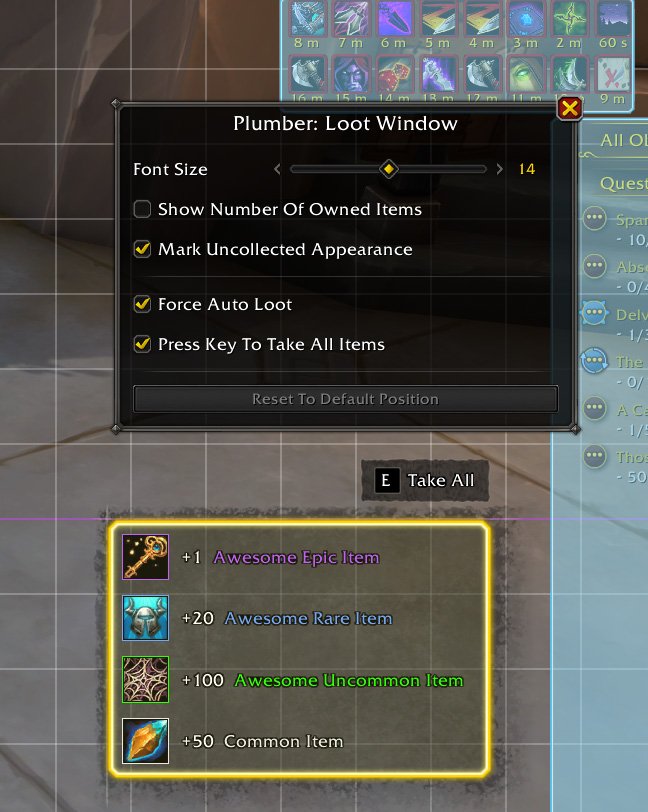
Loot Window has been added the Plumber add-on. This module is disabled by default.
Some QoL features:
1. Fix the occasional Auto Loot failure.
2. Alert you when the currency reached the cap.
3. Mark items with uncollected appearance.
4. A Take All button for Manual Loot.
@onyxicca In my first ever Ragnaros raid in vanilla with my hunter, I right clicked the boss, which triggered autoshot. The encounter started and we wiped, because we weren’t ready. 🤦♂️ Since the I turned my back to the boss before the pulls. 😂