Unique easy-to-learn and use Excel Models designed for Business and Personal usage offer a paradigm shift of new insight into your business and personal tasks.
Best premium smartwatches this November 2023: From Samsung Galaxy Watch5 to Apple Watch SE | Mint
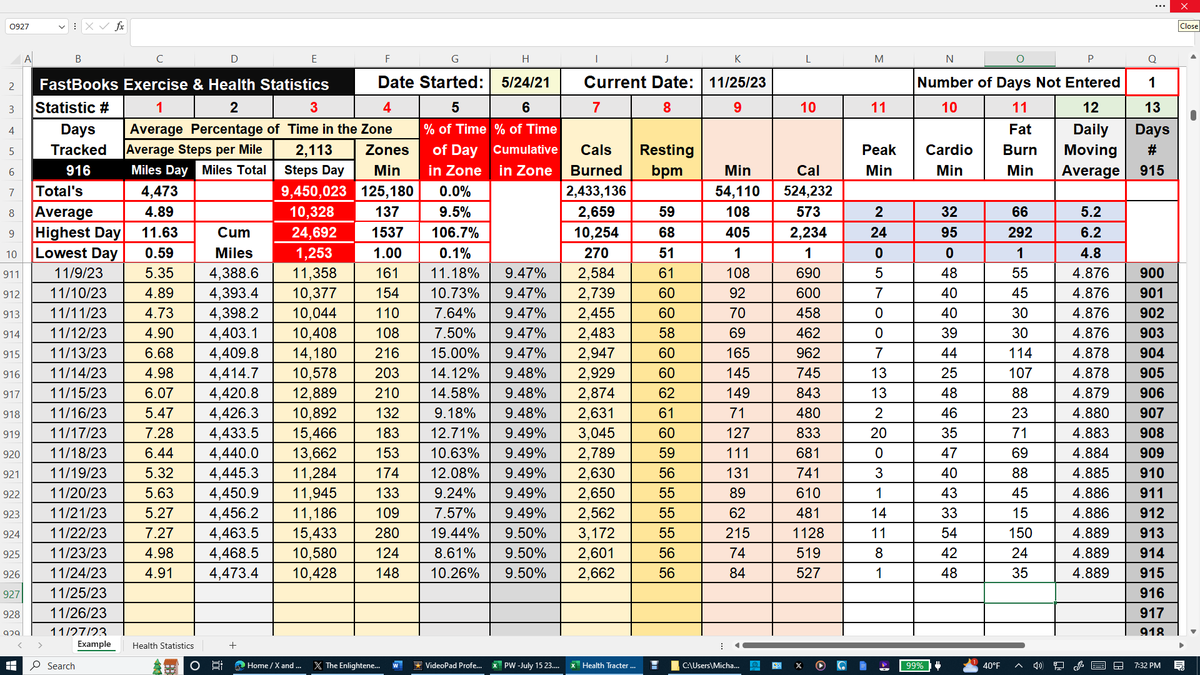
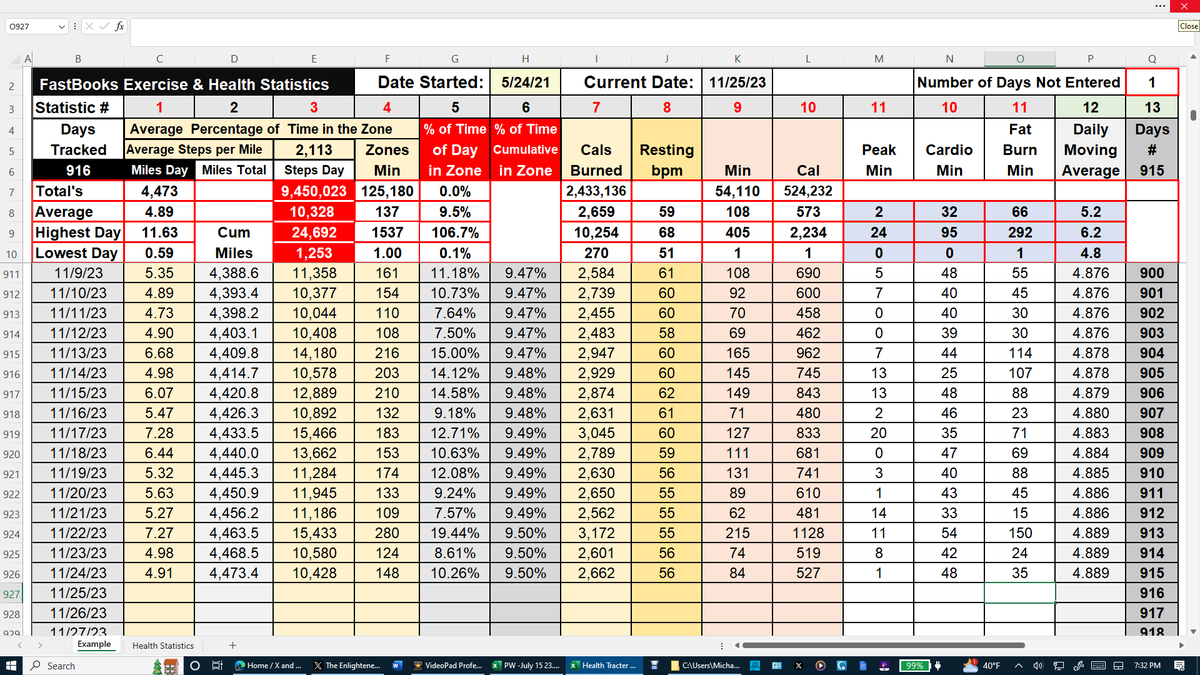
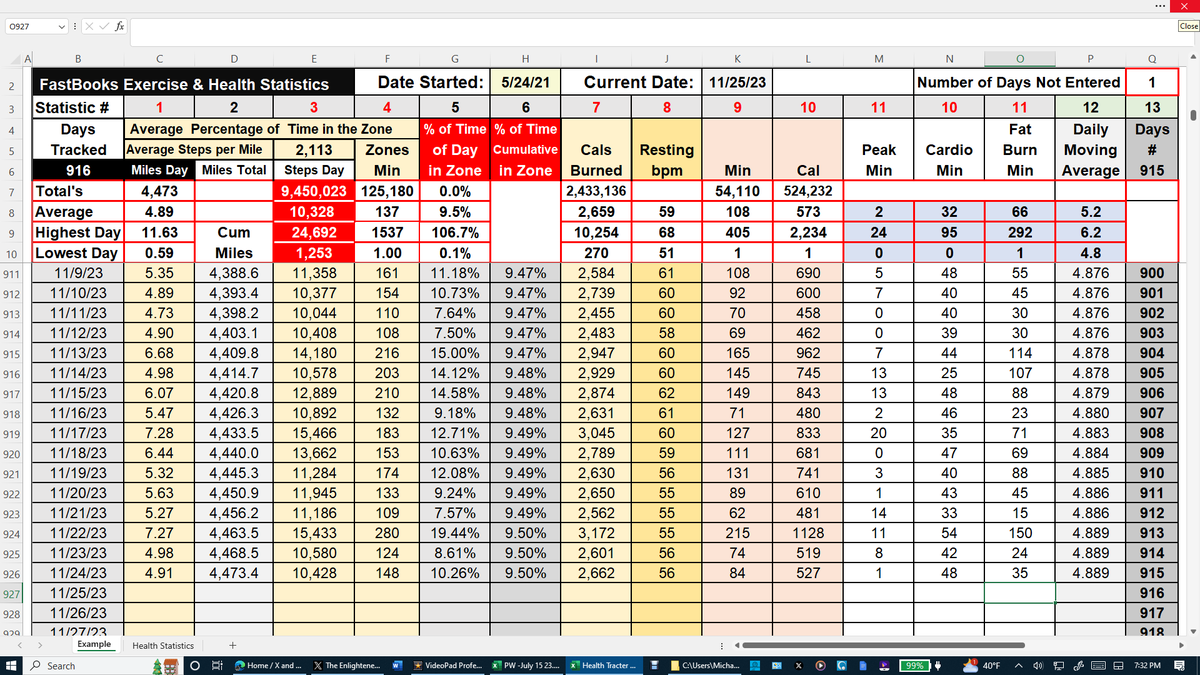
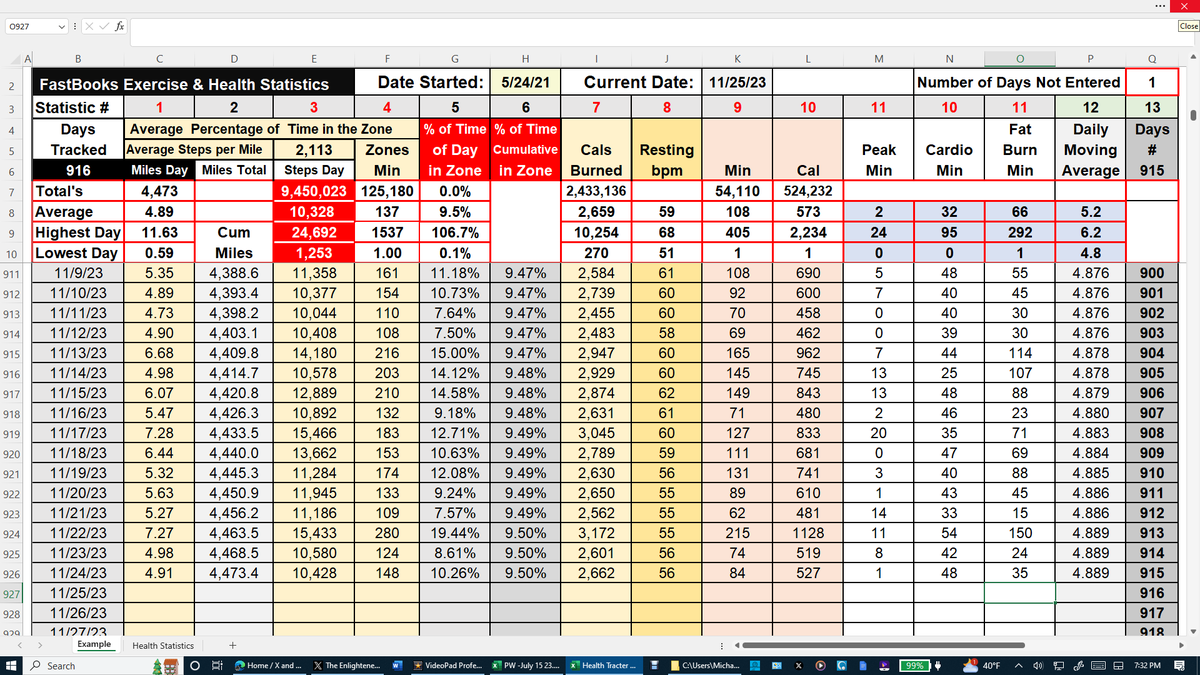
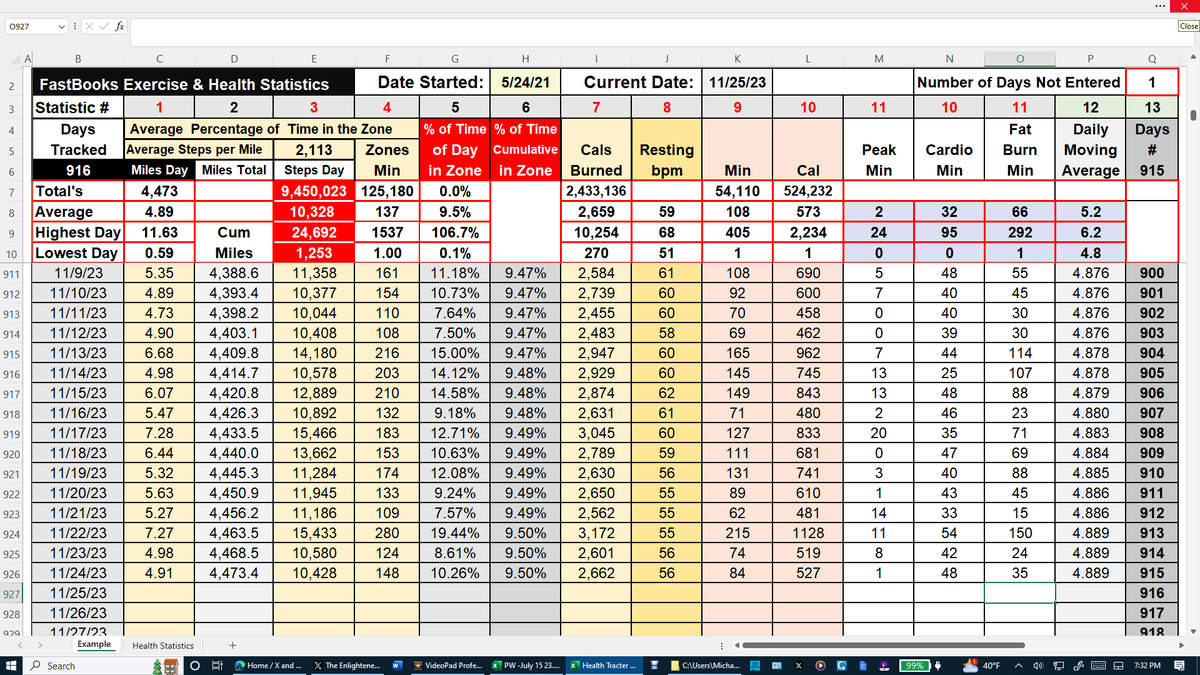
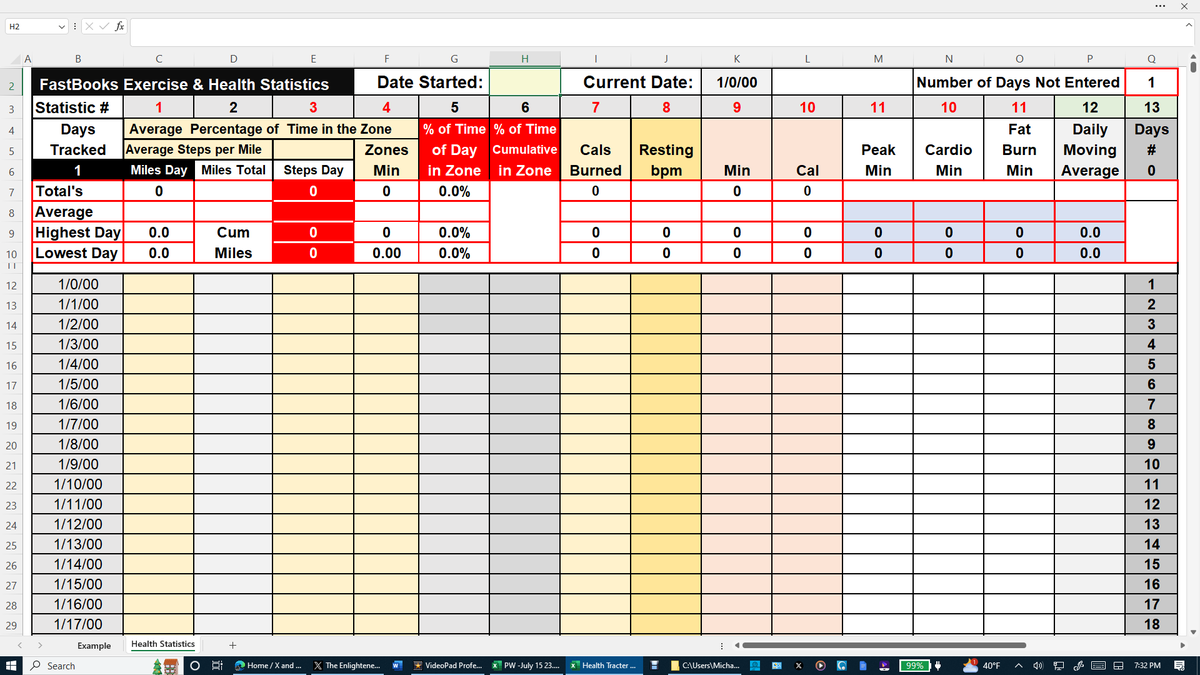
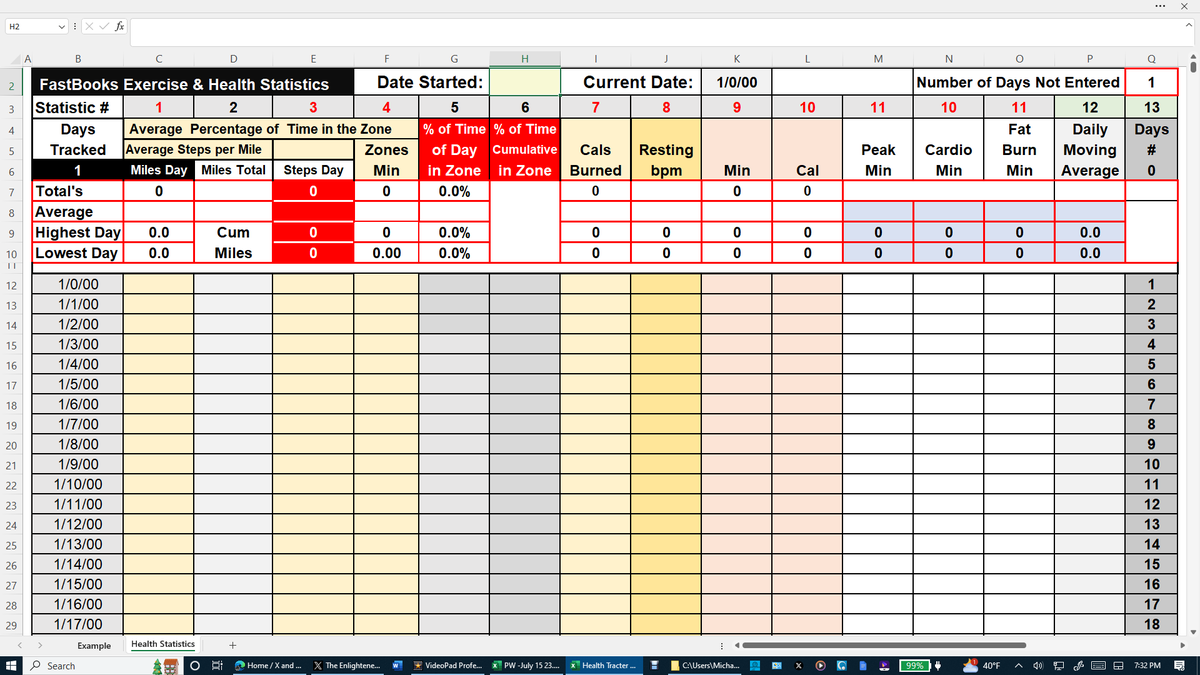
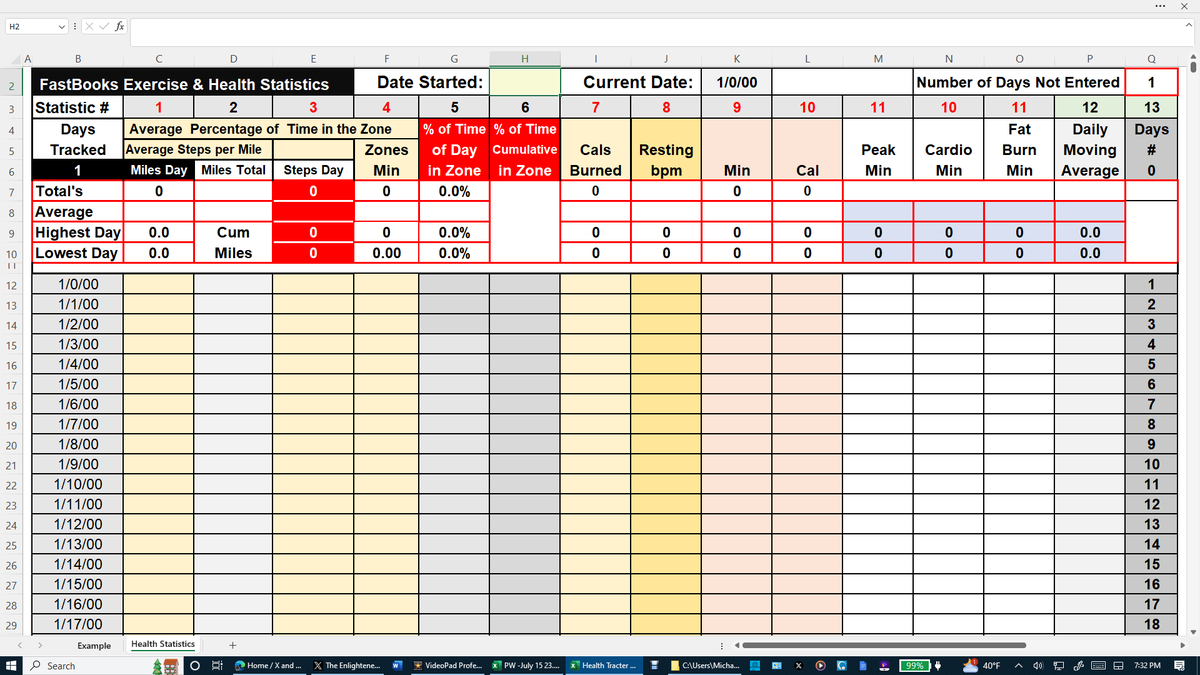
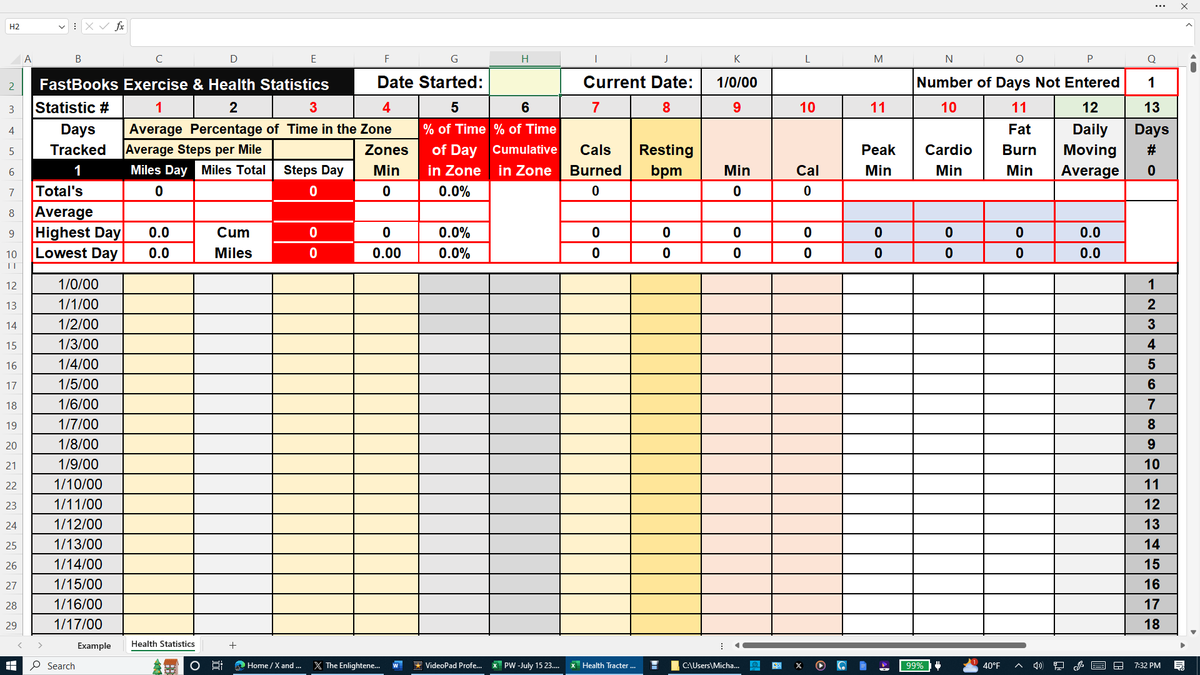
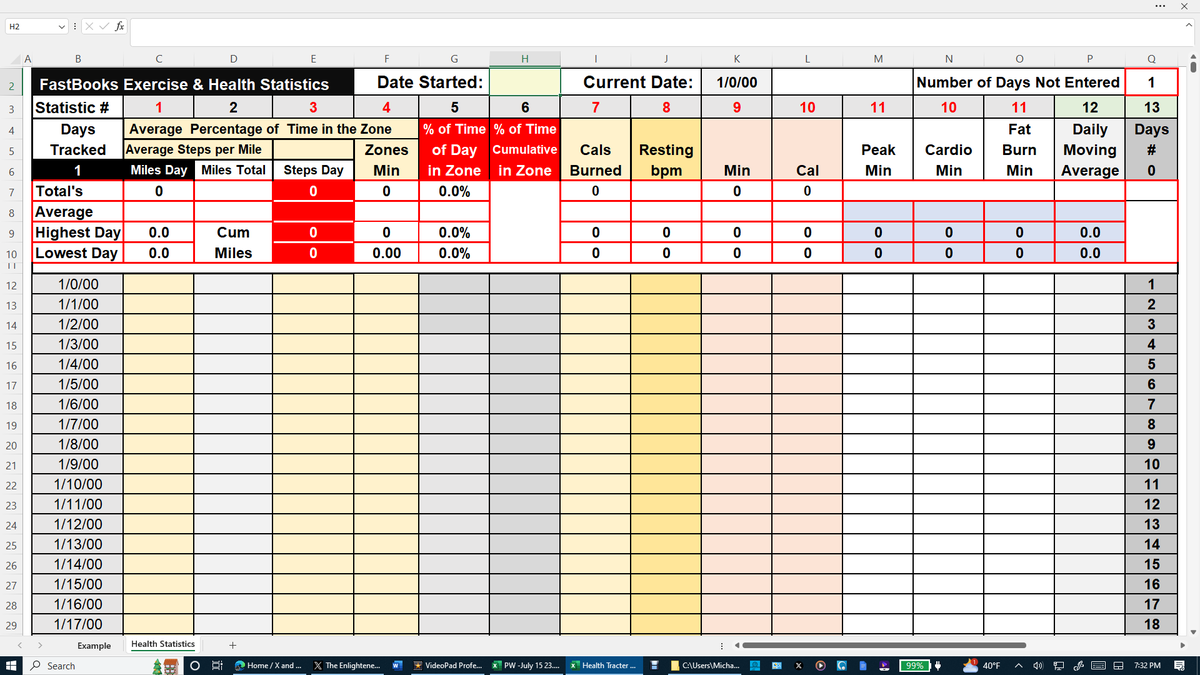
Download a FREE 5-Day Demo of the FastBooks Health and Exercise Tracker Excel Model. My Average Steps per Day over the past 915 days is 10,328 equalling 4.89 miles per day. I have been recording my steps, miles, and eight other health statistics on my FastBooks Health and Exercise Tracker Excel Model using data taken from my $50 Fitbit watch. This same data is offered on any Apple, Pixel, or Google watch. You can also use other similar data. This unique long-term ‘fitness feedback tool’ on one page provides over 50 useful statistics.
All FastBooks.Solution Business and Personal Excel Models are a great way to improve your Excel Skills. By unprotecting the sheet tabs, you can make changes to the models, change the statistics collected, add new sheet tabs for example, or review the formulas that created the over 50 Statistics provided in the model.
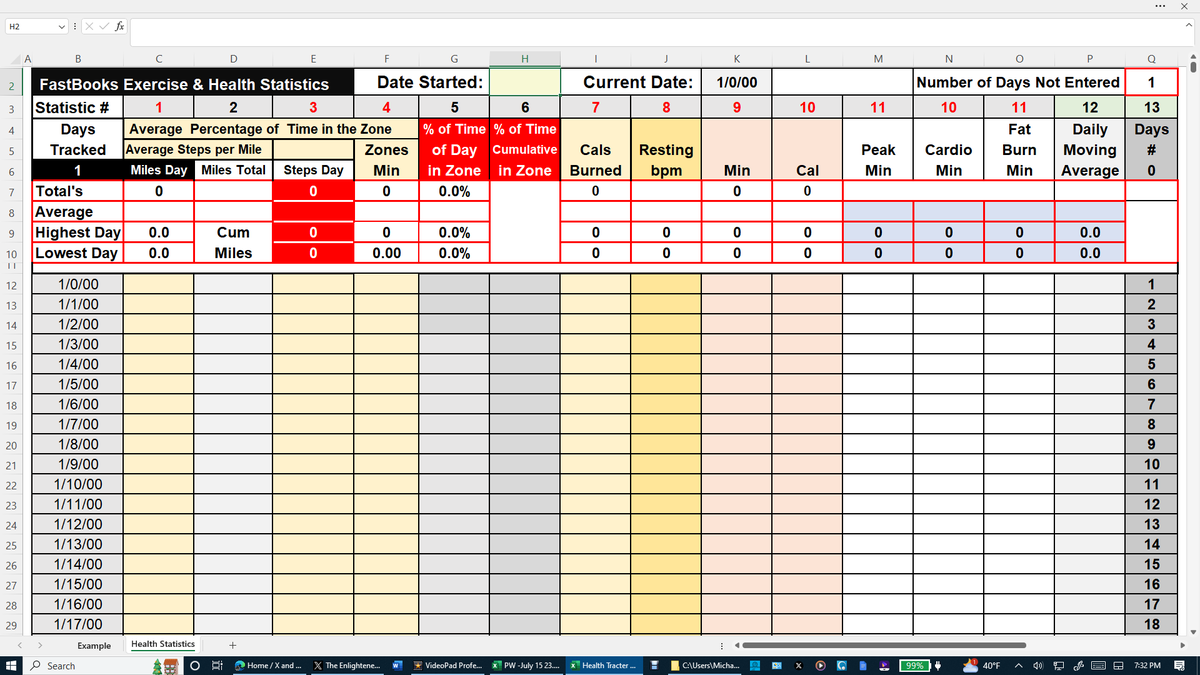
All the other cells in the model are locked except the cells in the 10 columns using red font numbering on row 3 that are designed to enter the daily exercise and health data from any smartwatch, which can be changed by simply unprotecting the model.
Click on the link below to download a FREE 5-Day Demo of the FastBooks Health Tracker Excel Model.
All FastBooks.Solution Business and Personal Excel models are designed to be downloaded only on a computer having a licensed copy of Microsoft Excel. If you do not use Excel now is a good time to start. Excel is mathematics in every science. If you don't have Excel on your computer, go to any public library. If you want to gain or enhance your Excel skills, here is your free opportunity. Any health statistic that calculating an Average, Highest, and Lowest number is useful can be used to replace 5 of the 10 statistics input columns provided.
The file will open in viewing mode. The Excel file contains two sheet tabs, name Example, and 5 Day Free Demo. The Example sheet tab is protected, so the only thing you can do is use the ‘up down scroll bar’ to gain an appreciation for the simple design of this easy-to-use Excel model. The Excel Zoom setting under ‘view’ will most likely have to be adjusted to fit your computer screen. Excel should be set in the Full-screen mode to be viewed as displayed in this posting on your computer.
https://t.co/6erSM964cY
The FastBooks Health and Exercise Tracker Excel Model can be purchased for $15 plus sales tax using the PayPal link below.
https://t.co/Ke7568N1XT
Accepts PayPal and all debit and credit cards and the card purchases are covered by PayPal Purchase Protection.
After Purchase, you will receive the Health and Exercise Tracker Excel Model by email from [email protected] with instructions and other information within 24 hours from the time of purchase.
https://t.co/VVi2pczJf6 via @GoogleNews
I've been using Nothing's new budget smartwatch for a week ... - Tom's Guide
Download a FREE 5-Day Demo of the FastBooks Health and Exercise Tracker Excel Model. My Average Steps per Day over the past 915 days is 10,328 equalling 4.89 miles per day. I have been recording my steps, miles, and eight other health statistics on my FastBooks Health and Exercise Tracker Excel Model using data taken from my $50 Fitbit watch. This same data is offered on any Apple, Pixel, or Google watch. You can also use other similar data. This unique long-term ‘fitness feedback tool’ on one page provides over 50 useful statistics.
All FastBooks.Solution Business and Personal Excel Models are a great way to improve your Excel Skills. By unprotecting the sheet tabs, you can make changes to the models, change the statistics collected, add new sheet tabs for example, or review the formulas that created the over 50 Statistics provided in the model.
All the other cells in the model are locked except the cells in the 10 columns using red font numbering on row 3 that are designed to enter the daily exercise and health data from any smartwatch, which can be changed by simply unprotecting the model.
Click on the link below to download a FREE 5-Day Demo of the FastBooks Health Tracker Excel Model.
All FastBooks.Solution Business and Personal Excel models are designed to be downloaded only on a computer having a licensed copy of Microsoft Excel. If you do not use Excel now is a good time to start. Excel is mathematics in every science. If you don't have Excel on your computer, go to any public library. If you want to gain or enhance your Excel skills, here is your free opportunity. Any health statistic that calculating an Average, Highest, and Lowest number is useful can be used to replace 5 of the 10 statistics input columns provided.
The file will open in viewing mode. The Excel file contains two sheet tabs, name Example, and 5 Day Free Demo. The Example sheet tab is protected, so the only thing you can do is use the ‘up down scroll bar’ to gain an appreciation for the simple design of this easy-to-use Excel model. The Excel Zoom setting under ‘view’ will most likely have to be adjusted to fit your computer screen. Excel should be set in the Full-screen mode to be viewed as displayed in this posting on your computer.
https://t.co/6erSM964cY
The FastBooks Health and Exercise Tracker Excel Model can be purchased for $15 plus sales tax using the PayPal link below.
https://t.co/Ke7568N1XT
Accepts PayPal and all debit and credit cards and the card purchases are covered by PayPal Purchase Protection.
After Purchase, you will receive the Health and Exercise Tracker Excel Model by email from [email protected] with instructions and other information within 24 hours from the time of purchase.
https://t.co/qRwoktrRcd via @GoogleNews
Review: Apple Watch Ultra 2 |Download a FREE 5-Day Demo of the FastBooks Health and Exercise Tracker Excel Model. My Average Steps per Day over the past 915 days is 10,328 equalling 4.89 miles per day. I have been recording my steps, miles, and eight other health statistics on my FastBooks Health and Exercise Tracker Excel Model using data taken from my $50 Fitbit watch. This same data is offered on any Apple, Pixel, or Google watch. You can also use other similar data. This unique long-term ‘fitness feedback tool’ on one page provides over 50 useful statistics.
All FastBooks.Solution Business and Personal Excel Models are a great way to improve your Excel Skills. By unprotecting the sheet tabs, you can make changes to the models, change the statistics collected, add new sheet tabs for example, or review the formulas that created the over 50 Statistics provided in the model.
All the other cells in the model are locked except the cells in the 10 columns using red font numbering on row 3 that are designed to enter the daily exercise and health data from any smartwatch, which can be changed by simply unprotecting the model.
Click on the link below to download a FREE 5-Day Demo of the FastBooks Health Tracker Excel Model.
All FastBooks.Solution Business and Personal Excel models are designed to be downloaded only on a computer having a licensed copy of Microsoft Excel. If you do not use Excel now is a good time to start. Excel is mathematics in every science. If you don't have Excel on your computer, go to any public library. If you want to gain or enhance your Excel skills, here is your free opportunity. Any health statistic that calculating an Average, Highest, and Lowest number is useful can be used to replace 5 of the 10 statistics input columns provided.
The file will open in viewing mode. The Excel file contains two sheet tabs, name Example, and 5 Day Free Demo. The Example sheet tab is protected, so the only thing you can do is use the ‘up down scroll bar’ to gain an appreciation for the simple design of this easy-to-use Excel model. The Excel Zoom setting under ‘view’ will most likely have to be adjusted to fit your computer screen. Excel should be set in the Full-screen mode to be viewed as displayed in this posting on your computer.
https://t.co/6erSM964cY
The FastBooks Health and Exercise Tracker Excel Model can be purchased for $15 plus sales tax using the PayPal link below.
https://t.co/Ke7568N1XT
Accepts PayPal and all debit and credit cards and the card purchases are covered by PayPal Purchase Protection.
After Purchase, you will receive the Health and Exercise Tracker Excel Model by email from [email protected] with instructions and other information within 24 hours from the time of purchase.
https://t.co/w2PKsVd5yf via @GoogleNews
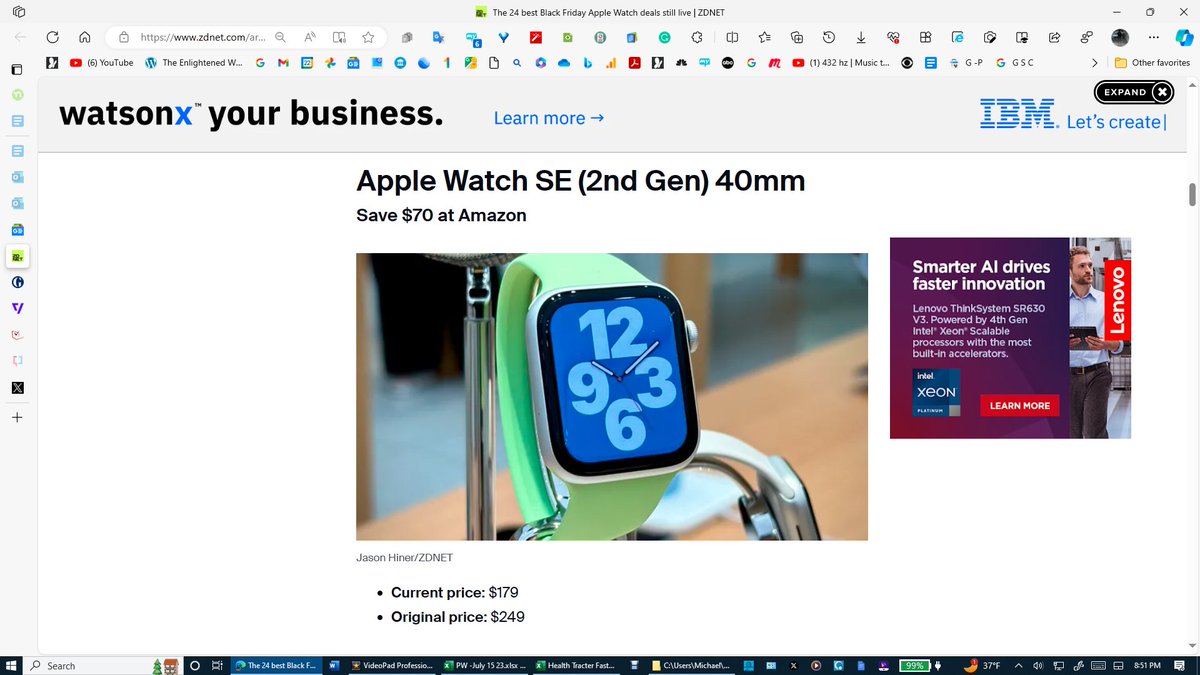
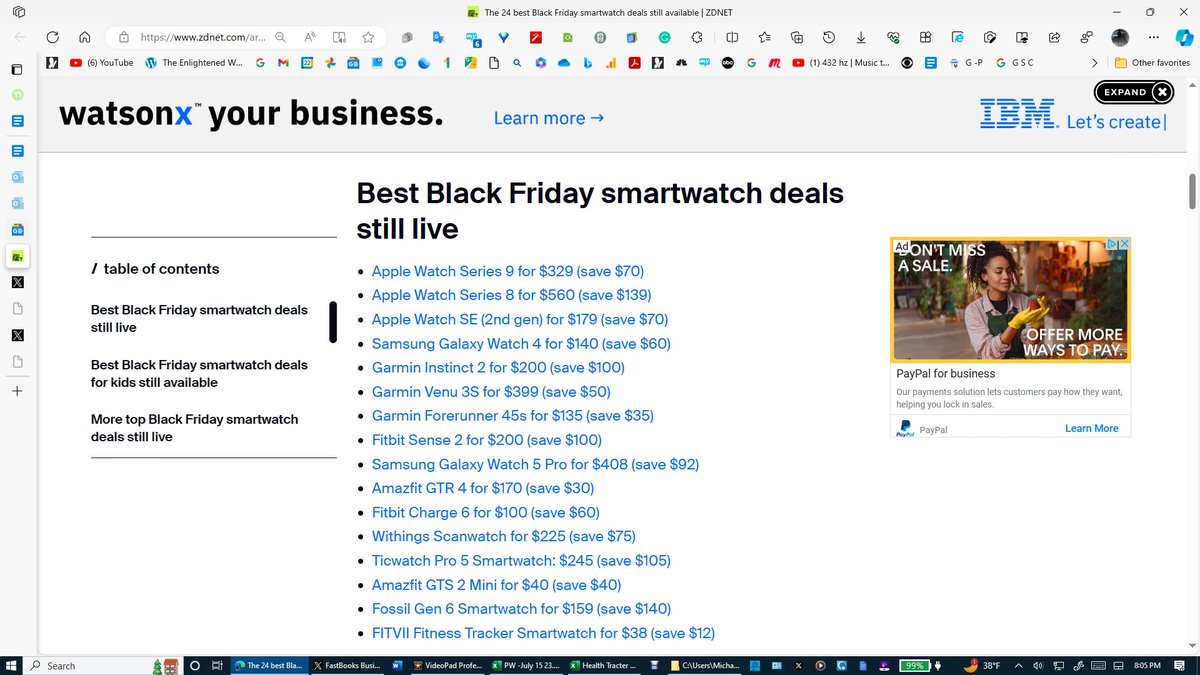
The 24 best Black Friday Apple Watch deals still live - ZDNet
Download a FREE 5-Day Demo of the FastBooks Health and Exercise Tracker Excel Model. My Average Steps per Day over the past 915 days is 10,328 equalling 4.89 miles per day. I have been recording my steps, miles, and eight other health statistics on my FastBooks Health and Exercise Tracker Excel Model using data taken from my $50 Fitbit watch. This same data is offered on any Apple, Pixel, or Google watch. You can also use other similar data. This unique long-term ‘fitness feedback tool’ on one page provides over 50 useful statistics.
All FastBooks.Solution Business and Personal Excel Models are a great way to improve your Excel Skills. By unprotecting the sheet tabs, you can make changes to the models, change the statistics collected, add new sheet tabs for example, or review the formulas that created the over 50 Statistics provided in the model.
All the other cells in the model are locked except the cells in the 10 columns using red font numbering on row 3 that are designed to enter the daily exercise and health data from any smartwatch, which can be changed by simply unprotecting the model.
Click on the link below to download a FREE 5-Day Demo of the FastBooks Health Tracker Excel Model.
All FastBooks.Solution Business and Personal Excel models are designed to be downloaded only on a computer having a licensed copy of Microsoft Excel. If you do not use Excel now is a good time to start. Excel is mathematics in every science. If you don't have Excel on your computer, go to any public library. If you want to gain or enhance your Excel skills, here is your free opportunity. Any health statistic that calculating an Average, Highest, and Lowest number is useful can be used to replace 5 of the 10 statistics input columns provided.
The file will open in viewing mode. The Excel file contains two sheet tabs, name Example, and 5 Day Free Demo. The Example sheet tab is protected, so the only thing you can do is use the ‘up down scroll bar’ to gain an appreciation for the simple design of this easy-to-use Excel model. The Excel Zoom setting under ‘view’ will most likely have to be adjusted to fit your computer screen. Excel should be set in the Full-screen mode to be viewed as displayed in this posting on your computer.
https://t.co/6erSM964cY
The FastBooks Health and Exercise Tracker Excel Model can be purchased for $15 plus sales tax using the PayPal link below.
https://t.co/Ke7568N1XT
Accepts PayPal and all debit and credit cards and the card purchases are covered by PayPal Purchase Protection.
After Purchase, you will receive the Health and Exercise Tracker Excel Model by email from [email protected] with instructions and other information within 24 hours from the time of purchase.
https://t.co/fbDGkXCAOi via @GoogleNews
Pixel Watch 2 review: Google smartwatch gets speed and battery boost - The Guardian
Download a FREE 5-Day Demo of the FastBooks Health and Exercise Tracker Excel Model. My Average Steps per Day over the past 915 days is 10,328 equalling 4.89 miles per day. I have been recording my steps, miles, and eight other health statistics on my FastBooks Health and Exercise Tracker Excel Model using data taken from my $50 Fitbit watch. This same data is offered on any Apple, Pixel, or Google watch. You can also use other similar data. This unique long-term ‘fitness feedback tool’ on one page provides over 50 useful statistics.
All FastBooks.Solution Business and Personal Excel Models are a great way to improve your Excel Skills. By unprotecting the sheet tabs, you can make changes to the models, change the statistics collected, add new sheet tabs for example, or review the formulas that created the over 50 Statistics provided in the model.
All the other cells in the model are locked except the cells in the 10 columns using red font numbering on row 3 that are designed to enter the daily exercise and health data from any smartwatch, which can be changed by simply unprotecting the model.
Click on the link below to download a FREE 5-Day Demo of the FastBooks Health Tracker Excel Model.
All FastBooks.Solution Business and Personal Excel models are designed to be downloaded only on a computer having a licensed copy of Microsoft Excel. If you do not use Excel now is a good time to start. Excel is mathematics in every science. If you don't have Excel on your computer, go to any public library. If you want to gain or enhance your Excel skills, here is your free opportunity. Any health statistic that calculating an Average, Highest, and Lowest number is useful can be used to replace 5 of the 10 statistics input columns provided.
The file will open in viewing mode. The Excel file contains two sheet tabs, name Example, and 5 Day Free Demo. The Example sheet tab is protected, so the only thing you can do is use the ‘up down scroll bar’ to gain an appreciation for the simple design of this easy-to-use Excel model. The Excel Zoom setting under ‘view’ will most likely have to be adjusted to fit your computer screen. Excel should be set in the Full-screen mode to be viewed as displayed in this posting on your computer.
https://t.co/6erSM964cY
The FastBooks Health and Exercise Tracker Excel Model can be purchased for $15 plus sales tax using the PayPal link below.
https://t.co/Ke7568N1XT
Accepts PayPal and all debit and credit cards and the card purchases are covered by PayPal Purchase Protection.
After Purchase, you will receive the Health and Exercise Tracker Excel Model by email from [email protected] with instructions and other information within 24 hours from the time of purchase.
https://t.co/RfeHG0nbxj via @GoogleNews
Google Pixel Watch 2 review: better battery, better watch - The Verge
Download a FREE 5-Day Demo of the FastBooks Health and Exercise Tracker Excel Model. My Average Steps per Day over the past 915 days is 10,328 equalling 4.89 miles per day. I have been recording my steps, miles, and eight other health statistics on my FastBooks Health and Exercise Tracker Excel Model using data taken from my $50 Fitbit watch. This same data is offered on any Apple, Pixel, or Google watch. You can also use other similar data. This unique long-term ‘fitness feedback tool’ on one page provides over 50 useful statistics.
All FastBooks.Solution Business and Personal Excel Models are a great way to improve your Excel Skills. By unprotecting the sheet tabs, you can make changes to the models, change the statistics collected, add new sheet tabs for example, or review the formulas that created the over 50 Statistics provided in the model.
All the other cells in the model are locked except the cells in the 10 columns using red font numbering on row 3 that are designed to enter the daily exercise and health data from any smartwatch, which can be changed by simply unprotecting the model.
Click on the link below to download a FREE 5-Day Demo of the FastBooks Health Tracker Excel Model.
All FastBooks.Solution Business and Personal Excel models are designed to be downloaded only on a computer having a licensed copy of Microsoft Excel. If you do not use Excel now is a good time to start. Excel is mathematics in every science. If you don't have Excel on your computer, go to any public library. If you want to gain or enhance your Excel skills, here is your free opportunity. Any health statistic that calculating an Average, Highest, and Lowest number is useful can be used to replace 5 of the 10 statistics input columns provided.
The file will open in viewing mode. The Excel file contains two sheet tabs, name Example, and 5 Day Free Demo. The Example sheet tab is protected, so the only thing you can do is use the ‘up down scroll bar’ to gain an appreciation for the simple design of this easy-to-use Excel model. The Excel Zoom setting under ‘view’ will most likely have to be adjusted to fit your computer screen. Excel should be set in the Full-screen mode to be viewed as displayed in this posting on your computer.
https://t.co/6erSM964cY
The FastBooks Health and Exercise Tracker Excel Model can be purchased for $15 plus sales tax using the PayPal link below.
https://t.co/Ke7568N1XT
Accepts PayPal and all debit and credit cards and the card purchases are covered by PayPal Purchase Protection.
After Purchase, you will receive the Health and Exercise Tracker Excel Model by email from [email protected] with instructions and other information within 24 hours from the time of purchase.
https://t.co/Nf3EOAmPuj via @GoogleNews
Budget smartwatch Rowatch 6 promises ECG, blood pressure, blood sugar, and more, currently costs less than half the ... -
Download a FREE 5-Day Demo of the FastBooks Health and Exercise Tracker Excel Model. My Average Steps per Day over the past 915 days is 10,328 equalling 4.89 miles per day. I have been recording my steps, miles, and eight other health statistics on my FastBooks Health and Exercise Tracker Excel Model using data taken from my $50 Fitbit watch. This same data is offered on any Apple, Pixel, or Google watch. You can also use other similar data. This unique long-term ‘fitness feedback tool’ on one page provides over 50 useful statistics.
All FastBooks.Solution Business and Personal Excel Models are a great way to improve your Excel Skills. By unprotecting the sheet tabs, you can make changes to the models, change the statistics collected, add new sheet tabs for example, or review the formulas that created the over 50 Statistics provided in the model.
All the other cells in the model are locked except the cells in the 10 columns using red font numbering on row 3 that are designed to enter the daily exercise and health data from any smartwatch, which can be changed by simply unprotecting the model.
Click on the link below to download a FREE 5-Day Demo of the FastBooks Health Tracker Excel Model.
All FastBooks.Solution Business and Personal Excel models are designed to be downloaded only on a computer having a licensed copy of Microsoft Excel. If you do not use Excel now is a good time to start. Excel is mathematics in every science. If you don't have Excel on your computer, go to any public library. If you want to gain or enhance your Excel skills, here is your free opportunity. Any health statistic that calculating an Average, Highest, and Lowest number is useful can be used to replace 5 of the 10 statistics input columns provided.
The file will open in viewing mode. The Excel file contains two sheet tabs, name Example, and 5 Day Free Demo. The Example sheet tab is protected, so the only thing you can do is use the ‘up down scroll bar’ to gain an appreciation for the simple design of this easy-to-use Excel model. The Excel Zoom setting under ‘view’ will most likely have to be adjusted to fit your computer screen. Excel should be set in the Full-screen mode to be viewed as displayed in this posting on your computer.
https://t.co/6erSM964cY
The FastBooks Health and Exercise Tracker Excel Model can be purchased for $15 plus sales tax using the PayPal link below.
https://t.co/Ke7568N1XT
Accepts PayPal and all debit and credit cards and the card purchases are covered by PayPal Purchase Protection.
After Purchase, you will receive the Health and Exercise Tracker Excel Model by email from [email protected] with instructions and other information within 24 hours from the time of purchase.
https://t.co/DlfXViwlyb https://t.co/VmFYVM7PW2 via @GoogleNews
Times running out on this fantastic Garmin smartwatch deal that drops it to an all-time low - XDA Developers
Download a FREE 5-Day Demo of the FastBooks Health and Exercise Tracker Excel Model. My Average Steps per Day over the past 915 days is 10,328 equalling 4.89 miles per day. I have been recording my steps, miles, and eight other health statistics on my FastBooks Health and Exercise Tracker Excel Model using data taken from my $50 Fitbit watch. This same data is offered on any Apple, Pixel, or Google watch. You can also use other similar data. This unique long-term ‘fitness feedback tool’ on one page provides over 50 useful statistics.
All FastBooks.Solution Business and Personal Excel Models are a great way to improve your Excel Skills. By unprotecting the sheet tabs, you can make changes to the models, change the statistics collected, add new sheet tabs for example, or review the formulas that created the over 50 Statistics provided in the model.
All the other cells in the model are locked except the cells in the 10 columns using red font numbering on row 3 that are designed to enter the daily exercise and health data from any smartwatch, which can be changed by simply unprotecting the model.
Click on the link below to download a FREE 5-Day Demo of the FastBooks Health Tracker Excel Model.
All FastBooks.Solution Business and Personal Excel models are designed to be downloaded only on a computer having a licensed copy of Microsoft Excel. If you do not use Excel now is a good time to start. Excel is mathematics in every science. If you don't have Excel on your computer, go to any public library. If you want to gain or enhance your Excel skills, here is your free opportunity. Any health statistic that calculating an Average, Highest, and Lowest number is useful can be used to replace 5 of the 10 statistics input columns provided.
The file will open in viewing mode. The Excel file contains two sheet tabs, name Example, and 5 Day Free Demo. The Example sheet tab is protected, so the only thing you can do is use the ‘up down scroll bar’ to gain an appreciation for the simple design of this easy-to-use Excel model. The Excel Zoom setting under ‘view’ will most likely have to be adjusted to fit your computer screen. Excel should be set in the Full-screen mode to be viewed as displayed in this posting on your computer.
https://t.co/6erSM964cY
The FastBooks Health and Exercise Tracker Excel Model can be purchased for $15 plus sales tax using the PayPal link below.
https://t.co/Ke7568N1XT
Accepts PayPal and all debit and credit cards and the card purchases are covered by PayPal Purchase Protection.
After Purchase, you will receive the Health and Exercise Tracker Excel Model by email from [email protected] with instructions and other information within 24 hours from the time of purchase.
https://t.co/aj2eyv8hsq via @GoogleNews
Apple Watch Series 9 review: Don't settle for the less expensive models this year. Here's why - ZDNet
Download a FREE 5-Day Demo of the FastBooks Health and Exercise Tracker Excel Model. My Average Steps per Day over the past 915 days is 10,328 equalling 4.89 miles per day. I have been recording my steps, miles, and eight other health statistics on my FastBooks Health and Exercise Tracker Excel Model using data taken from my $50 Fitbit watch. This same data is offered on any Apple, Pixel, or Google watch. You can also use other similar data. This unique long-term ‘fitness feedback tool’ on one page provides over 50 useful statistics.
All FastBooks.Solution Business and Personal Excel Models are a great way to improve your Excel Skills. By unprotecting the sheet tabs, you can make changes to the models, change the statistics collected, add new sheet tabs for example, or review the formulas that created the over 50 Statistics provided in the model.
All the other cells in the model are locked except the cells in the 10 columns using red font numbering on row 3 that are designed to enter the daily exercise and health data from any smartwatch, which can be changed by simply unprotecting the model.
Click on the link below to download a FREE 5-Day Demo of the FastBooks Health Tracker Excel Model.
All FastBooks.Solution Business and Personal Excel models are designed to be downloaded only on a computer having a licensed copy of Microsoft Excel. If you do not use Excel now is a good time to start. Excel is mathematics in every science. If you don't have Excel on your computer, go to any public library. If you want to gain or enhance your Excel skills, here is your free opportunity. Any health statistic that calculating an Average, Highest, and Lowest number is useful can be used to replace 5 of the 10 statistics input columns provided.
The file will open in viewing mode. The Excel file contains two sheet tabs, name Example, and 5 Day Free Demo. The Example sheet tab is protected, so the only thing you can do is use the ‘up down scroll bar’ to gain an appreciation for the simple design of this easy-to-use Excel model. The Excel Zoom setting under ‘view’ will most likely have to be adjusted to fit your computer screen. Excel should be set in the Full-screen mode to be viewed as displayed in this posting on your computer.
https://t.co/6erSM964cY
The FastBooks Health and Exercise Tracker Excel Model can be purchased for $15 plus sales tax using the PayPal link below.
https://t.co/Ke7568N1XT
Accepts PayPal and all debit and credit cards and the card purchases are covered by PayPal Purchase Protection.
After Purchase, you will receive the Health and Exercise Tracker Excel Model by email from [email protected] with instructions and other information within 24 hours from the time of purchase.
https://t.co/GnOUZ6qTdH via @GoogleNews
The 24 best Black Friday smartwatch deals - ZDNet
Download a FREE 5-Day Demo of the FastBooks Health and Exercise Tracker Excel Model. My Average Steps per Day over the past 915 days is 10,328 equalling 4.89 miles per day. I have been recording my steps, miles, and eight other health statistics on my FastBooks Health and Exercise Tracker Excel Model using data taken from my $50 Fitbit watch. This same data is offered on any Apple, Pixel, or Google watch. You can also use other similar data. This unique long-term ‘fitness feedback tool’ on one page provides over 50 useful statistics.
All FastBooks.Solution Business and Personal Excel Models are a great way to improve your Excel Skills. By unprotecting the sheet tabs, you can make changes to the models, change the statistics collected, add new sheet tabs for example, or review the formulas that created the over 50 Statistics provided in the model.
All the other cells in the model are locked except the cells in the 10 columns using red font numbering on row 3 that are designed to enter the daily exercise and health data from any smartwatch, which can be changed by simply unprotecting the model.
Click on the link below to download a FREE 5-Day Demo of the FastBooks Health Tracker Excel Model.
All FastBooks.Solution Business and Personal Excel models are designed to be downloaded only on a computer having a licensed copy of Microsoft Excel. If you do not use Excel now is a good time to start. Excel is mathematics in every science. If you don't have Excel on your computer, go to any public library. If you want to gain or enhance your Excel skills, here is your free opportunity. Any health statistic that calculating an Average, Highest, and Lowest number is useful can be used to replace 5 of the 10 statistics input columns provided.
The file will open in viewing mode. The Excel file contains two sheet tabs, name Example, and 5 Day Free Demo. The Example sheet tab is protected, so the only thing you can do is use the ‘up down scroll bar’ to gain an appreciation for the simple design of this easy-to-use Excel model. The Excel Zoom setting under ‘view’ will most likely have to be adjusted to fit your computer screen. Excel should be set in the Full-screen mode to be viewed as displayed in this posting on your computer.
https://t.co/6erSM964cY
The FastBooks Health and Exercise Tracker Excel Model can be purchased for $15 plus sales tax using the PayPal link below.
https://t.co/Ke7568N1XT
Accepts PayPal and all debit and credit cards and the card purchases are covered by PayPal Purchase Protection.
After Purchase, you will receive the Health and Exercise Tracker Excel Model by email from [email protected] with instructions and other information within 24 hours from the time of purchase.
https://t.co/HzzbruGGcv via @GoogleNews
Google Pixel Watch 2 Review: The First Android Smartwatch I am Willing to Sleep With. The Pixel Watch 2 is better at tracking heart health than its predecessor, but Fitbit's kinks hold it back a bit.
Download a FREE 5-Day Demo of the FastBooks Health and Exercise Tracker Excel Model. My Average Steps per Day over the past 915 days is 10,328 equalling 4.89 miles per day. I have been recording my steps, miles, and eight other health statistics on my FastBooks Health and Exercise Tracker Excel Model using data taken from my $50 Fitbit watch. This same data is offered on any Apple, Pixel, or Google watch. You can also use other similar data. This unique long-term ‘fitness feedback tool’ on one page provides over 50 useful statistics.
All FastBooks.Solution Business and Personal Excel Models are a great way to improve your Excel Skills. By unprotecting the sheet tabs, you can make changes to the models, change the statistics collected, add new sheet tabs for example, or review the formulas that created the over 50 Statistics provided in the model.
All the other cells in the model are locked except the cells in the 10 columns using red font numbering on row 3 that are designed to enter the daily exercise and health data from any smartwatch, which can be changed by simply unprotecting the model.
Click on the link below to download a FREE 5-Day Demo of the FastBooks Health Tracker Excel Model.
All FastBooks.Solution Business and Personal Excel models are designed to be downloaded only on a computer having a licensed copy of Microsoft Excel. If you do not use Excel now is a good time to start. Excel is mathematics in every science. If you don't have Excel on your computer, go to any public library. If you want to gain or enhance your Excel skills, here is your free opportunity. Any health statistic that calculating an Average, Highest, and Lowest number is useful can be used to replace 5 of the 10 statistics input columns provided.
The file will open in viewing mode. The Excel file contains two sheet tabs, name Example, and 5 Day Free Demo. The Example sheet tab is protected, so the only thing you can do is use the ‘up down scroll bar’ to gain an appreciation for the simple design of this easy-to-use Excel model. The Excel Zoom setting under ‘view’ will most likely have to be adjusted to fit your computer screen. Excel should be set in the Full-screen mode to be viewed as displayed in this posting on your computer.
https://t.co/6erSM964cY
The FastBooks Health and Exercise Tracker Excel Model can be purchased for $15 plus sales tax using the PayPal link below.
https://t.co/JpCCi6LuUV
Accepts PayPal and all debit and credit cards and the card purchases are covered by PayPal Purchase Protection.
After Purchase, you will receive the Health and Exercise Tracker Excel Model by email from [email protected] with instructions and other information within 24 hours from the time of purchase.
https://t.co/XlKN7PGtbK via @gizmodo
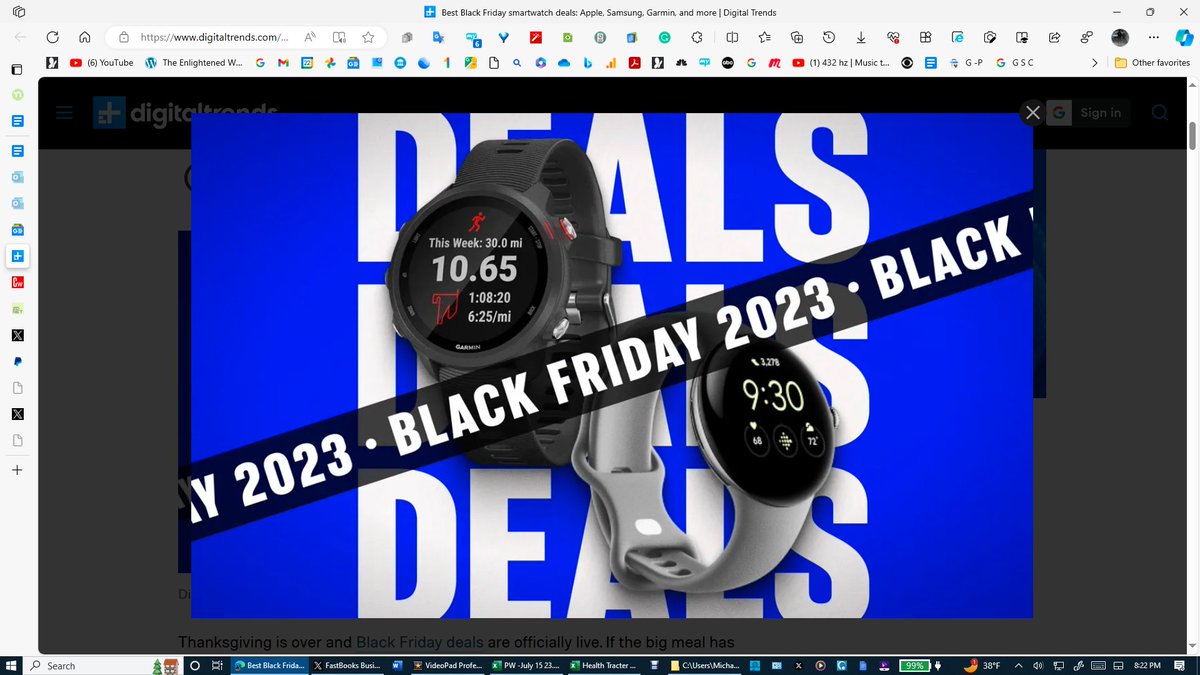
Best Black Friday smartwatch deals: Apple, Samsung, Garmin, and more - Digital Trends
Download a FREE 5-Day Demo of the FastBooks Health and Exercise Tracker Excel Model. My Average Steps per Day over the past 915 days is 10,328 equalling 4.89 miles per day. I have been recording my steps, miles, and eight other health statistics on my FastBooks Health and Exercise Tracker Excel Model using data taken from my $50 Fitbit watch. This same data is offered on any Apple, Pixel, or Google watch. You can also use other similar data. This unique long-term ‘fitness feedback tool’ on one page provides over 50 useful statistics.
All FastBooks.Solution Business and Personal Excel Models are a great way to improve your Excel Skills. By unprotecting the sheet tabs, you can make changes to the models, change the statistics collected, add new sheet tabs for example, or review the formulas that created the over 50 Statistics provided in the model.
All the other cells in the model are locked except the cells in the 10 columns using red font numbering on row 3 that are designed to enter the daily exercise and health data from any smartwatch, which can be changed by simply unprotecting the model.
Click on the link below to download a FREE 5-Day Demo of the FastBooks Health Tracker Excel Model.
All FastBooks.Solution Business and Personal Excel models are designed to be downloaded only on a computer having a licensed copy of Microsoft Excel. If you do not use Excel now is a good time to start. Excel is mathematics in every science. If you don't have Excel on your computer, go to any public library. If you want to gain or enhance your Excel skills, here is your free opportunity. Any health statistic that calculating an Average, Highest, and Lowest number is useful can be used to replace 5 of the 10 statistics input columns provided.
The file will open in viewing mode. The Excel file contains two sheet tabs, name Example, and 5 Day Free Demo. The Example sheet tab is protected, so the only thing you can do is use the ‘up down scroll bar’ to gain an appreciation for the simple design of this easy-to-use Excel model. The Excel Zoom setting under ‘view’ will most likely have to be adjusted to fit your computer screen. Excel should be set in the Full-screen mode to be viewed as displayed in this posting on your computer.
https://t.co/6erSM964cY
The FastBooks Health and Exercise Tracker Excel Model can be purchased for $15 plus sales tax using the PayPal link below.
https://t.co/Ke7568N1XT
Accepts PayPal and all debit and credit cards and the card purchases are covered by PayPal Purchase Protection.
After Purchase, you will receive the Health and Exercise Tracker Excel Model by email from [email protected] with instructions and other information within 24 hours from the time of purchase.
https://t.co/b8qZdkaVs6 via @GoogleNews
This is by far the best $100 you can spend on a smartwatch this Black Friday - CyclingWeekly
Download a FREE 5-Day Demo of the FastBooks Health and Exercise Tracker Excel Model. My Average Steps per Day over the past 915 days is 10,328 equalling 4.89 miles per day. I have been recording my steps, miles, and eight other health statistics on my FastBooks Health and Exercise Tracker Excel Model using data taken from my $50 Fitbit watch. This same data is offered on any Apple, Pixel, or Google watch. You can also use other similar data.
This unique long-term ‘fitness feedback tool’ on one page provides over 50 useful statistics. My Average Steps per Day since I created the model 898 days ago is 10,280, which can be seen in the first attachment in cell E8.
All FastBooks.Solution Business and Personal Excel Models are a great way to improve your Excel Skills. By unprotecting the sheet tabs, you can make changes to the models, change the statistics collected, add new sheet tabs for example, or review the formulas that created the over 50 Statistics provided in the model.
All the other cells in the model are locked except the cells in the 10 columns using red font numbering on row 3 that are designed to enter the daily exercise and health data from any smartwatch, which can be changed by simply unprotecting the model.
Click on the link below to download a FREE 5-Day Demo of the FastBooks Health Tracker Excel Model.
All FastBooks.Solution Business and Personal Excel models are designed to be downloaded only on a computer having a licensed copy of Microsoft Excel. If you do not use Excel now is a good time to start. Excel is mathematics in every science. If you don't have Excel on your computer, go to any public library. If you want to gain or enhance your Excel skills, here is your free opportunity. Any health statistic that calculating an Average, Highest, and Lowest number is useful can be used to replace 5 of the 10 statistics input columns provided.
The file will open in viewing mode. The Excel file contains two sheet tabs, name Example, and 5 Day Free Demo. The Example sheet tab is protected, so the only thing you can do is use the ‘up down scroll bar’ to gain an appreciation for the simple design of this easy-to-use Excel model. The Excel Zoom setting under ‘view’ will most likely have to be adjusted to fit your computer screen. Excel should be set in the Full-screen mode to be viewed as displayed in this posting on your computer.
https://t.co/6erSM964cY
The FastBooks Health and Exercise Tracker Excel Model can be purchased for $15 plus sales tax using the PayPal link below.
https://t.co/Ke7568N1XT
Accepts PayPal and all debit and credit cards and the card purchases are covered by PayPal Purchase Protection.
After Purchase, you will receive the Health and Exercise Tracker Excel Model by email from [email protected] with instructions and other information within 24 hours from the time of purchase.
https://t.co/0Lt4pGs8Y2 via @GoogleNews
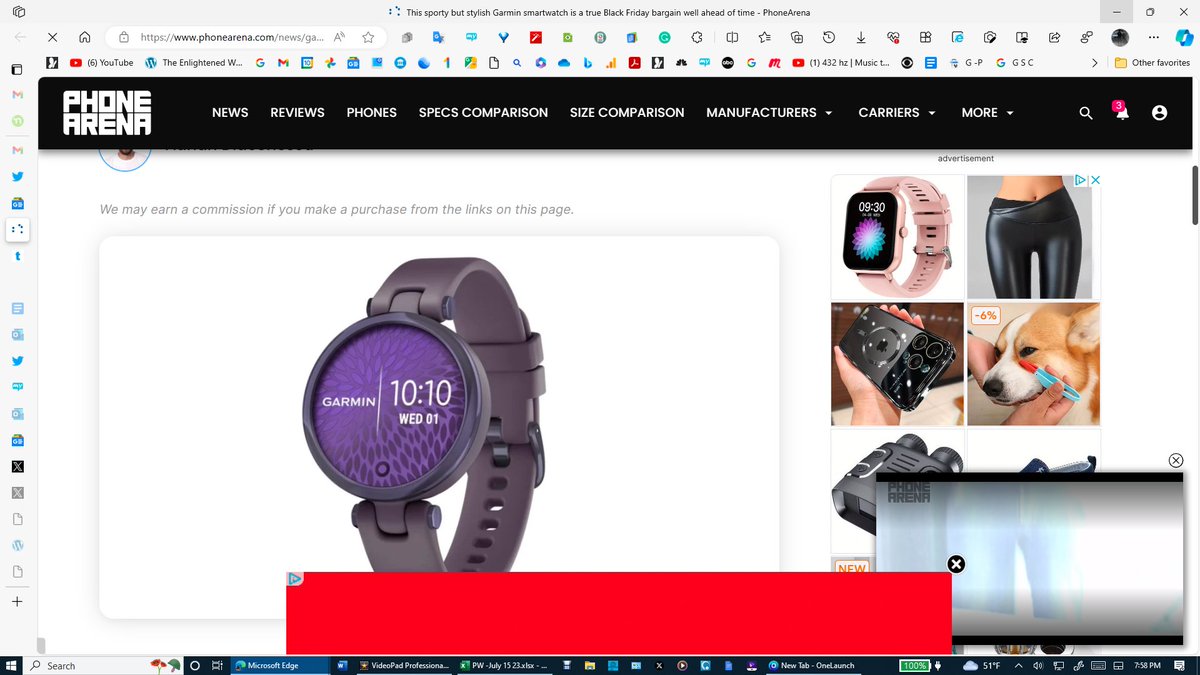
This sporty but stylish Garmin smartwatch is a true Black Friday bargain well ahead of time - PhoneArena
Download a FREE 5-Day Demo. My Average Steps per Day over the past 898 days is 10,280 equalling 4.9 miles per day. I have been recording my steps, miles, and eight other health statistics for the last 898 days in my FastBooks Health and Exercise Tracker Excel Model using data taken from my $50 Fitbit watch. This same data is offered on any Apple, Pixel, or Google watch. You can also use other similar data.
This unique long-term ‘fitness feedback tool’ on one page provides over 50 useful statistics. My Average Steps per Day since I created the model 898 days ago is 10,280, which can be seen in the first attachment in cell E8.
All FastBooks.Solution Business and Personal Excel Models are a great way to improve your Excel Skills. By unprotecting the sheet tabs, you can make changes to the models, change the statistics collected, add new sheet tabs for example, or review the formulas that created the over 50 Statistics provided in the model.
All the other cells in the model are locked except the cells in the 10 columns using red font numbering on row 3 that are designed to enter the daily exercise and health data from any smartwatch, which can be changed by simply unprotecting the model.
Click on the link below to download a FREE 5-Day Demo of the FastBooks Health Tracker Excel Model.
All FastBooks.Solution Business and Personal Excel models are designed to be downloaded only on a computer having a licensed copy of Microsoft Excel. If you do not use Excel now is a good time to start. Excel is mathematics in every science. If you don't have Excel on your computer, go to any public library. If you want to gain or enhance your Excel skills, here is your free opportunity. Any health statistic that calculating an Average, Highest, and Lowest number is useful can be used to replace 5 of the 10 statistics input columns provided.
The file will open in viewing mode. The Excel file contains two sheet tabs, name Example, and 5 Day Free Demo. The Example sheet tab is protected, so the only thing you can do is use the ‘up down scroll bar’ to gain an appreciation for the simple design of this easy-to-use Excel model. The Excel Zoom setting under ‘view’ will most likely have to be adjusted to fit your computer screen. Excel should be set in the Full-screen mode to be viewed as displayed in this posting on your computer.
https://t.co/6erSM964cY
The FastBooks Health and Exercise Tracker Excel Model can be purchased for $25 plus sales tax using the PayPal link below.
https://t.co/iElJd7izJE
Accepts PayPal and all debit and credit cards and the card purchases are covered by PayPal Purchase Protection.
After Purchase, you will receive the Health and Exercise Tracker Excel Model by email from [email protected] with instructions and other information within 24 hours from the time of purchase.
https://t.co/abkRNrVpfZ via @GoogleNews