📈We teach people how to use Excel to work faster
🏅Trained 97,778 students
⏰Saved them 100,000+ hours of work
🏆15,000 CPE Credits Issued
⬇️Excel University
Need all rows under an account prefix? `=FILTER(A2:C100,LEFT(B2:B100,2)=F2,"No matches")` returns every row whose code starts with the two characters in F2. For full-population review, FILTER beats a one-result lookup. #Excel
Rebuilding the same chart every month? Ask Copilot to turn worksheet data into an Excel Canvas report. It stays linked to the source, so edits flow through. Use it for recurring sales or expense summaries, then verify the totals. #Excel#Accounting
Find every transaction that mentions “hotel,” anywhere in the memo: `=FILTER(A2:C100,NOT(ISERROR(SEARCH(F2,B2:B100))),"No matches")`. SEARCH finds the term anywhere; FILTER returns all matches. #Excel
Excel Canvas can make an expense summary interactive: filter by department and category while viewing totals and recent transactions. Same connected workbook data, different slice. Check filters and totals before using it. Which two filters would help your next review? #Excel
Still removing duplicates from every vendor export? Use =UNIQUE(VendorRange) for the list, then MAXIFS with that spill range to return each vendor’s latest transaction date. New vendors can flow into the report automatically.
Want an optional charge included only when checked? Excel treats checkbox FALSE/TRUE as 0/1. Use `=BaseAmount+(Checkbox*OptionalAmount)`. Unchecked: add 0. Checked: add the optional charge.
Code has a stable prefix but a changing suffix? Try `=XLOOKUP("AP-51*",A2:A100,C2:C100,,2)`. The `*` matches any number of characters; `2` enables wildcard matching. XLOOKUP returns the first match, so use FILTER when you need every row. #Excel
Need a total for selected expenses? `=SUMIF(CheckboxRange,TRUE,AmountRange)` adds only rows where the linked checkbox is checked. Subtract that total from the budget to see what remains.
Agent Mode can act in an Excel workbook, check its work, and leave steps you can review. See it alongside COPILOT and Power Query fuzzy match in our free AI in Excel webinar. Eligible CPAs can earn 1 CPE. Pick a session: https://t.co/hOg2tNyHY0
Excel checkboxes store TRUE when checked and FALSE when unchecked. Formulas can use that value in close checklists, reconciliations, and review trackers. The box is the display; TRUE/FALSE is the data.
Need each vendor’s latest transaction date? In a PivotTable, put Vendor in Rows and Date in Values, then change the calculation to Max. Format as Short Date. Great for scanning vendor activity at month-end.
Want the principal part of a loan payment for month 18? Use PPMT: =PPMT(annual_rate/12,18,term_months,-loan_amount). PMT returns the whole payment; PPMT shows what reduces the balance. #Excel
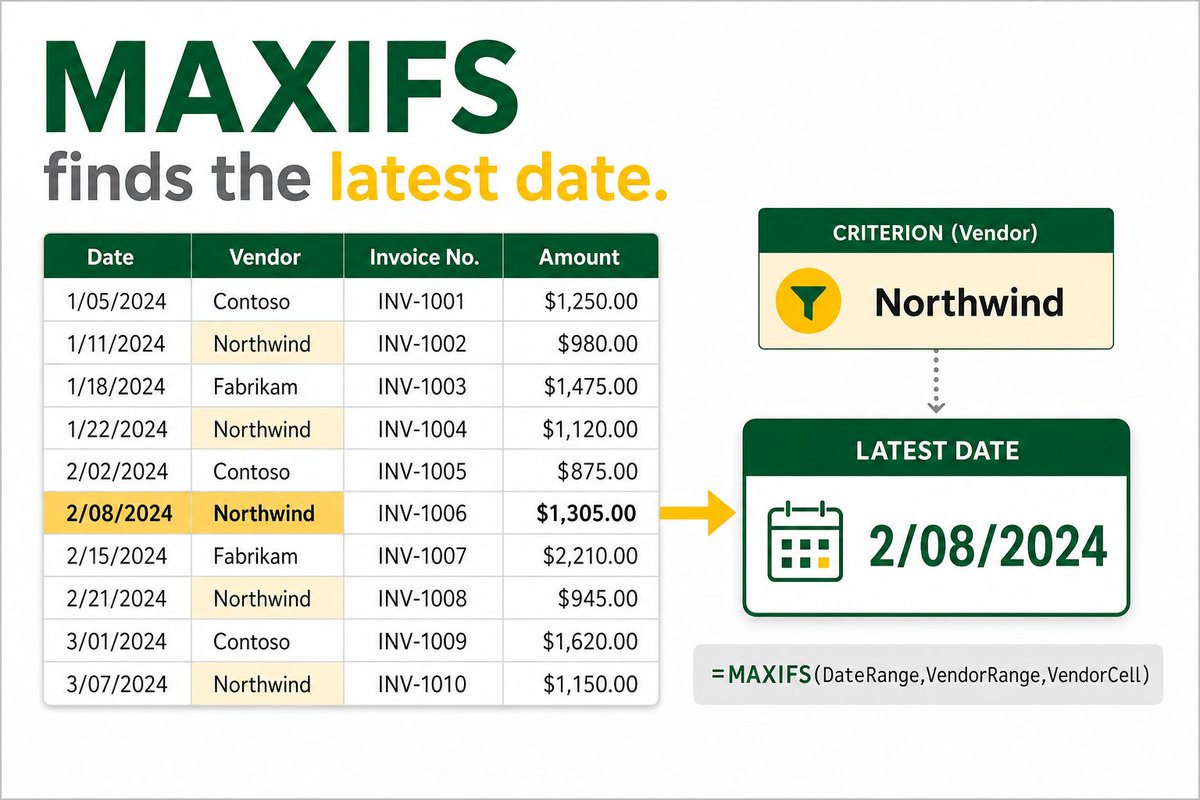
Latest transaction date by vendor, with a formula: =MAXIFS(DateRange,VendorRange,VendorCell). MAXIFS keeps only the matching vendor’s rows and returns the largest date. Format the result as Short Date.
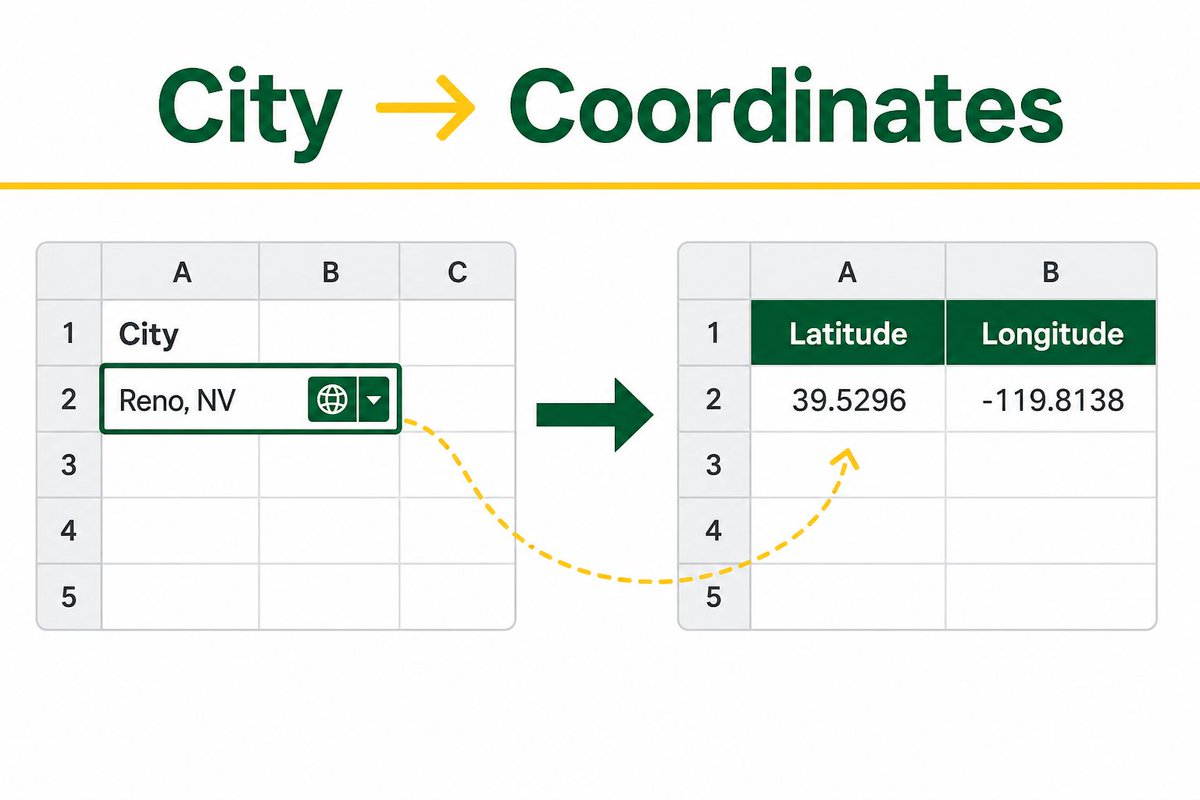
Need coordinates for a list of cities? In supported Excel versions, select a city/state cell, choose Data > Geography, then use Insert Data to add Latitude and Longitude. Ambiguous places can be confirmed in the data selector. Handy for territory and location analysis.
Need coordinates for many cities? Use CONCAT to build a geocoding URL from your city/state cells, then fetch it with WEBSERVICE:
=WEBSERVICE(C2)
where C2 holds the completed URL. Test the endpoint once first, then reuse the pattern down the location table.
XML lookup errors don't need to clutter a location table.
=IFERROR(FILTERXML(D2,"/searchresults/place/@lat"),"Place not found")
Use the XPath that matches your API's XML. IFERROR turns an unresolved city/state into a clear exception instead of #VALUE!.
Stop cleaning every CSV by hand. Choose Transform Data, then save the cleanup in Power Query: remove extra columns, filter rows, reorder fields, and Close & Load. Next export, refresh and repeat.
Modernize the Excel work behind your reports: dynamic arrays, Tables, Power Query, PivotTables, and AI tools, with hands-on practice. Self-paced, immediate access, $49, and 3 CPE for CPAs or anyone needing credit: https://t.co/VrjCUnI13z
CSV file moved? Edit the existing Power Query Source step (gear icon), browse to the new file, then Close & Load. Your saved transformations can stay in place, so there’s no need to rebuild the import.