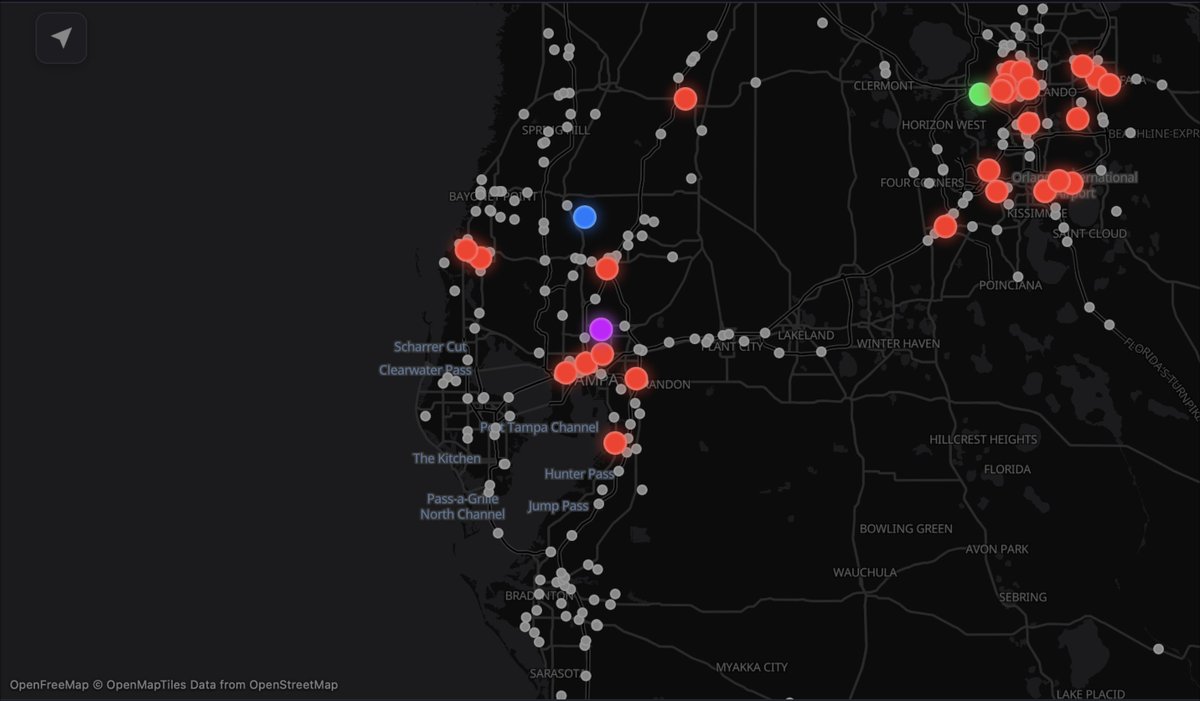
Mobile app for real-time Florida Highway Patrol traffic alerts, live maps, traffic cameras, and dispatch updates. Independent; not affiliated with FHP or FLHSMV
𝗙𝗛𝗣 𝗡𝗼𝘁𝗶𝗳𝗶𝗲𝗿 𝟮.𝟬 𝗜𝘀 𝗡𝗼𝘄 𝗔𝘃𝗮𝗶𝗹𝗮𝗯𝗹𝗲 𝗪𝗶𝘁𝗵 𝗮 𝗡𝗲𝘄 𝗧𝗿𝗮𝗳𝗳𝗶𝗰 𝗖𝗮𝗺𝗲𝗿𝗮 𝗟𝗮𝘆𝗲𝗿!
We’re extremely excited to announce the release of FHP Notifier Version 2.0, now available on both iOS and Android! This major update introduces one of our most requested new features, traffic cameras, allowing users to get a closer look at roadway conditions directly from the Incident Map.
With this new feature, users can now access thousands of traffic cameras located along interstates, highways, and other major state roads throughout Florida. These cameras provide frequently updated images of roadway conditions, allowing users to see what traffic and surrounding roadways look like before heading out.
Traffic cameras are displayed directly on the Incident Map using camera icons. When selecting a camera, users can view its most recently available image, along with information such as the roadway, nearby intersection or mile marker, direction of travel, county, and the time the image was last updated.
One of the biggest benefits of this feature is the ability to view nearby traffic cameras when an incident is reported. Whether you're monitoring a vehicle crash, roadway closure, fire, or another incident, you can now check nearby cameras to get a better understanding of roadway and traffic conditions in the surrounding area.
𝗛𝗼𝘄 𝘁𝗼 𝗘𝗻𝗮𝗯𝗹𝗲 𝗧𝗿𝗮𝗳𝗳𝗶𝗰 𝗖𝗮𝗺𝗲𝗿𝗮𝘀
Traffic cameras are disabled by default and must be manually enabled through the app's settings. To enable them, open Settings using the gear icon, select “Map Overlays,” and turn on “Show Traffic Cameras.” Once enabled, camera icons will appear throughout the Incident Map wherever cameras are available.
Please note that these cameras display frequently updated still images rather than continuous live video. Camera coverage is primarily concentrated along major roadways, meaning cameras may not be available along smaller or local roads.
This new feature is available in both light and dark mode and, like all other features within FHP Notifier, is completely free to use!
If you do not see the new "Show Traffic Cameras" feature within the Map Overlays option in Settings, please make sure you have updated FHP Notifier to Version 2.0 through the Apple App Store or Google Play Store. You can check which version of FHP Notifier you currently have installed by selecting the “About” button in the top-right corner of the app. Most devices should automatically update, but automatic updates may take several days, while a manual update is immediate.
We greatly appreciate everyone who continues to use FHP Notifier and provide feedback to help us improve the app. We’re always working to introduce new features and improvements that make it easier for Floridians to stay informed about what’s happening on roadways across the state.
Have a suggestion or feature request? We’d love to hear from you! Send your feedback to [email protected].
Google Play: https://t.co/ZN6Jz9g7YB
Apple App Store: https://t.co/niFVAQQBPi
If you’d like to help support FHP Notifier, we also have a donation link! The app is completely free, has no ads, and we don’t collect or sell user data. FHP Notifier is also run independently by a sole independent developer with no monetization of the app, and donations help with future development, infrastructure, and keeping everything running smoothly. Thank you for your support!
https://t.co/htV0bSNb8Y
𝗙𝗛𝗣 𝗡𝗼𝘁𝗶𝗳𝗶𝗲𝗿 𝗛𝗮𝘀 𝗛𝗶𝘁 𝟭𝟬,𝟬𝟬𝟬 𝗗𝗼𝘄𝗻𝗹𝗼𝗮𝗱𝘀 𝗔𝗰𝗿𝗼𝘀𝘀 𝗙𝗹𝗼𝗿𝗶𝗱𝗮!
We’re extremely excited to announce that FHP Notifier has officially reached 10,000 downloads statewide across Florida! We truly appreciate everyone who has downloaded the app, shared it with others, provided feedback, and continued using FHP Notifier to stay informed about what’s happening on roadways across the state.
We’ve also recently redone our website and added many more details about FHP Notifier, including information about the app, its features, how it works, and more. Feel free to check out our website at https://t.co/2CILrvrU3k and let us know what you think!
𝗛𝗲𝗹𝗽 𝗨𝘀 𝗥𝗲𝗮𝗰𝗵 𝗘𝘃𝗲𝗻 𝗠𝗼𝗿𝗲 𝗙𝗹𝗼𝗿𝗶𝗱𝗶𝗮𝗻𝘀!
If you find FHP Notifier useful, please consider sharing the app with your local community, whether that means sharing it in different Facebook groups, with your friends, family, coworkers, or anyone else who may benefit from it. Whether someone wants to stay informed during their daily commute, keep up with incidents near where they live or work, or simply be more aware of what’s happening on roadways across Florida, sharing the app is one of the best ways you can help us continue growing. Every share helps us reach more people across Florida who may find FHP Notifier useful for staying informed about what’s happening on their roadways.
If you’re enjoying FHP Notifier, please also consider leaving us a review on the Apple App Store or Google Play Store. The more reviews we receive, the more the app can be pushed out to additional users across the state, helping even more people discover FHP Notifier and stay informed about what’s happening on Florida’s roadways.
Thank you again to everyone who has helped us reach 10,000+ downloads. We truly appreciate your support and look forward to continuing to grow FHP Notifier and help even more Floridians stay informed about what’s happening on their roadways and in their communities!
Google Play: https://t.co/fqsJ13P99H
Apple App Store: https://t.co/niFVAQQBPi
𝗞𝗻𝗼𝘄 𝗦𝗼𝗺𝗲𝗼𝗻𝗲 𝗪𝗵𝗼 𝗖𝗼𝘂𝗹𝗱 𝗨𝘀𝗲 𝗙𝗛𝗣 𝗡𝗼𝘁𝗶𝗳𝗶𝗲𝗿?
Help us spread the word! If you’ve found FHP Notifier helpful, consider sharing it with your friends, family, coworkers, or anyone else who may find it useful.
Whether it’s helping someone stay informed during their daily commute, keeping up with traffic incidents around where they live and work, or simply staying aware of what’s happening in their community, every new user helps us continue growing across Florida.
If you’re enjoying the app, we’d also really appreciate it if you took a moment to leave us a review on the Apple App Store or Google Play Store. Reviews help others discover FHP Notifier and provide valuable feedback as we continue developing the app. Reviews also lead to the app being pushed out to more users!
Thank you to everyone who has downloaded, shared, reviewed, and supported FHP Notifier so far. We truly appreciate it!
Google Play: https://t.co/fqsJ13P99H
Apple App Store: https://t.co/niFVAQQBPi
𝗪𝗵𝗮𝘁 𝗱𝗼 𝘆𝗼𝘂 𝘁𝗵𝗶𝗻𝗸 𝗼𝗳 𝘁𝗵𝗲 𝗻𝗲𝘄 𝗛𝘆𝗯𝗿𝗶𝗱 𝗠𝗮𝗽?
With the release of our new 1.7 update, we’ve made some changes to the way our satellite map works and introduced a brand-new Hybrid map option.
The Satellite map is now focused solely on the existing satellite imagery, without the previous road layer. If you want roads, cities, waterways, and other map details displayed over the satellite imagery, you can now switch to Hybrid.
The new Hybrid map features a more detailed road overlay along with cities, waterways, and other geographic details, all displayed on top of our existing satellite imagery. While our old map layer provided a similar function, the new Hybrid map offers significantly more detail and a much more defined road overlay.
We’d love to hear what you think! Do you prefer the new Hybrid map, or do you like the prior Satellite view? Let us know in the comments!
𝗨𝗽𝗱𝗮𝘁𝗲 𝗥𝗲𝗴𝗮𝗿𝗱𝗶𝗻𝗴 𝗠𝗮𝗽 𝗜𝘀𝘀𝘂𝗲
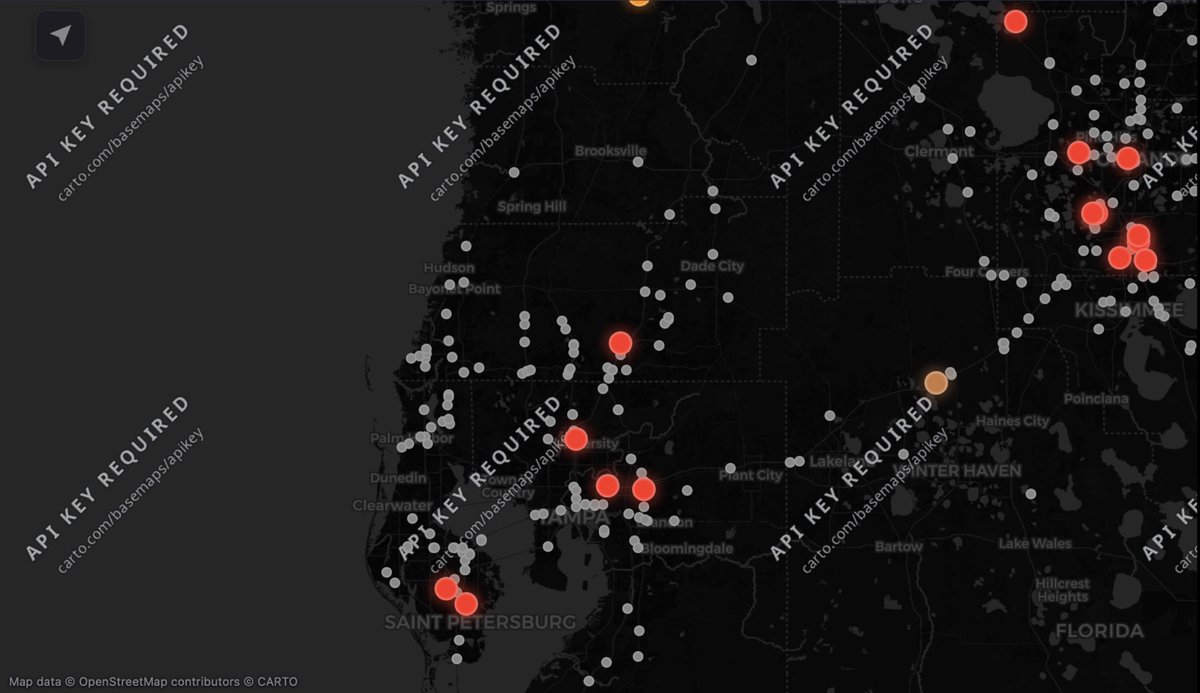
We are pleased to announce that a new update (1.7) is now available that resolves the previous map issue where an “API key required” message appeared across portions of the map.
As part of this update, we have switched to a new map data provider and introduced a new Hybrid map option. Hybrid combines our existing satellite imagery with a more well-defined and reimagined road layer, providing a clearer view of roads and the surrounding area.
Please note that users viewing Satellite imagery may no longer see road lines. If you would like to see roads displayed over the satellite imagery, please switch to the new Hybrid map option in Settings under “Map Style.” Users using the default map will see no difference, and no changes are needed.
If you are still seeing an “API key required” message, please update FHP Notifier to the latest version, as this issue has been resolved in the new update. Most devices should automatically update, but automatic updates may take several days in which a manual update is immediate.
We greatly appreciate your patience while we worked to resolve this issue and improve the mapping experience.
𝗜𝗻𝗳𝗼𝗿𝗺𝗮𝘁𝗶𝗼𝗻 𝗥𝗲𝗴𝗮𝗿𝗱𝗶𝗻𝗴 𝗠𝗮𝗽 𝗜𝘀𝘀𝘂𝗲
We are aware of a current issue affecting the map where “API key required” appears across portions of the map. We are actively working on a new update to resolve this issue and are in the process of switching map providers to prevent similar problems in the future.
Unfortunately, our current map provider, CARTO, made an abrupt change to its map access requirements without prior notice to us. This change has impacted thousands of apps and websites that rely on CARTO’s mapping services, not just FHP Notifier.
This issue does not currently affect our satellite map as that uses a different provider. If you need to view the map without the “API key required” message while we work on a permanent fix, you can switch to the satellite map in the app.
We apologize for the inconvenience and appreciate your patience while we work to get the map back to normal.
📱 𝗛𝗮𝘃𝗲 𝗙𝗛𝗣 𝗡𝗼𝘁𝗶𝗳𝗶𝗲𝗿? 𝗟𝗲𝘁 𝗨𝘀 𝗞𝗻𝗼𝘄 𝗛𝗼𝘄 𝗜𝘁’𝘀 𝗚𝗼𝗶𝗻𝗴!
Have you downloaded FHP Notifier yet? If you’re already using the app, we’d love to hear from you! Leave a comment below and let us know how your experience has been so far, what you like about the app, or anything you’d like to see added in the future.
If you’ve found FHP Notifier useful, please consider leaving us a review on the App Store or Google Play. Reviews help others discover the app and help us continue improving it.
You can also help us grow by sharing FHP Notifier with your family, friends, coworkers, local online community groups, or anyone else you think could find it useful.
Thank you to everyone who has downloaded, shared, reviewed, provided feedback, and supported FHP Notifier!
𝗗𝗶𝗱 𝘆𝗼𝘂 𝗸𝗻𝗼𝘄 𝗙𝗛𝗣 𝗡𝗼𝘁𝗶𝗳𝗶𝗲𝗿 𝗶𝘀 𝗮𝘃𝗮𝗶𝗹𝗮𝗯𝗹𝗲 𝗼𝗻 𝗠-����𝗲𝗿𝗶𝗲𝘀 𝗠𝗮𝗰𝘀? 💻
Because FHP Notifier is compatible with iPad, the app can also be downloaded and used on Apple silicon Macs, giving Mac users another way to access FHP Notifier.
At this time, we do not have plans for further development for laptops or desktops beyond Mac. M-Series Macs are able to run compatible iPad apps natively, so a separate Mac version of FHP Notifier is not currently necessary.
FHP Notifier is currently available on iOS, iPad, and M-Series Mac, along with Android devices and tablets.
⭐ 𝗘𝗻𝗷𝗼𝘆𝗶𝗻𝗴 𝗙𝗛𝗣 𝗡𝗼𝘁𝗶𝗳𝗶𝗲𝗿? 𝗪𝗲’𝗱 𝗟𝗼𝘃𝗲 𝗬𝗼𝘂𝗿 𝗙𝗲𝗲𝗱𝗯𝗮𝗰𝗸!
If FHP Notifier has been helpful to you, please consider taking a moment to leave a rating or review on the App Store or Google Play.
App Store & Google Play reviews play a huge role in helping independent apps like ours grow. Not only do they help improve visibility, as the more reviews a app has the more they are shown, but they also help other Floridians discover a tool designed to keep them informed about traffic incidents and public safety events happening across the state.
Every rating, review, and piece of feedback helps support the continued development and improvement of FHP Notifier and the best part, it’s very quick to do!
Thank you to everyone who has downloaded the app and supported the project so far. Your feedback truly makes a difference.
Link to App Review Page for IOS: https://t.co/niFVAQQBPi
Link to App Review Page for Android: https://t.co/ZN6Jz9g7YB
𝗙𝗛𝗣 𝗡𝗼𝘁𝗶𝗳𝗶𝗲𝗿 𝟭.𝟱.𝟭 𝗶𝘀 𝗻𝗼𝘄 𝗮𝘃𝗮𝗶𝗹𝗮𝗯𝗹𝗲 𝘄𝗶𝘁𝗵 𝗻𝗲𝘄 𝗔𝗻𝗱𝗿𝗼𝗶𝗱 𝗯𝗮𝗰𝗸 𝗯𝘂𝘁𝘁𝗼𝗻 𝘀𝘂𝗽𝗽𝗼𝗿𝘁!
We’re excited to announce the release of FHP Notifier 1.5.1 for Android!
This update focuses on improving navigation and overall usability across Android devices.
One of the biggest improvements in this release is the addition of native Android back button support for older devices, providing a more familiar and consistent navigation experience throughout the app. Previously the back button when clicked would close the app, and after receiving feedback from users, we have fixed this issue so that the back button functions as it should!
We’ve also improved the experience for devices used in landscape mode by adding support for the native Android navigation indicator along the edge of the screen. As shown in the example below, this provides a more familiar navigation experience while making it easier to use Android’s built-in back gesture. Previously, the Android navigation indicator was overlaid on top of the app’s content when the device was in landscape mode.
In addition to these changes, Version 1.5.1 includes several bug fixes, stability improvements, and backend enhancements to continue improving the overall app experience.
If you notice any issues after updating, please contact us through our Facebook page or email [email protected].
Have a suggestion or feature request? We’d love to hear from you! Send your feedback to [email protected]
🚨 𝗙𝗛𝗣 𝗡𝗼𝘁𝗶𝗳𝗶𝗲𝗿 𝟭.𝟱 𝗶𝘀 𝗻𝗼𝘄 𝗮𝘃𝗮𝗶𝗹𝗮𝗯𝗹𝗲 𝘄𝗶𝘁𝗵 𝗻𝗲𝘄 𝗖𝗲𝗻𝘁𝗿𝗮𝗹 𝗧𝗶𝗺𝗲 𝗭𝗼𝗻𝗲 𝘀𝘂𝗽𝗽𝗼𝗿𝘁 𝗳𝗼𝗿 𝗶𝗢𝗦 𝗮𝗻𝗱 𝗔𝗻𝗱𝗿𝗼𝗶𝗱! 🚨
We’re excited to announce the release of FHP Notifier 1.5, featuring one of the biggest improvements we’ve been working on: Central Time Zone support.
Prior to this update, all incident times were displayed in Eastern Time as the incident data provided by the Florida Highway Patrol is received strictly in Eastern Time despite incidents occurring in Central. Since incidents occur in both the Eastern and Central Time Zones, we developed our own system to identify the appropriate time zone for each incident based on its geographic coordinates.
To accomplish this, we created a precise geographic boundary covering the areas of Florida that observe Central Time. When a new incident is received, its coordinates are checked against this boundary. If the incident is located within the Central Time area, it is identified accordingly and the appropriate time-zone information is included within our system.
The FHP Notifier app can then use this information to properly display the incident time based on the user’s time zone. For example, users in the Eastern Time Zone viewing an incident that occurred in the Central Time Zone will see the time converted to their local time, with the original Central Time shown underneath. This also works in reverse for users in the Central Time Zone viewing incidents occurring in the Eastern Time Zone as shown in the example below.
For users located in Central Time areas, incident times will now be displayed in their respective time zone. This is a feature we have been working on for some time, and we’re excited to finally make Central Time support available to users across both iOS and Android.
In addition to the new Central Time Zone support, this update also includes several other improvements. We updated several features throughout the app to improve visibility, particularly when using Light Mode, and made the splash screen compatible with Light Mode as well.
We also expanded the troubleshooting information within the FAQ to provide additional guidance for users who may not be receiving notifications. Map data source attribution has also been added, along with various bug fixes, backend improvements, and other performance enhancements.
If you notice any issues after updating, please contact us through our Facebook page or email [email protected].
Have a suggestion or feature request? We’d love to hear from you! Send your feedback to [email protected].
Thank you for continuing to use and support FHP Notifier!
#FHPNotifier #Florida #FloridaTraffic #BreakingNews #TrafficAlerts #Traffic #FloridaNews #News #PublicSafety #RoadSafety #Miami #Orlando #Tampa #Jacksonville #FortLauderdale #WestPalmBeach #Tallahassee #Sarasota #FortMyers #DaytonaBeach #Pensacola #TrafficIncident #LiveTraffic
🎉 𝗙𝗛𝗣 𝗡𝗼𝘁𝗶𝗳𝗶𝗲���� 𝗖𝗼𝗺𝗺𝘂𝗻𝗶𝘁𝘆 𝗨𝗽𝗱𝗮𝘁𝗲!
We wanted to take a moment to say thank you to everyone who has downloaded and supported FHP Notifier. We’re excited to share that we’re now at 3,000 users across the state of Florida, including approximately 2,700 users on iOS and a little over 300 users on Android.
The Android version has only been publicly available for about a week, making this growth especially exciting. Seeing FHP Notifier reach communities across Florida in such a short amount of time has been incredible.
If you’ve found the app useful, one of the best ways to help us continue growing is by sharing it with others. Whether you share it with friends and family, post it in a local facebook community group, or simply recommend it to someone who may find it helpful, every share helps introduce FHP Notifier to more people across Florida.
We also want to give a special thank you to Tony M. for recently donating $10 through our Buy Me a Coffee page. Every contribution, no matter the size, makes a difference and helps support the ongoing costs associated with FHP Notifier, including backend servers, domains, developer accounts, email services, and continued development which do get costly.
Lastly, FHP Notifier is completely free and contains no advertisements. We are incredibly grateful for everyone who has downloaded the app, shared it, left a review, provided feedback, or supported the project in anyway!
Thank you for helping us continue to grow!
📱 Download for iPhone & iPad:
https://t.co/niFVAQQBPi
📱 Download for Android:
https://t.co/ZN6Jz9g7YB
☕ Support FHP Notifier:
https://t.co/htV0bSNb8Y
#FHPNotifier #Florida #FloridaTraffic #BreakingNews #TrafficAlerts #Traffic #FloridaNews #News #PublicSafety #RoadSafety #Miami #Orlando #Tampa #Jacksonville #FortLauderdale #WestPalmBeach #Tallahassee #Sarasota #FortMyers #DaytonaBeach #Pensacola #TrafficIncident #LiveTraffic
🎉 𝗧𝗵𝗮𝗻𝗸 𝗬𝗼𝘂 𝗳𝗼𝗿 𝟭𝟬𝟬+ 𝗔𝗻𝗱𝗿𝗼𝗶𝗱 𝗗𝗼𝘄𝗻𝗹𝗼𝗮𝗱𝘀!
We want to say a huge thank you to everyone who has downloaded FHP Notifier on Android! In just two days, we’ve already surpassed 100+ downloads, and we truly appreciate all of the support, feedback, and encouragement we’ve received so far!
If you’re enjoying the app, one of the best ways to support its continued growth is by leaving a review on the Google Play Store or on the Apple App Store. Your reviews help improve visibility and make it easier for others across Florida to discover FHP Notifier.
Another great way to help is by sharing the app with others. Whether it’s posting it in a local community Facebook group, recommending it to friends and family, or sharing it with coworkers, every share helps us reach more Floridians who may find the app useful.
Thank you again for being part of the FHP Notifier community and for helping us continue to grow. Your support truly makes a difference!