INSTEAD OF WATCHING NETFLIX TONIGHT.
Spend 1 hour with this.
Claude AI FULL COURSE that teaches you how to BUILD and AUTOMATE anything.
The people who watch this tonight will wake up tomorrow with a new skill.
Watch it and Bookmark it now
Anthropic engineer:
"you're not supposed to prompt Claude. you're supposed to build a system that prompts itself [loops]."
this is one of the best workflows I've seen in a long time
in this video he breaks down exactly how most people are building loops wrong:
- the memory file you never set up, so every loop starts from zero
- the sub-agents that 95% of builders have never split apart
- the stop condition setup that keeps loops from running forever and billing you in your sleep
- why writing one prompt a day is the slowest way to use Claude
if you've been using Claude for more than a month and still typing every task by hand, you've been running one prompt when you could be running a system of loops
instead of another prompt tonight, watch this
make sure to bookmark it before it gets buried
full guide in the article below
ANTHROPIC JUST QUIETLY SHIPPED A FEATURE THAT LETS CLAUDE SPAWN A WHOLE TEAM OF AGENTS THAT MESSAGE EACH OTHER AND REVIEW EACH OTHER'S WORK.
It's a Claude Code feature called agent teams. The team lead spawns multiple agents that share a task list and message each other directly, not subagents reporting back, actual peers. In the demo a QA agent caught three bugs, sent the work back to the front-end and back-end devs, they fixed it, app shipped in one pass.
How to run it:
1. Enable it. Needs Claude Code v2.1.32+. Add to settings.json: "env": { "CLAUDE_CODE_EXPERIMENTAL_AGENT_TEAMS": "1" }. Or paste that to Claude and say "add this to my settings." Restart.
2. Prompt in plain English. Start with a goal (agents wake with zero context), then "create a team of 3 using Sonnet," describe each role, its deliverable, and who it messages when done.
3. The rules: each agent owns its own files, define exact outputs, name who talks to who, keep it to 3-5 agents.
Use it for complex work with separate parts running in parallel. Skip it for simple or sequential tasks, teams cost 3-4x the tokens.
Bookmark this.
el ingeniero que construyó Claude Code acaba de publicar un video de 28 minutos sobre cómo escribir prompts que realmente funcionan
he visto cursos de 300$ que no cubren lo que él muestra en los primeros 10 minutos
archivos CLAUDE.md, atajos de memoria, sesiones paralelas, patrones de prompting
todo en un video y completamente gratis
funciona seas desarrollador, principiante o alguien que lleva meses usando Claude
You're using Claude wrong.
Here's my (exact) setup before I even prompt:
Step 1. Download Claude and open Cowork
→ Go to Claude. com/ download.
→ Install the desktop app.
→ Click the Cowork tab at the top.
→ You need a Pro plan ($20/mo). Worth it.
→ Full guide here: https://t.co/g6oLzWSOuo
---
Step 2. Select the right model (don't skip this)
→ Click the model dropdown.
→ Select "Opus 4.6."
→ Turn on "Extended Thinking."
→ Never change these. Wrong model = bad output.
---
Step 3. Build your folder
→ Create one master folder on your computer.
→ Inside it, create 4 subfolders:
✦ ABOUT ME - who you are + how you write
✦ PROJECTS - one subfolder per live project
✦ TEMPLATES - your best work as structures
✦ OUTPUTS - where Claude saves finished files
→ Upload this folder. That's how it reads you.
---
Step 4. Create 3 context files inside ABOUT ME
→ These replace prompting. This is the setup.
→ Create them as .md files. Plain text, saved as .md
✦ about-me.md - what you do day-to-day.
✦ my-voice.md - tone, phrases you hate, 3 example
✦ my-rules.md - ask first, show a plan, get approval
OR
Simply download my .md files here: https://t.co/psB7XxAv8w
Subscribe for free. Open my welcome email.
Hit the automatic reply button inside.
---
Step 5. Set Global Instructions (once, forever)
Go to Settings → Cowork → Edit Global Instructions.
→ Paste: "I'm [Name], [Role]. Read my files before every task. Ask clarifying questions before executing. Show a plan before acting. Never delete without my approval."
→ You set this once. It runs every session.
→ Your prompts can now be 10 words long.
---
Before your next Cowork session, check these:
1. Am I in Cowork (not Chat)?
2. Is Opus 4.6 + Extended Thinking on?
3. Did I point it to my folder with context files?
Set these first. Then prompt.
Top 1% of Claude users do this. Now you can too.
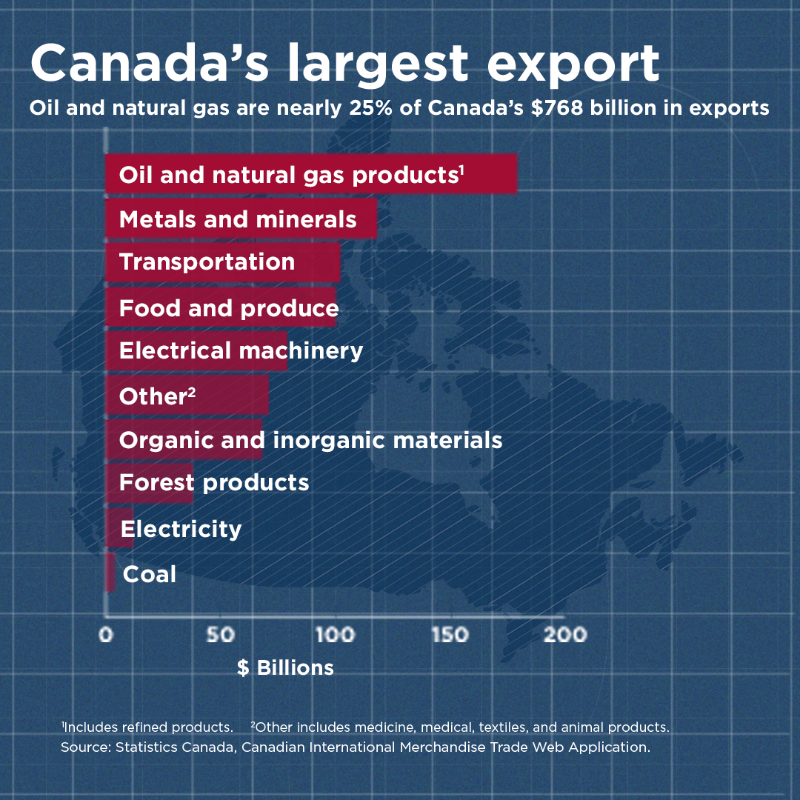
Canada’s oil & gas sector strengthens communities, supports Indigenous partnerships, and secures our energy future.
Now is the time to unlock our full potential.
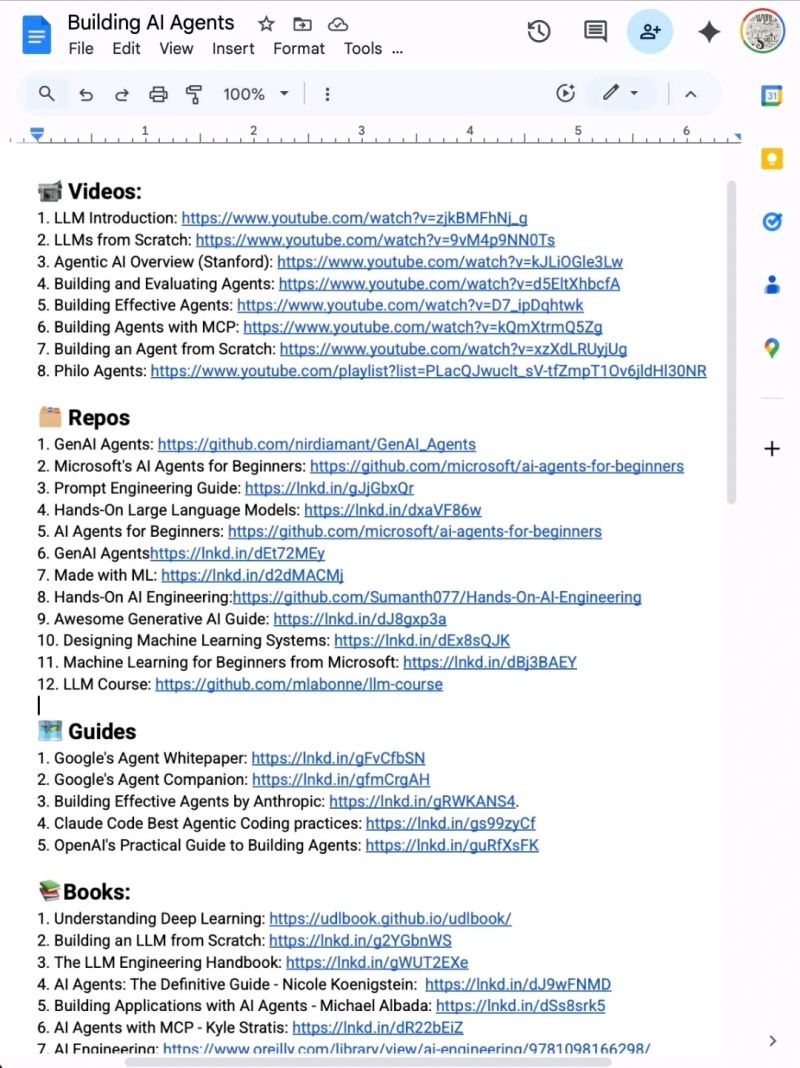
Stop wasting hours trying to learn AI. 📘📚
I have already done it for you.
With one list. Zero confusion. And no fluff
📹 Videos:
1. LLM Introduction: https://t.co/kyDon6qLrb
2. LLMs from Scratch: https://t.co/2hyMhuKoiI
3. Agentic AI Overview (Stanford): https://t.co/FXu6cAqITC
4. Building and Evaluating Agents: https://t.co/ZigR1tdOFL
5. Building Effective Agents: https://t.co/uYwfwO55mO
6. Building Agents with MCP: https://t.co/4arFTW1b3i
7. Building an Agent from Scratch: https://t.co/eOmveyM9Hz
8. Philo Agents: https://t.co/zLu7x1tx9m
🗂️ Repos
1. GenAI Agents: https://t.co/eXCl2YaRPv
2. Microsoft's AI Agents for Beginners: https://t.co/3CSW4zPAwf
3. Prompt Engineering Guide: https://t.co/GVzvxPYDVO
4. Hands-On Large Language Models: https://t.co/0rgDvhx3pI
5. AI Agents for Beginners: https://t.co/3CSW4zPAwf
6. GenAI Agentshttps://lnkd.in/dEt72MEy
7. Made with ML: https://t.co/9z5KHF9DMe
8. Hands-On AI Engineering:https://t.co/dldAj5Xkr6
9. Awesome Generative AI Guide: https://t.co/U2WZhT4ERV
10. Designing Machine Learning Systems: https://t.co/sYAZX34YdQ
11. Machine Learning for Beginners from Microsoft: https://t.co/NjFxHbC9jZ
12. LLM Course: https://t.co/N34YTPu1OK
🗺️ Guides
1. Google's Agent Whitepaper: https://t.co/bW3Ov3vMW0
2. Google's Agent Companion: https://t.co/wredwWAbBA
3. Building Effective Agents by Anthropic: https://t.co/fxtE4alVrJ.
4. Claude Code Best Agentic Coding practices: https://t.co/lLSwJ9pG7C
5. OpenAI's Practical Guide to Building Agents: https://t.co/xgkEIogGfh
📚Books:
1. Understanding Deep Learning: https://t.co/CjcKpTemmV
2. Building an LLM from Scratch: https://t.co/DaWBxOx8o3
3. The LLM Engineering Handbook: https://t.co/ZA1n0N41Mf
4. AI Agents: The Definitive Guide - Nicole Koenigstein: https://t.co/boLkl1VlKb
5. Building Applications with AI Agents - Michael Albada: https://t.co/H1Xf5EkJLL
6. AI Agents with MCP - Kyle Stratis: https://t.co/JI3ELQZE6a
7. AI Engineering: https://t.co/Xk0JzMIf7o
📜 Papers
1. ReAct: https://t.co/QNqE4UU55w
2. Generative Agents: https://t.co/CwEpoJgY1U.
3. Toolformer: https://t.co/5m9xZd5teZ
4. Chain-of-Thought Prompting: https://t.co/KjVlgdWi77.
🧑🏫 Courses:
1. HuggingFace's Agent Course: https://t.co/7FSUYKxIdG
2. MCP with Anthropic: https://t.co/IkZGiWm2yS
3. Building Vector Databases with Pinecone: https://t.co/2YRoMfLdXd
4. Vector Databases from Embeddings to Apps: https://t.co/23A50ixbHJ
5. Agent Memory: https://t.co/uc3L9BrNF7
Repost for your network ♻️
Collision: Keele St / Rutherford Rd #Vaughan
- 6:35 am
- 2 vehicle involved
- minor injuries
- closing SB traffic on Keele St, and EB traffic on Rutherford.
- Expect delays and Use alternate routes
#2025416706
HOMICIDE
1 a.m.
Andreeta Dr and Barons St, Vaughan
- Police responded to a residence for an injured person
- One victim pronounced deceased on scene
- Expect a large police presence
- Suspects have fled the area
- No immediate threat to public safety
- Please avoid the area while the investigation is underway
- Officers will be canvassing for video
- If you have any security cameras please make video accessible for investigators
- Updates to follow when available
- Anyone with information is asked to contact YRP Homicide at 1-866-876-5423 x7865
#GO25291148
Scenes from the flag hoisting ceremony — marking the official start of the 47th Jalsa Salana Canada.
Side by side, the Canadian flag and Liwa-e-Ahmadiyyat were raised — a powerful symbol of loyalty to country and devotion to faith. A proud and blessed moment for all.
#JalsaCanada












![rubenhassid's tweet photo. You're using Claude wrong.
Here's my (exact) setup before I even prompt:
Step 1. Download Claude and open Cowork
→ Go to Claude. com/ download.
→ Install the desktop app.
→ Click the Cowork tab at the top.
→ You need a Pro plan ($20/mo). Worth it.
→ Full guide here: https://t.co/g6oLzWSOuo
---
Step 2. Select the right model (don't skip this)
→ Click the model dropdown.
→ Select "Opus 4.6."
→ Turn on "Extended Thinking."
→ Never change these. Wrong model = bad output.
---
Step 3. Build your folder
→ Create one master folder on your computer.
→ Inside it, create 4 subfolders:
✦ ABOUT ME - who you are + how you write
✦ PROJECTS - one subfolder per live project
✦ TEMPLATES - your best work as structures
✦ OUTPUTS - where Claude saves finished files
→ Upload this folder. That's how it reads you.
---
Step 4. Create 3 context files inside ABOUT ME
→ These replace prompting. This is the setup.
→ Create them as .md files. Plain text, saved as .md
✦ about-me.md - what you do day-to-day.
✦ my-voice.md - tone, phrases you hate, 3 example
✦ my-rules.md - ask first, show a plan, get approval
OR
Simply download my .md files here: https://t.co/psB7XxAv8w
Subscribe for free. Open my welcome email.
Hit the automatic reply button inside.
---
Step 5. Set Global Instructions (once, forever)
Go to Settings → Cowork → Edit Global Instructions.
→ Paste: "I'm [Name], [Role]. Read my files before every task. Ask clarifying questions before executing. Show a plan before acting. Never delete without my approval."
→ You set this once. It runs every session.
→ Your prompts can now be 10 words long.
---
Before your next Cowork session, check these:
1. Am I in Cowork (not Chat)?
2. Is Opus 4.6 + Extended Thinking on?
3. Did I point it to my folder with context files?
Set these first. Then prompt.
Top 1% of Claude users do this. Now you can too.](https://pbs.twimg.com/media/HDD_MiBaYAAFFIh.jpg)