Prepare for takeoff. ✈️ Flight simulator is now available globally on web to all users. https://t.co/hQP0No142P
We've recently added many our most powerful professional desktop features to web. Elevation profiles, new import types, but there's always been one other feature you've been asking us to add to the web version of Google Earth, just for fun...
Where will you fly? Share your best maneuvers, views, and flyovers with us!
Coding agents make it easy to start more work.
But 'more' isn’t the goal. Shipping the right things is.
We built the new GitHub Copilot app helps you find the work that matters, implement with confidence, and steward your PR through to merge.
Any paid GitHub Copilot developer can start using it now by downloading from https://t.co/lga5cI1VOL :)
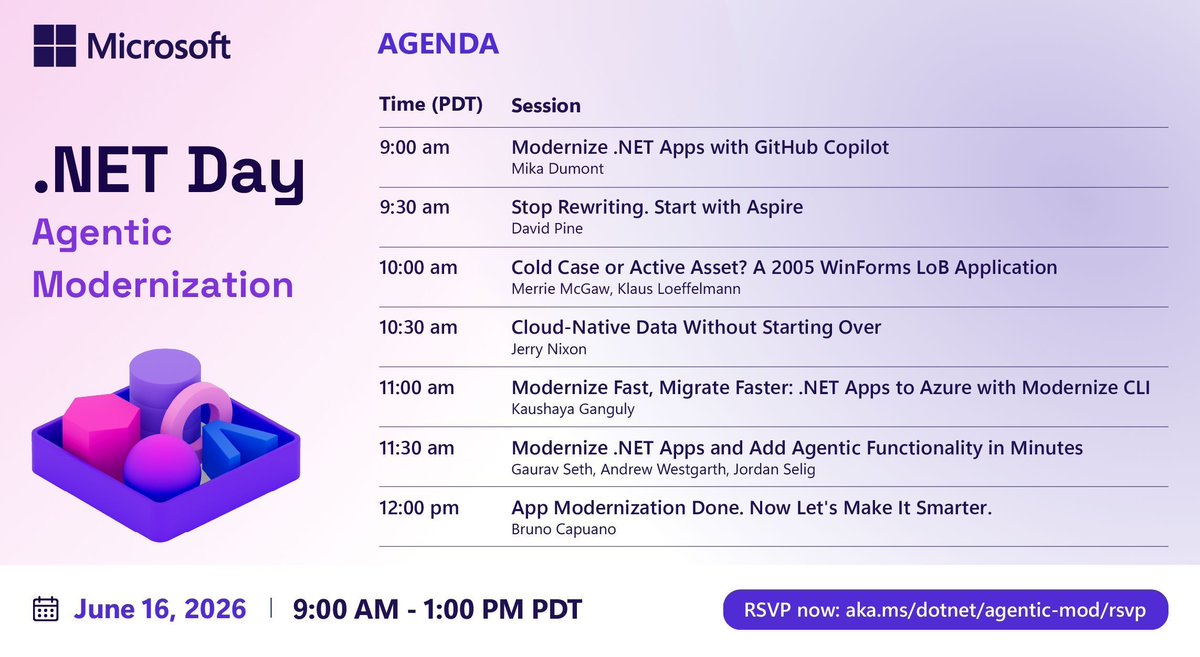
The .NET Day on Agentic Modernization agenda is live—see the new blog for what's in store, then join us to learn how to modernize apps without the rewrite. https://t.co/tJpEWnSAWN
#modernize#dotnetday#githubcopilot#azurepaas
Microsoft launched their own coding AI and it's FREE inside GitHub Copilot starting today 😳
not rented from OpenAI. built by Microsoft.
it's called MAI-Code-1-Flash and it's rolling out to ALL copilot tiers right now
part of microsoft's new MAI model family:
- MAI-Code-1-Flash (coding)
- MAI-Thinking-1 (reasoning, 35B params)
- MAI-Image-2.5 (image gen)
- MAI-Transcribe-1.5 (speech, 43 languages)
who gets it:
- free plan ✅
- pro plan ✅
- pro+ plan ✅
- max plan ✅
what makes it different:
- trained inside copilot's production environment, not externally tested then shipped
- 60% fewer tokens on complex tasks vs comparable models
- 85.8% on microsoft adversarial coding benchmark
- 256K context window
full setup guide (github copilot + MAI-Code-1-Flash - free):
step 1: create a free github account
> go to https://t.co/mkeXAMP9Eb
> sign up for free
step 2: enable github copilot
> go to https://t.co/MnxnSLslnO
> select the free plan - no credit card needed
step 3: install the VS Code extension
> open VS Code
> press ctrl+shift+x (windows) or cmd+shift+x (mac)
> search "GitHub Copilot"
> install the extension by GitHub
step 4: sign in
> VS Code will show a "Sign in to GitHub" prompt
> click it, approve in the browser, return to VS Code
step 5: open copilot chat
> press ctrl+shift+i (windows) or cmd+shift+i (mac)
> the chat panel opens on the right side
step 6: select MAI-Code-1-Flash
> click the model dropdown at the bottom of the chat panel
> choose MAI-Code-1-Flash from the list
> done
already have copilot? skip straight to step 5
microsoft built this without openai data, free coding model wars are getting serious.
bookmark this and start using this free model 🔖
"Aspire only makes sense if your whole stack is .NET."
I believed that too, until I wired up the open-source fullstackhero .net 10 starter kit a few months ago.
Now one command brings up a stack that is mostly not .NET, and all of it comes from a single AppHost.
Here is what spins up together:
A .NET 10 API.
Two React apps, an admin console and a dashboard, both TypeScript.
A small .NET console app that runs the database migrations and then exits.
Postgres, Redis, and MinIO for file storage, all as containers.
And a tiny shell script that creates the storage bucket before anything else is allowed to start.
The AppHost itself is a C# project, and that is the part that trips people up. They see C# and assume everything it runs has to be C# too. It doesn't.
For the React apps I just point Aspire at the folders and tell it to run them with npm. It handles the install and the dev server for me, no second terminal, no remembering which directory.
The API gets its Postgres, Redis, and storage details handed to it as environment variables, so there are no connection strings pasted into config by hand.
The migration app is set to wait for Postgres, run, and finish before the API is even allowed to boot, so the API never starts against a database that isn't ready.
The part that actually changed my day: all of it reports into one dashboard. One place for logs. One place for traces.
The same health checks for the React apps, the API, and the containers. I stopped juggling five terminals and a Docker window.
So yes, the AppHost is .NET. What it orchestrates is React, Postgres, Redis, object storage, and a shell script.
Different languages, different runtimes, one command, one dashboard.
If you skipped Aspire because your stack isn't pure .NET, that was never the requirement.
Introducing MAI-Code-1-Flash
Microsoft's latest small coding model.
51.2% on SWE-Bench Pro.
Rolling out now to @GitHub Copilot Free, Pro, Pro+ And Max users.
https://t.co/vQTuCTQTnF
Microsoft is announcing MAI-Thinking-1 today, its first advanced reasoning AI model. It's built for math and coding primarily, and is part of 7 new AI models Microsoft is launching today. Details 👇 https://t.co/Sz5CSCbYQD
IExceptionHandler replaced 60 lines of middleware in my project.
Most .NET APIs still ship a custom exception-handling middleware. A class with a `try`, a `catch (ValidationException)`, a `catch (NotFoundException)`, a `catch (Exception)` at the bottom, and a switch statement that manually builds a ProblemDetails response for each one.
That worked in .NET 7. In .NET 8 the framework added `IExceptionHandler` and `AddProblemDetails()`, and the whole pattern collapses to something cleaner:
One class per exception family. Each class implements `IExceptionHandler.TryHandleAsync`. It checks if the exception is its responsibility. If yes, it writes the response and returns `true`. If no, it returns `false` and the next handler gets a turn.
Registration is three lines in Program.cs:
`https://t.co/SUgtYkw6ve.AddProblemDetails();`
`https://t.co/SUgtYkw6ve.AddExceptionHandler<ValidationExceptionHandler>();`
`app.UseExceptionHandler();`
`AddProblemDetails()` is the line most people miss. Without it, unhandled exceptions still get a generic 500 response. With it, every error response follows RFC 9457 - `type`, `title`, `status`, `detail`, `instance`, plus a `traceId` for log correlation. Same shape across the whole API. Clients write one error handler, not one per endpoint.
The wins over a custom middleware:
1. Each handler is a separate, testable class. No 200-line god middleware.
2. Adding a new exception type is one new file, not a new `catch` in the chain.
3. ProblemDetails is consistent without any manual JSON building.
4. The order is explicit through DI registration order, not source-code order.
If you are still on a custom middleware, this is the .NET 8+ upgrade most worth doing.
I wrote a full walkthrough of global exception handling in https://t.co/5lU2uiIwnK Core 10, covering IExceptionHandler vs middleware vs filters, AppException patterns, ProblemDetails customization, handler chaining, and the .NET 10 SuppressDiagnosticsCallback:
https://t.co/JSZhTLg7FG
Are you still on a custom exception middleware, or have you moved to IExceptionHandler?
Microsoft just solved the biggest unsolved problem in AI engineering.
And they put the entire blueprint on the internet for free.
CI/CD for AI Agents on Microsoft Foundry. Their internal playbook. Now public.
Here is what it actually does:
→ Before your agent ships anywhere it gets automatically scored on accuracy, safety and factual grounding. Not vibes. Actual scores.
→ Each environment, Dev, Test and Prod, has its own gate. Your agent has to earn every single promotion.
→ Each deployed agent gets its own unique Microsoft Entra identity so you always know exactly which version did what.
→ Every action the agent takes is fully traced. You can see what it did, when it did it and why.
→ If your agent drifts in production, you roll it back instantly. One command.
The reference repo is live on GitHub right now. GitHub Actions and Azure DevOps both support out of the box.
This is the moment AI agents became real software.
Full blueprint here: https://t.co/lCyqNKC49S
Next week at #MSBuild ⚡
Copilot in Visual Studio: Agents that Debug, Profile & Test
These aren’t just code‑gen bots — they find bugs from runtime behavior, surface perf issues, and build tests to block regressions.
A must‑see for C#, .NET & C++ devs.
👉 https://t.co/N1e1b4GDQg
Not every real-time feature needs SignalR.
Sometimes you don’t need full-duplex communication.
You don’t need hubs.
You don’t need a client library.
You just need the server to push updates to the browser.
That’s where Server-Sent Events fit really well.
SSE gives you a simple one-way stream from server to client over plain HTTP.
And in ASPNET Core 10, it finally gets a native high-level API.
You can return a stream from an IAsyncEnumerable and let .NET keep the HTTP connection open:
return Results.ServerSentEvents(
channelReader.ReadAllAsync(cancellationToken),
eventType: "orders");
The browser side is just as simple.
No npm package.
No custom protocol.
Just `EventSource`.
SSE also gives you a few useful things out of the box:
- automatic browser reconnects
- standard HTTP middleware
- normal authorization
- simple user-based filtering
- support for replaying missed events with `Last-Event-ID`
That makes it a great fit for:
- notification bells
- dashboards
- progress updates
- order status changes
- lightweight live feeds
But it’s not a SignalR replacement.
If you need bidirectional messaging, complex scale-out, or a richer real-time protocol, SignalR is still the better tool.
The point is simpler:
Use the lightest tool that solves the problem.
I wrote a full walkthrough of Server-Sent Events in ASPNET Core and .NET 10, including streaming endpoints, missed event replay, user filtering, and JavaScript consumption:
https://t.co/GAjP8SJe5V
Time-travel your app configs ⏳✨
🕒 Retrieve past key-values instantly
🔄 Restore configs to a specific point
📜 Track changes with revision history
Simplify rollbacks with #Azure App Configuration 🚀 #DevOps#FeatureManagement
Start here 👉 https://t.co/ciNVPyk1mN