New phone? Bring your wallets with you. 📲
1. Update FxWallet on both phones and connect them to the same Wi-Fi.
2. On the new phone, show the transfer QR code.
3. On the old phone, go to Me → Security → Transfer to another phone, and scan it.
4. Enter the 6-digit code from the old phone on the new one, then confirm on both.
Every wallet, your address book and your settings move across. No mnemonic phrase to type.
Only transfer between two phones that are yours. Anyone who asks you to scan a transfer QR code or share the 6-digit code is a scammer.
Reset the old phone only after the new one opens every wallet. Keep your phrases on paper: a transfer isn't a backup.
How it works 👇
https://t.co/aRAY7wAKoH
Mining payouts piling up? ⛏️
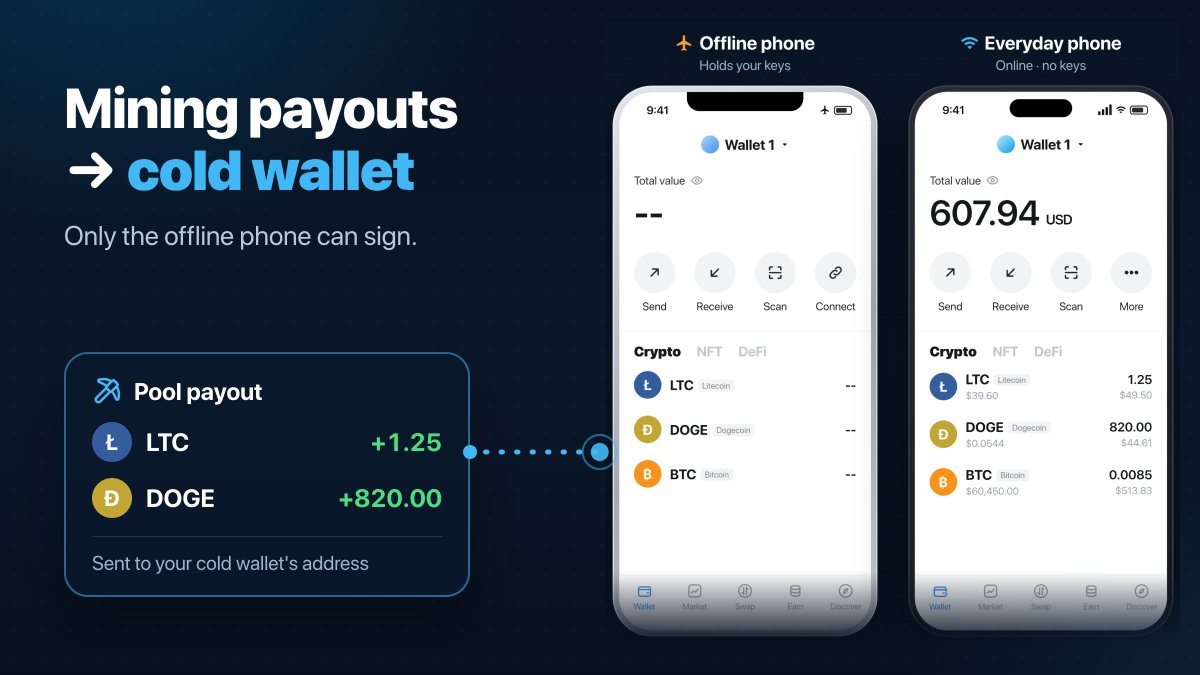
Send them straight to a cold wallet: a spare phone that stays offline and runs FxWallet. It signs for BTC, LTC, DOGE, ALPH, SC, SCP and more.
Your everyday phone shows the balance and prepares transfers. Only the offline phone can sign them.
Set the cold wallet's address as your pool payout address, and test with the smallest payout first.
Turn a spare phone into a cold wallet 👇
https://t.co/ahaum5Ew1N
Sent crypto on the wrong network? It's often still yours. 🔀
Find the transfer's TXID (in the coin's history in FxWallet, or in the exchange's withdrawal history) and look it up in a block explorer. It shows the network the transfer used and the address it went to.
- Your own address on another EVM network, such as Ethereum, BNB Chain or Arbitrum: it's in your wallet, on that network. Find it there in FxWallet, and add the token if it doesn't show. No need to export or import a key.
- An exchange's address: only the exchange can credit it. Send its support the TXID, the network and the amount.
- A non-EVM network such as Bitcoin, TRON or Solana was involved: it usually can't reach the recipient and may be lost. If an exchange received it, ask its support anyway.
Anyone who offers to get it back if you share your mnemonic phrase or private key is a scammer, even if they say they're FxWallet support.
Case by case 👇
https://t.co/Pf6T8wuLsb
The bait wallet's address starts with TVtR and ends with fWtG on TRON. If a wallet in your FxWallet has this address, it's this one: don't send anything to it, and delete it.
⚠️ Scam alert: a "free" wallet you can't empty
Last week we saw people import a wallet whose mnemonic phrase had been shared online. It shows more than $2,000 in USDT on TRON, and moving it out only seems to need a small fee in TRX.
It's bait. Before sharing the phrase, the scammer gave control of the account to another address of theirs. The phrase shows the balance but can't move it, and the TRX you send for the fee is taken.
Already imported it? Don't send anything to it. Delete it in Me → Wallet Management → select the wallet → Delete. Your own wallets aren't affected.
Anyone who offers to remove the restriction for a fee is running a second scam. A mnemonic phrase someone shares is never a gift.
What to look for 👇
https://t.co/1A7HzufZzc
What if your cold wallet phone breaks or goes missing? 📵
Your crypto isn't in the phone. It's on the blockchain, and your mnemonic phrase is the way back to it.
- The phone broke: import the same phrase on another offline phone, then connect it to your everyday phone again.
- The phone is lost or stolen: do the same, then create a new wallet and move everything to it. Whoever gets into that phone has your keys.
- No phrase on paper: nobody can restore the wallet. FxWallet can't either, because we never hold your keys.
Worth checking today: is every mnemonic phrase on that phone written down and kept offline?
How to back up 👇
https://t.co/pRelfcvSFS
🛰️ Security Radar #3: the website was real, the file looked routine.
1. Addresses swapped on real websites
On November 16, attackers used a flaw in a tool that many large websites use to test their pages, and slipped code into more than 170 of those sites. For about 12 hours, the code replaced crypto addresses shown on the page, or copied from it, with the attacker's own. The tool's maker says the flaw is fixed and the code is gone.
Lesson: an address on a well-known site can still be wrong, even before you copy it. For a large payment, confirm the address through a second channel, such as the recipient's own app or a message from them, and send a small test first.
Sent crypto on November 16 to an address from a website? Open the transaction and ask the recipient to confirm the address is theirs.
2. A "wallet update" that hands over your computer
On November 17, a security researcher reported ZIP files named like wallet updates, tax files and "transition" notes. On Windows, running the file inside installs a remote-control program, and the attacker takes over the computer.
Lesson: wallet updates come from the official app store or the wallet's own app, never as a file someone sends you. No real support team needs to control your computer.
Already ran a file like this? Stop using that computer for crypto. On another device you trust, create a new wallet and move everything to it.
This week's habit: turn on automatic updates on your phone and computer. The attack in #1 also tried to break into iPhones that hadn't been updated.
Holding savings long term? Keep them in a cold wallet. An old offline phone works 👇
https://t.co/ENd3BTqGPq
Looking back at a transaction shouldn't mean decoding a contract address. 📜
In FxWallet, your history says what each transaction did and who it was with:
- In the list: Swap, Approve, Transfer or Receive, the app or address on the other side, and the amounts.
- Tap a swap: what you paid and what you got.
- Tap an approval: how much, and to which contract.
Available on Ethereum, BNB Chain, Base, Arbitrum, Optimism, Polygon, Avalanche and Linea.
See it with your own address before you move anything: add it as a watch wallet. A watch wallet can't sign or send, so there's no key to hand over. The first time you open it, the history can take up to a minute to appear.
How to add one 👇
https://t.co/N4s9MD5C6i
Moving to a new wallet usually means hunting for contract addresses and adding tokens one by one. 🪙
In FxWallet, import your wallet and the tokens you hold on major EVM networks, like Ethereum, BNB Chain, Base and Arbitrum, show up on their own. No contract addresses to paste.
- Tiny amounts and tokens without a price, which is where spam usually is, stay off your home screen. They wait in Me → Assets Discovery if you want them.
- Something you hold still isn't there? Give it a moment, then pull down on the Wallet tab to refresh.
Moving from another app 👇
https://t.co/Yfe6FBBPvg
A transaction in your history that you don't remember? Tap it before you panic. 🔎
The transaction page says what it did:
- Type: Swap, Approve, Transfer, Receive, Contract interaction and more.
- Interacted with: the contract or token on the other side.
- For an approval, Approved amount and Approved to: how much of that token a contract can spend, and which contract. Unlimited means all of it.
Then:
- Tokens or tiny amounts you didn't ask for: ignore them. Don't open their links, and don't copy addresses from your history.
- An approval you don't recognize: revoke it in Wallet → More → Approvals.
- Crypto that left your wallet without you: create a new wallet and move everything to it now.
What each one means 👇
https://t.co/GyrwPEq7Pq
Honest question: what's the hardest part of using a self-custody wallet?
Tell us more in the replies. We read them, and we use them to decide what to fix and explain next.
(We'll never DM you first or ask for your mnemonic phrase. Anyone who does isn't us.)
FxWallet interview follow-up
Telegram usernames for this round
ran_dom_boy, imacoinSL, Kerdie2, nwamderxz, summielin
If you’re on the list, join our Telegram group and DM group admin hanEchoverse with your time zone and 2–3 times you’re free.
https://t.co/7oQQ8y9AkI
Hi everyone — We’re looking for a few FxWallet users for a short product interview (about 20–30 min). Quota is limited. If you’re interested, fill this form first (≈1 min). Filling the form does not mean you’re selected — we’ll follow up if there’s a match. Thank you for your support! https://t.co/5ZiWZ0uJW8
🛰️ Security Radar #2: the right sender, the right web address, and still a scam.
1. A fake recall in the wallet maker's name
Late on October 25, emails sent from real addresses of Foundation, maker of the Passport hardware wallet, said the device had been recalled and led people to websites that asked for their mnemonic phrase. Foundation counted more than 23,000 attempts. It says there is no recall and it found no evidence that Passport devices or their keys were compromised.
Lesson: an email from a company's real address can still be fake. No wallet maker needs you to move your funds or enter your mnemonic phrase because of an email or a phone call.
Already typed your phrase into a page like this? Create a new wallet now and move everything to it.
2. The right web address, the wrong site
On October 30–31, attackers took over the domains of at least 12 DeFi sites. Visitors typed the correct address and got a page built to drain their wallets.
Lesson: last week we said to use bookmarks. They stop look-alike sites, but not this. Read every approval and signature, even on a site you've used for years. If it asks for more than you came to do, reject it.
Connected or signed on one of these sites? Check Wallet → More → Approvals and revoke what you don't recognize. Then move that token to another wallet of yours, because a signed permit may not be listed.
This week's habit: keep a small wallet for DApps and your savings in another. A bad signature can only reach the wallet that signed it.
Holding savings long term? Keep them in a cold wallet. An old offline phone works 👇
https://t.co/wLmW2Y9C1b
Mining to a pool? Your payouts can land straight in your own wallet. ⛏️
A pool only needs your address:
1. In FxWallet, tap Receive, search for the exact coin you mine and copy the address.
2. Paste it into that coin's payout setting at the pool, and check it matches. Malware can change a copied address.
3. Set the lowest payout threshold the pool allows and wait for one payout to arrive.
4. When it shows up, set the threshold you want.
Pools that mine several coins at once, like Litecoin with Dogecoin, pay each coin separately, so copy a separate address for each.
Nobody at a pool ever needs your mnemonic phrase or private key.
Guide 👇
https://t.co/C7cZJburJy
Using an old phone as a cold wallet? You usually don't need to update it. 📵
FxWallet never asks an offline phone to update. It keeps signing for the networks it already supports.
Update only if you want a network added later, or if the offline phone can't sign a transaction from your everyday phone.
When you do, keep your keys off any phone that is online:
Android: download the APK on a computer, check its SHA-256, and copy it over USB. The phone stays in airplane mode.
iPhone: updates need the App Store, which means going online. With your mnemonic phrase on paper, reset the phone, install FxWallet, turn airplane mode back on, then import your wallet.
Don't reset or uninstall until you have every phrase on paper. Resetting erases the wallets on that phone.
Step by step 👇
https://t.co/PbZwwWmSM9
No transfer. No network fee. Your tokens can still be taken. ✍️
Some signature requests only prove you own an address. Others let a contract take your tokens later.
The one to watch is a permit: an approval given with a signature instead of a transaction. It costs nothing to sign, and whoever holds that signature can take that token, up to its limit, whenever they choose.
Before you sign in FxWallet:
- Who is asking? Check the site address letter by letter.
- What do you give away? For a permit, read the spender and the spend limit.
- Asked to sign to "claim", "verify" or "unlock" something? Don't.
Signed something suspicious? Revoke what you don't recognize in Wallet → More → Approvals. A permit that hasn't been used yet may not be listed there, so also move that token to another wallet of yours straight away.
Guide 👇
https://t.co/QlPbXzsOsJ
Good morning fam! We're still looking for users to join our interview with REWARDS. If you wanna help make FxWallet a better wallet and contribute to the process then fill in the form via the link! We're dying to hear what you have to say🥺! Whether you just started or have been using FxWallet for a while, we welcome all of you to participate! 🎁BIG REWARD awaits guys! Don't miss out on this one!
Hi everyone — We’re looking for a few FxWallet users for a short product interview (about 20–30 min). Quota is limited. If you’re interested, fill this form first (≈1 min). Filling the form does not mean you’re selected — we’ll follow up if there’s a match. Thank you for your support! https://t.co/5ZiWZ0uJW8
Have USDT but no ETH or BNB for the network fee? You can still send it in FxWallet. ⛽
1. Gas Card: it pays network fees for you. Wallet → More → Gas Card shows your cards and the Supported Networks of each. On the confirmation screen, tap Gas Fee → Pay with Gas Card.
2. Pay with a token: when you send on a supported EVM network, you can pay the fee with a supported ERC-20 token instead of the native coin. The first time, FxWallet upgrades your address on that network with EIP-7702.
Not every transaction takes these: bridges, batch transfers and Earn don't take Gas Cards, and swaps can't be paid with a token.
How it works 👇
https://t.co/b5PfKia1Cb
🛰️ Security Radar #1: two recent wallet scams, and one habit that stops them.
1. A "Deny" button that asks for your phrase
Hardware wallet maker NGRAVE reported a phishing attack in October: attackers hijacked the service behind its LIQUID app's push notifications and sent a fake security alert. The link led to a "Deny" button, then a page asking for the recovery phrase to block the intruder. Automated scripts emptied the first wallet within six minutes. NGRAVE has traced about $2.56M taken from about 70 wallet addresses.
Lesson: a notification from a real app can still be fake, and no real security step ever needs your mnemonic phrase. Not to block, verify, sync or restore.
Already typed yours into a page like this, even part of it? Create a new wallet now and move everything to it.
2. Fake exchange notifications
Indian exchange CoinDCX warned users about emails and notifications urging them to click a link, connect a wallet or enter account details.
Lesson: open the app, or type the address yourself. Don't act on a link in a message.
Connected a wallet through a link like that? Check Wallet → More → Approvals and revoke anything you don't recognize.
This week's habit: bookmark the sites you use and only open them from the bookmark. Our official links are all on one page 👇
https://t.co/OmBh7uTkco
Holding savings long term? Keep them in a cold wallet. An old offline phone works: see Wednesday's thread.
8/ Works with Ethereum, BNB Chain and other EVM networks, plus Bitcoin, Solana, TRON and more. Not every network in FxWallet is covered, so check the list in the guide first.
Full guide 👇
https://t.co/2cjJdrCL9q
Lose the offline phone? Your mnemonic phrase restores the wallet. Keep that paper safe.