Laravel 13.20+ finally brings first-party image processing. 🖼️
Huge shout-out to @enunomaduro for cooking this one.
$request->image(), Storage::image(), configurable drivers, and immutable transformations.
This feels like it has always belonged in Laravel.
🚨 GIVEAWAY ALERT
We're giving away 2x ErgoChair Pro - Autonomous' most popular ergonomic chair
Easy entry:
1. Follow @workspacesxyz + @autonomous_labs
2. Like & RT
3. Tag 2 friends you'd love to share this with
4. Subscribe https://t.co/Rpda3QPUNn
Ends Apr 15 - good luck!
Want to contribute to the growth of Morocco's tech scene? 🌟 I just took part in an important survey about development in our country. It's quick, easy, and impactful. Have your say https://t.co/cJ7jao87Yp #geeksblabla
@marouane53@hamzaaaaaaaa4 I had the same issue. I fixed it by using Microsoft’s MSKLC to make a custom Arabic phonetic keyboard—so I can type Arabic using English letters (like mrhba → م��حبا) system-wide, no need for external websites or copy-pasting. Way more accurate too.
Just released my first open-source Laravel package: File uploads with FilePond for the VILT stack. Polymorphic, styled, multilingual & Inertia-ready. Hope it's useful!
→ https://t.co/iKNh2NQSAx
#Laravel#VueJS#opensource
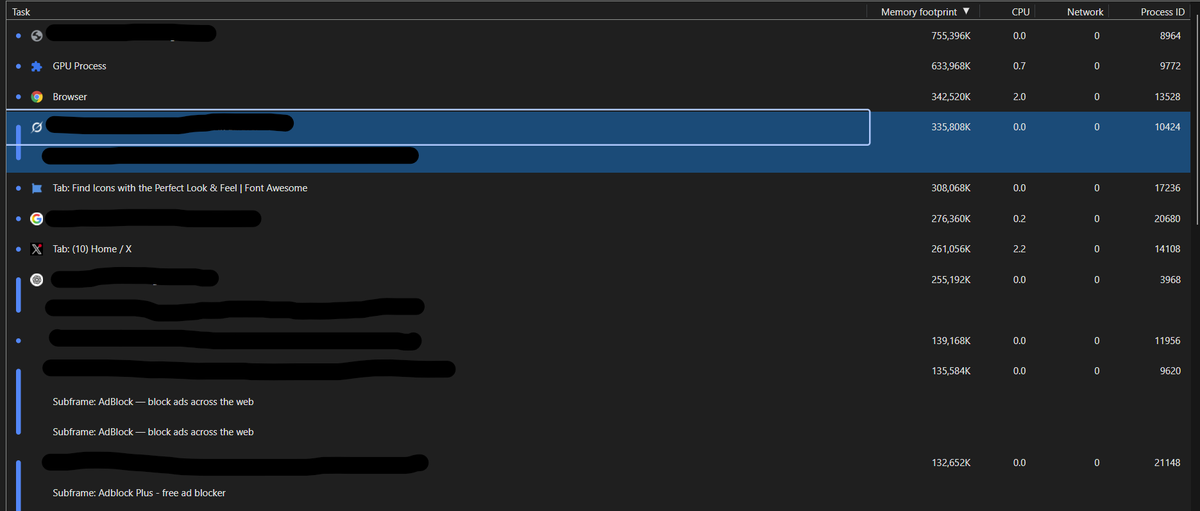
Ever opened Task Manager and found Chrome eating all your RAM?
But which tab or extension is the culprit?
Press Shift + Esc in Chrome to open its built-in Task Manager!
See RAM & CPU usage per tab, extension, ...
Found it accidentally while using DevTools — super handy!
Today I discovered a clever hack using Laravel's Str::slug()
I was seeding users with Arabic names and needed emails, but didn't want to manually translate everything or use faker().
Then I tried the code in the image.
Not perfect translation but EXACTLY what I needed #Laravel
@PovilasKorop IMO Laravel FormRequests and Resources provide a robust solution for most Laravel developers without adding an extra layer of complexity
you achieve both data integrity and consistent transformation, without needing separate DTO classes
The official Laravel VS Code extension is now available in beta.
✨ Blade syntax highlighting
🖊️ Eloquent autocompletion
🔗 Route, config, & middleware linking
🧠 Smart diagnostics
And more...
Get it now → https://t.co/M7svNXCJGi
Just discovered https://t.co/S6eFYkNBm0 — the ultimate resource for all Laravel Artisan commands! 🚀 Super handy for Laravel developers. Huge thanks to @jbrooksuk for creating this gem! #Laravel#PHP
How to structure Laravel projects?
It's the no.1 question I get over the years in various forms.
So here's a long tweet with my 4 quick recommendations.
---
1. Controller methods should be short.
It should only get/validate the request, call EXTERNAL classes for more logic, and return the response.
Otherwise, you get Controller methods that are hard to read, understand, and maintain. Especially if you have the same code pieces to reuse in other methods.
In fact, it's more global: ALL/MOST methods should be short. It's about the separation of concerns.
---
2. Move Validation from the Controller to Form Request classes.
It's a bit of a "personal preference", but later, while reading the Controller method, I want to focus on the main thing: what the method does, not how it validates the data.
Also, Form Requests are reusable.
Finally, Form Requests have the `authorize()` method, so you can offload the role/permission check there instead of the `Gate` check in the Controller.
---
3. Move logic from Controllers to Services/Actions.
Those "external classes" mentioned above. Typically, use Services if you have multiple methods inside around the same Model. Use Actions if you have just one method of `handle()` or similar.
Type-hint them in the Controller method:
```
public function store(StoreUserRequest $request, UserService $userService) {
$userService->someMethod();
}
```
If you use them in multiple methods of Controllers, type-hint them in the Constructor:
```
public function __construct(public UserService $userService) {}
public function store(StoreUserRequest $request) {
$this->userService->someMethod();
}
```
---
4. Use Events/Listeners only when you REALLY need it.
My personal experience: while event/listener is a typical pattern in coding, in Laravel it makes it harder to understand what is happening. I need to click somewhere else to find that out.
I use Listeners only when I have **A FEW** listeners or when I "feel" that other developers will want to create their own listeners in the future. This mostly happens when you create packages/frameworks, but not in typical web applications.
---
Of course, there are many more nuanced situations and exceptions, but it's hard to fit them in a tweet.
I discuss deeper things in my most popular course "How to Structure Laravel Projects": https://t.co/NCiY9gNG3n (this week 40% off with code FRIDAY24)