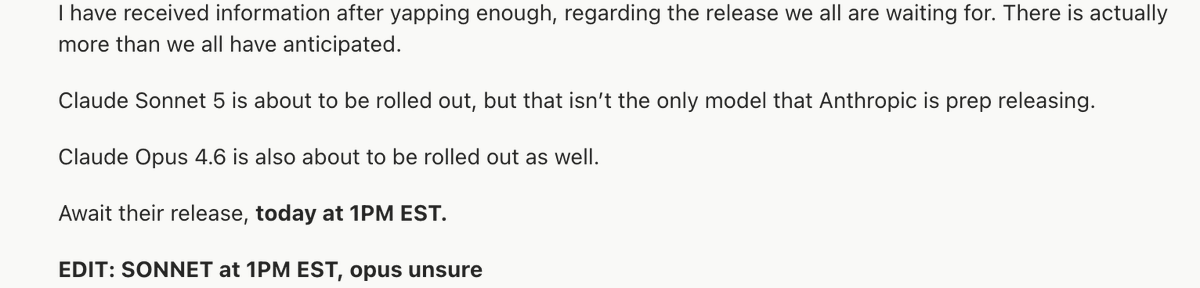
The takeaway from Fable 5 being BANNED by the government: GET GOOD AT LOCAL MODELS SO YOU HAVE 100% CONTROL.
My entire weekend was going to be building my craziest ideas with Fable 5. That's now cancelled.
So instead of building with Fable this weekend, I've decided I'll go deep on local models:
1. Start with the runtime. Download Ollama or LM Studio first. This is the thing that actually runs models on your machine.
2. Match the model to your hardware. A model's size is measured in billions of parameters (7B, 32B, 70B). Bigger is smarter but needs more memory. Rule of thumb: a 7B model runs on almost any laptop, a 32B needs a good Mac with 32GB+ RAM, a 70B needs serious hardware like a DGX Spark or a maxed-out Mac Studio.
3. Know which model for which job. Qwen 3 is the best all-around choice for most tasks. DeepSeek for reasoning and coding. Gemma 4 when you need something tiny that runs on a phone. Llama when you want the biggest community and the most fine-tunes.
4. Quantization. You can shrink a model to run on weaker hardware with barely any quality loss. Look for versions labeled Q4 or Q5. This is how a model that "needs" a server runs on your laptop. Learning this one concept changes everything.
5. Connect it to your agent. Point Hermes or your agent stack at a local model.
6. Context window is your real constraint locally. Cloud models give you huge context for free. Local models make you pay for it in memory. A bigger context window eats RAM fast. Keep your sessions tight and your prompts lean or your machine chokes.
7. Learn to give local models tools. A smaller local model with web search, file access, and code execution beats a giant model with none. The capability gap closes fast when you wire up the right tools. The model is the engine but the tools are the wheels.
8. Fine-tuning is more accessible than you think. You don't need this on day one, but know it exists. You can take an open model and train it on your own data so it gets good at your specific domain.
I'll probably do a breakdown at some point on this @startupideaspod if people are into it.
The lesson from this ban is basically don't build your entire workflow on something that can disappear with a single letter. Own part of your stack. Local models are insurance.
It reminds me when people realized they don't own social media accounts. And then you saw people build email lists etc.
I remember running a startup and my biggest traffic source was organic FB. All of a sudden, algo changed, and I lost 99% of my traffic.
Same sorta moment (but bigger) for AI.
This is a wake up call.
White Woman. BLM Activist.
Raped And Murdered By The Black Man She Let In.
He followed her home. She trusted him enough to open the door.
She fought for them.
They killed her.
This isn’t rare.
Hundreds of thousands of White people are victimized by Black violent crime every year in America.
Racial consciousness isn’t hate.
It’s how you stay alive.
Anthropic just took a big swipe at OpenAI's decision to put ads in ChatGPT. Anthropic is airing ads mocking ChatGPT ads during the Super Bowl, and they're hilarious 😅 Anthropic is also committing to no ads in Claude https://t.co/LR1v4xz9ds
How to @openclaw on VPS safely: from fresh Ubuntu VPS → hardened private AI server in 30 min
1) Lock down SSH
→ Keys only, no passwords, no root login.
sudo nano /etc/ssh/sshd_config
# Set explicitly:
PasswordAuthentication no
PermitRootLogin no
sudo sshd -t && sudo systemctl reload ssh
2) Default-deny firewall
→ Block everything incoming by default.
sudo apt install ufw -y
sudo ufw default deny incoming
sudo ufw default allow outgoing
sudo ufw enable
3) Brute-force protection
→ Auto-ban IPs after failed login attempts.
sudo apt install fail2ban -y
sudo systemctl enable --now fail2ban
4) Install Tailscale
→ Your private VPN mesh network.
curl -fsSL https://t.co/MynNrCBRlo | sh
sudo tailscale up
5) SSH only via Tailscale
→ No more public SSH exposure.
# Verify Tailscale is working first!
tailscale status
sudo ufw allow from 100.64.0.0/10 to any port 22 proto tcp
sudo ufw delete allow OpenSSH
6) Web ports private too
→ App only accessible from your devices.
sudo ufw allow from 100.64.0.0/10 to any port 443 proto tcp
sudo ufw allow from 100.64.0.0/10 to any port 80 proto tcp
7) Disable IPv6 (optional)
→ Reduces attack surface if unused.
sudo sed -i 's/IPV6=yes/IPV6=no/' /etc/default/ufw
echo "net.ipv6.conf.all.disable_ipv6 = 1" | sudo tee -a /etc/sysctl.conf
sudo sysctl -p && sudo ufw reload
8) Clawdbot install
→ AI assistant on your private server.
npm install -g clawdbot && clawdbot doctor
9) Lock Clawdbot to owner only
→ Only you can message the bot.
{ "dmPolicy": "allowlist", "allowFrom": ["YOUR_TELEGRAM_ID"], "groupPolicy": "allowlist" }
10) Fix credential permissions
→ Don't leave secrets world-readable.
chmod 700 ~/.clawdbot/credentials
chmod 600 .env
11) Run security audit
→ Catches issues you missed - don't skip!
clawdbot security audit --deep
Verify everything:
sudo ufw status
ss -tulnp
tailscale status
clawdbot doctor
Result:
✅ No public SSH
✅ No public web ports
✅ Server only reachable via Tailscale
✅ Bot responds only to you
✅ Private AI server in 30 min
NOW you can start playing, not before.
You buckle your seatbelts before you step on the gas, hmkay?