MASTERING PLAN FOR API DESIGN
STEP 1: UNDERSTAND API FUNDAMENTALS
→ What an API is and how it works
→ Types of APIs (REST, GraphQL, gRPC, SOAP)
→ Request-response lifecycle
→ HTTP fundamentals
→ API architecture basics
→ API-first development
Build a strong foundation before designing APIs.
STEP 2: MASTER HTTP PROTOCOL
→ HTTP methods (GET, POST, PUT, PATCH, DELETE)
→ Status codes
→ Headers and cookies
→ Content types (JSON, XML, Form Data)
→ URL structure
→ HTTPS and TLS basics
HTTP is the backbone of modern APIs.
STEP 3: DESIGN RESTFUL APIS
→ REST principles
→ Resource-based URLs
→ Naming conventions
→ CRUD operations
→ Versioning strategies
→ Idempotency
REST remains the most widely used API architecture.
STEP 4: REQUEST AND RESPONSE DESIGN
→ JSON request bodies
→ Response structures
→ Pagination
→ Filtering and sorting
→ Searching resources
→ Standardized error responses
Consistent APIs are easier to consume and maintain.
STEP 5: AUTHENTICATION AND AUTHORIZATION
→ API keys
→ JWT authentication
→ OAuth 2.0
→ OpenID Connect basics
→ Role-Based Access Control (RBAC)
→ Session vs token authentication
Security is essential for every API.
STEP 6: API VALIDATION AND ERROR HANDLING
→ Input validation
→ Data sanitization
→ Validation libraries
→ Error handling strategies
→ Error codes and messages
→ Exception handling
Reliable APIs gracefully handle invalid requests.
STEP 7: DATABASE DESIGN FOR APIS
→ SQL vs NoSQL databases
→ Database relationships
→ Efficient querying
→ Transactions
→ Data consistency
→ ORM best practices
Database design directly impacts API performance.
STEP 8: PERFORMANCE AND SCALABILITY
→ Caching strategies
→ Redis integration
→ Rate limiting
→ Compression
→ Asynchronous processing
→ Load balancing basics
Scalable APIs support growing applications.
STEP 9: API DOCUMENTATION
→ OpenAPI (Swagger)
→ API specifications
→ Interactive documentation
→ Example requests and responses
→ SDK generation
→ Developer experience (DX)
Good documentation makes APIs easy to adopt.
STEP 10: TESTING APIS
→ Unit testing
→ Integration testing
→ API testing with Postman
→ Automated testing
→ Mock servers
→ Performance testing
Testing ensures reliability before deployment.
STEP 11: API SECURITY
→ HTTPS everywhere
→ CORS configuration
→ Preventing SQL injection
→ Preventing XSS and CSRF
→ Secrets management
→ API security best practices
Secure APIs protect users and data.
STEP 12: DEPLOYMENT AND MONITORING
→ API gateways
→ Reverse proxies
→ Docker deployment
→ Kubernetes basics
→ Logging and monitoring
→ CI/CD for APIs
Production APIs require strong deployment strategies.
STEP 13: ADVANCED API ARCHITECTURES
→ GraphQL fundamentals
→ gRPC basics
→ WebSockets
→ Event-driven APIs
→ Webhooks
→ Microservices communication
Modern applications often use multiple API styles.
STEP 14: BUILD REAL-WORLD PROJECTS
→ Authentication API
→ E-commerce API
→ Blog API
→ Payment API integration
→ Chat application backend
→ Microservices API system
Projects transform knowledge into practical expertise.
STEP 15: INTERVIEW PREPARATION AND PRODUCTION SKILLS
→ API design interview questions
→ System design fundamentals
→ Performance optimization scenarios
→ Security best practices
→ Debugging production APIs
→ Real-world architecture discussions
Practical experience is the key to mastering API design.
---
API DESIGN HANDBOOK
Get the complete API Design Handbook with deep explanations, REST best practices, authentication strategies, scalable architectures, security techniques, and production-ready API development:
https://t.co/t2KOeauy6O
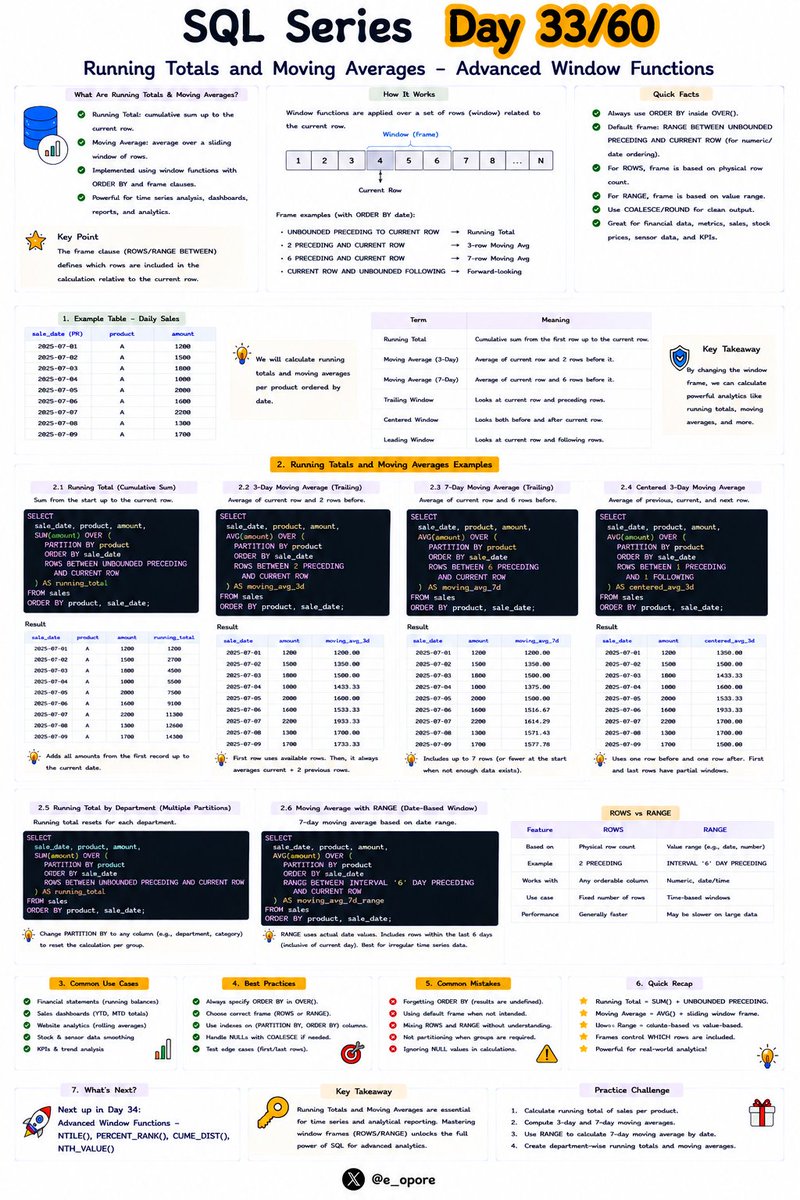
𝗗𝗮𝘆 𝟯𝟯/𝟲𝟬 𝗼𝗳 𝗦𝗤𝗟 𝗦𝗲𝗿𝗶𝗲𝘀 — 𝗥𝘂𝗻𝗻𝗶𝗻𝗴 𝗧𝗼𝘁𝗮𝗹𝘀 𝗮𝗻𝗱 𝗠𝗼𝘃𝗶𝗻𝗴 𝗔𝘃𝗲𝗿𝗮𝗴𝗲𝘀 – 𝗔𝗱𝘃𝗮𝗻𝗰𝗲𝗱 𝗪𝗶𝗻𝗱𝗼𝘄 𝗙𝘂𝗻𝗰𝘁𝗶𝗼𝗻𝘀
Businesses rarely care about a single row of data.
They care about trends—how sales are growing over time, how revenue accumulates, and how averages change from one period to the next.
SQL window functions make these analyses simple without writing complex subqueries.
Today, you'll learn how to calculate running totals and moving averages like a data analyst 👇
1️⃣ 𝗪𝗵𝗮𝘁 𝗶𝘀 𝗮 𝗥𝘂𝗻𝗻𝗶𝗻𝗴 𝗧𝗼𝘁𝗮𝗹?
A running total (also called a cumulative sum) continuously adds values as you move through ordered rows.
Example:
SELECT order_date,
amount,
SUM(amount) OVER (
ORDER BY order_date
) AS running_total
FROM orders;
Each row includes the total of all previous rows plus the current one.
2️⃣ 𝗪𝗵𝘆 𝗥𝘂𝗻𝗻𝗶𝗻𝗴 𝗧𝗼𝘁𝗮𝗹𝘀 𝗮𝗿𝗲 𝗨𝘀𝗲𝗳𝘂𝗹
Running totals help answer questions like:
• Total sales so far this month
• Bank account balances
• Website visitors over time
• Inventory tracking
• Revenue growth
They provide cumulative insights without multiple queries.
3️⃣ 𝗛𝗼𝘄 𝗢𝗥𝗗𝗘𝗥 𝗕𝗬 𝗔𝗳𝗳𝗲𝗰𝘁𝘀 𝗥𝘂𝗻𝗻𝗶𝗻𝗴 𝗧𝗼𝘁𝗮𝗹𝘀
The ORDER BY clause determines the sequence in which values are accumulated.
Changing the sort order changes the running total.
Always order by a meaningful column such as a date, timestamp, or transaction ID.
4️⃣ 𝗥𝘂𝗻𝗻𝗶𝗻𝗴 𝗧𝗼𝘁𝗮𝗹𝘀 𝘄𝗶𝘁𝗵 𝗣𝗔𝗥𝗧𝗜𝗧𝗜𝗢𝗡 𝗕𝗬
You can calculate separate running totals for each group.
Example:
SELECT department,
employee_name,
salary,
SUM(salary) OVER (
PARTITION BY department
ORDER BY employee_name
) AS department_total
FROM employees;
Each department maintains its own cumulative total.
5️⃣ 𝗪𝗵𝗮𝘁 𝗶𝘀 𝗮 𝗠𝗼𝘃𝗶𝗻𝗴 𝗔𝘃𝗲𝗿𝗮𝗴𝗲?
A moving average calculates the average over a sliding window of rows.
It smooths short-term fluctuations and highlights longer-term trends.
6️⃣ 𝗠𝗼𝘃𝗶𝗻𝗴 𝗔𝘃𝗲𝗿𝗮𝗴𝗲 𝗘𝘅𝗮𝗺𝗽𝗹𝗲
SELECT order_date,
amount,
AVG(amount) OVER (
ORDER BY order_date
ROWS BETWEEN 2 PRECEDING
AND CURRENT ROW
) AS moving_average
FROM orders;
This calculates a 3-row moving average using the current row and the previous two rows.
7️⃣ 𝗨𝗻𝗱𝗲𝗿𝘀𝘁𝗮𝗻𝗱𝗶𝗻𝗴 𝗪𝗶𝗻𝗱𝗼𝘄 𝗙𝗿𝗮𝗺𝗲𝘀
The ROWS BETWEEN clause defines which rows are included in the calculation.
Common window frames include:
• CURRENT ROW
• 1 PRECEDING
• 2 PRECEDING
• UNBOUNDED PRECEDING
• UNBOUNDED FOLLOWING
Choosing the right frame determines how much data each calculation uses.
8️⃣ 𝗥𝗲𝗮𝗹-𝘄𝗼𝗿𝗹𝗱 𝗨𝘀𝗲 𝗖𝗮𝘀𝗲𝘀
Running totals and moving averages are widely used in:
• Financial dashboards
• Sales reporting
• Stock market analysis
• Website traffic monitoring
• Forecasting
• Business intelligence
9️⃣ 𝗪𝗵𝘆 𝗪𝗶𝗻𝗱𝗼𝘄 𝗙𝘂𝗻𝗰𝘁𝗶𝗼𝗻𝘀 𝗔𝗿𝗲 𝗕𝗲𝘁𝘁𝗲𝗿
Without window functions, running totals often require self-joins or nested subqueries.
Window functions produce cleaner, faster, and more maintainable SQL.
🔟 𝗠𝗮𝘀𝘁𝗲𝗿 𝗧𝗵𝗲𝘀𝗲 𝗣𝗮𝘁𝘁𝗲𝗿𝗻𝘀
Running totals and moving averages are core techniques in data analytics.
Whether you're building reports, dashboards, or forecasting models, these advanced window functions will become part of your everyday SQL toolkit.
💡 𝗞𝗲𝘆 𝘁𝗮𝗸𝗲𝗮𝘄𝗮𝘆:
Running totals calculate cumulative values over ordered data, while moving averages smooth fluctuations by averaging values across a sliding window.
Combined with PARTITION BY, ORDER BY, and window frames, these techniques enable powerful analytical queries with concise, efficient SQL.
Grab SQL Playbook:
https://t.co/0bRVxTZBbK
Have you used running totals or moving averages in a real-world project? What was your use case?
𝐖𝐡𝐚𝐭 𝐢𝐬 𝐄𝐯𝐞𝐧𝐭-𝐃𝐫𝐢𝐯𝐞𝐧 𝐀𝐫𝐜𝐡𝐢𝐭𝐞𝐜𝐭𝐮𝐫𝐞 (𝐄𝐃𝐀)?
DEFINITION
-> Event-Driven Architecture (EDA) is a software architecture pattern where applications communicate by producing and consuming events
-> An event represents a significant change or action that occurs within a system
-> EDA allows systems to react to events asynchronously without tight coupling
CORE IDEA OF EDA
-> Systems communicate through events instead of direct requests
-> Event producers generate events when something happens
-> Event consumers react automatically when events are received
-> Multiple consumers can process the same event independently
WHY EDA IS NEEDED
-> Modern applications require real-time communication
-> Reduces dependencies between different services
-> Supports highly scalable distributed systems
-> Enables faster response to business events
EXAMPLE
-> A customer places an online order
-> The Order Service publishes an "Order Created" event
-> Payment Service processes the payment
-> Inventory Service updates stock
-> Shipping Service prepares delivery
-> Notification Service sends a confirmation email
KEY COMPONENTS OF EDA
EVENT
-> A record describing something that happened in the system
-> Examples include Order Created, Payment Completed, and User Registered
EVENT PRODUCER
-> Generates and publishes events
-> Does not know which services will consume the events
EVENT CONSUMER
-> Listens for events and performs specific actions
-> Multiple consumers can subscribe to the same event
EVENT BROKER
-> Receives, stores, and distributes events
-> Examples include Apache Kafka, RabbitMQ, AWS EventBridge, and Azure Event Grid
EVENT CHANNEL
-> A communication pathway used to transfer events between producers and consumers
HOW EDA WORKS
STEP 1: EVENT OCCURS
-> A business action triggers an event
STEP 2: EVENT IS PUBLISHED
-> The producer sends the event to an event broker
STEP 3: EVENT ROUTING
-> The broker distributes the event to subscribed consumers
STEP 4: EVENT PROCESSING
-> Consumers process the event independently
STEP 5: BUSINESS ACTIONS
-> Consumers perform their required tasks
STEP 6: NEW EVENTS
-> Consumers may publish additional events to continue the workflow
CHARACTERISTICS OF EDA
-> Loose Coupling
-> Asynchronous Communication
-> Scalability
-> High Availability
-> Event-Based Communication
-> Fault Tolerance
-> Real-Time Processing
COMMON EDA TECHNOLOGIES
-> Apache Kafka
-> RabbitMQ
-> Apache Pulsar
-> AWS EventBridge
-> Azure Event Grid
-> Google Pub/Sub
-> Redis Streams
ADVANTAGES OF EDA
-> Real-time processing
-> High scalability
-> Better fault isolation
-> Loose coupling
-> Faster system responsiveness
-> Easier integration
-> Supports distributed systems
CHALLENGES OF EDA
-> Increased architectural complexity
-> Event ordering challenges
-> Duplicate event handling
-> Monitoring distributed systems
-> Event consistency issues
-> Debugging asynchronous workflows
EDA VS REQUEST-RESPONSE ARCHITECTURE
EDA
-> Event-based communication
-> Asynchronous processing
-> Highly scalable
-> Loosely coupled services
REQUEST-RESPONSE
-> Direct communication
-> Synchronous processing
-> Immediate responses
-> Tightly connected interactions
EDA VS MICROSERVICES
EDA
-> Communication through events
-> Services react independently
-> Ideal for real-time workflows
MICROSERVICES
-> Architectural style for building applications
-> Services communicate using APIs or events
-> Focuses on independent deployment
REAL-WORLD APPLICATIONS OF EDA
-> Banking Systems
-> E-Commerce Platforms
-> IoT Applications
-> Stock Trading Platforms
-> Ride-Sharing Applications
-> Healthcare Systems
-> Logistics and Supply Chain Systems
Grab the Software Architectures Ebook:
https://t.co/rQ5uqOjgfE