LLMs are smart.
Their memory? Not so much. 🧠
Stateless → Context → Memory → Knowledge Graphs
I wrote about how we build AI agents that don’t just answer—but remember.
🔗 https://t.co/O0qBZV9Tm6
#AI#LLM#AIAgents@ChaiCodeHQ
Nobody likes writing architecture docs, but everybody complains when they’re missing.
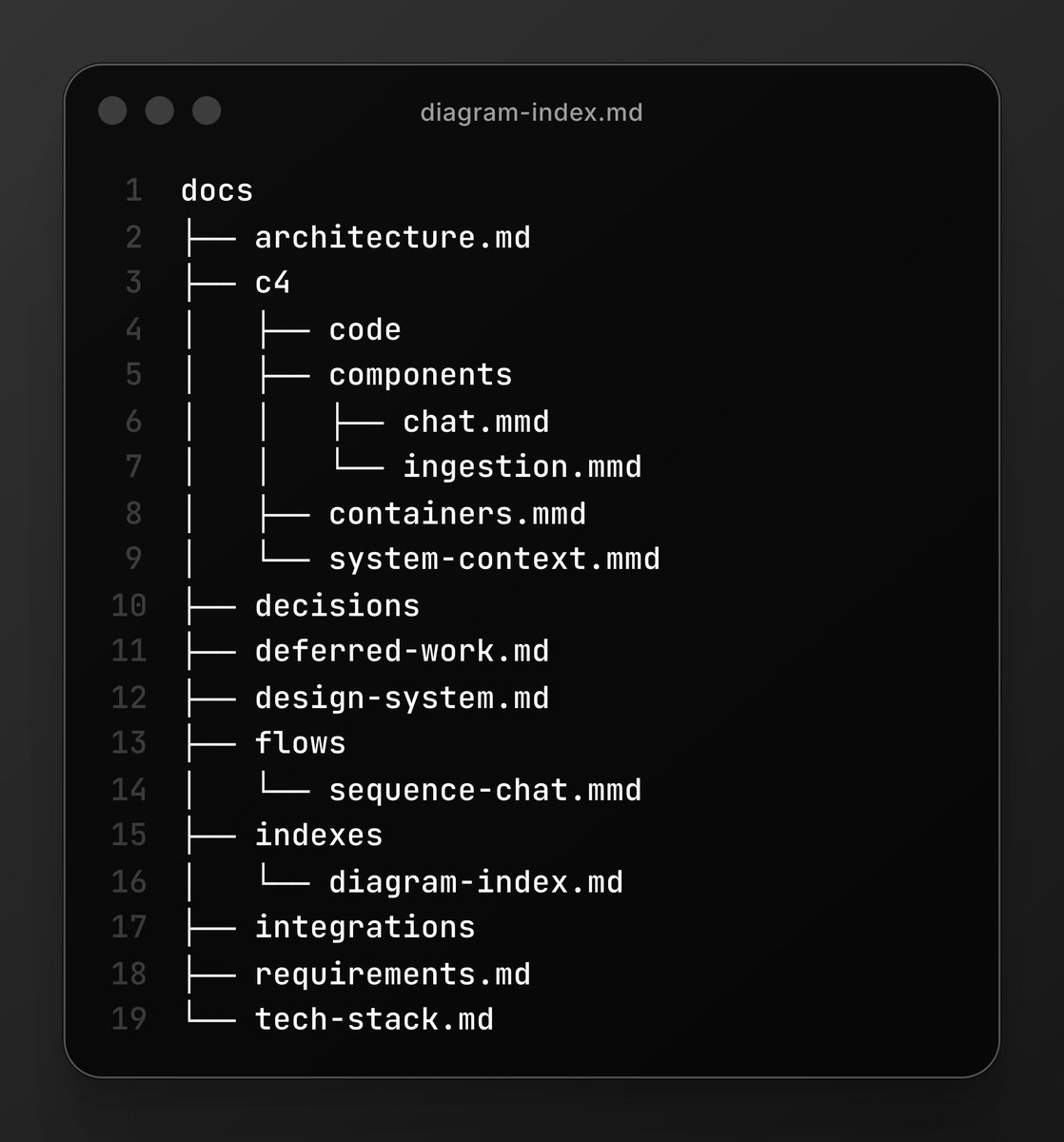
I built a new skill for bmad-method that automatically generates your entire product documentation and architectural diagrams.
#DeveloperTools#Documentation#BuildInPublic
Back after a long break — time to start building again. 🚀
Today I’m learning how voice agents work:
🎙️ STT → speech recognition
🧠 LLM → reasoning/context
🔊 TTS → voice generation
The interesting problems are beyond simply making an AI speak:
• Latency
• Handling interruptions
• Maintaining speech/conversation context
Working on Interruption-Context Aware Voice Agent. 🔥
#VoiceAI #VoiceAgents #GenerativeAI #LLM #STT #TTS #AIEngineering @ChaiCodeHQ
The more I read about MCP — resources, prompts, tool calling, etc. — the more it feels like we’re just repeating HTTP protocol concepts, but now passing system-prompt-like instructions, resources, and tools around in standardized JSON. And this MCP Gateway is just another MCP handling other MCP connections. (Will more details coming up)
Am I missing something, or has anyone else felt this? 🤔
#MCP #ModelContextProtocol #LLM #AI #AIAgents #ToolCalling #AIEngineering @ChaiCodeHQ
MCP started making much more sense to me today.
I realized that HTTP POST is only the way the message is sent — the transport layer. The actual MCP communication happens through JSON-RPC, which can work over HTTP, STDIO, or other transports.
We built a local MCP server and had an agent turn off a light bulb 💡🤖
#MCP #AIAgents #GenAI #chaicode
While learning about vector DBs and cosine similarity, a thought flashed:
What if, while indexing a document, we first represent it in a particular “tone” or format?
Then during retrieval, we transform the question into that same “tone” and search for similar vectors.
I was thinking HyDE might fit here because we can generate an idea of the expected output first, then use that to guide retrieval.
Just a learning thought—not claiming this is the right approach. Curious if this makes sense. 🤔
#VectorDB #CosineSimilarity #RAG #HyDE #Embeddings #GenerativeAI #LLM #InformationRetrieval #AIEngineering #MachineLearning #LearningInPublic #BuildInPublic
PEOPLE GOT SCAMMED $4K BY LOVABLE, SO WE MADE IT 100% FREE
I'm starting a war on overpriced AI subscriptions. The worst offender of this is Lovable.
They have predatory pricing: once people start building, they are locked in and now have to pay thousands to progress.
We built freebuff to eliminate this:
1 / no subscriptions, no API keys
2 / zero lock in: we rebuilt all of Lovable's features and made them completely free
3 / code endlessly for hours each day without paying a dime
We don't even accept a credit card.
Lovable's $12B valuation is going to disappear real soon.
I’ve been using the BMad Method heavily for project planning, understanding systems is much faster as diagrams rather than read 20 pages of markdown.
So I started building a BMad extension around a diagram-first workflow using Mermaid + C4:
👉 https://t.co/9kGIkVXcUv
While researching how to make this workflow better, I stumbled across IcePanel — a visual architecture/documentation tool that lets you model systems visually, while adding things like status, tech cards, tags, relationships, and context-aware information to the architecture.
“basically… someone already built my idea, but on steroids.” 😅
And it got me thinking much bigger about how diagrams could become useful context for AI coding agents.
#AIAgents #SoftwareArchitecture #Mermaid #DevTools #progress #gencoding #chaicode
🧵 More on the rabbit hole ↓
Right now, I’m using IcePanel as a source of inspiration while figuring out how to manage the Mermaid files in my BMad module more effectively.
Diagrams make it easier to understand and ideate, and well-managed diagram system could make it easier to infer the architecture before changing it.
That’s what I’m trying to build first: a better way to manage Mermaid files and integrate them into the BMad workflow.
And if I get irritated enough with the limitations… maybe I’ll end up building IcePanel myself. 😅
That’s the direction I’m exploring with my BMad diagram-based workflow:
👉 https://t.co/9kGIkVXcUv
Still very much a work in progress, but this rabbit hole has been way more interesting than I expected. 🚀
My original workflow was basically:
Write Mermaid → render in Excalidraw → inspect → modify → update Mermaid → repeat
Works, but it’s also painfully inefficient.
The diagram is the thing I actually want to think with, but the source of truth keeps living somewhere else. While exploring IcePanel, a few ideas immediately clicked for me:
Context-aware status — instead of a component just sitting there as a box, the diagram can surface useful context like cost, uptime, area, etc.
Tech cards — implementation details can live alongside the visual architecture instead of being buried in documentation.
Tags — useful for grouping and reasoning about different parts of the system.
And most importantly, the whole thing makes the big picture much easier to understand before diving into implementation.
That’s exactly what I’ve been missing from my current BMad workflow.