Claude just dropped 13 free AI courses (with certificates).
No $500 course needed.
No “guru” required.
Just real skills, straight from Anthropic.
Here’s the full list:
1. Claude 101
https://t.co/cEYY6ttzj9
2. AI Fluency: Frameworks & Foundations
https://t.co/Yultbr9GJK
3. Introduction to Agent Skills
https://t.co/CY2GBv6dAW
4. Building with the Claude API
https://t.co/suuw7vHWnq
5. Claude Code in Action
https://t.co/BXZ64BO6lz
6. Introduction to Model Context Protocol
https://t.co/zsNt1NAis4
7. MCP: Advanced Topics
https://t.co/RjyXfJE6fx
8. AI Fluency for Students
https://t.co/7sSCvFZSB1
9. AI Fluency for Educators
https://t.co/jSlhCWmbMI
10. Teaching AI Fluency
https://t.co/9ZetmbIRHw
11. AI Fluency for Nonprofits
https://t.co/9mGYvJ5g0l
12. Claude with Amazon Bedrock
https://t.co/sqVqOPYPbA
13. Claude with Google Vertex AI
https://t.co/8hg8iuJfw4
If you go through even half of these, you’ll be ahead of 95% of people using AI.
Most people won’t.
Because they’re still watching random YouTube videos, buying overpriced courses, or “learning AI” without actually building.
Don’t be that person.
Do this instead:
1. Bookmark this post (you’ll come back)
2. Pick 1 course and start today
3. Share it with someone who needs this
👇Comment "Course" for more resources.
Free. Practical. No excuses.
ADIEU POWERPOINT.
Claude 4.7 peut créer une présentation complète en 60 secondes.
Utilise ces 6 prompts et regarde la magie opérer.
📌 Garde ce post sous la main, il va te servir.
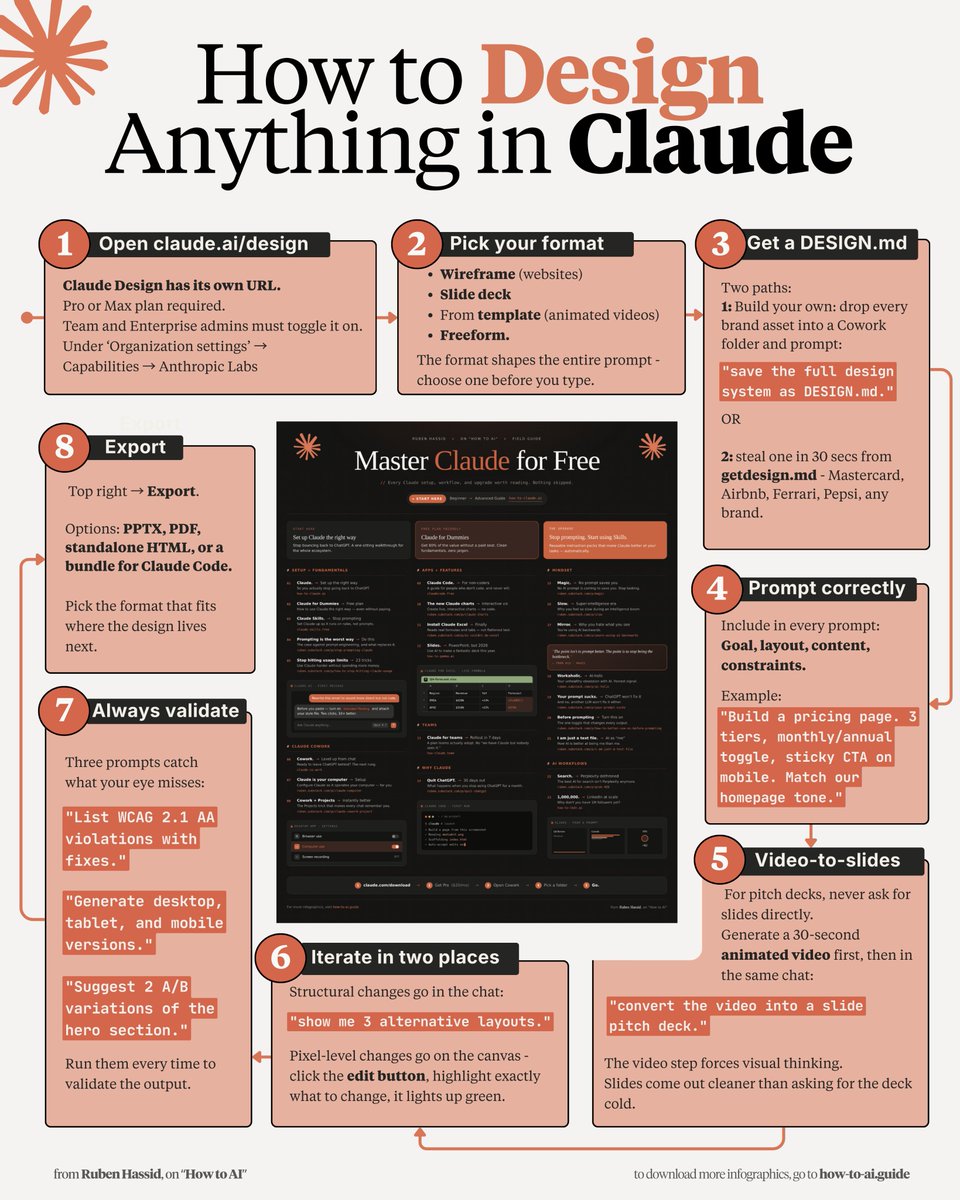
How to design anything in Claude in 5 mins:
(even if you've only ever used the basic chat)
1. Open claude .ai/design (it has its own URL).
2. Format: Wireframe, Slides, template or Freeform.
3. Sign in with a Pro or Max plan.
4. Use my full setup guide: https://t.co/ZY8Fg5D2ea.
Before you prompt, get a DESIGN .md:
1. Drop every brand asset into a Cowork folder. Prompt: "Save the design system as DESIGN .md"
2. OR steal one in 30 secs from getdesign .md (Airbnb, Ferrari, Pepsi, any brand)
✦ Then stop describing pixels. Paste this instead:
"Build a pricing page. 3 tiers, monthly/annual toggle, sticky CTA on mobile. Match our homepage tone."
✦ Good prompts have goals, layout, content & constraints. It reads DESIGN .md to build the page.
✦ For pitch decks, never ask for slides directly.
Generate a 30-sec animated video first, then in the same chat: "convert the video into a slide pitch deck."
✦ Iterate in two places:
Structural change in chat: "Give 3 different layouts."
Pixel changes in canvas. Click edit, it lights up green
✦ Always validate before you export:
"List WCAG 2.1 AA violations with fixes."
"Generate desktop, tablet, and mobile versions."
"Suggest 2 A/B variations of the hero section."
✦ Top right → Export. In PPTX, PDF, standalone HTML, or a bundle for Claude Code format.
The secret is knowing how to prompt. But to go even deeper, use my full guide: https://t.co/ZY8Fg5D2ea.
(save this if you can't design - you won't need to)
Stop telling Claude, "do this."
Stop telling Claude, "write code."
Stop telling Claude, "fix this error."
You're actually treating a senior AI like a junior intern.
Here are 8 prompts you can copy and paste directly:
20 ways to use Claude in 2026:
(bookmark this. You'll need it tomorrow.)
1. Bookmark this image. You'll need it tomorrow.
2. Full guide + prompts at: https://t.co/psB7XxAv8w.
3. Don't pay anything. It's free in the email.
---
1. ASK → Chat
☑ Quick questions. Quick answers.
☑ Don't use Cowork for "write a good email?"
2. THINK → Opus 4.7
☑ The smartest model. Always switch to it.
☑ For deep work, complex writing & thinking.
3. SPEED → Sonnet 4.6
☑ Faster, cheaper, still excellent.
☑ Use it for grammar, summaries, short answers.
4. REASON → Extended Thinking
☑ Toggle it on for hard problems.
☑ Turn it off for simple ones (saves tokens).
5. BUILD → Cowork
☑ Where serious work happens. .docx, .xlsx, .pptx.
☑ Point it at a folder. It works like an employee.
6. SHIP → Claude Code
☑ For developers (and curious non-devs).
☑ Build websites and apps from your terminal.
7. MODEL → Claude in Excel
☑ Install the add-in from the Excel store.
☑ Real formulas, real models, no copy-paste.
8. SLIDES → Gamma connector
☑ One prompt. Full presentation. With research.
☑ Connect Gamma inside Claude.
9. MOCKUP → Claude Design
☑ Go to claude .ai/design. Build websites in 1 hour.
☑ Upload a DESIGN .md. Export to Canva, PDF.
10. BROWSE → Claude in Chrome
☑ A browsing agent. Reads any page for you.
☑ Acts inside the browser, not just talks about it.
11. CLICK → Computer Use
☑ Settings > Turn it on.
☑ Claude clicks, types, browses on your Mac.
12. REMOTE → Dispatch
☑ Connect your phone. Text a task.
☑ It works on your computer while you're away.
13. SEARCH → Web Search
☑ Click the '+'. turn it on.
☑ It reads the live web before answering.
14. INVESTIGATE → Research
☑ For deep multi-source reports.
☑ 13 minutes. 50+ sources. One markdown file.
15. TRIGGER → Skills
☑ "Use the skill-creator to build a skill for [task]."
☑ Type /skill. It fires automatically.
16. STACK → Plugins
☑ Cowork > Customize > Browse Plugins.
☑ Bundles of skills for marketing, legal, sales.
17. PERSIST → Projects
☑ One Project per recurring deliverable.
☑ Upload one gold-standard example.
18. AUTOMATE → Scheduled Tasks
☑ Every Monday at 7am, Claude runs your report.
☑ Set it up once. No manual work.
19. CONNECT → Connectors
☑ Gmail, Drive, Slack, Notion, Granola, Calendar.
☑ 50+ apps. Claude reads, writes & acts inside.
20. RENDER → Artifacts
☑ Side pane where Claude opens charts, docs.
☑ Interactive. Editable. Shareable.
---
To download all of my other Claude infographics:
Step 1. Go to https://t.co/psB7XxAv8w.
Step 2. Subscribe for free. Don't pay anything.
Step 3. Open my welcome email (most skip this).
Step 4. Hit the automatic reply button inside.
Step 5. Download my infographics from my Notion.
Bonus. Enjoy my best copy-paste prompts, too.
INSTEAD OF WATCHING NETFLIX TONIGHT.
Spend 1 hour with this.
Claude AI FULL COURSE that teaches you how to BUILD and AUTOMATE anything.
The people who watch this tonight will wake up tomorrow with a new skill.
Watch it and Bookmark it now.
INSTEAD OF WATCHING NETFLIX TONIGHT.
Spend 2 hour with this.
Claude AI FULL COURSE that teaches you how to BUILD and AUTOMATE anything.
The people who watch this tonight will wake up tomorrow with a new skill.
Watch it and Bookmark it now.
MY SISTER SUBMITTED 52 JOB APPLICATIONS. ZERO RESPONSES. ZERO INTERVIEWS.
Then I uploaded his resume to GEMINI and got 11 replies in 9 days.
Here are the 7 prompts I used:
CLAUDE + YOUTUBE SHORTS = DINERO AUTOMÁTICO.
Sin cámara. Sin editar. Sin mostrar la cara.
Te dejo los 12 prompts exactos que uso para crear Shorts virales ⬇️
CLAUDE + YouTube = $$$$
CLAUDE + YouTube = $$$$
CLAUDE + YouTube = $$$$
No degree. No camera. No editing skills.
Even a 15-year-old can do this.
I'm going to show you exactly how.
12 prompts that print money on YouTube 👇
INSTEAD OF WATCHING NETFLIX TONIGHT.
Spend 1 hour with this.
Claude AI FULL COURSE that teaches you how to BUILD and AUTOMATE anything.
The people who watch this tonight will wake up tomorrow with a new skill.
Watch it and Bookmark it now.
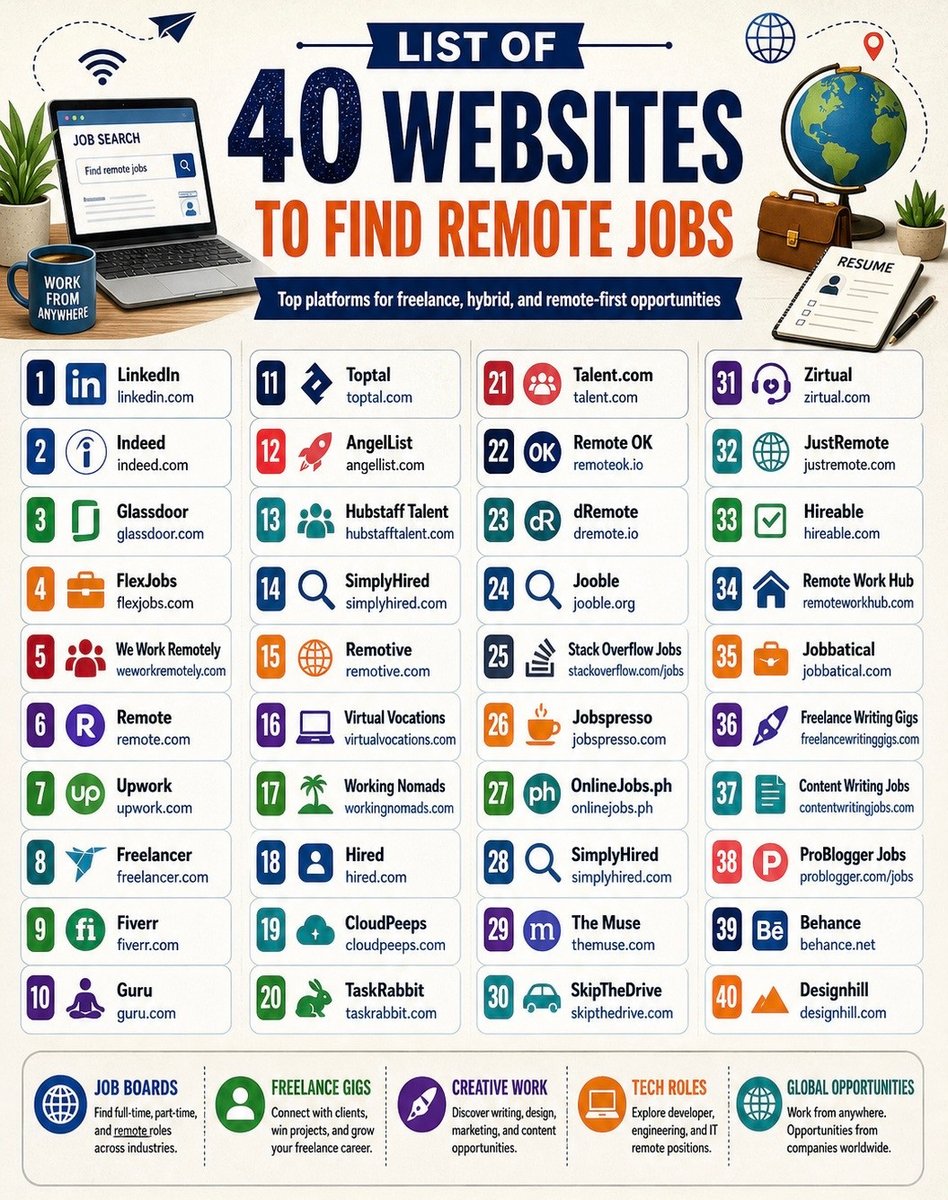
LIST OF 40 WEBSITES TO FIND REMOTE JOBS
1. Linkedin. com
2. Indeed. com
3. Glassdoor. com
4. FlexJobs. com
5. weworkremotely. com
6. Remote. com
7. Upwork. com
8. Freelancer. com
9. Fiverr. com
10. Guru. com
11. Toptal. com
12. AngelList. com
13. Hubstafftalent. com
14. Simplyhired. com
15. Remotive. com
16. Virtualvocations. com
17. workingnomads. com
18. Hired. com
19. cloudpeeps. com
20. taskrabbit. com
21. talent. com
22. remoteok. io
23. dremote. io
24. jooble. org
25. stackoverflow. com/jobs
26. jobspresso. com
27. onlinejobs. ph
28. simplyhired. com
29. themuse. com
30. skipthedrive. com
31. zirtual. com
32. justremote. com
33. hireable. com
34. remoteworkhub. com
35. jobbatical. com
36. freelancewritinggigs. com
37. contentwritingjobs. com
38. problogger. com/jobs
39. behance. net
40. designhill. com
Goodbye, astrologers.
ChatGPT just made this easy — and free.
All you have to do is enter your birth date.
No zodiac readings. No tarot.
For results that will surprise you, copy these 6 prompts ↓



![rubenhassid's tweet photo. 20 ways to use Claude in 2026:
(bookmark this. You'll need it tomorrow.)
1. Bookmark this image. You'll need it tomorrow.
2. Full guide + prompts at: https://t.co/psB7XxAv8w.
3. Don't pay anything. It's free in the email.
---
1. ASK → Chat
☑ Quick questions. Quick answers.
☑ Don't use Cowork for "write a good email?"
2. THINK → Opus 4.7
☑ The smartest model. Always switch to it.
☑ For deep work, complex writing & thinking.
3. SPEED → Sonnet 4.6
☑ Faster, cheaper, still excellent.
☑ Use it for grammar, summaries, short answers.
4. REASON → Extended Thinking
☑ Toggle it on for hard problems.
☑ Turn it off for simple ones (saves tokens).
5. BUILD → Cowork
☑ Where serious work happens. .docx, .xlsx, .pptx.
☑ Point it at a folder. It works like an employee.
6. SHIP → Claude Code
☑ For developers (and curious non-devs).
☑ Build websites and apps from your terminal.
7. MODEL → Claude in Excel
☑ Install the add-in from the Excel store.
☑ Real formulas, real models, no copy-paste.
8. SLIDES → Gamma connector
☑ One prompt. Full presentation. With research.
☑ Connect Gamma inside Claude.
9. MOCKUP → Claude Design
☑ Go to claude .ai/design. Build websites in 1 hour.
☑ Upload a DESIGN .md. Export to Canva, PDF.
10. BROWSE → Claude in Chrome
☑ A browsing agent. Reads any page for you.
☑ Acts inside the browser, not just talks about it.
11. CLICK → Computer Use
☑ Settings > Turn it on.
☑ Claude clicks, types, browses on your Mac.
12. REMOTE → Dispatch
☑ Connect your phone. Text a task.
☑ It works on your computer while you're away.
13. SEARCH → Web Search
☑ Click the '+'. turn it on.
☑ It reads the live web before answering.
14. INVESTIGATE → Research
☑ For deep multi-source reports.
☑ 13 minutes. 50+ sources. One markdown file.
15. TRIGGER → Skills
☑ "Use the skill-creator to build a skill for [task]."
☑ Type /skill. It fires automatically.
16. STACK → Plugins
☑ Cowork > Customize > Browse Plugins.
☑ Bundles of skills for marketing, legal, sales.
17. PERSIST → Projects
☑ One Project per recurring deliverable.
☑ Upload one gold-standard example.
18. AUTOMATE → Scheduled Tasks
☑ Every Monday at 7am, Claude runs your report.
☑ Set it up once. No manual work.
19. CONNECT → Connectors
☑ Gmail, Drive, Slack, Notion, Granola, Calendar.
☑ 50+ apps. Claude reads, writes & acts inside.
20. RENDER → Artifacts
☑ Side pane where Claude opens charts, docs.
☑ Interactive. Editable. Shareable.
---
To download all of my other Claude infographics:
Step 1. Go to https://t.co/psB7XxAv8w.
Step 2. Subscribe for free. Don't pay anything.
Step 3. Open my welcome email (most skip this).
Step 4. Hit the automatic reply button inside.
Step 5. Download my infographics from my Notion.
Bonus. Enjoy my best copy-paste prompts, too.](https://pbs.twimg.com/media/HHtQfCKbcAAqARq.jpg)