Minister K Shanmugam says:
The "sophisticated" threat actor has been identified and described as a "China-nexus espionage group".
🤷 Are we ready to be questioned by China based on our current baseless findings?
https://t.co/xh4UuNYw61
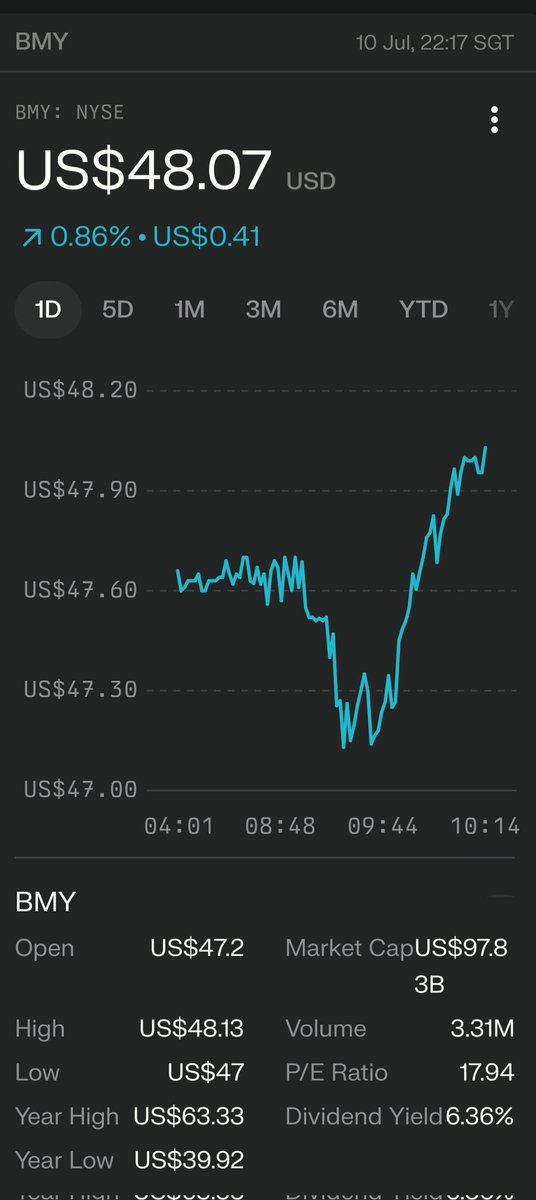
$BMY: Time to buy? Trading at a forward P/E of 6.85 (vs. industry 18.72), BMY is undervalued with a 5.35% dividend yield. Strong pipeline and $13.1B FCF offset patent cliff risks. Analysts see 21% upside to $58. Earnings 7/31 could spark a rally! #BMY#ValueInvesting#Dividend
The U.S. slams China’s AI progress again—this time, DeepSeek. Fear over facts, bias over balance. Why is every Chinese innovation met with hostility while Western AI gets praise? #DeepSeekR1#TechBias#AI
Excel tables are one of the most powerful features excel has to offer…
and few people truly understand the magnitude of their power.
Be sure to download this image in high res along with the free excel worksheet right here
👉 https://t.co/EsSVpi31ii
➡️ What is an Excel Table?
An excel table is a STRUCTURED range that when activated as a table, unlocks a number of features not available under traditional ranges
➡️ How do you convert a range to a table?
2 ways:
1️⃣ Click CTRL + T
2️⃣ Navigate to Insert > Table
➡️ What’s so special about Excel Tables?
I’m glad you asked 😄
Here are 8 benefits:
1️⃣ Auto extend range
Anytime you add a new column to the right / left of a table…
or a new row to the bottom of a table…
the range will automatically update.
This is huge, especially for the reason mention below in #7
2️⃣ Enhance readability in your formula
Tables take a range like this:
F6
to instead look like this:
PnL[Budget]
This greatly enhances readability of your formulas
3️⃣ Easily select ranges
Simply hit CTRL + Space to select a full table column
Shift + Space to select a full table row
CTRL + A to select a full table
4️⃣ Create consistent & uniform data structures
This is how structured data references are set up, making it infinitely easier to use in formulas.
The more you familiarize yourself with data structures in this format, the more dynamic you can set up your spreadsheet
5️⃣ Convert to Pivot Table or load to Power Query
Set up a Pivot Table 👉 Insert > Pivot Table, or Table Design > Summarize with PivotTable
Load to Power Query 👉 Data > Load from Table/Range
6️⃣ Change Formatting
Change the look and feel with one click when you navigate to
Table Design > Cell Styles
7️⃣ Automatically Extend References
Potentially my favorite.
When you reference a range in a table…
your range will extend as you add more rows.
I especially love using this with data validation drop down 💪
8️⃣ Add a total row
Table Design > ✅ Total Row
Then you can easily add a sum, average, count etc. to the bottom of your table
===
As we learned from Spiderman…
with great power comes great responsibility.
And tables have their dangers!
⬇️ Download this image in high resolution, and get the free accompanying excel worksheet via the link on the image below.
Got anything to add about Excel Tables?
Let me know in the comments below
If you aren’t using keyboard shortcuts in excel…
you are MISSING out…
and most likely adding tons EXTRA TIME with your mouse 🐌
Lucky for you, I have aggregated this cheat sheet for you to bookmark and refer to whenever you need...





![YourCFOGuy's tweet photo. Excel tables are one of the most powerful features excel has to offer…
and few people truly understand the magnitude of their power.
Be sure to download this image in high res along with the free excel worksheet right here
👉 https://t.co/EsSVpi31ii
➡️ What is an Excel Table?
An excel table is a STRUCTURED range that when activated as a table, unlocks a number of features not available under traditional ranges
➡️ How do you convert a range to a table?
2 ways:
1️⃣ Click CTRL + T
2️⃣ Navigate to Insert > Table
➡️ What’s so special about Excel Tables?
I’m glad you asked 😄
Here are 8 benefits:
1️⃣ Auto extend range
Anytime you add a new column to the right / left of a table…
or a new row to the bottom of a table…
the range will automatically update.
This is huge, especially for the reason mention below in #7
2️⃣ Enhance readability in your formula
Tables take a range like this:
F6
to instead look like this:
PnL[Budget]
This greatly enhances readability of your formulas
3️⃣ Easily select ranges
Simply hit CTRL + Space to select a full table column
Shift + Space to select a full table row
CTRL + A to select a full table
4️⃣ Create consistent & uniform data structures
This is how structured data references are set up, making it infinitely easier to use in formulas.
The more you familiarize yourself with data structures in this format, the more dynamic you can set up your spreadsheet
5️⃣ Convert to Pivot Table or load to Power Query
Set up a Pivot Table 👉 Insert > Pivot Table, or Table Design > Summarize with PivotTable
Load to Power Query 👉 Data > Load from Table/Range
6️⃣ Change Formatting
Change the look and feel with one click when you navigate to
Table Design > Cell Styles
7️⃣ Automatically Extend References
Potentially my favorite.
When you reference a range in a table…
your range will extend as you add more rows.
I especially love using this with data validation drop down 💪
8️⃣ Add a total row
Table Design > ✅ Total Row
Then you can easily add a sum, average, count etc. to the bottom of your table
===
As we learned from Spiderman…
with great power comes great responsibility.
And tables have their dangers!
⬇️ Download this image in high resolution, and get the free accompanying excel worksheet via the link on the image below.
Got anything to add about Excel Tables?
Let me know in the comments below](https://pbs.twimg.com/media/GDMA5T3XAAEXN6c.jpg)


