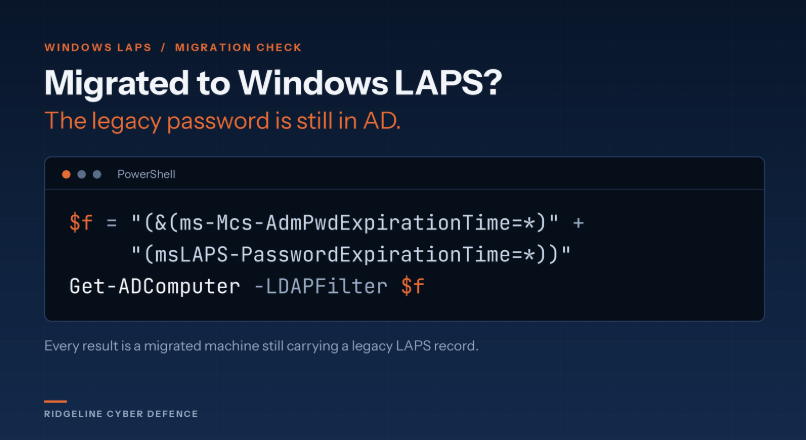
Migrated to Windows LAPS? Run this:
Get-ADComputer -LDAPFilter "(&(ms-Mcs-AdmPwdExpirationTime=*)(msLAPS-PasswordExpirationTime=*))"
Every result is a machine on Windows LAPS that still carries a legacy LAPS record. Windows LAPS doesn't clear the old attributes. Migration guidance has you do it by hand, so the last legacy password is still sitting in ms-Mcs-AdmPwd in cleartext.
If your Windows LAPS policy manages a different account than legacy did, that password is still live,
and nothing will ever rotate it.
You don't need rights to the password to find them. The expiration time isn't confidential.
🚀 ¿Necesitas publicar rápidamente un servicio que tienes en localhost?
@Cloudflare acaba de presentar una página dedicada a Quick Tunnels, una forma muy sencilla de exponer temporalmente una aplicación local en Internet usando cloudflared.
Con un solo comando:
cloudflared tunnel --url http://localhost:8000
Cloudflare crea una URL pública HTTPS como:
https://xxxxx . trycloudflare. com
🔐 Lo interesante es que:
• No necesitas abrir puertos en tu router
• No necesitas configurar DNS
• No necesitas una cuenta de Cloudflare
• La conexión desde tu equipo hacia Cloudflare es saliente
• Obtienes HTTPS automáticamente
• Puedes compartir rápidamente una aplicación local
Una opción muy práctica para pasar de localhost → Internet en cuestión de segundos.
🔗 https://t.co/YIUlIdqSc8
¿Cansado de hacer auditorías de seguridad a mano y perder horas armando reportes?
Conoce ARES: una plataforma open-source de Red Team autónomo construida con FastAPI y React que automatiza todo el proceso.
🚀 ¿Qué hace?
• Genera grafos de ataque autónomos (DAG) en tiempo real.
• Mapeo automático con MITRE ATT&CK.
• Cortafuegos de alcance y reportes instantáneos.
Si te dedicas al hacking ético o la validación de seguridad, esto te ahorra días de trabajo.
El enlace al repositorio lo dejo abajo en los comentarios para que lo pruebes 🔥👇
👋🏻ADIÓS A LOS DE CIBERSEGURIDAD!
YA PUEDEN IR APLICANDO A MCDONALD'S.
Acaba de salir un repositorio con cientos de herramientas de seguridad para IA en un repositorio open source.
Muestran técnicas y herramientas para poner a prueba sistemas de IA:
↳ Frameworks de jailbreak para LLMs
↳ Testers de prompt injection
↳ Agentes de red team para IA
↳ Herramientas de extracción de modelos
↳ Vectores de ataque a la supply chain
↳ Pentesting automatizado para aplicaciones con IA
Las MISMAS herramientas que usan los equipos de seguridad para defender sistemas.
Ahora están disponibles para cualquiera.
Dejo el enlace al repositorio en los comentarios↓↓
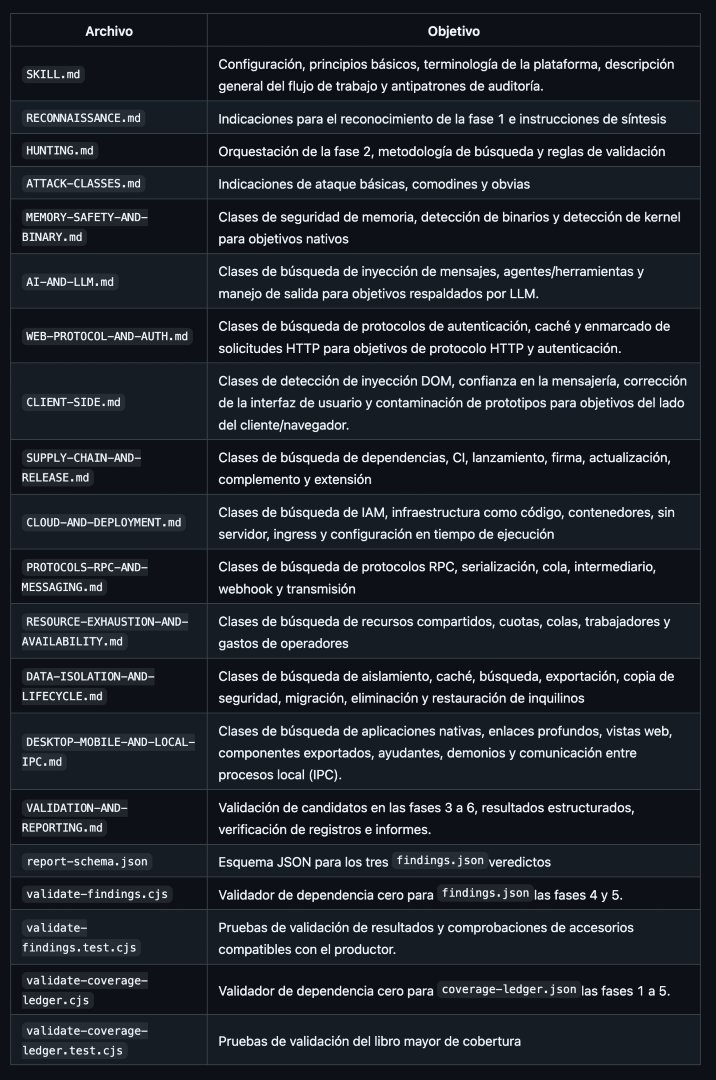
Cloudflare ha lanzado su propia skill completísima de auditorías de seguridad.
Es la que utilizaban internamente en la empresa como sistema de detección de vulnerabilidades.
→ https://t.co/p2WjZT7phe
https://t.co/p34WnW1QRJ est un logiciel libre et gratuit pour préparer une revue de sécurité informatique, un audit interne ou les réponses au questionnaire d’un client.
Vous partez d’un questionnaire ou de votre propre liste de contrôles. Pour chaque question, vous préparez une réponse, référencez les documents qui l’appuient et précisez les limites. Le dossier rend visibles les justificatifs manquants, les informations à actualiser et les actions à mener.
Un exemple : affirmer que les données sont sauvegardées ne dit pas si leur récupération a été testée. BLACKPROOF vous aide à documenter ce test, à référencer son compte rendu et à signaler ce qui n’a pas encore été vérifié.
Le travail se fait _uniquement dans votre navigateur_.
Vos questionnaires, réponses et références de preuves ne sont pas envoyés aux serveurs de BLACKPROOF.
Les dossiers enregistrés sont chiffrés avec une phrase secrète. Vous pouvez indiquer où se trouve un justificatif sensible sans transmettre le document lui-même.
Vous conservez votre dossier de travail et choisissez les informations à inclure dans la version à partager. Vous relisez le contenu, téléchargez les fichiers et les transmettez vous-même. Des contrôles permettent ensuite de vérifier leur intégrité et de repérer des modifications.
BLACKPROOF peut aussi être utilisé par un agent IA grâce à son serveur MCP local, disponible en version alpha. MCP est le protocole qui permet à un assistant d’utiliser les outils d’un logiciel. L’agent peut consulter la méthode, obtenir une liste de vérifications, contrôler l’intégrité d’un export que vous avez sélectionné ou compter les changements entre deux versions.
Ce serveur fonctionne en lecture seule. Il ne modifie pas vos dossiers et renvoie uniquement des résultats de contrôle et des compteurs, jamais le contenu de vos réponses ou de vos justificatifs. L’utilisation de dossiers privés exige que l’assistant et son modèle fonctionnent eux aussi localement, dans un environnement empêchant l’envoi de données vers un service distant.
L’intérêt : moins de réponses éparpillées, des manques visibles et une base claire pour préparer une revue, expliquer ses pratiques ou décider des prochaines actions.
BLACKPROOF organise les éléments et automatise certains contrôles techniques. L’examen des justificatifs et les conclusions restent humains. Une intégrité vérifiée ne garantit pas la véracité des déclarations. Le logiciel ne teste pas votre réseau et ne délivre aucune certification.
Sans compte, sans abonnement, sans traceur.
Le code est public :
https://t.co/CP2dXBQXhK
La vidéo montre le parcours, de l’import du questionnaire à la vérification du dossier.
👉 https://t.co/bkZVoLfvgx 👈
Compartimos nuestra configuración 📖 servidor web Apache mpm_event para recibir ⚡️ataques DDoS de hasta 1.5M peticiones en 1 minuto
Por defecto Apache no es capaz de manejar más de 512 conexiones simultáneas, con esta config podremos manejar 32K conexiones
Son valores muy altos, mínimo 32 cores y 64GB RAM
<IfModule mpm_event_module>
# Elevamos a 32 procesos iniciales
StartServers 32
ThreadLimit 128
ThreadsPerChild 128
# Para 16,384 trabajadores: ServerLimit 128 (128 * 128 = 16384)
# Para 32,768 trabajadores: eleva ServerLimit a 256 (256 * 128 = 32768)
ServerLimit 256
MaxRequestWorkers 16384
# Aumentamos el margen de hilos en reserva
MinSpareThreads 1024
MaxSpareThreads 2048
# Evita la fragmentación de memoria reiniciando procesos tras 10k peticiones
MaxConnectionsPerChild 10000
# AJUSTE ANTI-DDoS: Reducir peticiones por conexión KeepAlive
KeepAlive On
MaxKeepAliveRequests 100
KeepAliveTimeout 2
</IfModule>
📈Gráficas de CloudFlare y Monitorix
Conexiones TCP: Las conexiones ESTABLISHED en IPv4 pasaron de un promedio de ~315 a un pico de 16k
Apache Workers: Los workers dedicados a lectura (Reading request) alcanzaron un pico de 4.380 solicitudes simultáneas, empujando la capacidad total de procesadores al límite máximo de 15.706 (la mayoría retenidos en Waiting for conn).
Cierre de Sockets: Se registró un pico abrupto de conexiones en estado TIME_WAIT cercano a 20K
Azure bills rarely explode because of one big mistake.
It is usually a lot of small inefficiencies adding up quietly over time.
A VM that is oversized.
A workload running 24/7 when it does not need to.
Old disks nobody deleted.
Data sitting in an expensive storage tier.
Traffic patterns that were never optimized.
That is why Azure cost optimization needs to be treated as an engineering habit, not a quarterly cleanup exercise.
A few patterns make a big difference:
→ Rightsize compute based on real CPU and memory usage
→ Use autoscaling so apps scale with demand instead of sitting overprovisioned
→ Use reservations and savings plans for predictable workloads
→ Run interruptible workloads on Spot VMs where possible
→ Move older data to cooler storage tiers automatically
→ Reuse eligible licenses with Azure Hybrid Benefit
→ Go serverless when workloads are event-driven or inconsistent
→ Clean up idle resources like unattached disks, unused IPs, and orphaned services
→ Use tagging, budgets, and chargeback so teams know what they own and spend
→ Optimize caching and egress to reduce unnecessary backend and bandwidth costs
The goal is not to make cloud infrastructure as cheap as possible.
It is to make sure every dollar of cloud spend is tied to actual value.
The best FinOps cultures I have seen do not wait for a surprise bill.
They design cost awareness into the architecture from day one.
Which Azure cost optimization pattern has saved you the most in practice?
𝗕𝗲𝗰𝗼𝗺𝗲 𝗯𝗲𝘁𝘁𝗲𝗿 𝗮𝘁 𝗔𝗜 𝗶𝗻 𝗷𝘂𝘀𝘁 𝟭 𝗺𝗶𝗻𝘂𝘁𝗲 𝗮 𝗱𝗮𝘆. 𝗝𝗼𝗶𝗻 𝗺𝘆 𝘄𝗲𝗲𝗸𝗹𝘆 𝗻𝗲𝘄𝘀𝗹𝗲𝘁𝘁𝗲𝗿 𝘄𝗵𝗲𝗿𝗲 𝗜 𝗱𝗼𝗰𝘂𝗺𝗲𝗻𝘁 𝘁𝗵𝗲 𝗿𝗲𝗮𝗹-𝘄𝗼𝗿𝗹𝗱 𝗷𝗼𝘂𝗿𝗻𝗲𝘆 𝗼𝗳 𝗔𝗜 𝘁𝗿𝗮𝗻𝘀𝗳𝗼𝗿𝗺𝗮𝘁𝗶𝗼𝗻.
👉 𝗦𝗶𝗴𝗻 𝘂𝗽 𝗳𝗿𝗲𝗲 now → https://t.co/Kj8zW95H9X
Follow @AiswaryaVenkit1 for more such insights!!
🚀 Microsoft 𝗔𝘇𝘂𝗿𝗲 𝗟𝗮𝗻𝗱𝗶𝗻𝗴 𝗭𝗼𝗻𝗲 + 𝗜𝗻𝗳𝗿𝗮𝘀𝘁𝗿𝘂𝗰𝘁𝘂𝗿𝗲 𝗮𝘀 𝗖𝗼𝗱𝗲 (𝗜𝗮𝗖) = 𝗦𝗰𝗮𝗹𝗮𝗯𝗹𝗲 & 𝗦𝗲𝗰𝘂𝗿𝗲 𝗖𝗹𝗼𝘂𝗱 𝗙𝗼𝘂𝗻𝗱𝗮𝘁𝗶𝗼𝗻
Many organizations move to Azure…
But only a few build it the right way from Day 1.
An Azure Landing Zone provides a pre-configured, enterprise-ready cloud foundation aligned with Microsoft Cloud Adoption Framework (CAF).
When combined with Infrastructure as Code (IaC), it transforms cloud setup from manual & error-prone → to automated, consistent & scalable.
🔹 What it covers:
✅ Identity & Access Management (Microsoft Entra ID, RBAC)
✅ Networking (Hub-Spoke, VNets, ExpressRoute)
✅ Governance & Policies
✅ Security Baselines
✅ Monitoring & Management
✅ Structured Management Groups
🔹 Why IaC matters?
Without IaC → Manual setup, slow provisioning, difficult scaling
With IaC → Automated deployment, Git-based versioning, CI/CD integration, repeatable environments
🔹 Real-world impact:
✔ Faster onboarding
✔ Strong governance
✔ Secure Dev/Test/Prod environments
✔ Cost optimization
✔ Enterprise-grade standardization
💡 Tools commonly used: Terraform, Azure Bicep, ARM templates.
Cloud success isn’t just about migration — it’s about building a well-architected, secure, and scalable foundation.
Are you implementing Landing Zones with IaC in your organization?
𝗕𝗲𝗰𝗼𝗺𝗲 𝗯𝗲𝘁𝘁𝗲𝗿 𝗮𝘁 𝗔𝗜 𝗶𝗻 𝗷𝘂𝘀𝘁 𝟭 𝗺𝗶𝗻𝘂𝘁𝗲 𝗮 𝗱𝗮𝘆. 𝗝𝗼𝗶𝗻 𝗺𝘆 𝘄𝗲𝗲𝗸𝗹𝘆 𝗻𝗲𝘄𝘀𝗹𝗲𝘁𝘁𝗲𝗿 𝘄𝗵𝗲𝗿𝗲 𝗜 𝗱𝗼𝗰𝘂𝗺𝗲𝗻𝘁 𝘁𝗵𝗲 𝗿𝗲𝗮𝗹-𝘄𝗼𝗿𝗹𝗱 𝗷𝗼𝘂𝗿𝗻𝗲𝘆 𝗼𝗳 𝗔𝗜 𝘁𝗿𝗮𝗻𝘀𝗳𝗼𝗿𝗺𝗮𝘁𝗶𝗼𝗻.
👉 𝗦𝗶𝗴𝗻 𝘂𝗽 𝗳𝗿𝗲𝗲 now → https://t.co/Kj8zW95H9X
Follow @AiswaryaVenkit1 for more such insights!!
🔁 Microsoft Entra Connect (Azure AD Connect) version 2.6.84.0 is now available
Everything you need to know is in the carousel below.
Microsoft Entra Connect Sync is no longer available from the Microsoft Download Center. The .msi installation file must now be downloaded from the Microsoft Entra admin center:
entra[.]microsoft[.]com > Identity > Hybrid Management > Microsoft Entra Connect > Connect Sync > Get started > Manage tab
🚨 Mandatory upgrade before September 30, 2026 if running a version earlier than 2.5.79.0
The release of Microsoft Entra Connect Sync 2.6.84.0 is also a good opportunity to check your current version.
If your server is running a version earlier than 2.5.79.0, all synchronization services will stop working from September 30, 2026, until Microsoft Entra Connect Sync is upgraded.
This deadline is related to a back-end service change introduced with version 2.5.79.0 to strengthen the security of Microsoft Entra Connect Sync.
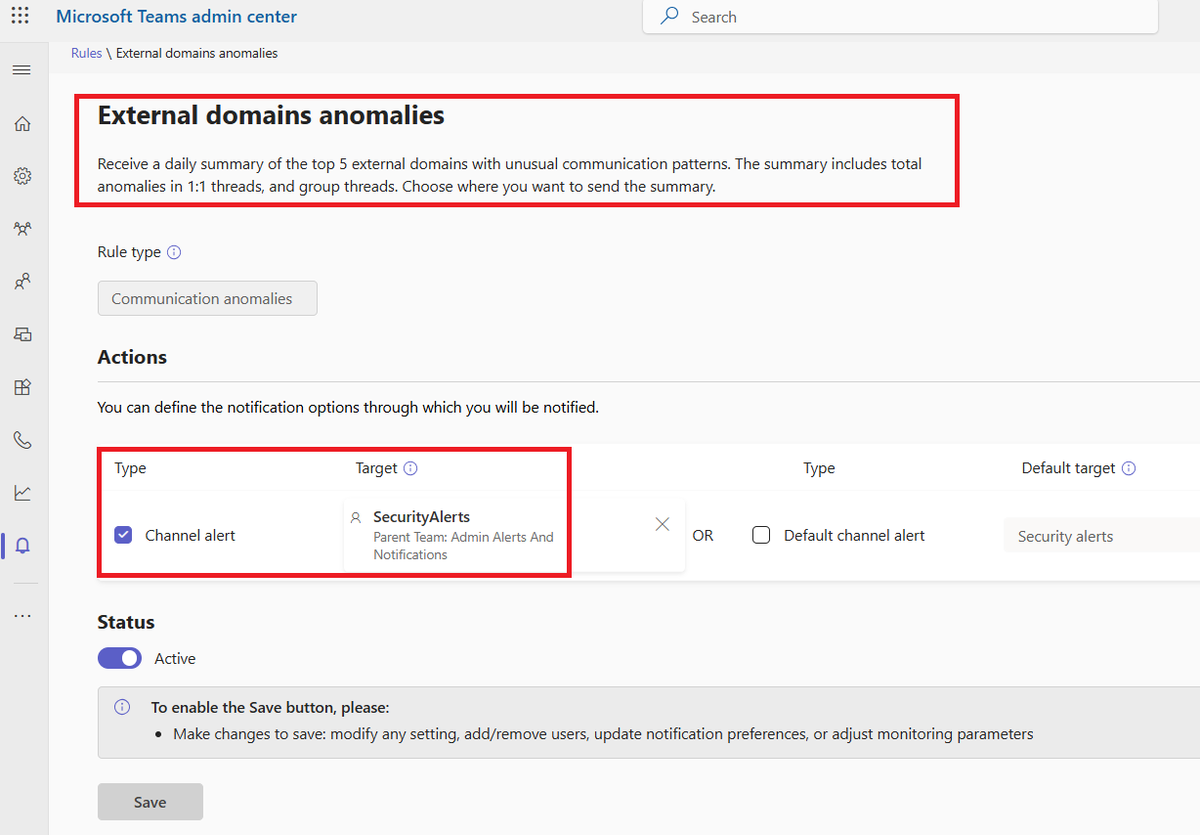
🔊 𝗘𝘅𝘁𝗲𝗿𝗻𝗮𝗹 𝗗𝗼𝗺𝗮𝗶𝗻 𝗔𝗻𝗼𝗺𝗮𝗹𝗶𝗲𝘀 𝗥𝗲𝗽𝗼𝗿𝘁 – 𝗔 𝗛𝗶𝗱𝗱𝗲𝗻 𝗚𝗲𝗺 𝗳𝗼𝗿 𝗠𝗶𝗰𝗿𝗼𝘀𝗼𝗳𝘁 𝗧𝗲𝗮𝗺𝘀 𝗦𝗲𝗰𝘂𝗿𝗶𝘁𝘆
Fellow defenders,
Looking to improve your visibility into potential 𝗘𝘅𝘁𝗲𝗿𝗻𝗮𝗹 𝗧𝗲𝗮𝗺𝘀 𝗜𝗺𝗽𝗲𝗿𝘀𝗼𝗻𝗮𝘁𝗶𝗼𝗻 𝗔𝘁𝘁𝗮𝗰𝗸𝘀? Ask your Teams administrators about enabling the 𝗘𝘅𝘁𝗲𝗿𝗻𝗮𝗹 𝗗𝗼𝗺𝗮𝗶𝗻 𝗔𝗻𝗼𝗺𝗮𝗹𝗶𝗲𝘀 𝗥𝗲𝗽𝗼𝗿𝘁.
Each day, you'll receive a concise summary of the 𝘁𝗼𝗽 𝟱 𝗲𝘅𝘁𝗲𝗿𝗻𝗮𝗹 𝗱𝗼𝗺𝗮𝗶𝗻𝘀 𝘀𝗵𝗼𝘄𝗶𝗻𝗴 𝘂𝗻𝘂𝘀𝘂𝗮𝗹 𝗰𝗼𝗺𝗺𝘂𝗻𝗶𝗰𝗮𝘁𝗶𝗼𝗻 𝗯𝗲𝗵𝗮𝘃𝗶𝗼𝗿, including:
✅ Anomalies in 1:1 chats
✅ Anomalies in group conversations
✅ Trends that may indicate suspicious external engagement
Even better, the report can be forwarded directly to your 𝗦𝗢𝗖 𝗧𝗲𝗮𝗺𝘀 𝗰𝗵𝗮𝗻𝗻𝗲𝗹, allowing analysts to investigate and respond to potential threats before they escalate.
Visibility drives detection. Detection drives defense.🫡
#MicrosoftTeams #CyberSecurity #SOC #ThreatDetection #IdentitySecurity
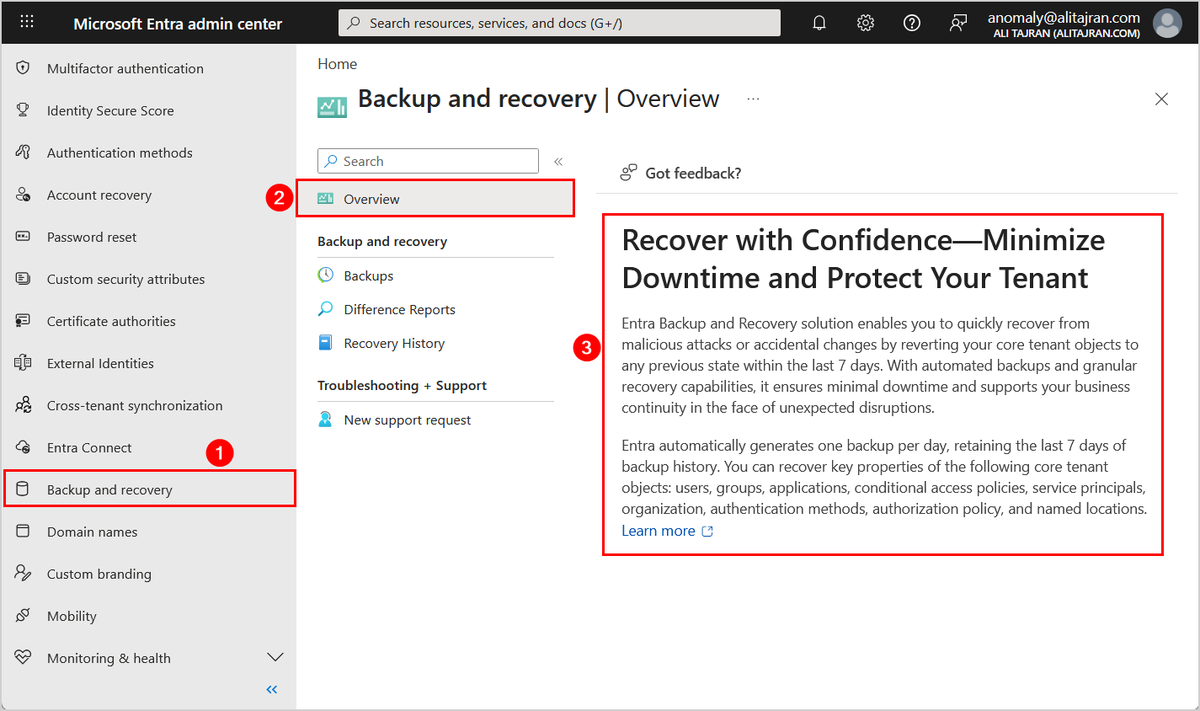
Microsoft Entra Backup and Recovery is now Generally Available!
Entra Backup and Recovery is a built-in solution to help restore your tenant after accidental changes or malicious updates.
It automatically backs up critical directory objects, including:
- Users
- Groups
- Applications
- Service principals
- Managed identities
- Conditional Access policies
- Named locations
- Agent IDs
- Authentication methods
- Authorization policies
Entra Backup and Recovery is enabled by default and automatically takes daily backup of a tenant's supported directory objects. If a tenant has Microsoft Entra ID P1 or P2 licenses, one backup is taken each day and retained for 7 days.
Admins can view available snapshots, generate difference reports to understand what has changed, and run recovery jobs to restore objects to a prior state.
This gives your organization a reliable, built-in safety net, helping you recover with confidence, minimize downtime, and protect your tenant from accidental changes, misconfigurations, or security compromises.
Learn more:
https://t.co/LhzogBYkWd
#EntraID #Microsoft365 #Microsoft
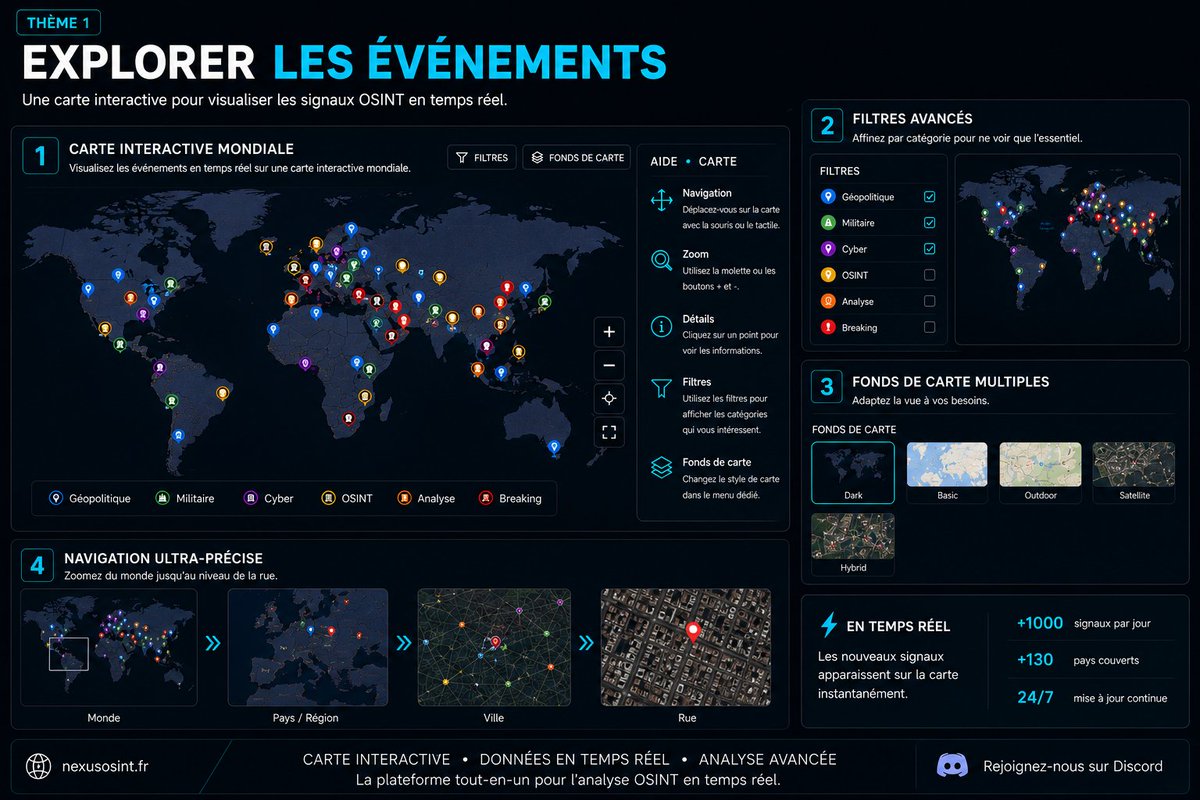
‼️ Lancement de notre Projet - NEXUS_OSINT V1
🌐Une plateforme dédiée à la visualisation et à l'analyse de données en sources ouvertes intégrant :
• 🌍 Cartographie interactive Mondiale
• 📡 Flux OSINT géolocalisés
• 🎥 Live Cams synchronisées
• ⏪ Frise temporelle avancée
• ✏️ Outils d'analyse intégrés
💻Les visuels ci-dessous présentent de manière simplifiée les principales fonctionnalités de la plateforme.
👉 Disponible maintenant : https://t.co/vWqIUg0wxv
Bomba HTTP/2: exploit DoS remoto afecta a nginx, Apache, IIS, Envoy y Cloudflare Pingora
Se ha revelado un nuevo exploit de denegación de servicio remoto llamado "HTTP/2 Bomb", que afecta a las configuraciones predeterminadas de los servidores web más utilizados, como nginx, Apache httpd, Microsoft IIS, Envoy y Cloudflare Pingora. Este fallo permite que un único atacante, utilizando una conexión doméstica, agote decenas de gigabytes de memoria del servidor en cuestión de segundos
https://t.co/I2r1YoPAEE
Esto parece ilegal…
Ahora puedes usar Claude para limpiar tu huella digital en solo unas horas:
Puede:
• Borrar completamente tu historial
• Limpiar cuentas antiguas
• Eliminar listados de brokers
• Reducir la exposición de datos personales
A continuación, encontrarás prompts paso a paso:
HER İNTERNET KULLANICISININ BU HAFTA SONU KONTROL ETMESİ GEREKEN 10 WEB SİTESİ.
Bu listeyi kaydedin. Çoğu insan bunu asla görmeyecek.
1. https://t.co/vjB7rb3uXd
E-postanızın sızdırıldığı her veri ihlalini gösterir.
2. https://t.co/wjrpzXSkfS
Herhangi bir e-posta adresine bağlı her sosyal profil ve oturum açma bilgisini ortaya çıkarır.
3. https://t.co/mEPzGHKbyW
Tarayıcı parmak izinizin ne kadar izlenebilir olduğunu gösterir.
4. https://t.co/pUajEUXMyp
VPN'inizin gerçekten çalışıp çalışmadığını veya gerçek IP adresinizi sessizce ifşa edip etmediğini kontrol eder.
5. https://t.co/oDJxMa9X7l
Hesabınızı herhangi bir büyük hizmetten silmek için doğrudan bağlantılar.
6. https://t.co/YooqV5aJWe
Herhangi bir dosyayı veya bağlantıyı saniyeler içinde 70'ten fazla antivirüs motoruna karşı tarar.
7. https://t.co/wOW6ZAiGSD
Yüzünüzün izniniz olmadan yapay zeka modellerini eğitmek için kullanılıp kullanılmadığını gösterir.
8. https://t.co/8z5EqZ2VRl
Tarayıcınızın web sitelerine sızdırdığı her veri parçasını ortaya çıkarır.
9. https://t.co/ZuCgAZMoNg
Bilgisayarınızdaki hangi uygulamaların gereksiz yazılım veya casus yazılım olduğunu söyler.
10. https://t.co/qeJlNCT6yW
Haber sitelerindeki ödeme duvarlarını kaldırarak okumayı ücretsiz hale getirir.
Sonra bana teşekkür edersiniz.
¿Quieres saber si una contraseña de tu #ActiveDirectory se ha filtrado antes de que comprometa la seguridad de tu entorno de dominio?
Usa Enzoic Password Monitoring, una solución que te ayuda:
🔹Comprobar contraseñas contra una base de datos de credenciales comprometidas que se actualiza continuamente.
🔹Puede detectar contraseñas débiles, comunes, reutilizadas o con coincidencias “difusas” además de las ya filtradas.
🔹Permite monitoreo continuo, no solo validación en el momento en que el usuario crea o cambia la contraseña.
https://t.co/V2L5N3oWx8


![bastienperez_'s tweet photo. 🔁 Microsoft Entra Connect (Azure AD Connect) version 2.6.84.0 is now available
Everything you need to know is in the carousel below.
Microsoft Entra Connect Sync is no longer available from the Microsoft Download Center. The .msi installation file must now be downloaded from the Microsoft Entra admin center:
entra[.]microsoft[.]com > Identity > Hybrid Management > Microsoft Entra Connect > Connect Sync > Get started > Manage tab
🚨 Mandatory upgrade before September 30, 2026 if running a version earlier than 2.5.79.0
The release of Microsoft Entra Connect Sync 2.6.84.0 is also a good opportunity to check your current version.
If your server is running a version earlier than 2.5.79.0, all synchronization services will stop working from September 30, 2026, until Microsoft Entra Connect Sync is upgraded.
This deadline is related to a back-end service change introduced with version 2.5.79.0 to strengthen the security of Microsoft Entra Connect Sync.](https://pbs.twimg.com/media/HNvtcX2WgAA1U6p.png)
![bastienperez_'s tweet photo. 🔁 Microsoft Entra Connect (Azure AD Connect) version 2.6.84.0 is now available
Everything you need to know is in the carousel below.
Microsoft Entra Connect Sync is no longer available from the Microsoft Download Center. The .msi installation file must now be downloaded from the Microsoft Entra admin center:
entra[.]microsoft[.]com > Identity > Hybrid Management > Microsoft Entra Connect > Connect Sync > Get started > Manage tab
🚨 Mandatory upgrade before September 30, 2026 if running a version earlier than 2.5.79.0
The release of Microsoft Entra Connect Sync 2.6.84.0 is also a good opportunity to check your current version.
If your server is running a version earlier than 2.5.79.0, all synchronization services will stop working from September 30, 2026, until Microsoft Entra Connect Sync is upgraded.
This deadline is related to a back-end service change introduced with version 2.5.79.0 to strengthen the security of Microsoft Entra Connect Sync.](https://pbs.twimg.com/media/HNvtb_XWoAA3ijT.png)
![bastienperez_'s tweet photo. 🔁 Microsoft Entra Connect (Azure AD Connect) version 2.6.84.0 is now available
Everything you need to know is in the carousel below.
Microsoft Entra Connect Sync is no longer available from the Microsoft Download Center. The .msi installation file must now be downloaded from the Microsoft Entra admin center:
entra[.]microsoft[.]com > Identity > Hybrid Management > Microsoft Entra Connect > Connect Sync > Get started > Manage tab
🚨 Mandatory upgrade before September 30, 2026 if running a version earlier than 2.5.79.0
The release of Microsoft Entra Connect Sync 2.6.84.0 is also a good opportunity to check your current version.
If your server is running a version earlier than 2.5.79.0, all synchronization services will stop working from September 30, 2026, until Microsoft Entra Connect Sync is upgraded.
This deadline is related to a back-end service change introduced with version 2.5.79.0 to strengthen the security of Microsoft Entra Connect Sync.](https://pbs.twimg.com/media/HNvtbpjXwAArrub.png)








![bastienperez_'s tweet photo. 🔁 Microsoft Entra Connect (Azure AD Connect) version 2.6.84.0 is now available
Everything you need to know is in the carousel below.
Microsoft Entra Connect Sync is no longer available from the Microsoft Download Center. The .msi installation file must now be downloaded from the Microsoft Entra admin center:
entra[.]microsoft[.]com > Identity > Hybrid Management > Microsoft Entra Connect > Connect Sync > Get started > Manage tab
🚨 Mandatory upgrade before September 30, 2026 if running a version earlier than 2.5.79.0
The release of Microsoft Entra Connect Sync 2.6.84.0 is also a good opportunity to check your current version.
If your server is running a version earlier than 2.5.79.0, all synchronization services will stop working from September 30, 2026, until Microsoft Entra Connect Sync is upgraded.
This deadline is related to a back-end service change introduced with version 2.5.79.0 to strengthen the security of Microsoft Entra Connect Sync.](https://pbs.twimg.com/media/HNvtcvcXsAA-XDI.png)