@ChristophWijns@inthecloud_247@mniehaus@Mister_MDM@jarwidmark Trying to upgrade an application? Use requirement rules. I've been using something like this:
if (Get-Package -Name "*7-zip*" -ProviderName "Programs" -ErrorAction SilentlyContinue -WarningAction SilentlyContinue) {
return $true
}
return $false
@Mister_MDM Happened to my computer this morning. I never took the time to investigate, so I’m very happy to see you solved it. This must be one of the worst PowerShell errors I’ve seen. Do you know why HP uses a batch script instead of a signed PowerShell script? This reeks of incompetence
@Mister_MDM One simply hack is to modify the "Install Command" and add "C:\Windows\System32\timeout.exe" 3600. Then open C:\Windows\IMECache (requires admin) and wait for the GUID to appear. Now you have 3600 seconds to copy the files.
@CaptainFirmware@xenappblog@Microsoft@MasterPackager@PatchMyPC I also include UninstallClassicTeams.ps1, UninstallOldTMA.ps1 and UninstallTMA.ps1 from Microsoft. This helps to remove all older version of Teams Meeting add-in and classic Teams. There is also no point in copying that msix file to temp.
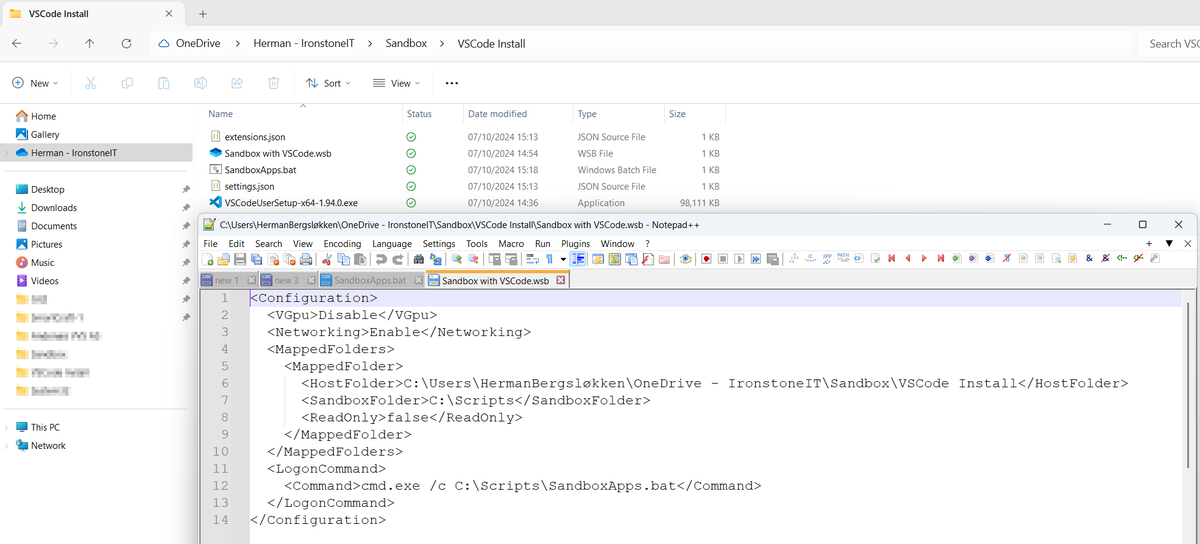
Anyone experiencing issues with Sandbox becoming corrupt in Win 11 24H2? Reinstalling feature fixes it temporarily, but it becomes corrupt again after some time. Seen this on several computers. Get-CimInstance just returns Access is denied. PSADT v3/v4 will fail with 60008.
Operating system not supported. Condition 'NTProductType <> 1' evaluates to false.
Trick WiX installer into thinking your machine is a server:
Install WiX Toolset, use dark.exe to extract installer,
modify BootstrapperApplicationData.xml and launchcondition of msi with Orca.
@jarwidmark Hi, thanks for this. Some very useful tips :) Do you recommend the Intune driver management over the vendor tools? Such as Commercial Vantage, HPIA, Dell Command Update etc.
Is anyone else experiencing issues with 'Outlook (New)' after upgrading to 17928.20216? Using 5 GB of RAM and 10% CPU. The GUI is unresponsive, and parts are completely missing. My inbox is only partially loading messages, and they keep disappearing.
@Mister_MDM Does the process run as a completely separate account or does it inherit your permissions? A lot of legacy apps require admin and still need to access resources on the network (On-prem server or drive mapping, etc.)
Seems like Microsoft removed PowerShell_Ise from Windows Sandbox on 24H2. Anyone knows how to turn it back on? It was the ONE function is used the most to quickly test a PowerShell-script and do some simple debugging :-(
Thank God for individuals like BloodDolly (Creator of TeslaDecoder). Was able to help a friend recover files from an old TeslaCrypt ransomware.@BleepinComputer
@petrijamsen@vesanopanen One issue down, at least one to go :D Seems like the Planning - Inventory - Devices - Import feature is broken. I keep getting "Devices imported successfully", but nothing happens. (Used the Powershell-script to gather peripherals)
@petrijamsen@vesanopanen Looks like it was a permission issue. My account was a Exchange Admin but I also needed the "Teams Rooms Pro Manager" role assigned. This is not mentioned in the "Setting up Bookable Desks in Microsoft Teams" documentation.
@petrijamsen Hey, this is the only tweet I can find on the subject :-) I'm missing both the "Inventory" and "Planning" option in the left navigation in the Teams Portal. Any idea why?
Wanting to run CMD as System with PsExec inside Sandbox?
IF "%USERNAME%"=="WDAGUtilityAccount" (
SET _SANDBOX=Yes
)
IF "%_SANDBOX%"=="Yes" (
"%~dp0PsExec64.exe" \\localhost /accepteula /s "%~dp0ServiceUI_x64.exe" -process:explorer.exe cmd.exe /k whoami
)